# Event streaming integration
## Integration overview
### Integration type
**Source:** Data is sent from Pushwoosh to your system via HTTP or gRPC based on configured event triggers.
### How does the integration work?
Pushwoosh transmits communication event data (e.g., push/email activity) to a client-defined endpoint. Data is sent in batch streams at scheduled intervals or upon reaching a minimum batch size.
Data is only sent if it matches the selected events, platforms, and optional filters (campaign/message codes, live activity). The client endpoint must be ready to receive and optionally respond with a status.
### Glossary
**Endpoint URL**: Server-side endpoint which allows receiving requests. The client may specify a port if needed.
Examples:
* `https://clientdomainname.com/webhook_endpoint`
* `https://clientdomainname.com:8081/webhook_endpoint`
### List of synchronized entities
* Communication statistics events (e.g., Push Sent, Email Delivered)
### Use cases
* **Real-time engagement tracking**
Monitor user interactions such as push sent, email opened, or message delivered as they happen, enabling immediate visibility into campaign performance.
* **External analytics integration**
Stream events to third-party analytics platforms for centralized reporting and analysis.
* **Automated user workflows**
Trigger actions in external systems (like CRMs or marketing automation tools) based on user behaviors, e.g., send a follow-up message when a user opens an email.
## Setting up the integration
To set up the integration:
1. In your Pushwoosh account, go to **Settings > 3rd party Integrations**, find **Event streaming integration**, and click **Configure**.
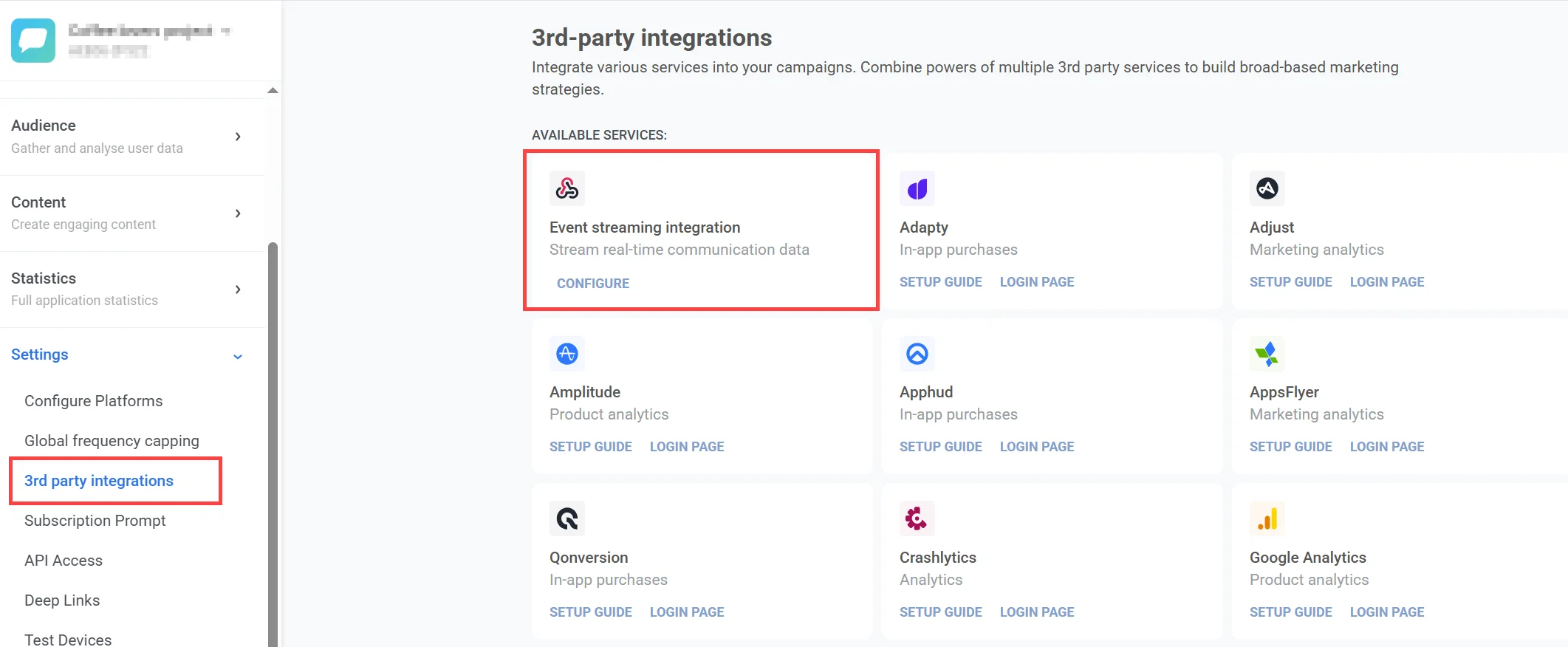
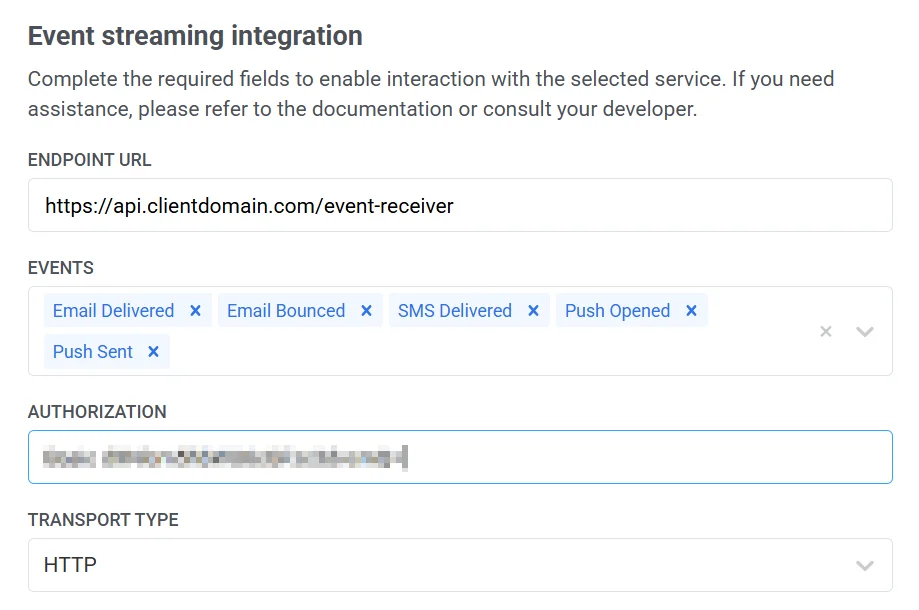
2. In the window that opens, fill out the necessary fields.
#### Enter endpoint URL
In the **Endpoint URL** field, enter the full URL where events will be sent, including the protocol and port if applicable.
**Example**
* `https://clientdomainname.com/webhook_endpoint`
* `https://clientdomainname.com:8081/webhook\_endpoint`
#### Select events
From the **Events** dropdown, select at least one event. If none are selected, validation will fail. The list of events is managed by the backend and may change over time.
#### Provide authorization credentials
If required by your server, enter the complete value for the `Authorization` header in the **Authorization** field.
Examples:
* `Bearer your_token_here`
* `Basic base64encoded_credentials`
#### Choose transport type
From the **Transport type** dropdown, choose the delivery protocol for event transmission: **HTTP** or **gRPC**. Each has specific behavior and configuration.
##### HTTP
With the **HTTP** transport type, Pushwoosh sends data in batches based on one of the following conditions:
* At least 100 events are ready to be sent, or
* One hour has passed since the last transmission.
After sending the data, the connection is closed once a successful response is received.
If the server responds with a **5xx error**, Pushwoosh will retry the request according to the defined retry policy.
**Retry mechanism**
| Attempt | Delay |
| :---- | :---- |
| 1st | 1 second |
| 2nd | 3 seconds after 1st try |
| 3rd | 8 seconds after 2nd try |
If all retries fail, the request is discarded.
**Timeout**
The default timeout for a request is **30 seconds**. This can be customized upon request via support.
##### gRPC
The gRPC transport type uses **bidirectional streaming** for data transmission. Learn more in the [gRPC documentation](https://grpc.io/docs/what-is-grpc/core-concepts/#bidirectional-streaming-rpc).
A stream is opened when either of the following conditions is met:
* At least 1,000 events are ready for delivery
* One hour has passed since the last stream was opened
The stream is closed after the events are sent. This ensures that a new stream is not opened for each individual event in a short time.
**Retry mechanism**
Each event includes a unique `uuid`. If an event fails:
1. The response must include a `status` **not equal to** `"Success"`
2. The original `uuid` from the request must be included
Pushwoosh will retry delivery based on this response.
**Connection settings**
Advanced options like **TLS**, **keep-alive**, or **retry policies** are configured manually via support and may require development involvement.
### Select platforms
In the **Platforms section**, select at least one platform to activate event streaming.
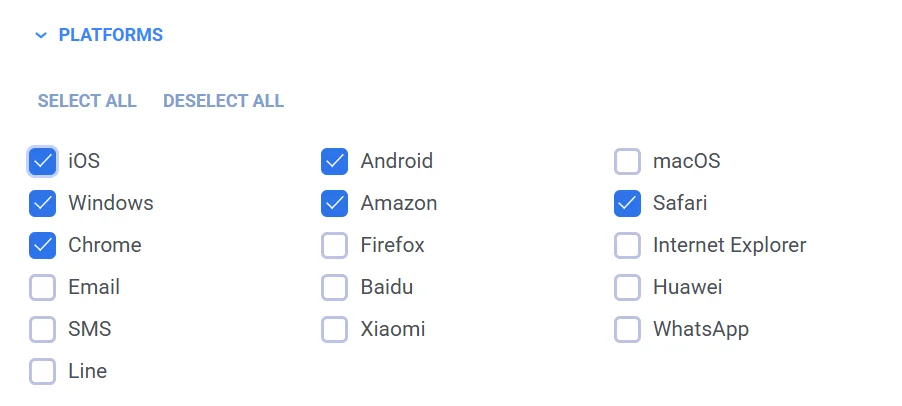
Supported platforms include:
* iOS, Android, macOS, Windows, Amazon, Safari
* Chrome, Firefox, Internet Explorer, Baidu, Huawei
* Email, SMS, Line, Xiaomi, WhatsApp
### Configure advanced filters
In the **Advanced filters** section, refine the event delivery criteria using filters:
* **Live activity events:** Enable to receive live activity events. These events contain only metadata including `live_activity_id`.
* **Campaign filters:** Filter by campaign code. Only events tied to these campaigns will be delivered.
* **Message filters:** Filter by message code. Only events tied to these messages will be delivered.
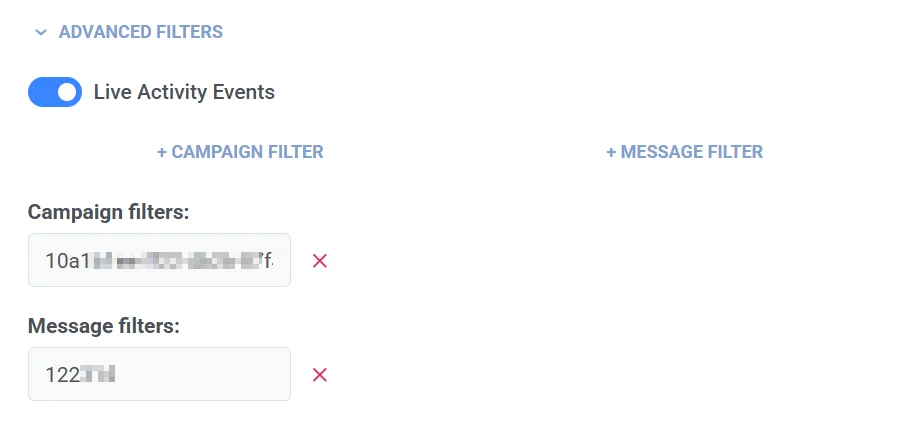
After completing all the required fields, click the **Apply** button to save and activate your integration.
## Request details and example
| | |
|-----------------------|----------------------------------------------------------|
| **Endpoint** | `https://exampleclientendpoint.com/webhook_endpoint` |
| **HTTP Request** | `POST` |
| **Authentication** | No |
| **Request type** | Source |
| **Request meaning** | Send requests to the webhook endpoint |
| **Headers** | `Content-Type: application/json` |
**Request body example**
```
{
"event_name": "Email Opened",
"message_code": "E682-E6D92B9A-53E24868",
"campaign_id": 961048,
"platform": "Email",
"payload": "Welcome to Headway! 👋",
"application_code": "XXXXX-XXXXX",
"hwid": "user@example.com",
"user_id": "USER_ID",
"timestamp": 1723799271,
"journey_title": "",
"journey_point_title": "5_Welcome_ID_new"
}
```
**Response**
At the moment, the response code and body are ignored.
## How do you know that the integration is working?
You will start receiving requests from Pushwoosh at your configured endpoint.