# Adapty integration
## Integration overview and use cases
[Adapty](https://app.adapty.io/login) is a mobile app subscription management and monetization platform.
By integrating Adapty with Pushwoosh, you can pass any subscription-related events and paywall interactions from Adapty to Pushwoosh. There, you can initiate targeted campaigns to engage your user base, promote upsells and stimulate renewals.
Thanks to this integration, subscription businesses can make their communications more efficient and achieve a substantial revenue uplift.
## Setting up the integration
1. **Start in your** [**Adapty account**](https://app.adapty.io/login)
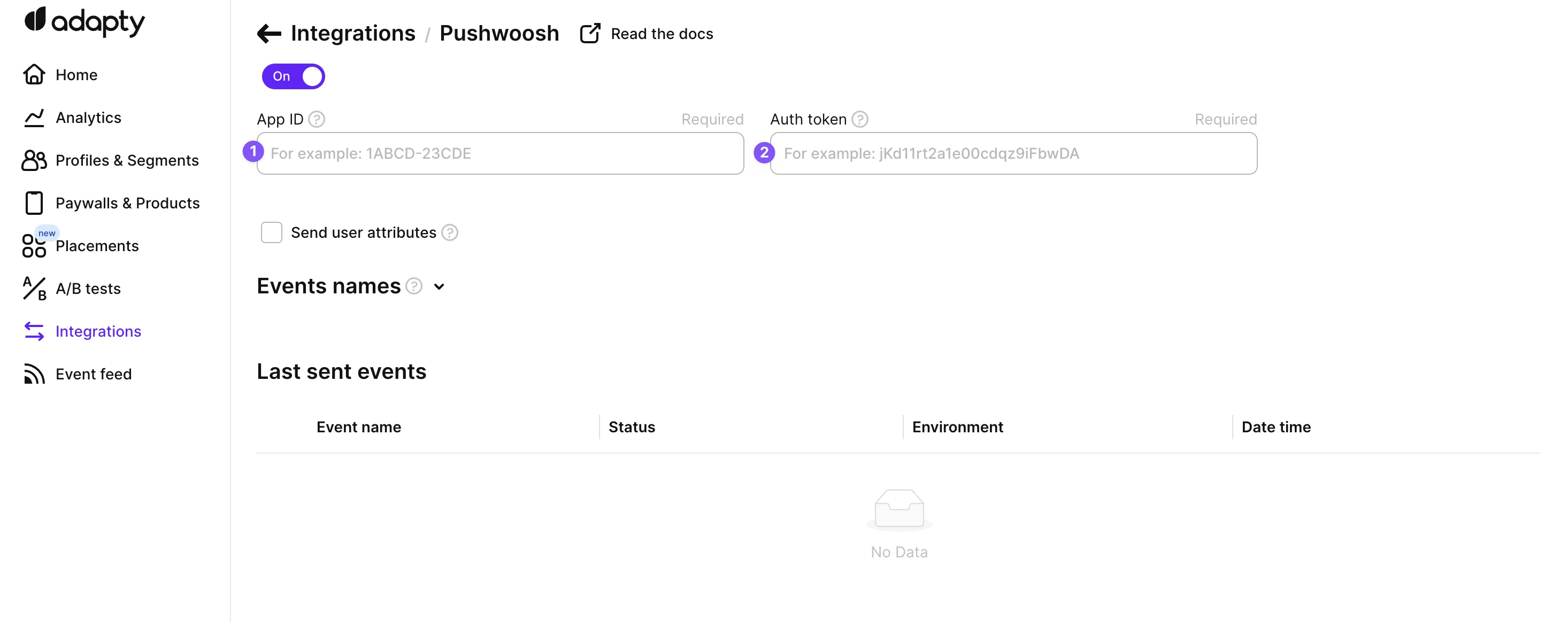
Navigate to the Integrations section, select Pushwoosh, activate it by switching the toggle from off to on, and then complete the necessary fields.
2. **Go to Pushwoosh to set up essential credentials**
Establish a connection between your Pushwoosh and Adapty accounts by setting up credentials. This requires your Pushwoosh App ID and authentication token.
3. **Locate your Pushwoosh credentials**
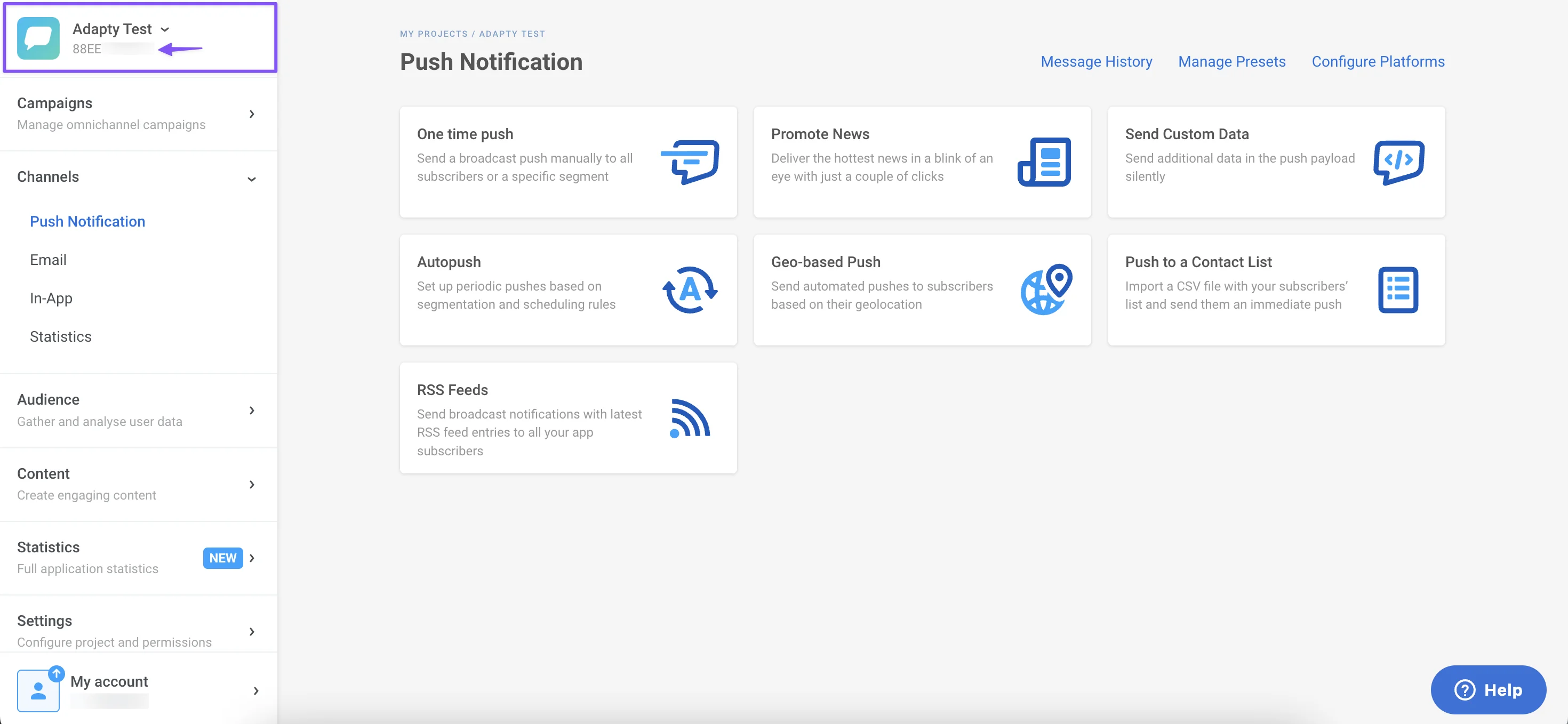
* App ID: Found in the Pushwoosh dashboard.
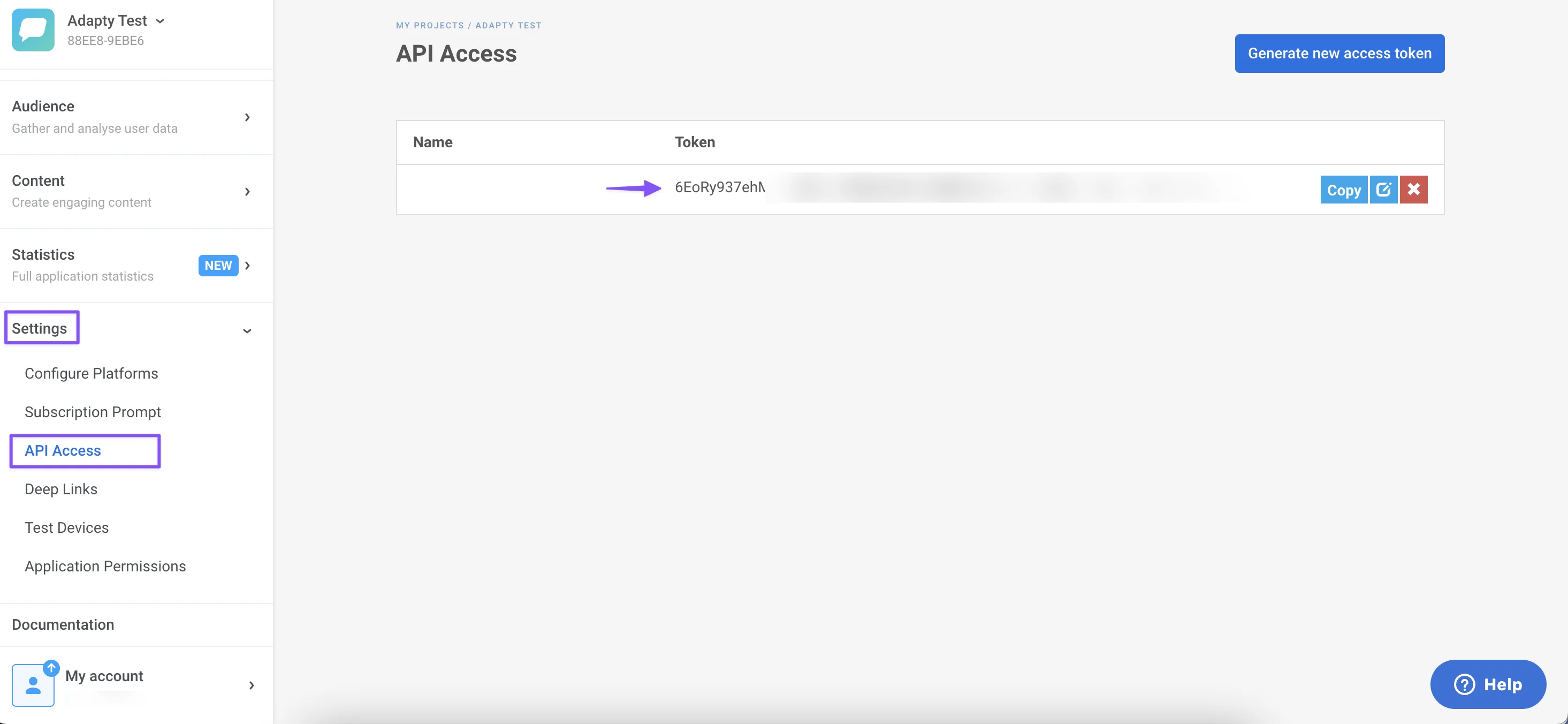
* Auth Token: Located in the API Access section of Pushwoosh Settings.
4. **Configure Events and Tags**
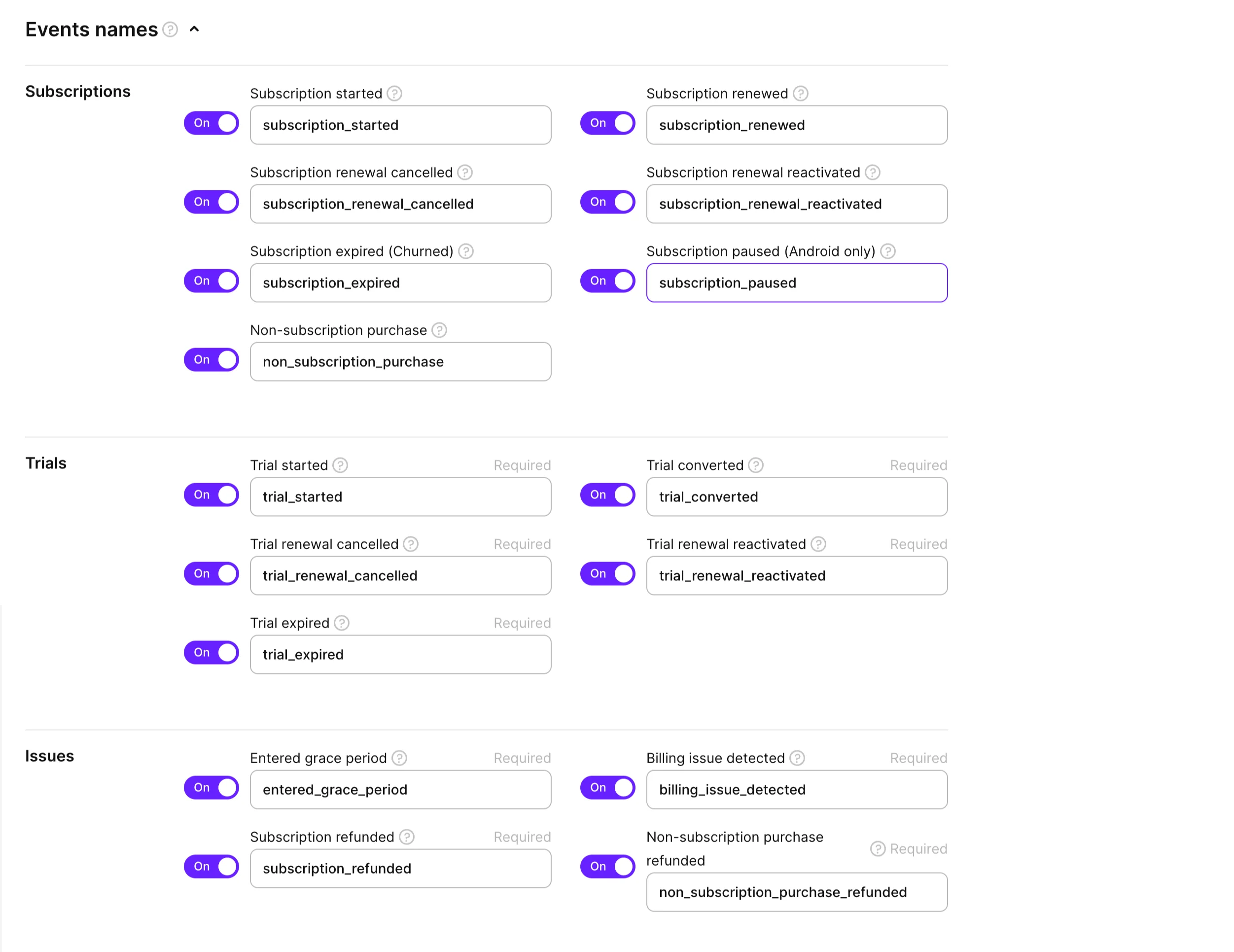
Below the credential settings, you'll find options to select and rename various event groups from Adapty to send to Pushwoosh. Review and choose the events you need. For a comprehensive list of events available in Adapty, refer to [their detailed guide](https://docs.adapty.io/docs/events).
Adapty handles the transmission of subscription events to Pushwoosh through a server-to-server integration, allowing full visibility of these events in your Pushwoosh Dashboard.
5. **Enable custom tags**
Enhance your Pushwoosh integration with Adapty by utilizing custom tags. These tags can be tailored to your specific requirements, as outlined below:
* adapty\_customer\_user\_id: A unique user identifier from Pushwoosh.
* adapty\_profile\_id: Unique Adapty User Profile ID, visible in the Adapty dashboard.
* environment: Identifies the user's environment, either 'Sandbox' or 'Production'.
* store: Indicates the purchasing store ('app\_store' or 'play\_store').
* vendor\_product\_id: The product ID in the Apple/Google store.
* subscription\_expires\_at: The latest subscription's expiration date, in a specific format.
* last\_event\_type: Type of the most recent event from Adapty.
* purchase\_date: Date of the last transaction, in a specific format.
* original\_purchase\_date: Date of the first purchase, in a specific format.
* active\_subscription: Indicates the subscription status.
* period\_type: Latest period type of the purchase or renewal.
Additionally, you can integrate custom attributes for greater tracking flexibility. On the integration page on Adapty's side, mark the 'Send user custom attributes' checkbox for automatic transmission to Pushwoosh.
6. **Required: Configure SDK**
To complete the integration, send the HWID value from Pushwoosh to Adapty:
```
let params = AdaptyProfileParameters.Builder()
.with(pushwooshHWID: Pushwoosh.sharedInstance().getHWID())
.build()
Adapty.updateProfile(params: params) { error in
// handle the error
}
```
```
val params = AdaptyProfileParameters.Builder()
.withPushwooshHwid(Pushwoosh.getInstance().hwid)
.build()
Adapty.updateProfile(params) { error ->
if (error != null) {
// handle the error
}
}
```
```
AdaptyProfileParameters params = new AdaptyProfileParameters.Builder()
.withPushwooshHwid(Pushwoosh.getInstance().getHwid())
.build();
Adapty.updateProfile(params, error -> {
if (error != null) {
// handle the error
}
})
```
```
import 'package:pushwoosh/pushwoosh.dart';
final builder = AdaptyProfileParametersBuilder()
..setPushwooshHWID(
await Pushwoosh.getInstance.getHWID,
);
try {
await adapty.updateProfile(builder.build());
} on AdaptyError catch (adaptyError) {
// handle error
} catch (e) {}
```
```
import { adapty } from 'react-native-adapty';
import Pushwoosh from 'pushwoosh-react-native-plugin';
// ...
try {
await adapty.updateProfile({
pushwooshHWID: hwid,
});
} catch (error) {
// handle `AdaptyError`
}
```
```
var builder = new Adapty.ProfileParameters.Builder();
builder.SetPushwooshHWID(Pushwoosh.Instance.HWID);
Adapty.UpdateProfile(builder.Build(), (error) => {
// handle error
});
```
 2. **Go to Pushwoosh to set up essential credentials**
Establish a connection between your Pushwoosh and Adapty accounts by setting up credentials. This requires your Pushwoosh App ID and authentication token.
2. **Go to Pushwoosh to set up essential credentials**
Establish a connection between your Pushwoosh and Adapty accounts by setting up credentials. This requires your Pushwoosh App ID and authentication token.
 3. **Locate your Pushwoosh credentials**
* App ID: Found in the Pushwoosh dashboard.
* Auth Token: Located in the API Access section of Pushwoosh Settings.
3. **Locate your Pushwoosh credentials**
* App ID: Found in the Pushwoosh dashboard.
* Auth Token: Located in the API Access section of Pushwoosh Settings.
 4. **Configure Events and Tags**
Below the credential settings, you'll find options to select and rename various event groups from Adapty to send to Pushwoosh. Review and choose the events you need. For a comprehensive list of events available in Adapty, refer to [their detailed guide](https://docs.adapty.io/docs/events).
Adapty handles the transmission of subscription events to Pushwoosh through a server-to-server integration, allowing full visibility of these events in your Pushwoosh Dashboard.
4. **Configure Events and Tags**
Below the credential settings, you'll find options to select and rename various event groups from Adapty to send to Pushwoosh. Review and choose the events you need. For a comprehensive list of events available in Adapty, refer to [their detailed guide](https://docs.adapty.io/docs/events).
Adapty handles the transmission of subscription events to Pushwoosh through a server-to-server integration, allowing full visibility of these events in your Pushwoosh Dashboard.
 5. **Enable custom tags**
Enhance your Pushwoosh integration with Adapty by utilizing custom tags. These tags can be tailored to your specific requirements, as outlined below:
* adapty\_customer\_user\_id: A unique user identifier from Pushwoosh.
* adapty\_profile\_id: Unique Adapty User Profile ID, visible in the Adapty dashboard.
* environment: Identifies the user's environment, either 'Sandbox' or 'Production'.
* store: Indicates the purchasing store ('app\_store' or 'play\_store').
* vendor\_product\_id: The product ID in the Apple/Google store.
* subscription\_expires\_at: The latest subscription's expiration date, in a specific format.
* last\_event\_type: Type of the most recent event from Adapty.
* purchase\_date: Date of the last transaction, in a specific format.
* original\_purchase\_date: Date of the first purchase, in a specific format.
* active\_subscription: Indicates the subscription status.
* period\_type: Latest period type of the purchase or renewal.
Additionally, you can integrate custom attributes for greater tracking flexibility. On the integration page on Adapty's side, mark the 'Send user custom attributes' checkbox for automatic transmission to Pushwoosh.
6. **Required: Configure SDK**
To complete the integration, send the HWID value from Pushwoosh to Adapty:
5. **Enable custom tags**
Enhance your Pushwoosh integration with Adapty by utilizing custom tags. These tags can be tailored to your specific requirements, as outlined below:
* adapty\_customer\_user\_id: A unique user identifier from Pushwoosh.
* adapty\_profile\_id: Unique Adapty User Profile ID, visible in the Adapty dashboard.
* environment: Identifies the user's environment, either 'Sandbox' or 'Production'.
* store: Indicates the purchasing store ('app\_store' or 'play\_store').
* vendor\_product\_id: The product ID in the Apple/Google store.
* subscription\_expires\_at: The latest subscription's expiration date, in a specific format.
* last\_event\_type: Type of the most recent event from Adapty.
* purchase\_date: Date of the last transaction, in a specific format.
* original\_purchase\_date: Date of the first purchase, in a specific format.
* active\_subscription: Indicates the subscription status.
* period\_type: Latest period type of the purchase or renewal.
Additionally, you can integrate custom attributes for greater tracking flexibility. On the integration page on Adapty's side, mark the 'Send user custom attributes' checkbox for automatic transmission to Pushwoosh.
6. **Required: Configure SDK**
To complete the integration, send the HWID value from Pushwoosh to Adapty: