# Loop
Use the **Loop** element to send users back through a set of connected steps instead of building the same sequence out repeatedly on the canvas. Connect its **Repeat** output back to an earlier point to form the loop body. Connect **Exit** to continue once the limit is reached. A journey can loop back only through a Loop's **Repeat** output. Connecting any other output backward to an earlier step is rejected when you save.
##### Use cases
* **Payment reminder retries:** loop a **Wait for Trigger** (on the `payment_completed` event) and a reminder push a limited number of times, spaced by a minimum interval, until the user pays or the loop exits.
* **Re-engagement drip:** loop a message plus a **Time delay** to send a capped number of nudges to inactive users, then continue on **Exit** with a different offer or a suppression step.
* **Poll until a condition changes:** loop a **Wait for Trigger** step on its own (`0` minimum interval, since the wait step already paces each pass) to keep checking for an event without building out repeated copies of the same branch.
## Prerequisites
Loop must be enabled for your account. It's off by default. Contact [Pushwoosh Support](https://help.pushwoosh.com/hc/en-us/requests/new) if you need it enabled.
## Add and configure Loop
1. Place the **Loop** element on the canvas and double-click it to configure.
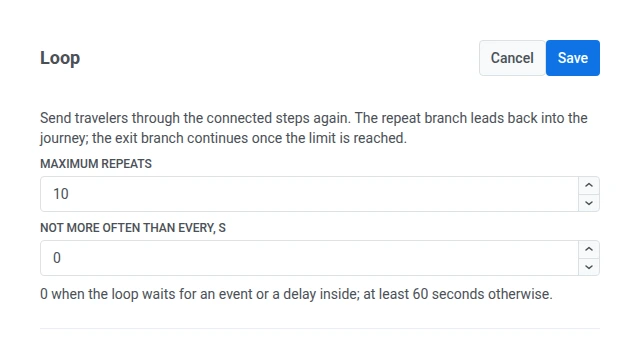
2. Set **Maximum repeats**: how many times a user can go around the loop, from 1 to 100 (default 10). Outside that range, saving the journey fails with `Maximum repeats must be from 1 to 100`.
3. Set **Not more often than every, s**: the minimum time between passes, in seconds. Leave it at `0` if the loop body already waits on its own (a **Wait for Trigger** or **Time delay** step inside the loop). Otherwise, set at least 60 seconds.
4. Connect the **Repeat** output to the first step of the sequence you want to repeat.
5. Connect the **Exit** output to wherever users should go once they stop looping.
6. Click **Save**.
## Repeat and Exit branches
* **Repeat** sends the user back into the loop body for another pass. Leave it unconnected and saving fails with `Connect the repeat output of the Loop`. Point it back at the Loop element itself and saving fails with `The repeat output of the Loop cannot lead to the Loop itself`.
* **Exit** fires once a user has looped **Maximum repeats** times, and continues the journey from there.
## Set the minimum interval
**Not more often than every, s** limits how soon a user can pass through the Loop again after their last pass:
* **`0`**: no floor of its own. Use this when the loop body already paces users with a **Wait for Trigger** or **Time delay** step (or a nested Loop that has its own interval set) before they reach **Repeat** again.
* **60 or more seconds**: the Loop itself holds each pass back until the interval has elapsed since the previous one, queuing the user if they'd otherwise repeat sooner.
Typing a value from 1 to 59 snaps up to 60 immediately, as soon as you type a valid digit.
## Nested loops
You can put a Loop inside another Loop's body. The inner loop's own pass count resets to zero every time the outer loop starts a new pass, so **Maximum repeats** on the inner Loop is a per-outer-pass limit, not a running total across the whole journey.
## Safety limit across all loops
Independent of each Loop's own **Maximum repeats**, Pushwoosh caps the combined number of passes through all Loop elements in a journey at 1000 per user. A user who hits this combined cap is forced out through the last Loop's **Exit** branch, even if that Loop's own limit hasn't been reached yet. This mainly guards against deeply nested loops (for example, two 100-repeat loops nested inside each other) compounding into far more passes than either limit alone suggests.
 ## Repeat and Exit branches
* **Repeat** sends the user back into the loop body for another pass. Leave it unconnected and saving fails with `Connect the repeat output of the Loop`. Point it back at the Loop element itself and saving fails with `The repeat output of the Loop cannot lead to the Loop itself`.
* **Exit** fires once a user has looped **Maximum repeats** times, and continues the journey from there.
## Set the minimum interval
**Not more often than every, s** limits how soon a user can pass through the Loop again after their last pass:
* **`0`**: no floor of its own. Use this when the loop body already paces users with a **Wait for Trigger** or **Time delay** step (or a nested Loop that has its own interval set) before they reach **Repeat** again.
* **60 or more seconds**: the Loop itself holds each pass back until the interval has elapsed since the previous one, queuing the user if they'd otherwise repeat sooner.
Typing a value from 1 to 59 snaps up to 60 immediately, as soon as you type a valid digit.
## Nested loops
You can put a Loop inside another Loop's body. The inner loop's own pass count resets to zero every time the outer loop starts a new pass, so **Maximum repeats** on the inner Loop is a per-outer-pass limit, not a running total across the whole journey.
## Safety limit across all loops
Independent of each Loop's own **Maximum repeats**, Pushwoosh caps the combined number of passes through all Loop elements in a journey at 1000 per user. A user who hits this combined cap is forced out through the last Loop's **Exit** branch, even if that Loop's own limit hasn't been reached yet. This mainly guards against deeply nested loops (for example, two 100-repeat loops nested inside each other) compounding into far more passes than either limit alone suggests.
## Repeat and Exit branches
* **Repeat** sends the user back into the loop body for another pass. Leave it unconnected and saving fails with `Connect the repeat output of the Loop`. Point it back at the Loop element itself and saving fails with `The repeat output of the Loop cannot lead to the Loop itself`.
* **Exit** fires once a user has looped **Maximum repeats** times, and continues the journey from there.
## Set the minimum interval
**Not more often than every, s** limits how soon a user can pass through the Loop again after their last pass:
* **`0`**: no floor of its own. Use this when the loop body already paces users with a **Wait for Trigger** or **Time delay** step (or a nested Loop that has its own interval set) before they reach **Repeat** again.
* **60 or more seconds**: the Loop itself holds each pass back until the interval has elapsed since the previous one, queuing the user if they'd otherwise repeat sooner.
Typing a value from 1 to 59 snaps up to 60 immediately, as soon as you type a valid digit.
## Nested loops
You can put a Loop inside another Loop's body. The inner loop's own pass count resets to zero every time the outer loop starts a new pass, so **Maximum repeats** on the inner Loop is a per-outer-pass limit, not a running total across the whole journey.
## Safety limit across all loops
Independent of each Loop's own **Maximum repeats**, Pushwoosh caps the combined number of passes through all Loop elements in a journey at 1000 per user. A user who hits this combined cap is forced out through the last Loop's **Exit** branch, even if that Loop's own limit hasn't been reached yet. This mainly guards against deeply nested loops (for example, two 100-repeat loops nested inside each other) compounding into far more passes than either limit alone suggests.