# Data to app
The **Data to app** Journey element allows you to send custom data or [silent push notifications](/product/messaging-channels/push-notifications/advanced-push-features/silent-push-notifications) and deliver data that your app can interpret and act upon, enhancing user engagement and app functionality.
## What is Custom Data?
Custom data is additional information sent along with a push notification. This data is typically in JSON format and can include various parameters that instruct the app to perform specific actions upon receiving the notification.
When a push notification with custom data is received, the app processes the JSON payload to perform predefined actions. This allows for dynamic content updates, navigation, and other interactive features without requiring the user to manually open the app.
## How to send custom data with the Data to app element
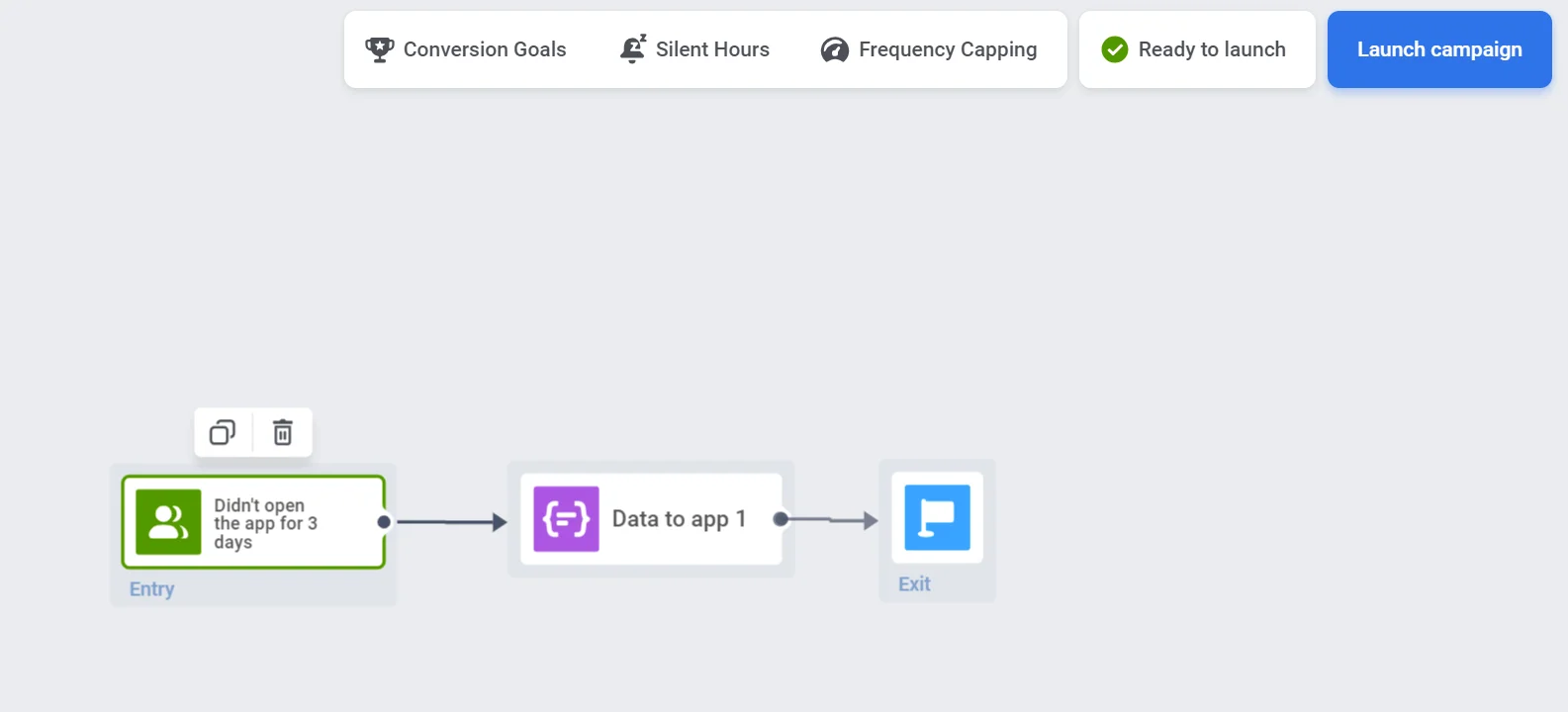
1. Add the Data to app element to the Journey canvas.
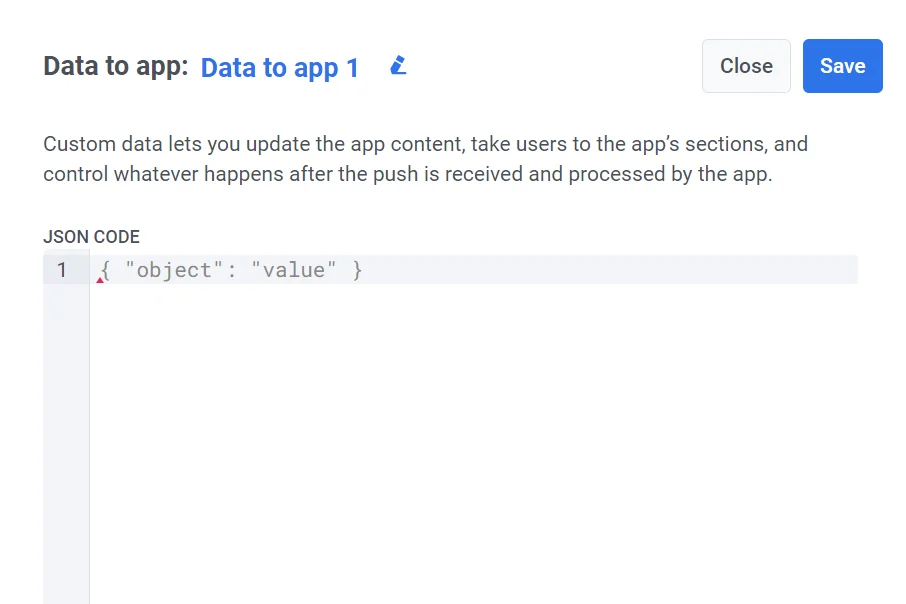
2. Paste your JSON code into the provided field.
3. After entering your JSON data, click **Save** to apply the configuration.
### Use vouchers
Add voucher codes from a predefined pool to your custom data payload to support in-app promotions, discounts, or loyalty rewards—delivered silently or triggered by specific app logic.
To set up vouchers:
1. Include the ``{{voucher}}`` placeholder in your JSON payload.
**Example:**
```json
{
"message": "Congratulations! You've received a special discount: {{voucher}}"
}
```
2. In the Data to app element settings, toggle **Vouchers** to ON.
3. Choose the relevant **Voucher Pool** that contains the available codes (make sure it's created in advance).
4. (Optional) Use **Assign Tag** to label users who receive vouchers for tracking or segmentation.
[Learn more about vouchers](/product/content/vouchers/)
## Data to app usage examples
#### Send silent push notifications
Silent push notifications are a type of push notification that does not alert the user with sounds, vibrations, or visual notifications. Instead, they are delivered quietly in the background. Silent push notifications paired with custom data are used to update the app content, sync data, or trigger specific app behavior without interrupting the user.
#### Track uninstalls
Send a silent push daily to your user base to verify if the app is installed on the user's device.
#### Update your application proactively
In certain situations, you may need to update your application on users’ devices without requiring any action from them. A silent push with Custom Data is ideal for this purpose. You can send it to all users or a specific user segment. The push notification will open automatically, launching your application in the background and updating its content within a minute, all without any user intervention.
##### JSON example
```
{
"Action": "UpdateApp"
}
```
#### Test a new section or module in your application
With Custom Data, you can open a new feature for beta testing. Select a target segment and send them a push notification announcing the added functionality. If a user taps the message, they will gain access to the section you opened exclusively for them.
##### JSON example
```
{
"EnableNewFeatureSection" : "Yes"
}
```
#### Update app icon
Change the app icon dynamically.
##### JSON example
```
{
"UpdateAppIcon": "https://example.com/new-icon.png"
}
```
#### Deliver promo codes and discounts
You can send push notifications with promo codes or discounts that are automatically applied when the user taps on the notification. This approach encourages user engagement and makes it easier for users to take advantage of special offers, enhancing their overall experience.
##### JSON example
```
{
"ApplyPromoCode": "DISCOUNT2024"
}
```
#### Grant bonus points to users
Send push notifications with custom data to grant bonus points. When the user taps the notification, the bonus points are credited to their account automatically.
##### JSON example
```
{
"AddPromo" : "+1000"
}
```
Learn more about how to [customize your messages with custom data](/product/messaging-channels/push-notifications/advanced-push-features/using-custom-data)
 2. Paste your JSON code into the provided field.
 3. After entering your JSON data, click **Save** to apply the configuration.
### Use vouchers
Add voucher codes from a predefined pool to your custom data payload to support in-app promotions, discounts, or loyalty rewards—delivered silently or triggered by specific app logic.
To set up vouchers:
1. Include the ``{{voucher}}`` placeholder in your JSON payload.
**Example:**
```json
{
"message": "Congratulations! You've received a special discount: {{voucher}}"
}
```
2. In the Data to app element settings, toggle **Vouchers** to ON.
3. Choose the relevant **Voucher Pool** that contains the available codes (make sure it's created in advance).
4. (Optional) Use **Assign Tag** to label users who receive vouchers for tracking or segmentation.
[Learn more about vouchers](/product/content/vouchers/)
## Data to app usage examples
#### Send silent push notifications
Silent push notifications are a type of push notification that does not alert the user with sounds, vibrations, or visual notifications. Instead, they are delivered quietly in the background. Silent push notifications paired with custom data are used to update the app content, sync data, or trigger specific app behavior without interrupting the user.
#### Track uninstalls
Send a silent push daily to your user base to verify if the app is installed on the user's device.
#### Update your application proactively
In certain situations, you may need to update your application on users’ devices without requiring any action from them. A silent push with Custom Data is ideal for this purpose. You can send it to all users or a specific user segment. The push notification will open automatically, launching your application in the background and updating its content within a minute, all without any user intervention.
##### JSON example
```
{
"Action": "UpdateApp"
}
```
#### Test a new section or module in your application
With Custom Data, you can open a new feature for beta testing. Select a target segment and send them a push notification announcing the added functionality. If a user taps the message, they will gain access to the section you opened exclusively for them.
##### JSON example
```
{
"EnableNewFeatureSection" : "Yes"
}
```
#### Update app icon
Change the app icon dynamically.
##### JSON example
```
{
"UpdateAppIcon": "https://example.com/new-icon.png"
}
```
#### Deliver promo codes and discounts
You can send push notifications with promo codes or discounts that are automatically applied when the user taps on the notification. This approach encourages user engagement and makes it easier for users to take advantage of special offers, enhancing their overall experience.
##### JSON example
```
{
"ApplyPromoCode": "DISCOUNT2024"
}
```
#### Grant bonus points to users
Send push notifications with custom data to grant bonus points. When the user taps the notification, the bonus points are credited to their account automatically.
##### JSON example
```
{
"AddPromo" : "+1000"
}
```
Learn more about how to [customize your messages with custom data](/product/messaging-channels/push-notifications/advanced-push-features/using-custom-data)
3. After entering your JSON data, click **Save** to apply the configuration.
### Use vouchers
Add voucher codes from a predefined pool to your custom data payload to support in-app promotions, discounts, or loyalty rewards—delivered silently or triggered by specific app logic.
To set up vouchers:
1. Include the ``{{voucher}}`` placeholder in your JSON payload.
**Example:**
```json
{
"message": "Congratulations! You've received a special discount: {{voucher}}"
}
```
2. In the Data to app element settings, toggle **Vouchers** to ON.
3. Choose the relevant **Voucher Pool** that contains the available codes (make sure it's created in advance).
4. (Optional) Use **Assign Tag** to label users who receive vouchers for tracking or segmentation.
[Learn more about vouchers](/product/content/vouchers/)
## Data to app usage examples
#### Send silent push notifications
Silent push notifications are a type of push notification that does not alert the user with sounds, vibrations, or visual notifications. Instead, they are delivered quietly in the background. Silent push notifications paired with custom data are used to update the app content, sync data, or trigger specific app behavior without interrupting the user.
#### Track uninstalls
Send a silent push daily to your user base to verify if the app is installed on the user's device.
#### Update your application proactively
In certain situations, you may need to update your application on users’ devices without requiring any action from them. A silent push with Custom Data is ideal for this purpose. You can send it to all users or a specific user segment. The push notification will open automatically, launching your application in the background and updating its content within a minute, all without any user intervention.
##### JSON example
```
{
"Action": "UpdateApp"
}
```
#### Test a new section or module in your application
With Custom Data, you can open a new feature for beta testing. Select a target segment and send them a push notification announcing the added functionality. If a user taps the message, they will gain access to the section you opened exclusively for them.
##### JSON example
```
{
"EnableNewFeatureSection" : "Yes"
}
```
#### Update app icon
Change the app icon dynamically.
##### JSON example
```
{
"UpdateAppIcon": "https://example.com/new-icon.png"
}
```
#### Deliver promo codes and discounts
You can send push notifications with promo codes or discounts that are automatically applied when the user taps on the notification. This approach encourages user engagement and makes it easier for users to take advantage of special offers, enhancing their overall experience.
##### JSON example
```
{
"ApplyPromoCode": "DISCOUNT2024"
}
```
#### Grant bonus points to users
Send push notifications with custom data to grant bonus points. When the user taps the notification, the bonus points are credited to their account automatically.
##### JSON example
```
{
"AddPromo" : "+1000"
}
```
Learn more about how to [customize your messages with custom data](/product/messaging-channels/push-notifications/advanced-push-features/using-custom-data)