# Work with multiple pages
A [Web popup content](/product/content/web-popup-content/) layout can have more than one page, for example to guide visitors through a short multi-step offer. Each page has its own layout, media, and size. See [Popup settings](/product/content/web-popup-content/popup-settings/) to style and size a page.
## Add a page
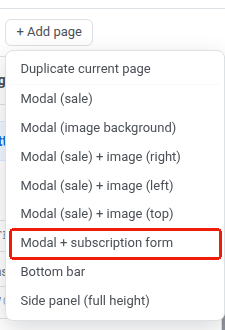
Click **+ Add page** to open the add-page menu:
- **Duplicate current page:** copies the active page, including any edits you've made, as a new page. If the source page has a subscription form, the copy is created without it, because a popup can only have one.
- Pick one of the single-page layouts to add a fresh page with that layout's demo content. The new page is independent of the others, so it can use a different layout.
- **Modal + subscription form** is one of these layouts. It comes with a [subscription form](/product/audience-data-and-segmentation/subscription-forms/) block already in place.
Each tab is one page. Click a tab to switch to it.
## Set the start page
The tab marked with ★ is the **start page**, the page visitors see first. To change it, open another tab and click ☆ on that tab.
## Delete a page
On the active tab, click **✕**. A confirmation dialog opens. Click **Delete** to remove the page. This can't be undone.
 Each tab is one page. Click a tab to switch to it.
## Set the start page
The tab marked with ★ is the **start page**, the page visitors see first. To change it, open another tab and click ☆ on that tab.
Each tab is one page. Click a tab to switch to it.
## Set the start page
The tab marked with ★ is the **start page**, the page visitors see first. To change it, open another tab and click ☆ on that tab.
 ## Delete a page
On the active tab, click **✕**. A confirmation dialog opens. Click **Delete** to remove the page. This can't be undone.
## Delete a page
On the active tab, click **✕**. A confirmation dialog opens. Click **Delete** to remove the page. This can't be undone.