# Import and export translations
Instead of generating translations with [AI Translate](/product/content/push-presets/translate-push-content-with-ai/), you can bring your own from a translation vendor, a spreadsheet, or another Pushwoosh preset. **Import** and **Export** sit next to the language selector at the top of the [Push presets editor](/product/content/push-presets/), as two icon buttons.
## Export the current content
Click **Export** to download the preset's title, subtitle, and message for every language it currently has, including the default one, as a CSV file named `-translations.csv`.
## File format
A CSV file needs a header row with a `language` column. `title`, `subtitle`, and `message` are optional, and all four can be in any order. A column you leave out is treated as blank for every row, the same as an empty cell in a column you kept. Each following row is one language. Write the language code the same way it appears in the [language selector](/product/content/push-presets/#define-the-languages-you-want-to-use-in-your-push), for example `zh-Hant` for Traditional Chinese. Pushwoosh matches it case-insensitively, but flags an unrecognized code instead of matching it:
| language | title | subtitle | message |
|---|---|---|---|
| default | Welcome to our app! | | Thanks for installing. |
| es | ¡Bienvenido a nuestra app! | | Gracias por instalar. |
| de | Willkommen in unserer App! | | Danke fürs Installieren. |
A JSON file works instead of CSV. It's accepted in either of two shapes:
* Keyed by language, each holding its own `title`, `subtitle`, and `message`:
```json
{
"default": { "title": "Welcome to our app!", "message": "Thanks for installing." },
"es": { "title": "¡Bienvenido a nuestra app!", "message": "Gracias por instalar." }
}
```
* The same shape the [Presets API](/developer/api-reference/presets-api/) uses for `localizedTitle`, `localizedSubtitle`, and `localizedContent`. Useful if you already export presets through the API:
```json
{
"localizedTitle": { "default": "Welcome to our app!", "es": "¡Bienvenido a nuestra app!" },
"localizedContent": { "default": "Thanks for installing.", "es": "Gracias por instalar." }
}
```
## Import translations into the preset
1. Click **Import** next to the language selector.
2. Choose a `.csv` or `.json` file. Pushwoosh reads it and shows how many languages will be applied, how many of those are new to this preset, and how many are skipped. A language is skipped when nothing in its row would change anything: either every field in the row is blank, or (without **Overwrite**, see the next step) the preset already has text in every field that row fills in.
3. To replace text in languages that already have content, check **Overwrite languages that already have text**. Leave it unchecked to only fill in languages that are still empty or add new languages, without touching what you already wrote.
4. Click **Import**.
### If Pushwoosh can't read the file
Pushwoosh shows one of these messages instead of a preview when it can't make sense of the file:
| Message | When it happens |
|---|---|
| The file is empty. | The file has no content. |
| The file is not valid JSON. | A `.json` file (or a file starting with `{`) can't be parsed as JSON, or its top level isn't an object. |
| The CSV file has no "language" column. | The header row of a CSV file is missing the `language` column. |
| The file has no translations. | Every row, or every JSON entry, is missing a language code. |
A language in the file that isn't in the preset yet is added automatically. An empty cell or field never clears existing text, even with **Overwrite** checked. It's only skipped, not written as blank.
 ## Export the current content
Click **Export** to download the preset's title, subtitle, and message for every language it currently has, including the default one, as a CSV file named `
## Export the current content
Click **Export** to download the preset's title, subtitle, and message for every language it currently has, including the default one, as a CSV file named `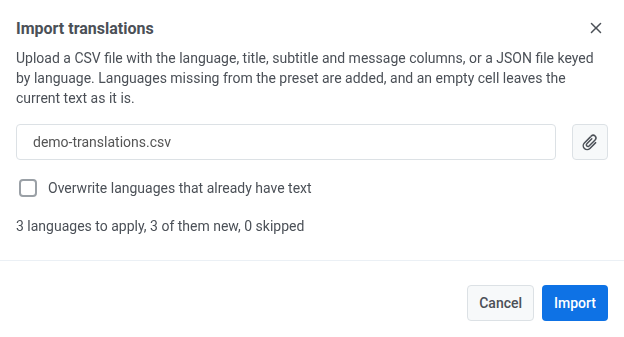 ### If Pushwoosh can't read the file
Pushwoosh shows one of these messages instead of a preview when it can't make sense of the file:
| Message | When it happens |
|---|---|
| The file is empty. | The file has no content. |
| The file is not valid JSON. | A `.json` file (or a file starting with `{`) can't be parsed as JSON, or its top level isn't an object. |
| The CSV file has no "language" column. | The header row of a CSV file is missing the `language` column. |
| The file has no translations. | Every row, or every JSON entry, is missing a language code. |
A language in the file that isn't in the preset yet is added automatically. An empty cell or field never clears existing text, even with **Overwrite** checked. It's only skipped, not written as blank.
### If Pushwoosh can't read the file
Pushwoosh shows one of these messages instead of a preview when it can't make sense of the file:
| Message | When it happens |
|---|---|
| The file is empty. | The file has no content. |
| The file is not valid JSON. | A `.json` file (or a file starting with `{`) can't be parsed as JSON, or its top level isn't an object. |
| The CSV file has no "language" column. | The header row of a CSV file is missing the `language` column. |
| The file has no translations. | Every row, or every JSON entry, is missing a language code. |
A language in the file that isn't in the preset yet is added automatically. An empty cell or field never clears existing text, even with **Overwrite** checked. It's only skipped, not written as blank.