# How to create segments

Segments allow you to target specific groups of users based on their attributes and behavior. Pushwoosh provides multiple ways to create segments, from simple tag-based filters to advanced compound filters combining multiple conditions.


To build a segment, follow these steps:

1. Go to the **Segments** (**Filters**) section of the Pushwoosh Control Panel.
2. Click the **Create Segment** button.
3. Choose **Build Segment** from the dropdown menu.
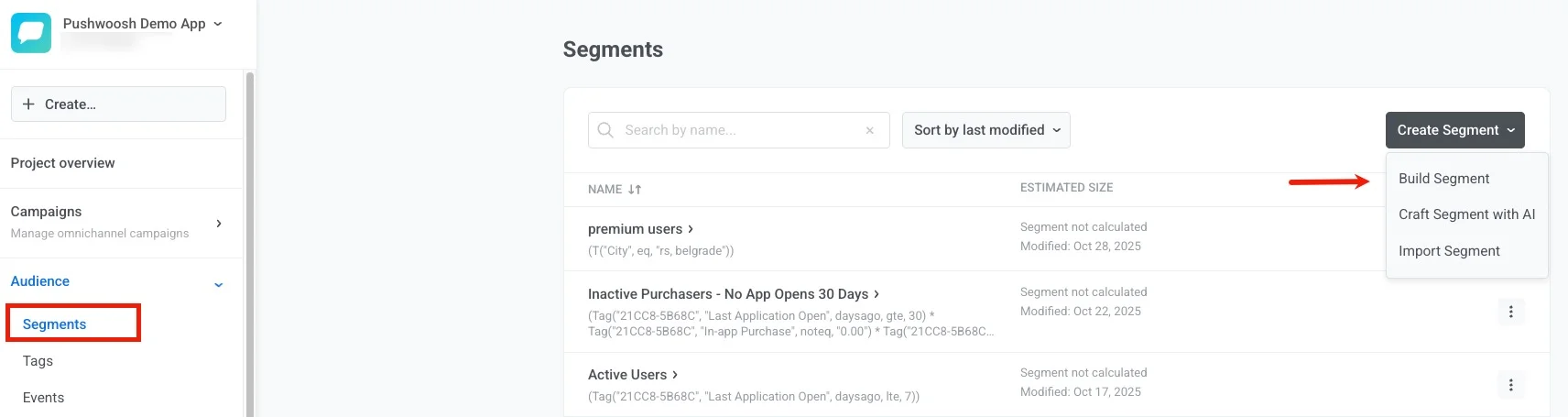

<img src="/segmentation-segments-1.webp" alt="Build Segment interface showing create segment button and dropdown menu"/>


## Ways to create segments

Select a guide below to get started:

<CardGrid>
  <IconLinkCard
    title="Build segments by tags"
    description="Start with the basics—create segments using user attributes and tag values."
    href="/product/audience-data-and-segmentation/segmentation/create-segments/by-tags"
    icon="star"
  />
  <IconLinkCard
    title="Build segments by events"
    description="Target users based on specific behaviors and event occurrences with flexible time frames."
    href="/product/audience-data-and-segmentation/segmentation/create-segments/by-events"
    icon="star"
  />
  <IconLinkCard
    title="Build segments by existing segments"
    description="Reuse and combine previously created segments to build more complex audiences."
    href="/product/audience-data-and-segmentation/segmentation/create-segments/by-existing-segments"
    icon="star"
  />
  <IconLinkCard
    title="Build segments by User ID"
    description="Target known users by their Pushwoosh User IDs and combine them with other filters."
    href="/product/audience-data-and-segmentation/segmentation/create-segments/by-user-id"
    icon="star"
  />
  <IconLinkCard
    title="Build segments by geolocation"
    description="Target users who are near a selected point on the map within a defined radius."
    href="/product/audience-data-and-segmentation/segmentation/create-segments/by-geo"
    icon="star"
  />
  <IconLinkCard
    title="Build segments with compound filters"
    description="Create advanced segments by combining multiple filter types with logical operators."
    href="/product/audience-data-and-segmentation/segmentation/create-segments/compound-filters"
    icon="star"
  />
  <IconLinkCard
    title="Create anniversary segments"
    description="Target users on significant dates like birthdays or app anniversaries."
    href="/product/audience-data-and-segmentation/segmentation/create-segments/anniversary-segments"
    icon="star"
  />
  <IconLinkCard
    title="Import a segment"
    description="Create segments by uploading a CSV file with User IDs or Hardware IDs."
    href="/product/audience-data-and-segmentation/segmentation/create-segments/by-import"
    icon="star"
  />
  <IconLinkCard
    title="Build segments with AI"
    description="Use natural language to automatically generate segments with AI assistance."
    href="/product/audience-data-and-segmentation/segmentation/create-segments/build-segments-with-ai"
    icon="star"
  />
  <IconLinkCard
    title="Create segments via API"
    description="Build segments programmatically using the createFilter API method for automation."
    href="/developer/api-reference/segmentation-filters-api#createfilter"
    icon="star"
  />
</CardGrid>