# Build segments by geolocation
Use the **Geo** filter to create a segment of users who are near a selected location. This is useful for location-based campaigns, local offers, event reminders, and messages tied to a physical area.
## How location is determined
The **Geo** filter uses the device coordinates available in Pushwoosh to check whether the device is within the radius you set. These coordinates can come from:
* Coordinates sent through [`registerDevice`](/developer/api-reference/device-api#registerdevice)
* The device IP address, with city-level accuracy, when coordinates are not available
## How to build a segment by geolocation
To create a geolocation-based segment:
1. Go to **Audience** → **Segments**.
2. Click **Create Segment**.
3. Select **Build Segment**.
4. In the segment builder, click **Geo** in **Add filter by**.
5. Set the location and radius.
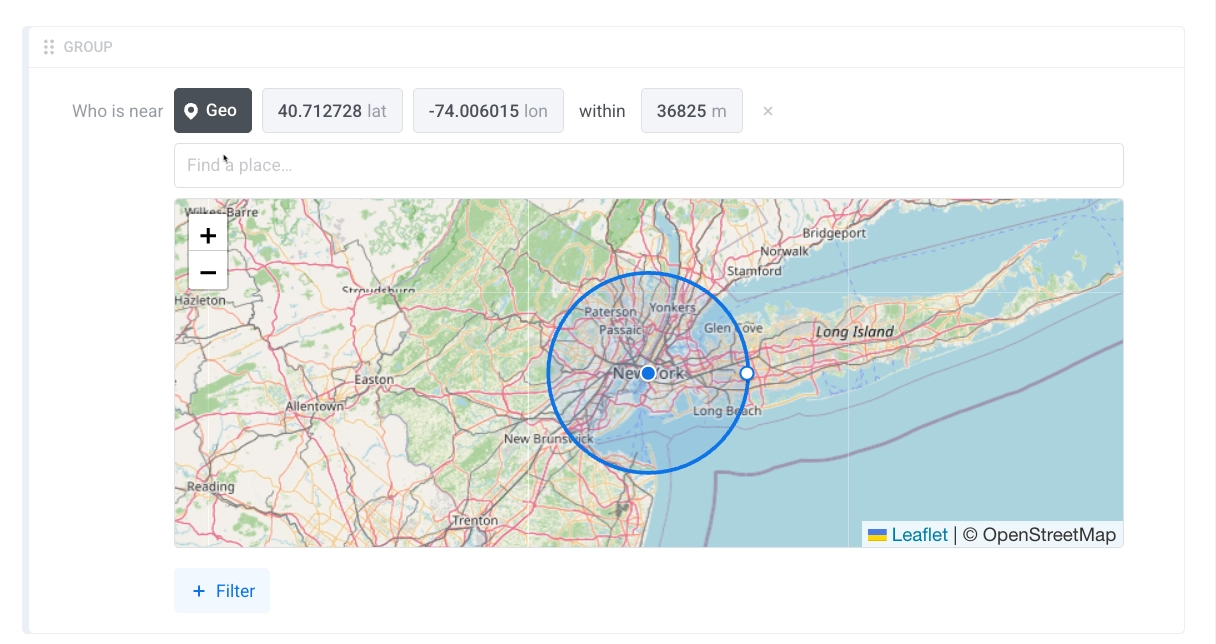
The Geo filter lets you define a circular area around a point on the map. From the screen, you can:
* Use **Find a place...** to search for a location.
* Enter latitude and longitude values.
* Set the radius in meters in the **within** field.
* Adjust the selected area on the map.
6. Add more filters if needed.
7. To target a user across all their devices when one device matches the Geo condition, use **Include all user devices**. [Learn how this option works](/product/audience-data-and-segmentation/segmentation/create-segments/by-tags/#include-all-user-devices).
8. Click **Save**.
 5. Set the location and radius.
The Geo filter lets you define a circular area around a point on the map. From the screen, you can:
* Use **Find a place...** to search for a location.
* Enter latitude and longitude values.
* Set the radius in meters in the **within** field.
* Adjust the selected area on the map.
5. Set the location and radius.
The Geo filter lets you define a circular area around a point on the map. From the screen, you can:
* Use **Find a place...** to search for a location.
* Enter latitude and longitude values.
* Set the radius in meters in the **within** field.
* Adjust the selected area on the map.
 6. Add more filters if needed.
7. To target a user across all their devices when one device matches the Geo condition, use **Include all user devices**. [Learn how this option works](/product/audience-data-and-segmentation/segmentation/create-segments/by-tags/#include-all-user-devices).
8. Click **Save**.
6. Add more filters if needed.
7. To target a user across all their devices when one device matches the Geo condition, use **Include all user devices**. [Learn how this option works](/product/audience-data-and-segmentation/segmentation/create-segments/by-tags/#include-all-user-devices).
8. Click **Save**.