# Customer Journey를 통한 일회성 푸시
[일회성 푸시 양식](/ko/product/messaging-channels/push-notifications/send-push-notifications/one-time-push/) 대신 Customer Journey Builder를 통해 일회성 푸시 알림을 보낼 수 있습니다. 이 과정은 모바일과 웹에서 동일합니다.
## Journey 빌드하기
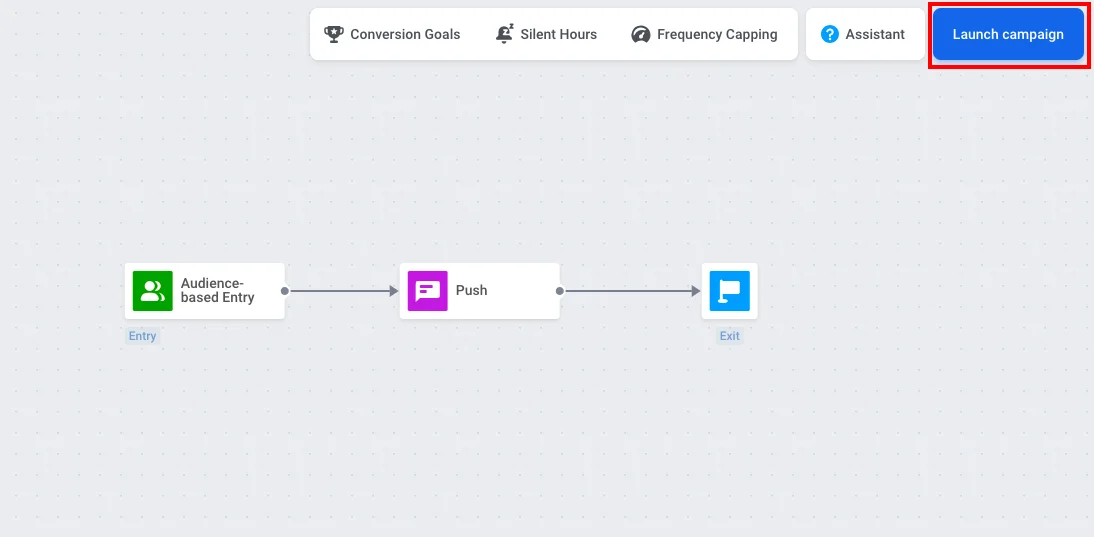
Customer Journey Builder에서 푸시 캠페인을 생성할 때 **One-time campaign** 템플릿을 선택하세요. 이 템플릿은 [Audience-based Entry](/ko/product/customer-journey/journey-elements/entry-elements/audience-based-entry/), [Push](/ko/product/customer-journey/journey-elements/channels/push/), [Exit](/ko/product/customer-journey/journey-elements/flow-controls/exit/)를 캔버스에 추가하고 자동으로 연결해 줍니다.
이 세 가지 요소를 캔버스로 드래그하여 순서대로 연결함으로써 Journey를 수동으로 빌드할 수도 있습니다.
## Audience 설정하기
**Audience-based Entry** 요소를 더블 클릭하여 푸시를 받을 대상을 선택합니다. 동일한 요소에서 **Scheduled Launch**를 설정하여 특정 날짜와 시간에 푸시를 보낼 수 있습니다. [Scheduled launch](/ko/product/customer-journey/journey-elements/entry-elements/audience-based-entry/#scheduled-launch)를 포함한 [Audience-based Entry에 대해 자세히 알아보기](/ko/product/customer-journey/journey-elements/entry-elements/audience-based-entry/).
이미 옵트인한 사용자 세그먼트(예: Push Alerts Enabled)가 있는 경우, **Audience Source**에서 해당 세그먼트를 선택합니다.
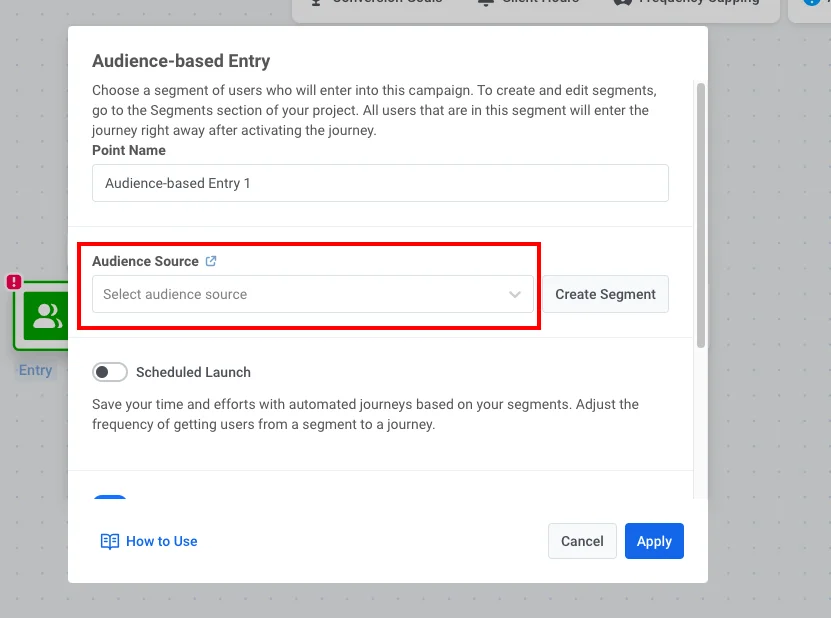 세그먼트를 생성해야 하는 경우:
1. **Create Segment**를 클릭합니다.
2. 세그먼트 빌더에서 필터를 추가합니다: 태그 **Push Alerts Enabled**가 true입니다.
3. **Save segment**를 클릭합니다.
## 푸시 구성 및 실행
1. **Push** 요소를 더블 클릭하고 [푸시 콘텐츠를 생성](/ko/product/content/push-presets/)하거나 선택합니다.
[Customer Journey의 Push 요소에 대해 자세히 알아보기](/ko/product/customer-journey/journey-elements/channels/push/)
2. Journey가 준비되면 **Launch campaign**을 클릭합니다.
세그먼트를 생성해야 하는 경우:
1. **Create Segment**를 클릭합니다.
2. 세그먼트 빌더에서 필터를 추가합니다: 태그 **Push Alerts Enabled**가 true입니다.
3. **Save segment**를 클릭합니다.
## 푸시 구성 및 실행
1. **Push** 요소를 더블 클릭하고 [푸시 콘텐츠를 생성](/ko/product/content/push-presets/)하거나 선택합니다.
[Customer Journey의 Push 요소에 대해 자세히 알아보기](/ko/product/customer-journey/journey-elements/channels/push/)
2. Journey가 준비되면 **Launch campaign**을 클릭합니다.