# Pushwoosh에서 콘텐츠 생성 및 구성하기

Pushwoosh는 캠페인을 위한 메시징 콘텐츠를 생성, 관리 및 최적화하는 데 필요한 도구와 인사이트를 제공합니다. 푸시 알림 제작, 이메일 디자인, 웹 팝업 콘텐츠 생성, 리치 미디어 설정, SMS 메시지 작성 등 어떤 작업을 하든 Pushwoosh를 사용하면 여러 채널에 걸쳐 관련성 있고 매력적인 커뮤니케이션을 전달할 수 있습니다.

## 사용 가능한 콘텐츠 유형

Pushwoosh를 사용하면 다음과 같은 다양한 채널을 통해 메시지를 보낼 콘텐츠를 만들 수 있습니다:
### 핵심 메시징 채널용 콘텐츠
<CardGrid>
  <IconLinkCard
      href="/product/content/push-presets/"
      icon="push"
      title="푸시 프리셋"
      description=""
  />
  <IconLinkCard
      href="/product/content/email-content/"
      icon="email"
      title="이메일 콘텐츠"
      description=""
  />
  <IconLinkCard
      href="/product/content/in-apps/"
      icon="inapp"
      title="인앱 템플릿"
      description=""
  />
  <IconLinkCard
      href="/product/content/web-popups-content/"
      icon="document"
      title="웹 팝업 콘텐츠"
      description=""
  />
  <IconLinkCard
      href="/product/content/cloud-pages/"
      icon="document"
      title="클라우드 페이지"
      description=""
  />
</CardGrid>

무음 푸시, 받은 편지함에 저장 또는 플랫폼별 설정(소리, 배지, 만료)의 경우 [Push preset (legacy form)](/ko/product/content/push-presets/push-preset-legacy-form/)을 사용하세요.

### 메신저 채팅 및 관련 채널용 콘텐츠

<CardGrid>
      <IconLinkCard
      href="/product/content/sms-presets/"
      icon="sms"
      title="SMS 프리셋"
      description=""
  />
  <IconLinkCard
    href="/product/content/line-presets/"
    icon="line"
    title="LINE 프리셋"
    description=""
  />
</CardGrid>

### 프로모션 콘텐츠 (바우처)
<CardGrid>
    <IconLinkCard
      href="/product/content/vouchers/"
      icon="heart"
      title="바우처"
      description="프로모션 코드가 포함된 메시지를 위한 바우처 풀 생성"
  />
</CardGrid>

### 미디어 라이브러리
<CardGrid>
    <IconLinkCard
      href="/product/content/media-store/"
      icon="document"
      title="미디어 스토어"
      description="이미지를 업로드하고 호스팅한 다음 안정적인 URL로 콘텐츠 전반에 걸쳐 재사용"
  />
</CardGrid>

## Push AI composer 및 번역기 사용

콘텐츠 제작을 간소화하기 위해 Pushwoosh는 푸시 알림을 위한 고품질의 매력적인 문구를 자동으로 생성하는 AI 기반 어시스턴트인 AI Content Composer를 제공합니다. 키워드를 제공하기만 하면 AI가 잠재 고객에게 맞춤화된 강력한 메시지를 제안합니다. 이를 통해 시간을 절약하고 메시징을 최적화하며 모든 콘텐츠 유형에서 참여도를 높일 수 있습니다.
<LinkCard title="더 알아보기" href="/product/content/push-presets/push-ai-composer/" />

## AI 도구로 이메일 콘텐츠 향상시키기

Pushwoosh의 Drag & Drop Email Editor에는 고품질의 개인화된 이메일 콘텐츠를 더 빠르게 만들 수 있도록 도와주는 AI 도구가 내장되어 있습니다.

## 콘텐츠 카테고리

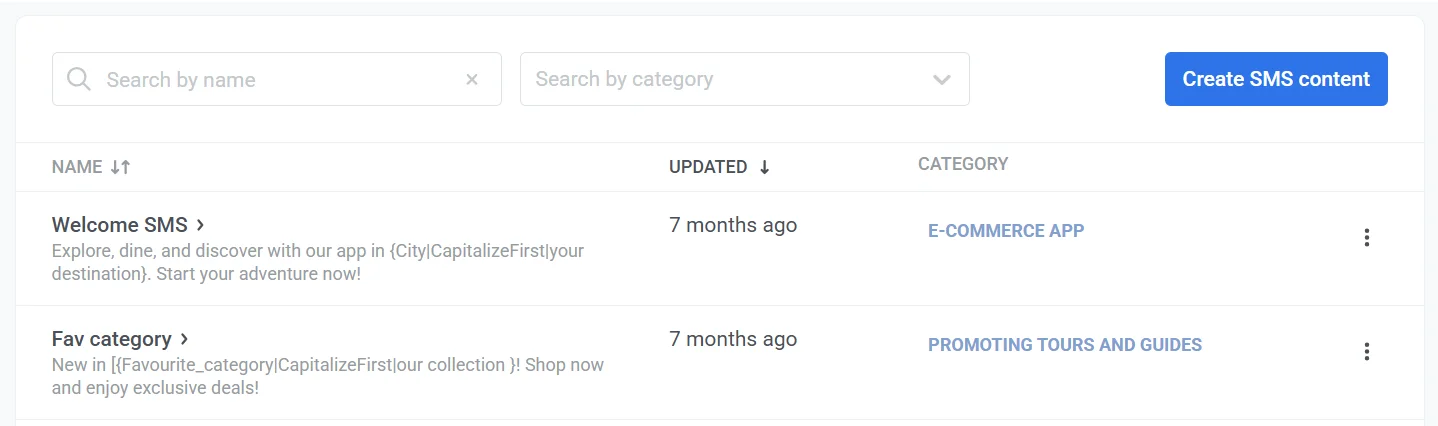
**콘텐츠 카테고리**는 단일 프로젝트 내의 모든 유형의 콘텐츠를 구성하는 데 도움이 됩니다. 이 카테고리를 사용하면 콘텐츠를 효율적으로 구조화하고 관리할 수 있습니다. 이를 통해 특정 메시징 자료를 더 쉽게 찾고 재사용할 수 있습니다.
![콘텐츠 카테고리](/contentcategories.webp)

<Aside>콘텐츠 카테고리는 프로젝트 내의 모든 콘텐츠 유형(푸시 제외)에 적용되어 다양한 채널의 메시지를 정리하는 데 도움이 됩니다.</Aside>

카테고리를 설정하려면 **Category** 열에서 **No category**를 클릭한 다음 카테고리를 선택하거나 추가하세요.

![카테고리 설정](/contentcategories-1.webp)