# Windows SDK 연동
[**SDK 다운로드**](https://github.com/Pushwoosh/pushwoosh-windows-sdk)\
[**샘플 다운로드**](https://github.com/Pushwoosh/pushwoosh-windows-sdk/tree/master/Samples/UniversalWin8.1)\
[**SDK API 문서**](https://github.com/Pushwoosh/pushwoosh-windows-sdk/tree/master/Documentation-WNS)
## SDK 연동
Pushwoosh를 애플리케이션에 연동하려면 아래 단계를 따르세요.
**1.** SDK 패키지를 다운로드합니다.
**2.** 프로젝트에 **PushSDK/Project-Win8.1-WNS/PushSDK.winmd**에 대한 참조를 추가합니다.\
또는 Windows 10용으로 개발하는 경우 **PushSDK/Project-Win10-WNS/PushSDK.winmd**에 대한 참조를 추가합니다.
**3.** 코드에 PushSDK 네임스페이스를 추가합니다: `using PushSDK;`
**4.** 다음 코드로 푸시 서비스를 초기화합니다:
```csharp
NotificationService service = PushSDK.NotificationService.GetCurrent("YOUR_PUSHWOOSH_APP_ID");
service.OnPushAccepted += (sender, pushNotification) => {
//code to handle push notification
string pushString = pushNotification.ToString(); //will return json push payload
};
service.OnPushTokenReceived += (sender, pushToken) => {
//code to handle push token
};
service.OnPushTokenFailed += (sender, errorMessage) => {
//code to handle push subscription failure
};
service.SubscribeToPushService();
```
**5.** **App.xaml.cs**의 **OnLaunched** 함수에 다음을 추가합니다:
```csharp
protected override void OnLaunched(LaunchActivatedEventArgs args)
{
NotificationService.HandleStartPush(args.Arguments);
//other code
}
```
### Windows 8.1의 알려진 문제
Pushwoosh SDK를 Windows 8.1에 연동할 때 다음과 같은 오류가 발생할 수 있습니다:
```
The underlying connection was closed: An unexpected error occurred on a send
```
이 오류가 발생하면 프로젝트에 다음 코드를 추가하세요:
```
// Default is 'false'
NotificationService.IsWin81(true);
```
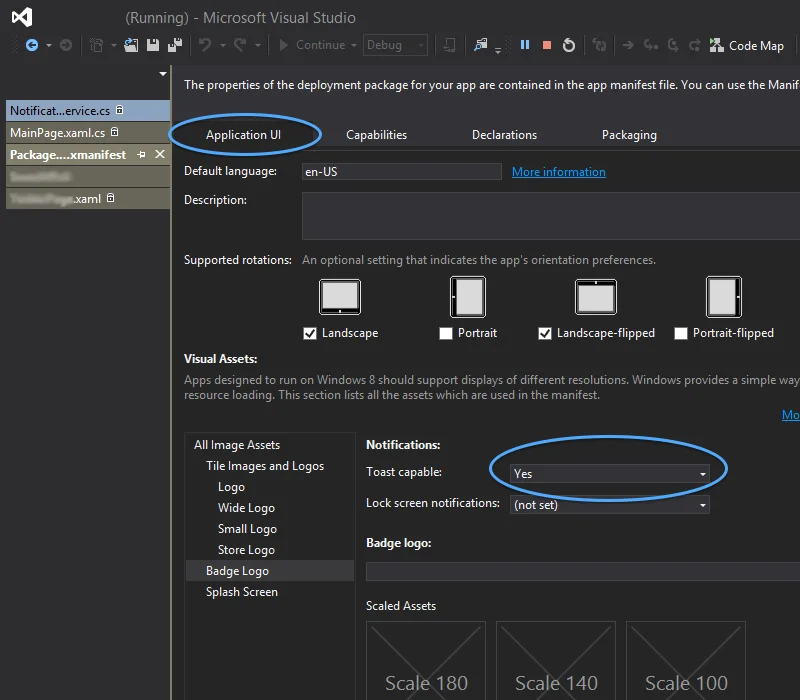 ### Windows 8.1의 알려진 문제
Pushwoosh SDK를 Windows 8.1에 연동할 때 다음과 같은 오류가 발생할 수 있습니다:
```
The underlying connection was closed: An unexpected error occurred on a send
```
이 오류가 발생하면 프로젝트에 다음 코드를 추가하세요:
```
// Default is 'false'
NotificationService.IsWin81(true);
```
### Windows 8.1의 알려진 문제
Pushwoosh SDK를 Windows 8.1에 연동할 때 다음과 같은 오류가 발생할 수 있습니다:
```
The underlying connection was closed: An unexpected error occurred on a send
```
이 오류가 발생하면 프로젝트에 다음 코드를 추가하세요:
```
// Default is 'false'
NotificationService.IsWin81(true);
```