# Huawei React Native 플러그인 통합
## React Native 플러그인 통합
React Native 통합 가이드를 참조하세요.
## AppGallery Connect를 통해 Huawei 구성
1. [AppGallery Connect -> 프로젝트 목록](https://developer.huawei.com/consumer/en/service/josp/agc/index.html#/myProject)으로 이동하여 구성할 프로젝트를 선택합니다.
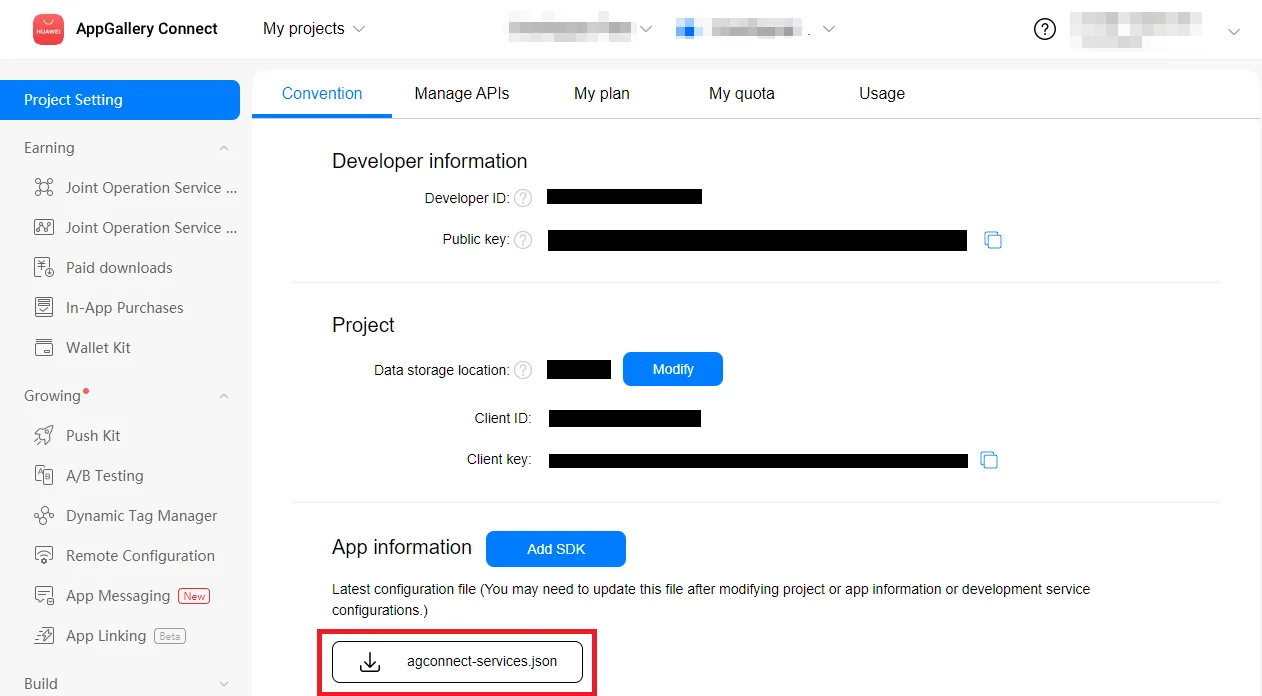
2. 앱 정보 섹션에서 **agconnect-services.json**을 눌러 구성 파일을 다운로드합니다.
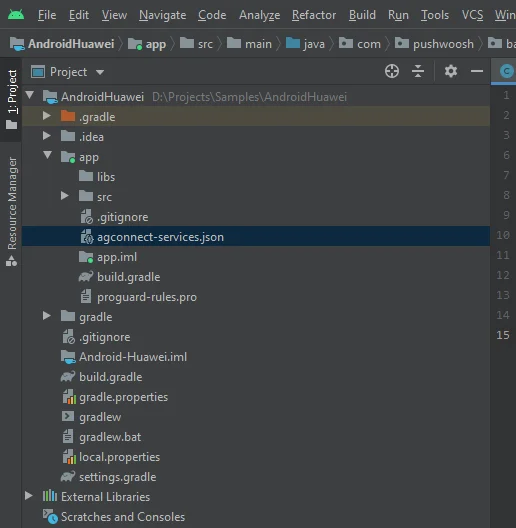
 3. 다운로드한 파일을 Android Studio 프로젝트(YOUR\_PROJECT/app/agconnect-services.json)에 넣습니다.
 ## 서명 인증서 지문 생성
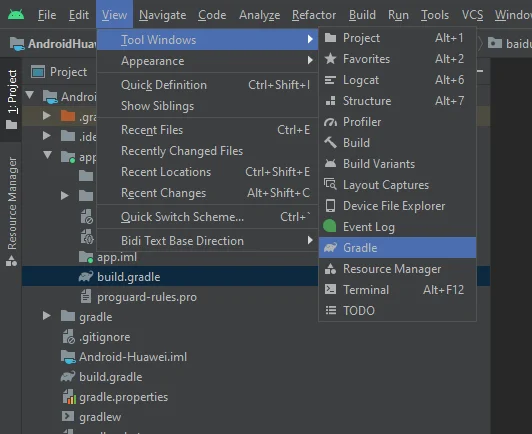
1. Android Studio에서 View > Tool Windows > Gradle로 이동합니다.
## 서명 인증서 지문 생성
1. Android Studio에서 View > Tool Windows > Gradle로 이동합니다.
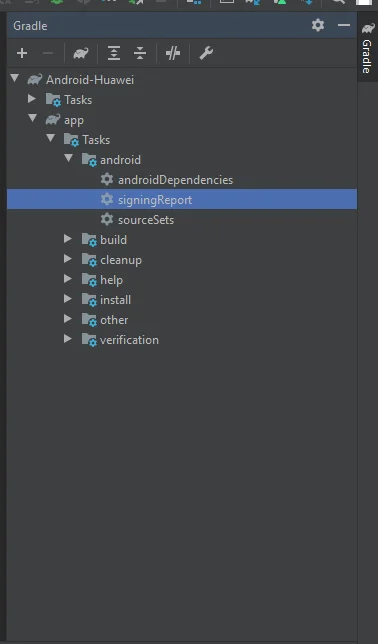
 2. 열린 창에서 app > Tasks > android > signingReport로 이동합니다.
 3. 릴리스 키 저장소에서 SHA-256을 복사합니다.
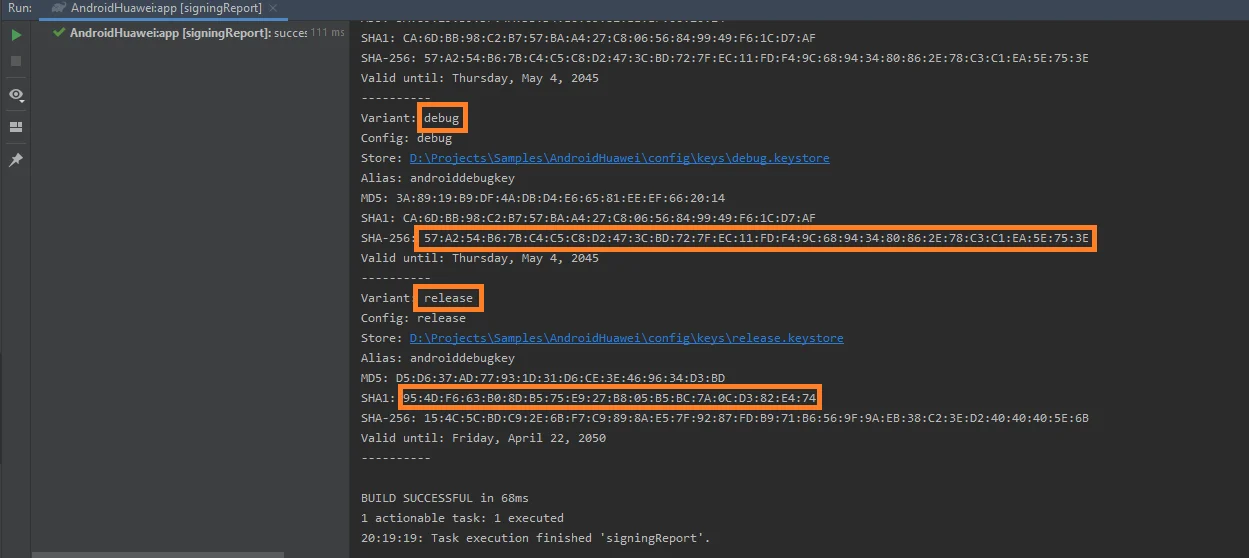 테스트 목적으로 디버그 키 저장소의 SHA-256을 추가할 수도 있습니다.
4. [AppGallery Connect 프로젝트 목록](https://developer.huawei.com/consumer/en/service/josp/agc/index.html#/myProject)에서 프로젝트를 선택합니다.
5. SHA-256을 **SHA-256 인증서 지문** 필드에 붙여넣습니다.
지문 처리에는 최대 10분이 소요될 수 있습니다.
## Pushwoosh에서 Huawei 구성
가이드에 따라 Pushwoosh 프로젝트에 대한 Huawei 플랫폼을 구성하세요:
## 종속성 추가
Android 프로젝트에 종속성을 추가합니다:
* `android/build.gradle`에
```
buildscript {
repositories {
google()
maven { url 'https://developer.huawei.com/repo/' }
}
dependencies {
...
classpath 'com.huawei.agconnect:agcp:1.4.1.300'
}
}
allprojects {
repositories {
google()
maven { url 'https://developer.huawei.com/repo/' }
}
}
```
* `android/app/build.gradle`에
```
apply plugin: "com.huawei.agconnect"
...
dependencies {
...
implementation 'com.huawei.hms:push:6.1.0.300'
}
```
## 푸시 알림 활성화
React Native 프로젝트에서 **Pushwoosh.register()**를 호출하기 전에 **Pushwoosh.enableHuaweiPushNotification();**를 추가합니다.
## 피드백 공유
귀하의 피드백은 더 나은 경험을 만드는 데 도움이 됩니다. SDK 통합 과정에서 문제가 발생하면 언제든지 알려주시기 바랍니다. 어려움이 있으시면 주저하지 마시고 [이 양식을 통해](https://docs.google.com/forms/d/e/1FAIpQLSd\_0b8jwn-V\_JmoPLIxIFYbHACCQhrzidOZV3ELywoQPXRSxw/viewform) 의견을 공유해 주세요.
테스트 목적으로 디버그 키 저장소의 SHA-256을 추가할 수도 있습니다.
4. [AppGallery Connect 프로젝트 목록](https://developer.huawei.com/consumer/en/service/josp/agc/index.html#/myProject)에서 프로젝트를 선택합니다.
5. SHA-256을 **SHA-256 인증서 지문** 필드에 붙여넣습니다.
지문 처리에는 최대 10분이 소요될 수 있습니다.
## Pushwoosh에서 Huawei 구성
가이드에 따라 Pushwoosh 프로젝트에 대한 Huawei 플랫폼을 구성하세요:
## 종속성 추가
Android 프로젝트에 종속성을 추가합니다:
* `android/build.gradle`에
```
buildscript {
repositories {
google()
maven { url 'https://developer.huawei.com/repo/' }
}
dependencies {
...
classpath 'com.huawei.agconnect:agcp:1.4.1.300'
}
}
allprojects {
repositories {
google()
maven { url 'https://developer.huawei.com/repo/' }
}
}
```
* `android/app/build.gradle`에
```
apply plugin: "com.huawei.agconnect"
...
dependencies {
...
implementation 'com.huawei.hms:push:6.1.0.300'
}
```
## 푸시 알림 활성화
React Native 프로젝트에서 **Pushwoosh.register()**를 호출하기 전에 **Pushwoosh.enableHuaweiPushNotification();**를 추가합니다.
## 피드백 공유
귀하의 피드백은 더 나은 경험을 만드는 데 도움이 됩니다. SDK 통합 과정에서 문제가 발생하면 언제든지 알려주시기 바랍니다. 어려움이 있으시면 주저하지 마시고 [이 양식을 통해](https://docs.google.com/forms/d/e/1FAIpQLSd\_0b8jwn-V\_JmoPLIxIFYbHACCQhrzidOZV3ELywoQPXRSxw/viewform) 의견을 공유해 주세요.