# Guía de integración básica del SDK de iOS
Esta sección contiene información sobre cómo integrar el SDK de Pushwoosh en su aplicación de iOS.
## Prerrequisitos
Para integrar el SDK de Pushwoosh para iOS en su aplicación, necesitará lo siguiente:
## Pasos de integración
### 1. Instalación
Puede integrar el SDK de Pushwoosh en su aplicación utilizando **Swift Package Manager** o **CocoaPods**.
#### Swift Package Manager
En la sección **Package Dependencies**, agregue el siguiente paquete:
```
https://github.com/Pushwoosh/Pushwoosh-XCFramework
```
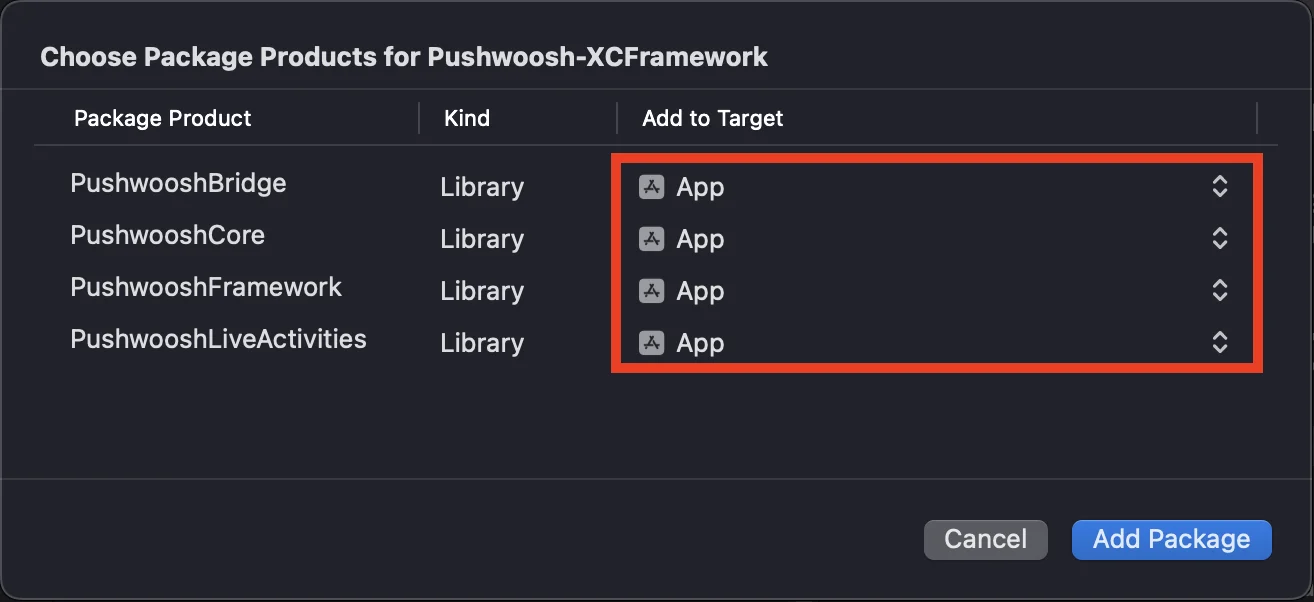
Para usar el SDK de Pushwoosh para iOS, asegúrese de agregar los siguientes cuatro frameworks a su app target al integrar a través de Swift Package Manager:
* ```PushwooshFramework```
* ```PushwooshCore```
* ```PushwooshBridge```
* ```PushwooshLiveActivities```
 #### CocoaPods
Abra su `Podfile` y agregue la dependencia:
```bash
# Uncomment the next line to define a global platform for your project
# platform :ios, '9.0'
target 'MyApp' do
# Comment the next line if you don't want to use dynamic frameworks
use_frameworks!
pod 'PushwooshXCFramework'
end
```
Luego, en la terminal, ejecute el siguiente comando para instalar las dependencias:
```bash
pod install
```
### 2. Capacidades
Para habilitar las Notificaciones Push en su proyecto, necesita agregar ciertas capacidades.
En la sección Signing & Capabilities, agregue las siguientes capacidades:
- `Push Notifications`
- `Background Modes`. Después de agregar esta capacidad, marque la casilla para `Remote notifications`.
Si tiene la intención de usar Time Sensitive Notifications (iOS 15+), agregue también la capacidad de `Time Sensitive Notifications`.
### 3. Código de inicialización
#### AppDelegate
Agregue el siguiente código a su clase AppDelegate:
```swift
import SwiftUI
import PushwooshFramework
@main
struct MyApp: App {
// Register AppDelegate as UIApplicationDelegate
@UIApplicationDelegateAdaptor(AppDelegate.self) var appDelegate
var body: some Scene {
WindowGroup {
ContentView()
}
}
}
class AppDelegate: NSObject, UIApplicationDelegate, PWMessagingDelegate {
func application(_ application: UIApplication, didFinishLaunchingWithOptions launchOptions: [UIApplication.LaunchOptionsKey: Any]?) -> Bool {
// Initialization code
// Set custom delegate for push handling
Pushwoosh.sharedInstance().delegate = self
// Register for push notifications
Pushwoosh.sharedInstance().registerForPushNotifications()
return true
}
// Handle token received from APNS
func application(_ application: UIApplication, didRegisterForRemoteNotificationsWithDeviceToken deviceToken: Data) {
Pushwoosh.sharedInstance().handlePushRegistration(deviceToken)
}
// Handle token receiving error
func application(_ application: UIApplication, didFailToRegisterForRemoteNotificationsWithError error: Error) {
Pushwoosh.sharedInstance().handlePushRegistrationFailure(error)
}
//for silent push notifications
func application(_ application: UIApplication, didReceiveRemoteNotification userInfo: [AnyHashable: Any], fetchCompletionHandler completionHandler: @escaping (UIBackgroundFetchResult) -> Void) {
Pushwoosh.sharedInstance().handlePushReceived(userInfo)
completionHandler(.noData)
}
// Fired when a push is received
func pushwoosh(_ pushwoosh: Pushwoosh, onMessageReceived message: PWMessage) {
print("onMessageReceived: ", message.payload!.description)
}
// Fired when a user taps the notification
func pushwoosh(_ pushwoosh: Pushwoosh, onMessageOpened message: PWMessage) {
print("onMessageOpened: ", message.payload!.description)
}
}
struct ContentView: View {
var body: some View {
Text("Pushwoosh with SwiftUI")
.padding()
}
}
```
```swift
import PushwooshFramework
@UIApplicationMain
class AppDelegate: UIResponder, UIApplicationDelegate, PWMessagingDelegate {
var window: UIWindow?
func application(_ application: UIApplication, didFinishLaunchingWithOptions launchOptions: [UIApplication.LaunchOptionsKey: Any]?) -> Bool {
//initialization code
//set custom delegate for push handling, in our case AppDelegate
Pushwoosh.sharedInstance().delegate = self;
//register for push notifications
Pushwoosh.sharedInstance().registerForPushNotifications()
return true
}
//handle token received from APNS
func application(_ application: UIApplication, didRegisterForRemoteNotificationsWithDeviceToken deviceToken: Data) {
Pushwoosh.sharedInstance().handlePushRegistration(deviceToken)
}
//handle token receiving error
func application(_ application: UIApplication, didFailToRegisterForRemoteNotificationsWithError error: Error) {
Pushwoosh.sharedInstance().handlePushRegistrationFailure(error);
}
//for silent push notifications
func application(_ application: UIApplication, didReceiveRemoteNotification userInfo: [AnyHashable : Any], fetchCompletionHandler completionHandler: @escaping (UIBackgroundFetchResult) -> Void) {
Pushwoosh.sharedInstance().handlePushReceived(userInfo)
completionHandler(.noData)
}
//this event is fired when the push gets received
func pushwoosh(_ pushwoosh: Pushwoosh, onMessageReceived message: PWMessage) {
print("onMessageReceived: ", message.payload!.description)
}
// Fired when a user taps the notification
func pushwoosh(_ pushwoosh: Pushwoosh, onMessageOpened message: PWMessage) {
print("onMessageOpened: ", message.payload!.description)
}
}
```
```objective-c
#import
@implementation AppDelegate
- (BOOL)application:(UIApplication *)application didFinishLaunchingWithOptions:(NSDictionary *)launchOptions {
//-----------PUSHWOOSH PART-----------
// set custom delegate for push handling, in our case AppDelegate
[Pushwoosh sharedInstance].delegate = self;
//register for push notifications!
[[Pushwoosh sharedInstance] registerForPushNotifications];
return YES;
}
//handle token received from APNS
- (void)application:(UIApplication *)application
didRegisterForRemoteNotificationsWithDeviceToken:(NSData *)deviceToken {
[[Pushwoosh sharedInstance] handlePushRegistration:deviceToken];
}
//handle token receiving error
- (void)application:(UIApplication *)application didFailToRegisterForRemoteNotificationsWithError:(NSError *)error {
[[Pushwoosh sharedInstance] handlePushRegistrationFailure:error];
}
//for silent push notifications
- (void)application:(UIApplication *)application
didReceiveRemoteNotification:(NSDictionary *)userInfo
fetchCompletionHandler:(void (^)(UIBackgroundFetchResult))completionHandler {
[[Pushwoosh sharedInstance] handlePushReceived:userInfo];
completionHandler(UIBackgroundFetchResultNoData);
}
//this event is fired when the push gets received
- (void)pushwoosh:(Pushwoosh *)pushwoosh onMessageReceived:(PWMessage *)message {
NSLog(@"onMessageReceived: %@", message.payload);
}
//this event is fired when user taps the notification
- (void)pushwoosh:(Pushwoosh *)pushwoosh onMessageOpened:(PWMessage *)message {
NSLog(@"onMessageOpened: %@", message.payload);
}
@end
```
#### Info.plist
En su `Info.plist`:
- establezca la clave `Pushwoosh_APPID` en el Código de Aplicación de Pushwoosh.
- establezca la clave `Pushwoosh_API_TOKEN` en el [Token de API de Dispositivo de Pushwoosh](/es/developer/api-reference/api-access-token/#device-api-token)
### 4. Seguimiento de la entrega de mensajes
Pushwoosh admite el seguimiento de eventos de entrega para notificaciones push a través de la Notification Service Extension
#### Agregar Notification Service Extension
1. En Xcode, seleccione **File** > **New** > **Target...**
2. Elija **Notification Service Extension** y presione **Next.**
3. Ingrese el nombre del target y presione **Finish.**
4. Cuando se le solicite la activación, presione **Cancel.**
#### Dependencias para la Notification Service Extension (solo CocoaPods)
Nota: Si está utilizando Swift Package Manager para gestionar las dependencias, puede omitir este paso, ya que las dependencias se agregan automáticamente.
Abra su `Podfile` y agregue la dependencia para el target:
```ruby title="Podfile"
# Uncomment the next line to define a global platform for your project
# platform :ios, '9.0'
target 'MyApp' do
# Comment the next line if you don't want to use dynamic frameworks
use_frameworks!
pod 'PushwooshXCFramework'
end
target 'MyAppNotificationExtension' do
use_frameworks!
pod 'PushwooshXCFramework'
end
```
Ejecute el siguiente comando en la terminal para actualizar las dependencias:
```shell
pod update
```
#### Agregar el SDK de Pushwoosh a la Notification Service Extension
Este código le permite interceptar y procesar notificaciones dentro de su extensión de notificación.
```swift
import UserNotifications
import PushwooshFramework
class NotificationService: UNNotificationServiceExtension {
var contentHandler: ((UNNotificationContent) -> Void)?
var bestAttemptContent: UNMutableNotificationContent?
override func didReceive(_ request: UNNotificationRequest, withContentHandler contentHandler: @escaping (UNNotificationContent) -> Void) {
// Pushwoosh **********
PWNotificationExtensionManager.shared().handle(request, contentHandler: contentHandler)
// ********************
self.contentHandler = contentHandler
bestAttemptContent = (request.content.mutableCopy() as? UNMutableNotificationContent)
if let bestAttemptContent = bestAttemptContent {
// Modify the notification content here...
contentHandler(bestAttemptContent)
}
}
override func serviceExtensionTimeWillExpire() {
// Called just before the extension will be terminated by the system.
// Use this as an opportunity to deliver your "best attempt" at modified content, otherwise the original push payload will be used.
if let contentHandler = contentHandler, let bestAttemptContent = bestAttemptContent {
contentHandler(bestAttemptContent)
}
}
}
```
```objective-c
#import "PWNotificationExtensionManager.h"
@interface NotificationService : UNNotificationServiceExtension
@end
@implementation NotificationService
- (void)didReceiveNotificationRequest:(UNNotificationRequest *)request withContentHandler:(void (^)(UNNotificationContent * _Nonnull))contentHandler {
// Pushwoosh **********
[[PWNotificationExtensionManager sharedManager] handleNotificationRequest:request contentHandler:contentHandler];
//*********************
}
@end
```
#### Info.plist
En el Info.plist de su Notification Service Extension, agregue:
- `Pushwoosh_APPID` - Su Código de Aplicación.
### 5. Ejecutar el proyecto
1. Compile y ejecute el proyecto.
2. Vaya al Panel de Control de Pushwoosh y [envíe una notificación push](/es/product/messaging-channels/push-notifications/send-push-notifications/one-time-push).
3. Debería ver la notificación en la aplicación.
## Integración extendida de Pushwoosh para iOS
En esta etapa, ya ha integrado el SDK y puede enviar y recibir notificaciones push. Ahora, exploremos la funcionalidad principal
### Notificaciones push
En el SDK de Pushwoosh, hay dos callbacks diseñados para manejar notificaciones push:
- `onMessageReceived`: Este método se invoca cuando se recibe una notificación push.
- `onMessageOpened`: Este método se llama cuando el usuario interactúa con (abre) la notificación
Estos callbacks permiten a los desarrolladores gestionar la recepción y la interacción del usuario con las notificaciones push dentro de sus aplicaciones
```swift
import PushwooshFramework
class AppDelegate: NSObject, UIApplicationDelegate, PWMessagingDelegate {
func application(_ application: UIApplication, didFinishLaunchingWithOptions launchOptions: [UIApplication.LaunchOptionsKey : Any]? = nil) -> Bool {
Pushwoosh.sharedInstance().delegate = self;
}
func pushwoosh(_ pushwoosh: Pushwoosh, onMessageOpened message: PWMessage) {
if let payload = message.payload {
print("onMessageOpened: \(payload)")
}
}
func pushwoosh(_ pushwoosh: Pushwoosh, onMessageReceived message: PWMessage) {
if let payload = message.payload {
print("onMessageReceived: \(payload)")
}
}
}
```
```objective-c
#import
@interface AppDelegate ()
@end
@implementation AppDelegate
- (BOOL)application:(UIApplication *)application didFinishLaunchingWithOptions:(NSDictionary *)launchOptions {
[[Pushwoosh sharedInstance] setDelegate:self];
return YES;
}
- (void)pushwoosh:(Pushwoosh *)pushwoosh onMessageOpened:(PWMessage *)message {
if (message.payload) {
NSLog(@"onMessageOpened: %@", message.payload);
}
}
- (void)pushwoosh:(Pushwoosh *)pushwoosh onMessageReceived:(PWMessage *)message {
if (message.payload) {
NSLog(@"onMessageReceived: %@", message.payload);
}
}
@end
```
### Configuración de usuario
Al centrarse en el comportamiento y las preferencias individuales de los usuarios, puede ofrecer contenido personalizado, lo que conduce a una mayor satisfacción y lealtad del usuario
```swift
import PushwooshFramework
class Registration {
func afterUserLogin(user: User) {
let pushwoosh = Pushwoosh.sharedInstance()
// set user ID
if let userId = user.userId {
pushwoosh.setUserId(userId)
}
// set user email
if let userEmail = user.email {
pushwoosh.setEmail(userEmail)
}
// set user SMS number
if let userSmsNumber = user.SmsNumber {
pushwoosh.registerSmsNumber(userSmsNumber)
}
// set user WhatsApp number
if let userWhatsAppNumber = user.WhatsAppNumber {
pushwoosh.registerSmsNumber(userWhatsAppNumber)
}
// setting additional user information as tags for Pushwoosh
if let age = user.userDetails.age,
let name = user.userDetails.userName,
let lastLogin = user.userDetails.lastLoginDate {
pushwoosh.setTags([
"age": age,
"name": name,
"last_login": lastLogin
])
}
}
}
```
```objective-c
#import
@implementation Registration
- (void)afterUserLogin:(User *)user {
Pushwoosh *pushwoosh = [Pushwoosh sharedInstance];
// set user ID
if (user.userId) {
[pushwoosh setUserId:user.userId];
}
// set user email
if (user.email) {
[pushwoosh setEmail:user.email];
}
// setting additional user information as tags for Pushwoosh
if (user.userDetails.age && user.userDetails.userName && user.userDetails.lastLoginDate) {
NSDictionary *tags = @{
@"age": user.userDetails.age,
@"name": user.userDetails.userName,
@"last_login": user.userDetails.lastLoginDate
};
[pushwoosh setTags:tags];
}
}
@end
```
### Etiquetas
Las etiquetas son pares clave-valor asignados a usuarios o dispositivos, que permiten la segmentación basada en atributos como preferencias o comportamiento, lo que posibilita la mensajería dirigida.
```swift
import PushwooshFramework
class UpdateUser {
func afterUserUpdateProfile(user: User) {
let pushwoosh = Pushwoosh.sharedInstance()
// set list of favorite categories
pushwoosh.setTags(["favorite_categories" : user.getFavoriteCategories()])
// set payment information
pushwoosh.setTags([
"is_subscribed": user.isSubscribed(),
"payment_status": user.getPaymentStatus(),
"billing_address": user.getBillingAddress()
])
}
}
```
```objective-c
#import
@implementation UpdateUser
- (void)afterUserUpdateProfile:(User *)user {
Pushwoosh *pushwoosh = [Pushwoosh sharedInstance];
// set list of favorite categories
[pushwoosh setTags:@{@"favorite_categories" : user.getFavoriteCategories}];
// set payment information
NSDictionary *tags = @{
@"is_subscribed": @(user.isSubscribed),
@"payment_status": user.getPaymentStatus,
@"billing_address": user.getBillingAddress
};
[pushwoosh setTags:tags];
}
@end
```
### Eventos
Los eventos son acciones específicas del usuario u ocurrencias dentro de la aplicación que se pueden rastrear para analizar el comportamiento y activar los mensajes o acciones correspondientes
```swift
import PushwooshFramework
class Registration {
func afterUserLogin(user: User) {
if let userName = user.getUserName(), let lastLogin = user.getLastLoginDate() {
PWInAppManager.shared().postEvent("login", withAttributes: [
"name": userName,
"last_login": lastLogin
])
}
}
func afterUserPurchase(user: User, product: Product) {
let pushwoosh = Pushwoosh.sharedInstance()
// Track purchase event
PWInAppManager.shared().postEvent("purchase", withAttributes: [
"product_id": product.getId(),
"product_name": product.getName(),
"price": product.getPrice(),
"quantity": product.getQuantity()
])
// Set user tags
let lastPurchaseDate = Date().timeIntervalSince1970
let lifetimeSpend = getCurrentLifetimeSpend() + product.getPrice()
pushwoosh.setTags([
"last_purchase_date": lastPurchaseDate,
"lifetime_spend": lifetimeSpend
])
}
}
```
```objective-c
#import
#import
@implementation Registration
- (void)afterUserLogin:(User *)user {
NSString *userName = [user getUserName];
NSDate *lastLogin = [user getLastLoginDate];
if (userName && lastLogin) {
[[PWInAppManager sharedManager] postEvent:@"login" withAttributes:@{
@"name": userName,
@"last_login": lastLogin
}];
}
}
- (void)afterUserPurchase:(User *)user product:(Product *)product {
Pushwoosh *pushwoosh = [Pushwoosh sharedInstance];
// Track purchase event
[[PWInAppManager sharedManager] postEvent:@"purchase" withAttributes:@{
@"product_id": [product getId],
@"product_name": [product getName],
@"price": @([product getPrice]),
@"quantity": @([product getQuantity])
}];
// Set user tags
NSTimeInterval lastPurchaseDate = [[NSDate date] timeIntervalSince1970];
double lifetimeSpend = /* fetch current lifetime spend */ + [product getPrice];
NSDictionary *tags = @{
@"last_purchase_date": @(lastPurchaseDate),
@"lifetime_spend": @(lifetimeSpend)
};
[pushwoosh setTags:tags];
}
@end
```
### Rich Media
Rich media se refiere a contenido interactivo y multimedia, como imágenes, videos o HTML, utilizado en notificaciones y mensajes in-app para mejorar la participación del usuario
```swift
import PushwooshFramework
class ViewController: UIViewController, PWRichMediaPresentingDelegate {
override func viewDidLoad() {
super.viewDidLoad()
let richMediaConfiguration = PWModalWindowConfiguration.shared()
PWRichMediaManager.shared().delegate = self
richMediaConfiguration.configureModalWindow(with: .PWModalWindowPositionBottom,
present: .PWAnimationPresentFromBottom,
dismiss: .PWAnimationDismissDown)
}
func richMediaManager(_ richMediaManager: PWRichMediaManager!, shouldPresent richMedia: PWRichMedia!) -> Bool {
print("Rich media will be presented with: \(richMedia.pushPayload!)")
return true
}
func richMediaManager(_ richMediaManager: PWRichMediaManager!, didPresent richMedia: PWRichMedia!) {
print("Rich media has been presented with: \(richMedia.pushPayload!)")
}
func richMediaManager(_ richMediaManager: PWRichMediaManager!, didClose richMedia: PWRichMedia!) {
print("Rich media has been closed with: \(richMedia.pushPayload!)")
}
func richMediaManager(_ richMediaManager: PWRichMediaManager!, presentingDidFailFor richMedia: PWRichMedia!, withError error: (any Error)!) {
print("Failed to present rich media with: \(richMedia.pushPayload!). Error: \(error.localizedDescription)")
}
}
```
```objective-c
#import "ViewController.h"
#import
#import
#import
@interface ViewController ()
@end
@implementation ViewController
- (void)viewDidLoad {
[super viewDidLoad];
[[PWRichMediaManager sharedManager] setDelegate:self];
[[PWModalWindowConfiguration shared] configureModalWindowWith:PWModalWindowPositionBottom
presentAnimation:PWAnimationPresentFromBottom
dismissAnimation:PWAnimationDismissDown];
}
- (BOOL)richMediaManager:(PWRichMediaManager *)richMediaManager shouldPresentRichMedia:(PWRichMedia *)richMedia {
NSLog(@"Rich media will be presented with: %@", richMedia.pushPayload);
return YES;
}
- (void)richMediaManager:(PWRichMediaManager *)richMediaManager didPresentRichMedia:(PWRichMedia *)richMedia {
NSLog(@"Rich media has been presented with: %@", richMedia.pushPayload);
}
- (void)richMediaManager:(PWRichMediaManager *)richMediaManager didCloseRichMedia:(PWRichMedia *)richMedia {
NSLog(@"Rich media has been closed with:: %@", richMedia.pushPayload);
}
- (void)richMediaManager:(PWRichMediaManager *)richMediaManager presentingDidFailForRichMedia:(PWRichMedia *)richMedia withError:(NSError *)error {
NSLog(@"Failed to present rich media with: %@. Error: %@", richMedia.pushPayload, error.localizedDescription);
}
@end
```
## Solución de problemas
### Error al compilar el módulo 'PushwooshFramework'
Al compilar su proyecto, puede encontrar un error similar a:
```
Failed to build module 'PushwooshFramework'; this SDK is not supported by the compiler
(the SDK is built with 'Apple Swift version 5.10 (swiftlang-5.10.0.13 clang-1500.3.9.4)',
while this compiler is 'Apple Swift version 6.1.2 effective-5.10 (swiftlang-6.1.2.1.2 clang-1700.0.13.5)')
```
**Causa:** Este error no está relacionado con la incompatibilidad de la versión del compilador de Swift. A partir de la versión 6.8.0 del SDK de Pushwoosh para iOS, el SDK está modularizado en varios componentes que interactúan entre sí. El error ocurre cuando no se agregan todos los frameworks requeridos a su proyecto.
**Solución:** Asegúrese de que los cuatro frameworks requeridos se agreguen a su app target al integrar a través de Swift Package Manager:
* ```PushwooshFramework```
* ```PushwooshCore```
* ```PushwooshBridge```
* ```PushwooshLiveActivities```
Para verificar esto en Xcode:
1. Seleccione su proyecto en el Project Navigator
2. Seleccione su app target
3. Vaya a **General** > **Frameworks, Libraries, and Embedded Content**
4. Confirme que los cuatro frameworks están en la lista
---
Si encuentra algún problema durante el proceso de integración, consulte la sección de [soporte y comunidad](/es/developer/pushwoosh-sdk/support-and-community).
#### CocoaPods
Abra su `Podfile` y agregue la dependencia:
```bash
# Uncomment the next line to define a global platform for your project
# platform :ios, '9.0'
target 'MyApp' do
# Comment the next line if you don't want to use dynamic frameworks
use_frameworks!
pod 'PushwooshXCFramework'
end
```
Luego, en la terminal, ejecute el siguiente comando para instalar las dependencias:
```bash
pod install
```
### 2. Capacidades
Para habilitar las Notificaciones Push en su proyecto, necesita agregar ciertas capacidades.
En la sección Signing & Capabilities, agregue las siguientes capacidades:
- `Push Notifications`
- `Background Modes`. Después de agregar esta capacidad, marque la casilla para `Remote notifications`.
Si tiene la intención de usar Time Sensitive Notifications (iOS 15+), agregue también la capacidad de `Time Sensitive Notifications`.
### 3. Código de inicialización
#### AppDelegate
Agregue el siguiente código a su clase AppDelegate:
```swift
import SwiftUI
import PushwooshFramework
@main
struct MyApp: App {
// Register AppDelegate as UIApplicationDelegate
@UIApplicationDelegateAdaptor(AppDelegate.self) var appDelegate
var body: some Scene {
WindowGroup {
ContentView()
}
}
}
class AppDelegate: NSObject, UIApplicationDelegate, PWMessagingDelegate {
func application(_ application: UIApplication, didFinishLaunchingWithOptions launchOptions: [UIApplication.LaunchOptionsKey: Any]?) -> Bool {
// Initialization code
// Set custom delegate for push handling
Pushwoosh.sharedInstance().delegate = self
// Register for push notifications
Pushwoosh.sharedInstance().registerForPushNotifications()
return true
}
// Handle token received from APNS
func application(_ application: UIApplication, didRegisterForRemoteNotificationsWithDeviceToken deviceToken: Data) {
Pushwoosh.sharedInstance().handlePushRegistration(deviceToken)
}
// Handle token receiving error
func application(_ application: UIApplication, didFailToRegisterForRemoteNotificationsWithError error: Error) {
Pushwoosh.sharedInstance().handlePushRegistrationFailure(error)
}
//for silent push notifications
func application(_ application: UIApplication, didReceiveRemoteNotification userInfo: [AnyHashable: Any], fetchCompletionHandler completionHandler: @escaping (UIBackgroundFetchResult) -> Void) {
Pushwoosh.sharedInstance().handlePushReceived(userInfo)
completionHandler(.noData)
}
// Fired when a push is received
func pushwoosh(_ pushwoosh: Pushwoosh, onMessageReceived message: PWMessage) {
print("onMessageReceived: ", message.payload!.description)
}
// Fired when a user taps the notification
func pushwoosh(_ pushwoosh: Pushwoosh, onMessageOpened message: PWMessage) {
print("onMessageOpened: ", message.payload!.description)
}
}
struct ContentView: View {
var body: some View {
Text("Pushwoosh with SwiftUI")
.padding()
}
}
```
```swift
import PushwooshFramework
@UIApplicationMain
class AppDelegate: UIResponder, UIApplicationDelegate, PWMessagingDelegate {
var window: UIWindow?
func application(_ application: UIApplication, didFinishLaunchingWithOptions launchOptions: [UIApplication.LaunchOptionsKey: Any]?) -> Bool {
//initialization code
//set custom delegate for push handling, in our case AppDelegate
Pushwoosh.sharedInstance().delegate = self;
//register for push notifications
Pushwoosh.sharedInstance().registerForPushNotifications()
return true
}
//handle token received from APNS
func application(_ application: UIApplication, didRegisterForRemoteNotificationsWithDeviceToken deviceToken: Data) {
Pushwoosh.sharedInstance().handlePushRegistration(deviceToken)
}
//handle token receiving error
func application(_ application: UIApplication, didFailToRegisterForRemoteNotificationsWithError error: Error) {
Pushwoosh.sharedInstance().handlePushRegistrationFailure(error);
}
//for silent push notifications
func application(_ application: UIApplication, didReceiveRemoteNotification userInfo: [AnyHashable : Any], fetchCompletionHandler completionHandler: @escaping (UIBackgroundFetchResult) -> Void) {
Pushwoosh.sharedInstance().handlePushReceived(userInfo)
completionHandler(.noData)
}
//this event is fired when the push gets received
func pushwoosh(_ pushwoosh: Pushwoosh, onMessageReceived message: PWMessage) {
print("onMessageReceived: ", message.payload!.description)
}
// Fired when a user taps the notification
func pushwoosh(_ pushwoosh: Pushwoosh, onMessageOpened message: PWMessage) {
print("onMessageOpened: ", message.payload!.description)
}
}
```
```objective-c
#import
@implementation AppDelegate
- (BOOL)application:(UIApplication *)application didFinishLaunchingWithOptions:(NSDictionary *)launchOptions {
//-----------PUSHWOOSH PART-----------
// set custom delegate for push handling, in our case AppDelegate
[Pushwoosh sharedInstance].delegate = self;
//register for push notifications!
[[Pushwoosh sharedInstance] registerForPushNotifications];
return YES;
}
//handle token received from APNS
- (void)application:(UIApplication *)application
didRegisterForRemoteNotificationsWithDeviceToken:(NSData *)deviceToken {
[[Pushwoosh sharedInstance] handlePushRegistration:deviceToken];
}
//handle token receiving error
- (void)application:(UIApplication *)application didFailToRegisterForRemoteNotificationsWithError:(NSError *)error {
[[Pushwoosh sharedInstance] handlePushRegistrationFailure:error];
}
//for silent push notifications
- (void)application:(UIApplication *)application
didReceiveRemoteNotification:(NSDictionary *)userInfo
fetchCompletionHandler:(void (^)(UIBackgroundFetchResult))completionHandler {
[[Pushwoosh sharedInstance] handlePushReceived:userInfo];
completionHandler(UIBackgroundFetchResultNoData);
}
//this event is fired when the push gets received
- (void)pushwoosh:(Pushwoosh *)pushwoosh onMessageReceived:(PWMessage *)message {
NSLog(@"onMessageReceived: %@", message.payload);
}
//this event is fired when user taps the notification
- (void)pushwoosh:(Pushwoosh *)pushwoosh onMessageOpened:(PWMessage *)message {
NSLog(@"onMessageOpened: %@", message.payload);
}
@end
```
#### Info.plist
En su `Info.plist`:
- establezca la clave `Pushwoosh_APPID` en el Código de Aplicación de Pushwoosh.
- establezca la clave `Pushwoosh_API_TOKEN` en el [Token de API de Dispositivo de Pushwoosh](/es/developer/api-reference/api-access-token/#device-api-token)
### 4. Seguimiento de la entrega de mensajes
Pushwoosh admite el seguimiento de eventos de entrega para notificaciones push a través de la Notification Service Extension
#### Agregar Notification Service Extension
1. En Xcode, seleccione **File** > **New** > **Target...**
2. Elija **Notification Service Extension** y presione **Next.**
3. Ingrese el nombre del target y presione **Finish.**
4. Cuando se le solicite la activación, presione **Cancel.**
#### Dependencias para la Notification Service Extension (solo CocoaPods)
Nota: Si está utilizando Swift Package Manager para gestionar las dependencias, puede omitir este paso, ya que las dependencias se agregan automáticamente.
Abra su `Podfile` y agregue la dependencia para el target:
```ruby title="Podfile"
# Uncomment the next line to define a global platform for your project
# platform :ios, '9.0'
target 'MyApp' do
# Comment the next line if you don't want to use dynamic frameworks
use_frameworks!
pod 'PushwooshXCFramework'
end
target 'MyAppNotificationExtension' do
use_frameworks!
pod 'PushwooshXCFramework'
end
```
Ejecute el siguiente comando en la terminal para actualizar las dependencias:
```shell
pod update
```
#### Agregar el SDK de Pushwoosh a la Notification Service Extension
Este código le permite interceptar y procesar notificaciones dentro de su extensión de notificación.
```swift
import UserNotifications
import PushwooshFramework
class NotificationService: UNNotificationServiceExtension {
var contentHandler: ((UNNotificationContent) -> Void)?
var bestAttemptContent: UNMutableNotificationContent?
override func didReceive(_ request: UNNotificationRequest, withContentHandler contentHandler: @escaping (UNNotificationContent) -> Void) {
// Pushwoosh **********
PWNotificationExtensionManager.shared().handle(request, contentHandler: contentHandler)
// ********************
self.contentHandler = contentHandler
bestAttemptContent = (request.content.mutableCopy() as? UNMutableNotificationContent)
if let bestAttemptContent = bestAttemptContent {
// Modify the notification content here...
contentHandler(bestAttemptContent)
}
}
override func serviceExtensionTimeWillExpire() {
// Called just before the extension will be terminated by the system.
// Use this as an opportunity to deliver your "best attempt" at modified content, otherwise the original push payload will be used.
if let contentHandler = contentHandler, let bestAttemptContent = bestAttemptContent {
contentHandler(bestAttemptContent)
}
}
}
```
```objective-c
#import "PWNotificationExtensionManager.h"
@interface NotificationService : UNNotificationServiceExtension
@end
@implementation NotificationService
- (void)didReceiveNotificationRequest:(UNNotificationRequest *)request withContentHandler:(void (^)(UNNotificationContent * _Nonnull))contentHandler {
// Pushwoosh **********
[[PWNotificationExtensionManager sharedManager] handleNotificationRequest:request contentHandler:contentHandler];
//*********************
}
@end
```
#### Info.plist
En el Info.plist de su Notification Service Extension, agregue:
- `Pushwoosh_APPID` - Su Código de Aplicación.
### 5. Ejecutar el proyecto
1. Compile y ejecute el proyecto.
2. Vaya al Panel de Control de Pushwoosh y [envíe una notificación push](/es/product/messaging-channels/push-notifications/send-push-notifications/one-time-push).
3. Debería ver la notificación en la aplicación.
## Integración extendida de Pushwoosh para iOS
En esta etapa, ya ha integrado el SDK y puede enviar y recibir notificaciones push. Ahora, exploremos la funcionalidad principal
### Notificaciones push
En el SDK de Pushwoosh, hay dos callbacks diseñados para manejar notificaciones push:
- `onMessageReceived`: Este método se invoca cuando se recibe una notificación push.
- `onMessageOpened`: Este método se llama cuando el usuario interactúa con (abre) la notificación
Estos callbacks permiten a los desarrolladores gestionar la recepción y la interacción del usuario con las notificaciones push dentro de sus aplicaciones
```swift
import PushwooshFramework
class AppDelegate: NSObject, UIApplicationDelegate, PWMessagingDelegate {
func application(_ application: UIApplication, didFinishLaunchingWithOptions launchOptions: [UIApplication.LaunchOptionsKey : Any]? = nil) -> Bool {
Pushwoosh.sharedInstance().delegate = self;
}
func pushwoosh(_ pushwoosh: Pushwoosh, onMessageOpened message: PWMessage) {
if let payload = message.payload {
print("onMessageOpened: \(payload)")
}
}
func pushwoosh(_ pushwoosh: Pushwoosh, onMessageReceived message: PWMessage) {
if let payload = message.payload {
print("onMessageReceived: \(payload)")
}
}
}
```
```objective-c
#import
@interface AppDelegate ()
@end
@implementation AppDelegate
- (BOOL)application:(UIApplication *)application didFinishLaunchingWithOptions:(NSDictionary *)launchOptions {
[[Pushwoosh sharedInstance] setDelegate:self];
return YES;
}
- (void)pushwoosh:(Pushwoosh *)pushwoosh onMessageOpened:(PWMessage *)message {
if (message.payload) {
NSLog(@"onMessageOpened: %@", message.payload);
}
}
- (void)pushwoosh:(Pushwoosh *)pushwoosh onMessageReceived:(PWMessage *)message {
if (message.payload) {
NSLog(@"onMessageReceived: %@", message.payload);
}
}
@end
```
### Configuración de usuario
Al centrarse en el comportamiento y las preferencias individuales de los usuarios, puede ofrecer contenido personalizado, lo que conduce a una mayor satisfacción y lealtad del usuario
```swift
import PushwooshFramework
class Registration {
func afterUserLogin(user: User) {
let pushwoosh = Pushwoosh.sharedInstance()
// set user ID
if let userId = user.userId {
pushwoosh.setUserId(userId)
}
// set user email
if let userEmail = user.email {
pushwoosh.setEmail(userEmail)
}
// set user SMS number
if let userSmsNumber = user.SmsNumber {
pushwoosh.registerSmsNumber(userSmsNumber)
}
// set user WhatsApp number
if let userWhatsAppNumber = user.WhatsAppNumber {
pushwoosh.registerSmsNumber(userWhatsAppNumber)
}
// setting additional user information as tags for Pushwoosh
if let age = user.userDetails.age,
let name = user.userDetails.userName,
let lastLogin = user.userDetails.lastLoginDate {
pushwoosh.setTags([
"age": age,
"name": name,
"last_login": lastLogin
])
}
}
}
```
```objective-c
#import
@implementation Registration
- (void)afterUserLogin:(User *)user {
Pushwoosh *pushwoosh = [Pushwoosh sharedInstance];
// set user ID
if (user.userId) {
[pushwoosh setUserId:user.userId];
}
// set user email
if (user.email) {
[pushwoosh setEmail:user.email];
}
// setting additional user information as tags for Pushwoosh
if (user.userDetails.age && user.userDetails.userName && user.userDetails.lastLoginDate) {
NSDictionary *tags = @{
@"age": user.userDetails.age,
@"name": user.userDetails.userName,
@"last_login": user.userDetails.lastLoginDate
};
[pushwoosh setTags:tags];
}
}
@end
```
### Etiquetas
Las etiquetas son pares clave-valor asignados a usuarios o dispositivos, que permiten la segmentación basada en atributos como preferencias o comportamiento, lo que posibilita la mensajería dirigida.
```swift
import PushwooshFramework
class UpdateUser {
func afterUserUpdateProfile(user: User) {
let pushwoosh = Pushwoosh.sharedInstance()
// set list of favorite categories
pushwoosh.setTags(["favorite_categories" : user.getFavoriteCategories()])
// set payment information
pushwoosh.setTags([
"is_subscribed": user.isSubscribed(),
"payment_status": user.getPaymentStatus(),
"billing_address": user.getBillingAddress()
])
}
}
```
```objective-c
#import
@implementation UpdateUser
- (void)afterUserUpdateProfile:(User *)user {
Pushwoosh *pushwoosh = [Pushwoosh sharedInstance];
// set list of favorite categories
[pushwoosh setTags:@{@"favorite_categories" : user.getFavoriteCategories}];
// set payment information
NSDictionary *tags = @{
@"is_subscribed": @(user.isSubscribed),
@"payment_status": user.getPaymentStatus,
@"billing_address": user.getBillingAddress
};
[pushwoosh setTags:tags];
}
@end
```
### Eventos
Los eventos son acciones específicas del usuario u ocurrencias dentro de la aplicación que se pueden rastrear para analizar el comportamiento y activar los mensajes o acciones correspondientes
```swift
import PushwooshFramework
class Registration {
func afterUserLogin(user: User) {
if let userName = user.getUserName(), let lastLogin = user.getLastLoginDate() {
PWInAppManager.shared().postEvent("login", withAttributes: [
"name": userName,
"last_login": lastLogin
])
}
}
func afterUserPurchase(user: User, product: Product) {
let pushwoosh = Pushwoosh.sharedInstance()
// Track purchase event
PWInAppManager.shared().postEvent("purchase", withAttributes: [
"product_id": product.getId(),
"product_name": product.getName(),
"price": product.getPrice(),
"quantity": product.getQuantity()
])
// Set user tags
let lastPurchaseDate = Date().timeIntervalSince1970
let lifetimeSpend = getCurrentLifetimeSpend() + product.getPrice()
pushwoosh.setTags([
"last_purchase_date": lastPurchaseDate,
"lifetime_spend": lifetimeSpend
])
}
}
```
```objective-c
#import
#import
@implementation Registration
- (void)afterUserLogin:(User *)user {
NSString *userName = [user getUserName];
NSDate *lastLogin = [user getLastLoginDate];
if (userName && lastLogin) {
[[PWInAppManager sharedManager] postEvent:@"login" withAttributes:@{
@"name": userName,
@"last_login": lastLogin
}];
}
}
- (void)afterUserPurchase:(User *)user product:(Product *)product {
Pushwoosh *pushwoosh = [Pushwoosh sharedInstance];
// Track purchase event
[[PWInAppManager sharedManager] postEvent:@"purchase" withAttributes:@{
@"product_id": [product getId],
@"product_name": [product getName],
@"price": @([product getPrice]),
@"quantity": @([product getQuantity])
}];
// Set user tags
NSTimeInterval lastPurchaseDate = [[NSDate date] timeIntervalSince1970];
double lifetimeSpend = /* fetch current lifetime spend */ + [product getPrice];
NSDictionary *tags = @{
@"last_purchase_date": @(lastPurchaseDate),
@"lifetime_spend": @(lifetimeSpend)
};
[pushwoosh setTags:tags];
}
@end
```
### Rich Media
Rich media se refiere a contenido interactivo y multimedia, como imágenes, videos o HTML, utilizado en notificaciones y mensajes in-app para mejorar la participación del usuario
```swift
import PushwooshFramework
class ViewController: UIViewController, PWRichMediaPresentingDelegate {
override func viewDidLoad() {
super.viewDidLoad()
let richMediaConfiguration = PWModalWindowConfiguration.shared()
PWRichMediaManager.shared().delegate = self
richMediaConfiguration.configureModalWindow(with: .PWModalWindowPositionBottom,
present: .PWAnimationPresentFromBottom,
dismiss: .PWAnimationDismissDown)
}
func richMediaManager(_ richMediaManager: PWRichMediaManager!, shouldPresent richMedia: PWRichMedia!) -> Bool {
print("Rich media will be presented with: \(richMedia.pushPayload!)")
return true
}
func richMediaManager(_ richMediaManager: PWRichMediaManager!, didPresent richMedia: PWRichMedia!) {
print("Rich media has been presented with: \(richMedia.pushPayload!)")
}
func richMediaManager(_ richMediaManager: PWRichMediaManager!, didClose richMedia: PWRichMedia!) {
print("Rich media has been closed with: \(richMedia.pushPayload!)")
}
func richMediaManager(_ richMediaManager: PWRichMediaManager!, presentingDidFailFor richMedia: PWRichMedia!, withError error: (any Error)!) {
print("Failed to present rich media with: \(richMedia.pushPayload!). Error: \(error.localizedDescription)")
}
}
```
```objective-c
#import "ViewController.h"
#import
#import
#import
@interface ViewController ()
@end
@implementation ViewController
- (void)viewDidLoad {
[super viewDidLoad];
[[PWRichMediaManager sharedManager] setDelegate:self];
[[PWModalWindowConfiguration shared] configureModalWindowWith:PWModalWindowPositionBottom
presentAnimation:PWAnimationPresentFromBottom
dismissAnimation:PWAnimationDismissDown];
}
- (BOOL)richMediaManager:(PWRichMediaManager *)richMediaManager shouldPresentRichMedia:(PWRichMedia *)richMedia {
NSLog(@"Rich media will be presented with: %@", richMedia.pushPayload);
return YES;
}
- (void)richMediaManager:(PWRichMediaManager *)richMediaManager didPresentRichMedia:(PWRichMedia *)richMedia {
NSLog(@"Rich media has been presented with: %@", richMedia.pushPayload);
}
- (void)richMediaManager:(PWRichMediaManager *)richMediaManager didCloseRichMedia:(PWRichMedia *)richMedia {
NSLog(@"Rich media has been closed with:: %@", richMedia.pushPayload);
}
- (void)richMediaManager:(PWRichMediaManager *)richMediaManager presentingDidFailForRichMedia:(PWRichMedia *)richMedia withError:(NSError *)error {
NSLog(@"Failed to present rich media with: %@. Error: %@", richMedia.pushPayload, error.localizedDescription);
}
@end
```
## Solución de problemas
### Error al compilar el módulo 'PushwooshFramework'
Al compilar su proyecto, puede encontrar un error similar a:
```
Failed to build module 'PushwooshFramework'; this SDK is not supported by the compiler
(the SDK is built with 'Apple Swift version 5.10 (swiftlang-5.10.0.13 clang-1500.3.9.4)',
while this compiler is 'Apple Swift version 6.1.2 effective-5.10 (swiftlang-6.1.2.1.2 clang-1700.0.13.5)')
```
**Causa:** Este error no está relacionado con la incompatibilidad de la versión del compilador de Swift. A partir de la versión 6.8.0 del SDK de Pushwoosh para iOS, el SDK está modularizado en varios componentes que interactúan entre sí. El error ocurre cuando no se agregan todos los frameworks requeridos a su proyecto.
**Solución:** Asegúrese de que los cuatro frameworks requeridos se agreguen a su app target al integrar a través de Swift Package Manager:
* ```PushwooshFramework```
* ```PushwooshCore```
* ```PushwooshBridge```
* ```PushwooshLiveActivities```
Para verificar esto en Xcode:
1. Seleccione su proyecto en el Project Navigator
2. Seleccione su app target
3. Vaya a **General** > **Frameworks, Libraries, and Embedded Content**
4. Confirme que los cuatro frameworks están en la lista
---
Si encuentra algún problema durante el proceso de integración, consulte la sección de [soporte y comunidad](/es/developer/pushwoosh-sdk/support-and-community).