# Configuración de badges para Flutter
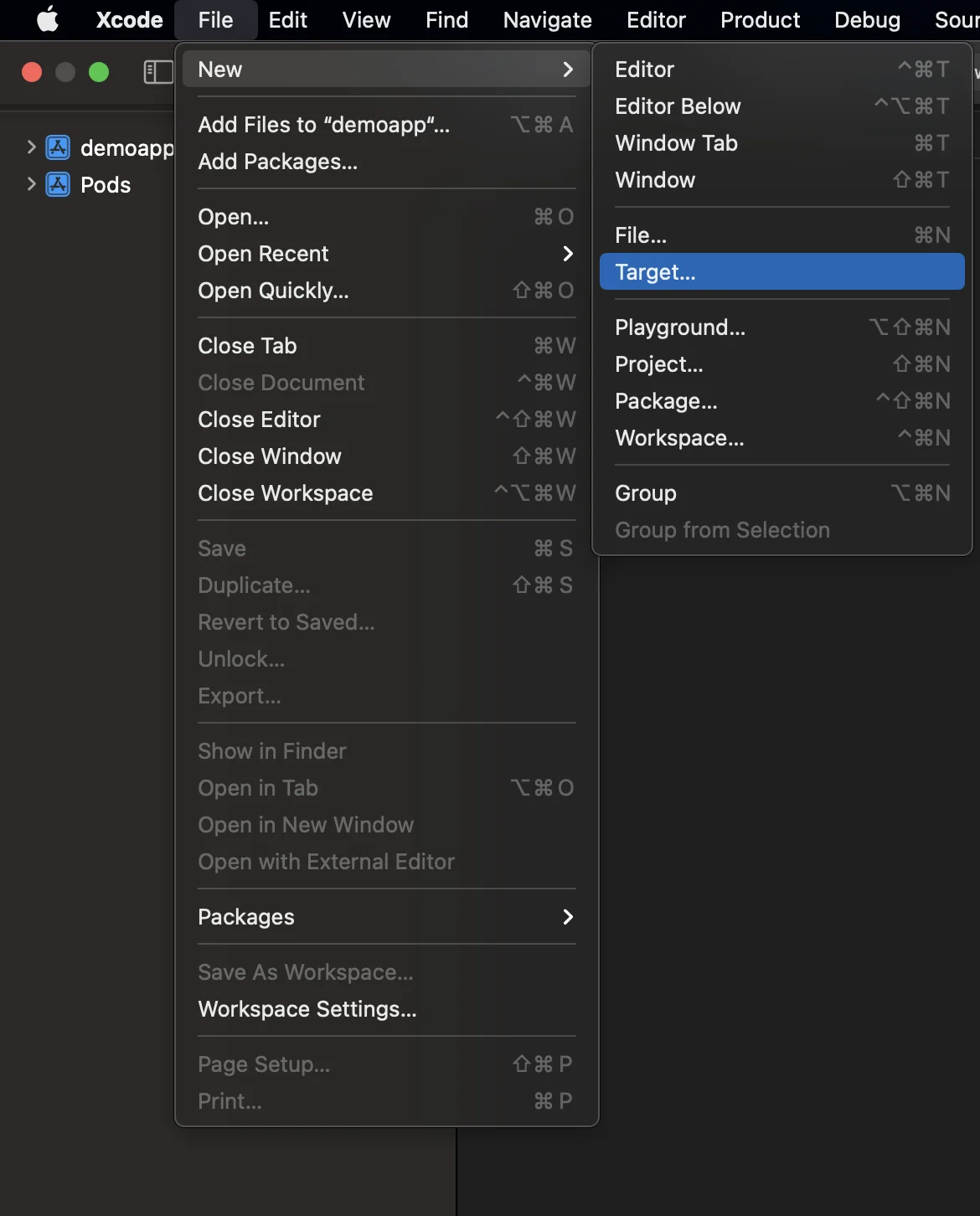
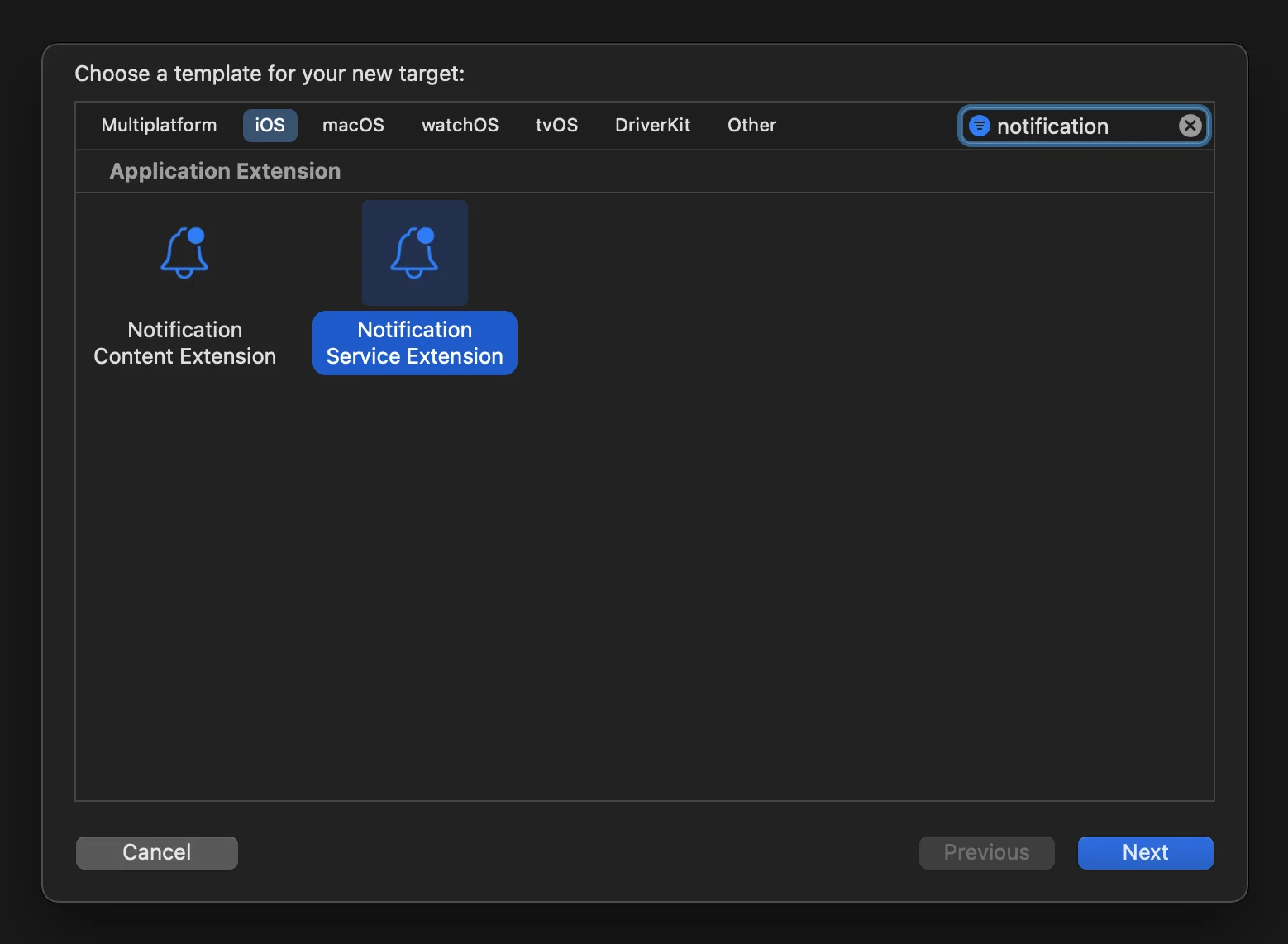
1. Abre tu proyecto de iOS ubicado en **your_project/ios/Runner.xcworkspace** y crea una **NotificationServiceExtension**:
2. Abre el Podfile (ubicado en **your_project/ios/Podfile**) y añade la dependencia **PushwooshXCFramework** para el NotificationServiceExtensionTarget:
```
target ‘NotificationService’ do
pod ‘PushwooshXCFramework’, ‘>=6.5.0’
end
```
3. Instala los pods a través de la Terminal:
```
cd ios && pod install
```
4. Cierra y vuelve a abrir tu proyecto de Xcode.
5. Asegúrate de que tu **Deployment target coincida con el del Runner target**; de lo contrario, podrías encontrarte con un problema al compilar tu aplicación (por ejemplo, si especificas iOS 10.0 en el target Runner y iOS 15.5 en el target NotificationService).
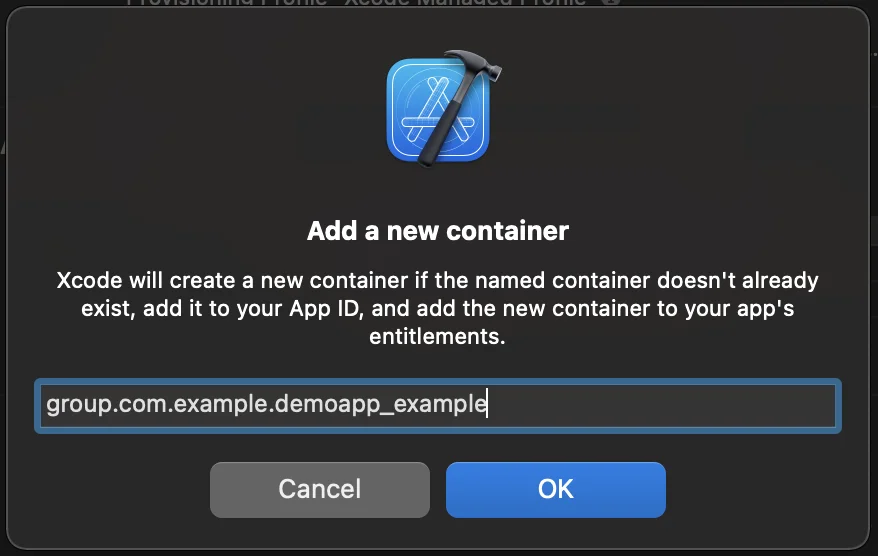
6. Añade la **capacidad de App Groups** tanto al target Runner como al NotificationService y añade un nuevo grupo con el mismo nombre para ambos targets:
7. Añade el flag **PW_APP_GROUPS_NAME** de info.plist tanto al target Runner como al NotificationService con el nombre del grupo como su valor de cadena:
8. Ve a **NotificationService.m** y reemplaza su código con el siguiente:
```objective-c
#import “NotificationService.h”
#import <Pushwoosh/PWNotificationExtensionManager.h>
@interface NotificationService ()
@property (nonatomic, strong) void (^contentHandler)(UNNotificationContent *contentToDeliver);
@property (nonatomic, strong) UNMutableNotificationContent *bestAttemptContent;
@end
@implementation NotificationService
- (void)didReceiveNotificationRequest:(UNNotificationRequest *)request withContentHandler:(void (^)(UNNotificationContent * _Nonnull))contentHandler {
self.contentHandler = contentHandler;
self.bestAttemptContent = [request.content mutableCopy];
[[PWNotificationExtensionManager sharedManager] handleNotificationRequest:request contentHandler:contentHandler];
}
- (void)serviceExtensionTimeWillExpire {
// Called just before the extension will be terminated by the system.
// Use this as an opportunity to deliver your “best attempt” at modified content, otherwise the original push payload will be used.
self.contentHandler(self.bestAttemptContent);
}
@end
```
## Comparte tus comentarios con nosotros
Tus comentarios nos ayudan a crear una mejor experiencia, por lo que nos encantaría saber de ti si tienes algún problema durante el proceso de integración del SDK. Si encuentras alguna dificultad, no dudes en compartir tus opiniones con nosotros [a través de este formulario](https://docs.google.com/forms/d/e/1FAIpQLSd\_0b8jwn-V\_JmoPLIxIFYbHACCQhrzidOZV3ELywoQPXRSxw/viewform).
 2. Abre el Podfile (ubicado en **your_project/ios/Podfile**) y añade la dependencia **PushwooshXCFramework** para el NotificationServiceExtensionTarget:
```
target ‘NotificationService’ do
pod ‘PushwooshXCFramework’, ‘>=6.5.0’
end
```
3. Instala los pods a través de la Terminal:
```
cd ios && pod install
```
4. Cierra y vuelve a abrir tu proyecto de Xcode.
5. Asegúrate de que tu **Deployment target coincida con el del Runner target**; de lo contrario, podrías encontrarte con un problema al compilar tu aplicación (por ejemplo, si especificas iOS 10.0 en el target Runner y iOS 15.5 en el target NotificationService).
6. Añade la **capacidad de App Groups** tanto al target Runner como al NotificationService y añade un nuevo grupo con el mismo nombre para ambos targets:
2. Abre el Podfile (ubicado en **your_project/ios/Podfile**) y añade la dependencia **PushwooshXCFramework** para el NotificationServiceExtensionTarget:
```
target ‘NotificationService’ do
pod ‘PushwooshXCFramework’, ‘>=6.5.0’
end
```
3. Instala los pods a través de la Terminal:
```
cd ios && pod install
```
4. Cierra y vuelve a abrir tu proyecto de Xcode.
5. Asegúrate de que tu **Deployment target coincida con el del Runner target**; de lo contrario, podrías encontrarte con un problema al compilar tu aplicación (por ejemplo, si especificas iOS 10.0 en el target Runner y iOS 15.5 en el target NotificationService).
6. Añade la **capacidad de App Groups** tanto al target Runner como al NotificationService y añade un nuevo grupo con el mismo nombre para ambos targets:
 7. Añade el flag **PW_APP_GROUPS_NAME** de info.plist tanto al target Runner como al NotificationService con el nombre del grupo como su valor de cadena:
 8. Ve a **NotificationService.m** y reemplaza su código con el siguiente:
```objective-c
#import “NotificationService.h”
#import <Pushwoosh/PWNotificationExtensionManager.h>
@interface NotificationService ()
@property (nonatomic, strong) void (^contentHandler)(UNNotificationContent *contentToDeliver);
@property (nonatomic, strong) UNMutableNotificationContent *bestAttemptContent;
@end
@implementation NotificationService
- (void)didReceiveNotificationRequest:(UNNotificationRequest *)request withContentHandler:(void (^)(UNNotificationContent * _Nonnull))contentHandler {
self.contentHandler = contentHandler;
self.bestAttemptContent = [request.content mutableCopy];
[[PWNotificationExtensionManager sharedManager] handleNotificationRequest:request contentHandler:contentHandler];
}
- (void)serviceExtensionTimeWillExpire {
// Called just before the extension will be terminated by the system.
// Use this as an opportunity to deliver your “best attempt” at modified content, otherwise the original push payload will be used.
self.contentHandler(self.bestAttemptContent);
}
@end
```
## Comparte tus comentarios con nosotros
Tus comentarios nos ayudan a crear una mejor experiencia, por lo que nos encantaría saber de ti si tienes algún problema durante el proceso de integración del SDK. Si encuentras alguna dificultad, no dudes en compartir tus opiniones con nosotros [a través de este formulario](https://docs.google.com/forms/d/e/1FAIpQLSd\_0b8jwn-V\_JmoPLIxIFYbHACCQhrzidOZV3ELywoQPXRSxw/viewform).
8. Ve a **NotificationService.m** y reemplaza su código con el siguiente:
```objective-c
#import “NotificationService.h”
#import <Pushwoosh/PWNotificationExtensionManager.h>
@interface NotificationService ()
@property (nonatomic, strong) void (^contentHandler)(UNNotificationContent *contentToDeliver);
@property (nonatomic, strong) UNMutableNotificationContent *bestAttemptContent;
@end
@implementation NotificationService
- (void)didReceiveNotificationRequest:(UNNotificationRequest *)request withContentHandler:(void (^)(UNNotificationContent * _Nonnull))contentHandler {
self.contentHandler = contentHandler;
self.bestAttemptContent = [request.content mutableCopy];
[[PWNotificationExtensionManager sharedManager] handleNotificationRequest:request contentHandler:contentHandler];
}
- (void)serviceExtensionTimeWillExpire {
// Called just before the extension will be terminated by the system.
// Use this as an opportunity to deliver your “best attempt” at modified content, otherwise the original push payload will be used.
self.contentHandler(self.bestAttemptContent);
}
@end
```
## Comparte tus comentarios con nosotros
Tus comentarios nos ayudan a crear una mejor experiencia, por lo que nos encantaría saber de ti si tienes algún problema durante el proceso de integración del SDK. Si encuentras alguna dificultad, no dudes en compartir tus opiniones con nosotros [a través de este formulario](https://docs.google.com/forms/d/e/1FAIpQLSd\_0b8jwn-V\_JmoPLIxIFYbHACCQhrzidOZV3ELywoQPXRSxw/viewform).