# Windows SDK integration
[**Download SDK**](https://github.com/Pushwoosh/pushwoosh-windows-sdk)\
[**Download Sample**](https://github.com/Pushwoosh/pushwoosh-windows-sdk/tree/master/Samples/UniversalWin8.1)\
[**SDK API Docs**](https://github.com/Pushwoosh/pushwoosh-windows-sdk/tree/master/Documentation-WNS)
## SDK Integration
To integrate Pushwoosh into your application, follow the steps below.
**1.** Download our SDK package.
**2.** Add reference to **PushSDK/Project-Win8.1-WNS/PushSDK.winmd** to your project\
Or **PushSDK/Project-Win10-WNS/PushSDK.winmd** if you develop for Windows 10
**3.** In the code add PushSDK namespace: `using PushSDK;`
**4.** Initialize push service with the following code:
```csharp
NotificationService service = PushSDK.NotificationService.GetCurrent("YOUR_PUSHWOOSH_APP_ID");
service.OnPushAccepted += (sender, pushNotification) => {
//code to handle push notification
string pushString = pushNotification.ToString(); //will return json push payload
};
service.OnPushTokenReceived += (sender, pushToken) => {
//code to handle push token
};
service.OnPushTokenFailed += (sender, errorMessage) => {
//code to handle push subscription failure
};
service.SubscribeToPushService();
```
**5.** In your **App.xaml.cs** in **OnLaunched** function add:
```csharp
protected override void OnLaunched(LaunchActivatedEventArgs args)
{
NotificationService.HandleStartPush(args.Arguments);
//other code
}
```
### Known issues for Windows 8.1
When integrating the Pushwoosh SDK into your Windows 8.1, you might face the following error:
```
The underlying connection was closed: An unexpected error occurred on a send
```
If you encounter that error, add the following code to your project:
```
// Default is 'false'
NotificationService.IsWin81(true);
```
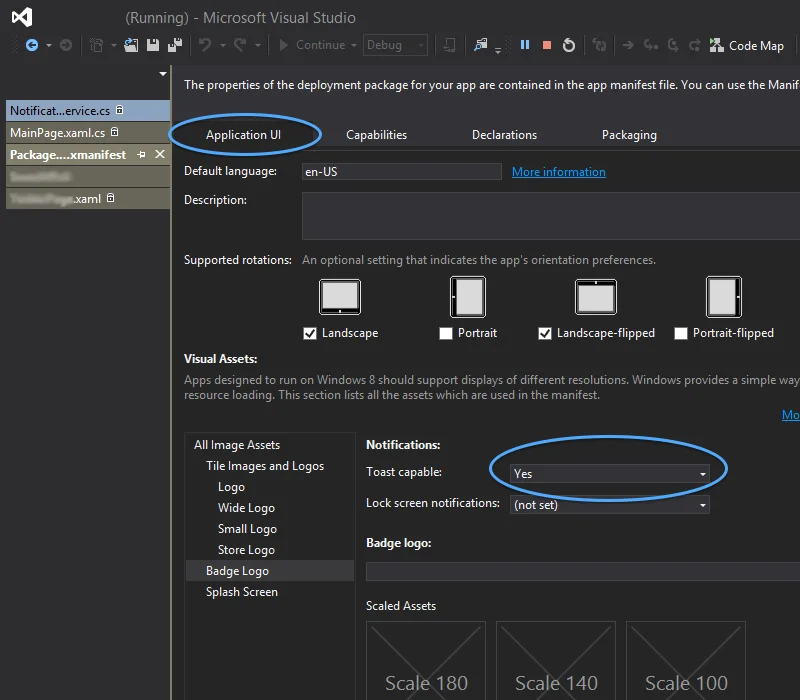 ### Known issues for Windows 8.1
When integrating the Pushwoosh SDK into your Windows 8.1, you might face the following error:
```
The underlying connection was closed: An unexpected error occurred on a send
```
If you encounter that error, add the following code to your project:
```
// Default is 'false'
NotificationService.IsWin81(true);
```
### Known issues for Windows 8.1
When integrating the Pushwoosh SDK into your Windows 8.1, you might face the following error:
```
The underlying connection was closed: An unexpected error occurred on a send
```
If you encounter that error, add the following code to your project:
```
// Default is 'false'
NotificationService.IsWin81(true);
```