# Web push SDK 3.0
## Integration
[**Integration sample on GitHub**](https://github.com/Pushwoosh/web-push-notifications-sample)
### Get Pushwoosh Web Push SDK and unzip it. You should have the following files:
* **pushwoosh-service-worker.js**
### Place all these files to top-level root of your website directory.
### Initialize the SDK:
1. Include the SDK from our CDN _asynchronously_.
```txt
```
2. Initialize the Web Push SDK and make sure to queue the initialization until the moment the SDK is fully loaded.
```html
```
#### Web popups
Add `webPopups` to your `init` object to enable [Web popup campaigns](/product/messaging-channels/web-popups/#start-working-with-web-popups) on your site.
```javascript
webPopups: {
enable: true,
autoShow: true, // optional, set to false to load popups without displaying them automatically — see WebPopups methods below
},
```
Web popup campaigns display overlays you configure in the Control Panel such as promos, announcements, or lead capture forms. Unlike the [custom subscription popup](/developer/pushwoosh-sdk/web-push-notifications/custom-subscription-popup/) (`subscribePopup`), which only handles web push opt-in, Web popup campaigns can display any content you configure.
For setup in the Control Panel, see [Understanding Web popups](/product/messaging-channels/web-popups/).
For programmatic control, see [WebPopups methods](#webpopups-methods) and [Web popup events](#web-popup-events).
#### Push subscription button
To prompt your users to subscribe for push notifications, we recommend implementing a [push subscription button](/developer/pushwoosh-sdk/web-push-notifications/push-subscription-button/) on your website. Enhance user experience and get more subscribers!
## Configuration
To finish implementing push notifications into your website, you need to configure web platforms in your Pushwoosh Control Panel following our step-by-step guides:
* [Chrome Configuration](/developer/first-steps/connect-messaging-services/chrome-configuration/)
* [Firefox Configuration](/developer/first-steps/connect-messaging-services/chrome-configuration/)
* [Safari Configuration](/developer/first-steps/connect-messaging-services/safari-configuration/)
## Registering service worker in a different scope
Sometimes you can't place the service worker file in a root directory of a website but in a subdirectory.
In this case, modify the configuration (**step 4.3**) by adding a parameter
`serviceWorkerUrl: “/push-notifications/pushwoosh-service-worker.js”`
where `/push-notifications/pushwoosh-service-worker.js` is the path to `pushwoosh-service-worker.js` file.
## Event handlers
In Pushwoosh Web SDK 3.0 you can subscribe to certain events to track them**,** or unsubscribe from events if don't need tracking them anymore.
To track the Web SDK 3.0 load, fire the `onLoad` event as follows:
```javascript
// Load Event
Pushwoosh.push(['onLoad', (api) => {
console.log('Pushwoosh load!');
}]);
```
To track the correct Web SDK initialization, fire the `onReady` event:
```javascript
// Ready Event
Pushwoosh.push((api) => {
console.log('Pushwoosh ready!');
});
```
To subscribe to or unsubscribe from any of the SDK events, use the handlers after the SDK load:
```javascript
Pushwoosh.push(['onLoad', (api) => {
function onEventNameHandler() {
console.log('Triggered event: event-name!');
}
// To subscribe to an event:
Pushwoosh.addEventHandler('event-name', onEventNameHandler)
// To unsubscribe from an event:
Pushwoosh.removeEventHandler('event-name', onEventNameHandler)
}]);
```
### SDK events
#### Subscribe event
Executed after a user agrees to receive push notifications.
```javascript
Pushwoosh.push(['onLoad', (api) => {
Pushwoosh.addEventHandler('subscribe', (payload) => {
console.log('Triggered event: subscribe');
});
}]);
```
#### Unsubscribe event
Executed after a device is unregistered from notifications.
```javascript
Pushwoosh.push(['onLoad', (api) => {
Pushwoosh.addEventHandler('unsubscribe', (payload) => {
console.log('Triggered event: unsubscribe');
});
}]);
```
#### Subscription widget events
Track displaying of a Subscription Prompt widget.
```javascript
Pushwoosh.push(['onLoad', (api) => {
// Executed on displaying of the Subscription Prompt widget
Pushwoosh.addEventHandler('show-subscription-widget', (payload) => {
console.log('Triggered event: show-subscription-widget');
});
// Executed on hiding of the Subscription Prompt widget
Pushwoosh.addEventHandler('hide-subscription-widget', (payload) => {
console.log('Triggered event: hide-subscription-widget');
});
}]);
```
#### Notification permission dialog events
Track displaying of native subscription dialog.
```javascript
Pushwoosh.push(['onLoad', function (api) {
// Executed on permission dialog displaying
Pushwoosh.addEventHandler('show-notification-permission-dialog', (payload) => {
console.log('Triggered event: show-notification-permission-dialog');
});
// Executed on hiding the permission dialog with one of three possible statuses:
// 1. default - the dialog is closed
// 2. granted - permission is granted
// 3. denied - permission is denied
Pushwoosh.addEventHandler('hide-notification-permission-dialog', (payload) => {
console.log('Triggered event: hide-notification-permission-dialog', payload.permission);
});
}]);
```
#### Permission events
Check the push notifications permission's status on SDK initialization; track the update of this status whenever it takes place.
```javascript
Pushwoosh.push(['onLoad', (api) => {
// Executed during the SDK initialization if 'autoSubscribe: false' or/and if a user ignores a push notification prompt.
Pushwoosh.addEventHandler('permission-default', (payload) => {
console.log('Triggered event: permission-default');
});
// Executed during the SDK initialization if notifications are blocked or once a user blocks push notifications.
Pushwoosh.addEventHandler('permission-denied', (payload) => {
console.log('Triggered event: permission-denied');
});
// Executed during the SDK initialization if notifications are allowed or once a user allows push notifications.
Pushwoosh.addEventHandler('permission-granted', (payload) => {
console.log('Triggered event: permission-granted');
});
}]);
```
#### Receive push event
Track push delivery to a device.
```javascript
Pushwoosh.push(['onLoad', (api) => {
// Executed when a push notification is displayed.
Pushwoosh.addEventHandler('receive-push', (payload) => {
console.log('Triggered event: receive-push', payload.notification);
});
}]);
```
#### Notification events
Track whether a push notification is opened or closed by a user.
```javascript
Pushwoosh.push(['onLoad', (api) => {
// Executed when a user clicks on notification.
Pushwoosh.addEventHandler('open-notification', (payload) => {
console.log('Triggered event: open-notification', payload.notification);
});
// Executed when a user closes a push notification.
Pushwoosh.addEventHandler('hide-notification', (payload) => {
console.log('Triggered event: hide-notification', payload.notification);
});
}]);
```
#### Inbox events
Track notifications sent to Inbox.
```javascript
Pushwoosh.push(['onLoad', (api) => {
// Executed by ServiceWorker after the Inbox Message is received and saved to indexedDB.
Pushwoosh.addEventHandler('receive-inbox-message', (payload) => {
console.log('Triggered event: receive-inbox-message', payload.message);
});
// Executed after the Inbox is updated automatically while the page is loading.
Pushwoosh.addEventHandler('update-inbox-messages', (payload) => {
console.log('Triggered event: receive-inbox-message', payload.messages);
});
}]);
```
#### Custom subscription popup events
For details about handling custom subscription popup events, please refer to the [Custom Subscription Popup Events Guide](/developer/pushwoosh-sdk/web-push-notifications/custom-subscription-popup/#custom-subscription-popup-events).
#### Web popup events
```javascript
Pushwoosh.push(['onLoad', (api) => {
// Executed once web popups have loaded and the automatic display pipeline has run for the current page
Pushwoosh.addEventHandler('web-popups-ready', () => {
console.log('Triggered event: web-popups-ready');
});
// Executed when a web popup is shown, automatically or via webPopups.show()
Pushwoosh.addEventHandler('show-web-popup', (payload) => {
console.log('Triggered event: show-web-popup', payload.code, payload.trigger); // trigger: 'auto' | 'api'
});
// Executed when a web popup is hidden
Pushwoosh.addEventHandler('hide-web-popup', (payload) => {
console.log('Triggered event: hide-web-popup', payload.code, payload.reason); // reason: 'user' | 'api' | 'preempted'
});
}]);
```
## API
After the Web Push SDK is initialized, you can make the following calls to Pushwoosh API. All the methods return [**Promise**](https://developer.mozilla.org/en/docs/Web/JavaScript/Reference/Global\_Objects/Promise) objects.
```javascript
Pushwoosh.push((api) => {
// Set tags for a user
api.setTags({
'Tag Name 1': 'value1',
'Tag Name 2': 'value2'
});
// Get tags for a user from server
api.getTags();
// Register user ID
api.registerUser('user123');
// Register user email
api.registerEmail('user@example.com');
// Register SMS number
api.registerSmsNumber('+15551234567');
// Register WhatsApp number
api.registerWhatsappNumber('+1234567890');
// Post an Event
api.postEvent('myEventName', {attributeName: 'attributeValue'});
//Unregister from notifications
api.unregisterDevice();
// Set the device language (overrides the value in the "Language" Tag)
api.setLanguage('es');
// Alternatively Multi-register user with devices and channels
api.multiRegisterDevice({
user_id: 'user123',
email: 'user@example.com',
sms_phone_number: '+1234567890',
tags: {
'UserType': { operation: TTagOperationSet, value: 'Premium' },
'Interests': { operation: TTagOperationAppend, values: ['sports', 'technology'] }
}
});
});
```
### multiRegisterDevice
Enhanced registration method that allows registering a user profile with multiple devices and messaging channels in a single API call. This method is particularly useful for cross-platform applications or when implementing omnichannel messaging strategies.
```javascript
Pushwoosh.push((api) => {
api.multiRegisterDevice({
user_id: 'user123', // Optional: User identifier
email: 'user@example.com', // Optional: Email for email messaging
sms_phone_number: '+1234567890', // Optional: SMS phone number (E.164 format)
whatsapp_phone_number: '+1234567890', // Optional: WhatsApp number (E.164 format)
kakao_phone_number: '+1234567890', // Optional: KakaoTalk number (E.164 format)
language: 'en', // Optional: Language code (ISO 639-1)
timezone: 'America/New_York', // Optional: Timezone identifier
city: 'New York', // Optional: City for targeting
country: 'US', // Optional: Country for targeting
state: 'NY', // Optional: State for targeting
tags: { // Optional: Tag values with operations
'UserType': {
operation: TTagOperationSet, // Set tag value (0)
value: 'Premium'
},
'Interests': {
operation: TTagOperationAppend, // Append to tag value (1)
values: ['sports', 'technology']
},
'LoginCount': {
operation: TTagOperationIncrement, // Increment tag value (3)
value: '1'
}
},
push_devices: [ // Optional: Array of push devices
{
hwid: 'web-device-456',
platform: TPlatformChrome, // Chrome platform (11)
push_token: 'fcm-token-here',
app_version: '2.1.0',
platformData: {
public_key: 'web-push-public-key',
auth_token: 'web-push-auth-token',
browser: 'chrome'
}
}
]
})
.then((response) => {
console.log('Multi-registration successful:', response);
})
.catch((error) => {
console.error('Multi-registration failed:', error);
});
});
```
**Platform Types:**
- `TPlatformSafari` (10): Safari platform
- `TPlatformChrome` (11): Chrome platform
- `TPlatformFirefox` (12): Firefox platform
**Tag Operation Types:**
- `TTagOperationSet` (0): Set tag value (replace existing value)
- `TTagOperationAppend` (1): Append to tag value (add to list)
- `TTagOperationRemove` (2): Remove tag value (remove from list)
- `TTagOperationIncrement` (3): Increment tag value (numeric increment)
**Benefits:**
- **Single API call**: Register multiple devices and channels at once
- **Atomic operation**: All registrations succeed or fail together
- **User-centric**: Associates all devices with a single user profile
- **Advanced tagging**: Supports complex tag operations
- **Cross-platform**: Handle multiple platforms simultaneously
Example of sending Tags to Pushwoosh:
```javascript
Pushwoosh.push((api) => {
var myCustomTags = {
'Tag 1': 123,
'Tag 2': 'some string'
};
api.setTags(myCustomTags)
.then((res) => {
var skipped = res && res.skipped || [];
if (!skipped.length) {
console.log('success');
}
else {
console.warn('skipped tags:', skipped);
}
})
.catch((err) => {
console.error('setTags error:', err);
});
});
```
### Increment Tag value
To i**ncrement a value** of a Number Tag, use the `operation` parameter with the ‘increment’ value as follows:
```javascript
Pushwoosh.push((api) => {
api.setTags({
'Tag 1': {
operation: 'increment',
value: 1
}
})
});
```
### Append Tag values
To **append new values** to the existing List Tag, use the `operation` parameter with the ‘append’ value as follows:
```javascript
Pushwoosh.push((api) => {
api.setTags({
'Tag 3': {
operation: 'append',
value: ['Value3']
}
})
});
```
### Remove Tag value
To **remove a value** from a List Tag, use the `operation` parameter with the ‘remove’ value as follows:
```javascript
Pushwoosh.push((api) =>{
api.setTags({
'Tag 3': {
operation: 'remove',
value: ['Value2']
}
})
});
```
## Public methods
**Pushwoosh.subscribe()**
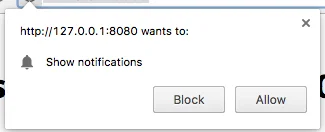
This method is used to request a user's permission for push notifications. If a user is already subscribed, the method will stop executing.
If a user hasn’t subscribed for pushes yet:
1\. Permission for push notifications is requested.
2\. If a user allows notifications, `onSubscribe` event is triggered.
`Pushwoosh.subscribe()` is executed automatically if `autoSubscribe: true`. is set during the SDK initialization.
Call this method if you have chosen to manually prompt a user to subscribe for pushes using the `autoSubscribe: false` parameter during the initialization:
```html
```
**Pushwoosh.unsubscribe()**
1. `/unregisterDevice` method is executed.
2. `onUnsubscribe` event is triggered.
```html
```
**Pushwoosh.isSubscribed()**
Checks if a user is subscribed and returns true/false flag.
```javascript
Pushwoosh.isSubscribed().then((isSubscribed) => {
console.log('isSubscribed', isSubscribed);
});
```
**Pushwoosh.getHWID()**
Returns Pushwoosh HWID.
```javascript
Pushwoosh.getHWID().then((hwid) => {
console.log('hwid:', hwid);
});
```
**Pushwoosh.getPushToken()**
Returns push token if it is available.
```javascript
Pushwoosh.getPushToken().then((pushToken) => {
console.log('pushToken:', pushToken);
});
```
**Pushwoosh.getUserId()**
Returns [**User ID**](/developer/pushwoosh-knowledge-hub/users-userids/users-userids/) if available.
```javascript
Pushwoosh.getUserId().then((userId) => {
console.log('userId:', userId);
});
```
**Pushwoosh.getParams()**
Returns a list of the following parameters:
```javascript
Pushwoosh.getParams().then((params) => {
params = params || {};
var hwid = params.hwid;
var pushToken = params.pushToken;
var userId = params.userId;
});
```
**Pushwoosh.isAvailableNotifications()**
Checks if a browser supports the Pushwoosh WebSDK 3.0, returns ‘true’ or ‘false’.
```
Pushwoosh.isAvailableNotifications() // true/false
```
### InboxMessages methods
**messagesWithNoActionPerformedCount(): Promise\**
Returns the number of opened messages.
```javascript
Pushwoosh.pwinbox.messagesWithNoActionPerformedCount()
.then((count) => {
console.log(`${count} messages opened`);
});
```
**unreadMessagesCount()**
Returns the number of unread messages.
```javascript
Pushwoosh.pwinbox.unreadMessagesCount()
.then((count) => {
console.log(`${count} messages unread`);
});
```
**messagesCount(): Promise\**
Returns the total number of messages.
```javascript
Pushwoosh.pwinbox.messagesCount()
.then((count) => {
console.log(`${count} messages`);
});
```
**loadMessages(): Promise\**
Loads the list of undeleted messages.
```javascript
Pushwoosh.pwinbox.loadMessages()
.then(() => {
console.log('Messages have been loaded');
});
```
**readMessagesWithCodes(codes: Array\): Promise\**
Marks messages as read by Inbox\_Ids.
```javascript
Pushwoosh.pwinbox.readMessagesWithCodes(codes)
.then(() => {
console.log('Messages have been read');
});
```
**performActionForMessageWithCode(code: string): Promise\**
Performs the action assigned to a message and marks the message as read.
```javascript
Pushwoosh.pwinbox.performActionForMessageWithCode(code)
.then(() => {
console.log('Action has been performed');
});
```
**deleteMessagesWithCodes(codes: Array\): Promise\**
Marks messages as deleted.
```javascript
Pushwoosh.pwinbox.deleteMessagesWithCodes([code])
.then(() => {
console.log('Messages have been deleted');
});
```
**syncMessages(): Promise\**
Synchronizes messages with the server.
```javascript
Pushwoosh.pwinbox.syncMessages()
.then(() => {
console.log('Messages have been synchronized');
});
```
### WebPopups methods
The programmatic [Web popups](#web-popups) API requires `webPopups: {enable: true}` in the `init` object; it is available via `Pushwoosh.moduleRegistry.webPopups` once the `web-popups-ready` event has fired.
**show(code: string): Promise\**
Shows a popup immediately, bypassing every display condition (delay, page rules, device/visitor type, frequency capping, trigger type). Closes an already visible popup to make room. Resolves `false` instead of rejecting when the popup can't be shown.
```javascript
Pushwoosh.moduleRegistry.webPopups.show('popup_code')
.then((shown) => console.log('Popup shown:', shown));
```
**hide(code?: string): boolean**
Hides the visible popup. If `code` is passed, only hides it when it matches the visible popup. Returns `false` if nothing was hidden.
```javascript
Pushwoosh.moduleRegistry.webPopups.hide();
```
**hideAll(): boolean**
Hides the visible popup and dismisses everything still pending for the current page load. `show()` keeps working afterwards.
```javascript
Pushwoosh.moduleRegistry.webPopups.hideAll();
```
**isVisible(code?: string): boolean**
Checks whether a popup is currently visible. Without `code`, checks whether any popup is visible.
```javascript
Pushwoosh.moduleRegistry.webPopups.isVisible('popup_code');
```
**getVisibleCode(): string | null**
Returns the code of the popup currently on screen, or `null` if none is visible.
```javascript
Pushwoosh.moduleRegistry.webPopups.getVisibleCode();
```
**getAvailableCodes(): Array\**
Returns the codes of every popup the server returned for this device.
```javascript
Pushwoosh.moduleRegistry.webPopups.getAvailableCodes();
```
**getState(): object**
Returns a snapshot of the Web popup's state: `visible` (code on screen, or `null`), `queued` (codes waiting for the display slot), `waiting` (codes with an armed delay timer), and `available` (every code the server returned).
```javascript
Pushwoosh.moduleRegistry.webPopups.getState();
```
## Progressive Web App support
To integrate Pushwoosh into your Progressive Web Application (PWA), follow the steps described below.
**1**. Copy the path to your Service Worker file:
```javascript
if ('serviceWorker' in navigator) {
window.addEventListener('load', () => {
navigator.serviceWorker.register('/service-worker.js') // <- your service worker url
});
}
```
Then, use the serviceWorkerUrl parameter while initializing the WebSDK as follows:
```javascript
var Pushwoosh = Pushwoosh || [];
Pushwoosh.push(['init', {
logLevel: 'error',
applicationCode: 'XXXXX-XXXXX',
safariWebsitePushID: 'web.com.example.domain',
defaultNotificationTitle: 'Pushwoosh',
defaultNotificationImage: 'https://yoursite.com/img/logo-medium.png',
serviceWorkerUrl: '/service-worker.js', // <- your service worker url
}]);
```
WebSDK does not register the new Service Worker immediately; a Service Worker is registered when it's needed:
* when a device receives a push token (on device registration or re-subscription),
* when a push token is deleted (on removing a device from user base).
It speeds your pages loading by shortening the number of server requests.
Browsers do not allow two different Service Workers to be registered at the same time (read more: [https://github.com/w3c/ServiceWorker/issues/921](https://github.com/w3c/ServiceWorker/issues/921)), so to make your PWA work correctly, a common Service Worker should be registered for your codebase and the Pushwoosh codebase.
**2**. Add the following string to your Service Worker (at the beginning or at the end of, it doesn’t matter):
```javascript
importScripts('https://cdn.pushwoosh.com/webpush/v3/pushwoosh-service-worker.js' + self.location.search);
```
Thus you enable receiving and processing of push notifications sent via Pushwoosh services for your Service Worker.
## Installing from Google Tag Manager
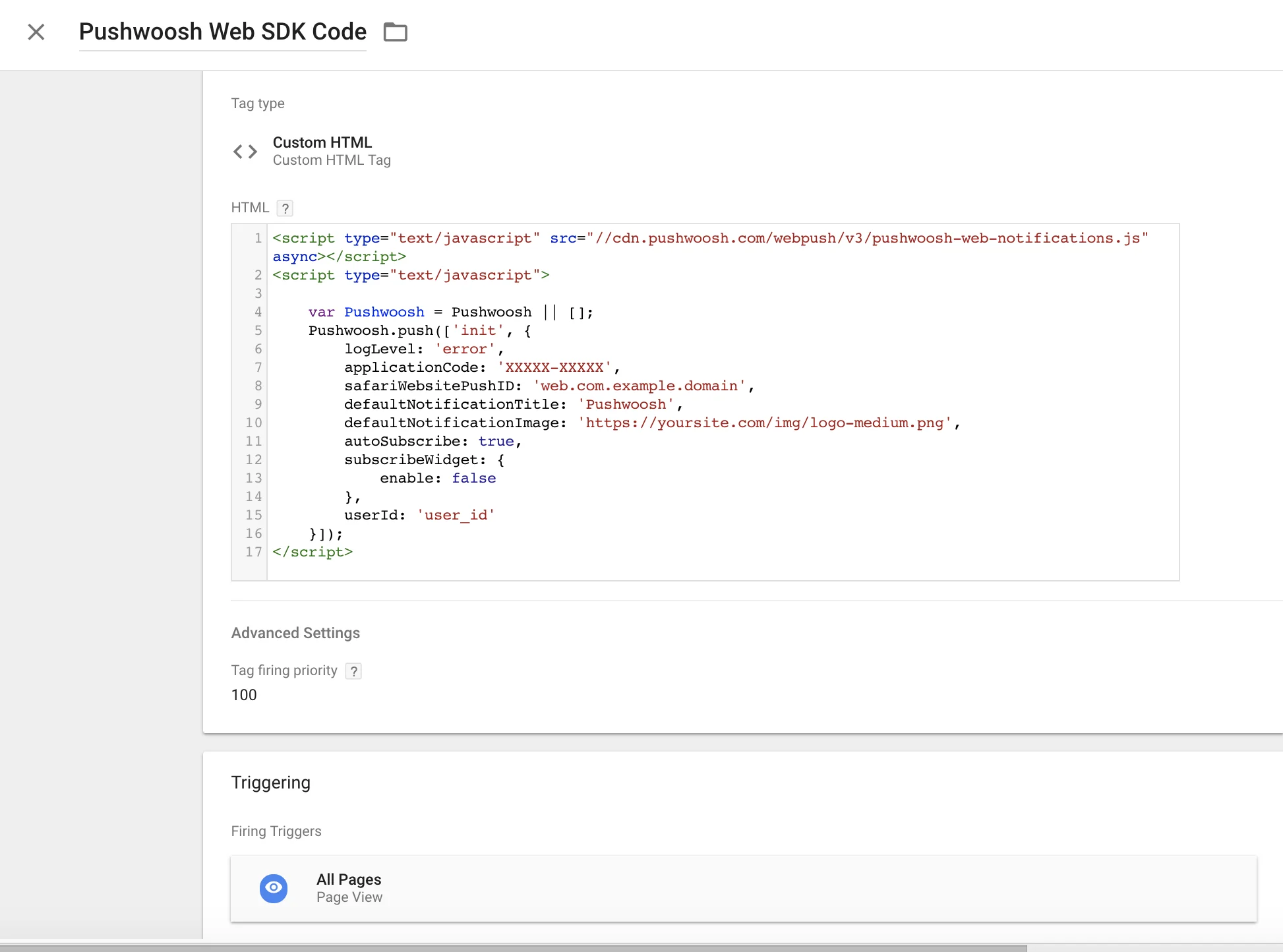
Use the following code in your **Google Tag Manager** to initialize Pushwoosh SDK. Create a Custom HTML Tag and paste the code below. Make sure to change your Pushwoosh Application Code, Safari Website ID, and default notification image URL.\
Also set high **Tag Firing** priority (ex: 100) and trigger it on **All Pages**. See below for a screenshot.Copy
```html
```
 2\. If a user allows notifications, `onSubscribe` event is triggered.
`Pushwoosh.subscribe()` is executed automatically if `autoSubscribe: true`. is set during the SDK initialization.
Call this method if you have chosen to manually prompt a user to subscribe for pushes using the `autoSubscribe: false` parameter during the initialization:
```html
```
**Pushwoosh.unsubscribe()**
1. `/unregisterDevice` method is executed.
2. `onUnsubscribe` event is triggered.
```html
```
**Pushwoosh.isSubscribed()**
Checks if a user is subscribed and returns true/false flag.
```javascript
Pushwoosh.isSubscribed().then((isSubscribed) => {
console.log('isSubscribed', isSubscribed);
});
```
**Pushwoosh.getHWID()**
Returns Pushwoosh HWID.
```javascript
Pushwoosh.getHWID().then((hwid) => {
console.log('hwid:', hwid);
});
```
**Pushwoosh.getPushToken()**
Returns push token if it is available.
```javascript
Pushwoosh.getPushToken().then((pushToken) => {
console.log('pushToken:', pushToken);
});
```
**Pushwoosh.getUserId()**
Returns [**User ID**](/developer/pushwoosh-knowledge-hub/users-userids/users-userids/) if available.
```javascript
Pushwoosh.getUserId().then((userId) => {
console.log('userId:', userId);
});
```
**Pushwoosh.getParams()**
Returns a list of the following parameters:
```javascript
Pushwoosh.getParams().then((params) => {
params = params || {};
var hwid = params.hwid;
var pushToken = params.pushToken;
var userId = params.userId;
});
```
**Pushwoosh.isAvailableNotifications()**
Checks if a browser supports the Pushwoosh WebSDK 3.0, returns ‘true’ or ‘false’.
```
Pushwoosh.isAvailableNotifications() // true/false
```
### InboxMessages methods
**messagesWithNoActionPerformedCount(): Promise\
2\. If a user allows notifications, `onSubscribe` event is triggered.
`Pushwoosh.subscribe()` is executed automatically if `autoSubscribe: true`. is set during the SDK initialization.
Call this method if you have chosen to manually prompt a user to subscribe for pushes using the `autoSubscribe: false` parameter during the initialization:
```html
```
**Pushwoosh.unsubscribe()**
1. `/unregisterDevice` method is executed.
2. `onUnsubscribe` event is triggered.
```html
```
**Pushwoosh.isSubscribed()**
Checks if a user is subscribed and returns true/false flag.
```javascript
Pushwoosh.isSubscribed().then((isSubscribed) => {
console.log('isSubscribed', isSubscribed);
});
```
**Pushwoosh.getHWID()**
Returns Pushwoosh HWID.
```javascript
Pushwoosh.getHWID().then((hwid) => {
console.log('hwid:', hwid);
});
```
**Pushwoosh.getPushToken()**
Returns push token if it is available.
```javascript
Pushwoosh.getPushToken().then((pushToken) => {
console.log('pushToken:', pushToken);
});
```
**Pushwoosh.getUserId()**
Returns [**User ID**](/developer/pushwoosh-knowledge-hub/users-userids/users-userids/) if available.
```javascript
Pushwoosh.getUserId().then((userId) => {
console.log('userId:', userId);
});
```
**Pushwoosh.getParams()**
Returns a list of the following parameters:
```javascript
Pushwoosh.getParams().then((params) => {
params = params || {};
var hwid = params.hwid;
var pushToken = params.pushToken;
var userId = params.userId;
});
```
**Pushwoosh.isAvailableNotifications()**
Checks if a browser supports the Pushwoosh WebSDK 3.0, returns ‘true’ or ‘false’.
```
Pushwoosh.isAvailableNotifications() // true/false
```
### InboxMessages methods
**messagesWithNoActionPerformedCount(): Promise\