# Swift Package Manager Setup
## Requirements
* Create [Pushwoosh](https://pushwoosh.com/) account if you do not already have one.
* A Mac with a new version of Xcode (Apple Silicon only).
* An iOS Push Certificate. Details see: [iOS configuration](/developer/first-steps/connect-messaging-services/ios-configuration/ios-token-based-configuration/)
## Integration
1. Open your project in Xcode and Navigate to the **project's settings** -> **Package Dependencies** -> and press **'+'** button.
2. Enter the following Package URL:
[https://github.com/Pushwoosh/PushwooshVision-XCFramework](https://github.com/Pushwoosh/PushwooshVision-XCFramework)
3. Set up **Dependency Rule**
4. On the next screen, to choose your Package, select Pushwoosh Package and **Add Package** to your main app Target.
5. Open your Main App Target and under **Frameworks, Libraries, and Embedded Content** ensure that the Pushwoosh iOS SDK has been added.
6. Well done! You've just integrated the Pushwoosh visionOS SDK into your project.
## Add Required Capabilities
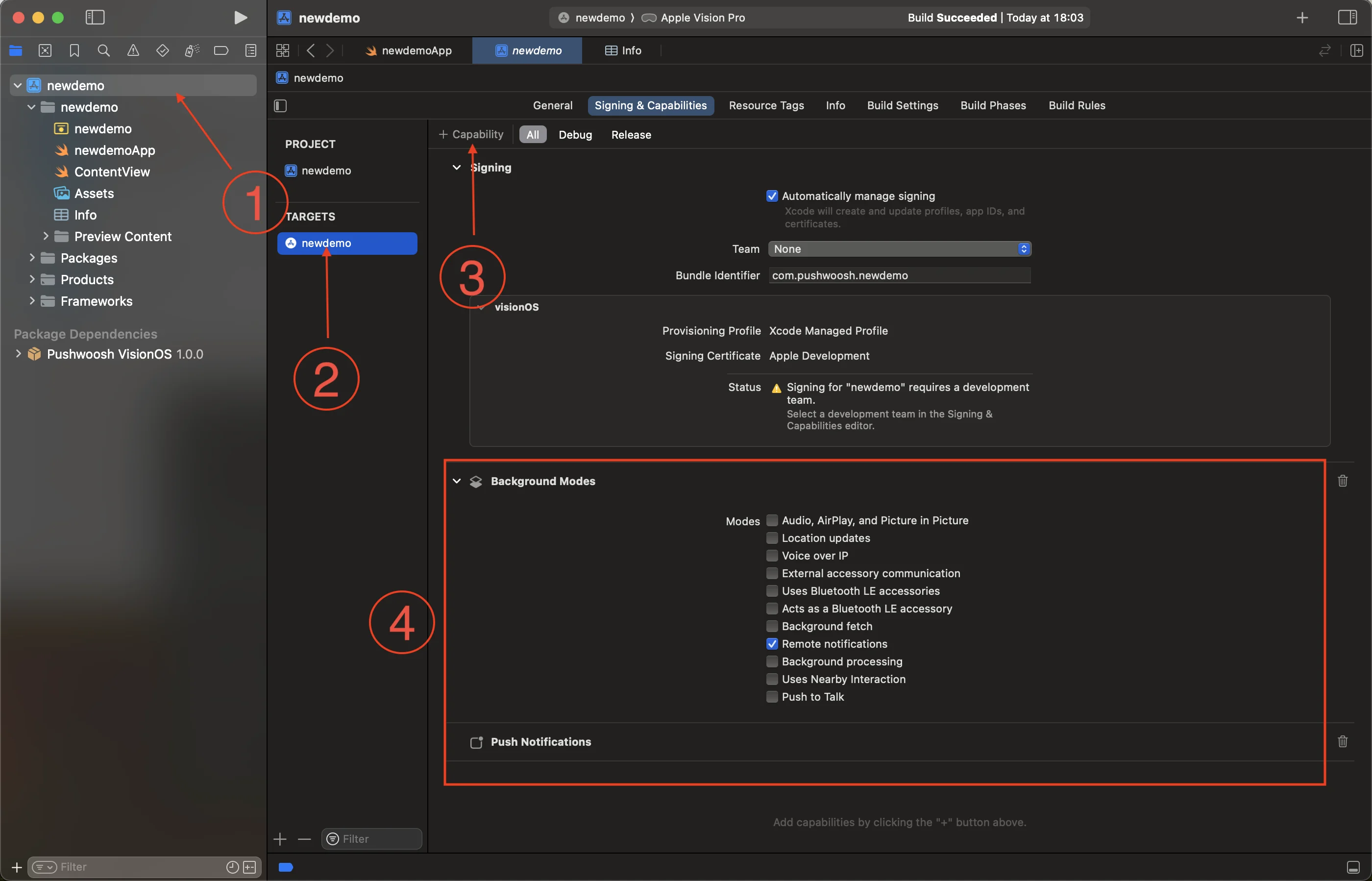
1. Select the root project (1) and your main app target (2), then go to the **Signing and Capabilities** tab.
2. Press **+ Capability** button (3) and select the **Push Notifications** capability.
3. Then, add the **Background Modes** capability and check the **Remote notifications** check box (4).
4. Well done! Xcode capabilities configuration completed.
## Add the Pushwoosh Initialization code
1. Add the following code to your App
```swift
import SwiftUI
import Pushwoosh
class AppDelegate: NSObject, UIApplicationDelegate, UNUserNotificationCenterDelegate, PWMessagingDelegate {
func application(_ application: UIApplication, didFinishLaunchingWithOptions launchOptions: [UIApplication.LaunchOptionsKey : Any]? = nil) -> Bool {
Pushwoosh.sharedInstance().registerForPushNotifications()
Pushwoosh.sharedInstance().delegate = self
return true
}
func application(_ application: UIApplication, didRegisterForRemoteNotificationsWithDeviceToken deviceToken: Data) {
Pushwoosh.sharedInstance().handlePushRegistration(deviceToken)
}
func application(_ application: UIApplication, didFailToRegisterForRemoteNotificationsWithError error: any Error) {
Pushwoosh.sharedInstance().handlePushRegistrationFailure(error)
print("\(error.localizedDescription)")
}
func pushwoosh(_ pushwoosh: Pushwoosh, onMessageOpened message: PWMessage) {
print("Message opened: \(message.payload!)")
}
func pushwoosh(_ pushwoosh: Pushwoosh, onMessageReceived message: PWMessage) {
print("Message received: \(message.payload!)")
}
}
@main
struct newdemoApp: App {
@UIApplicationDelegateAdaptor(AppDelegate.self) var appDelegate
var body: some Scene {
WindowGroup {
ContentView()
}
}
}
```
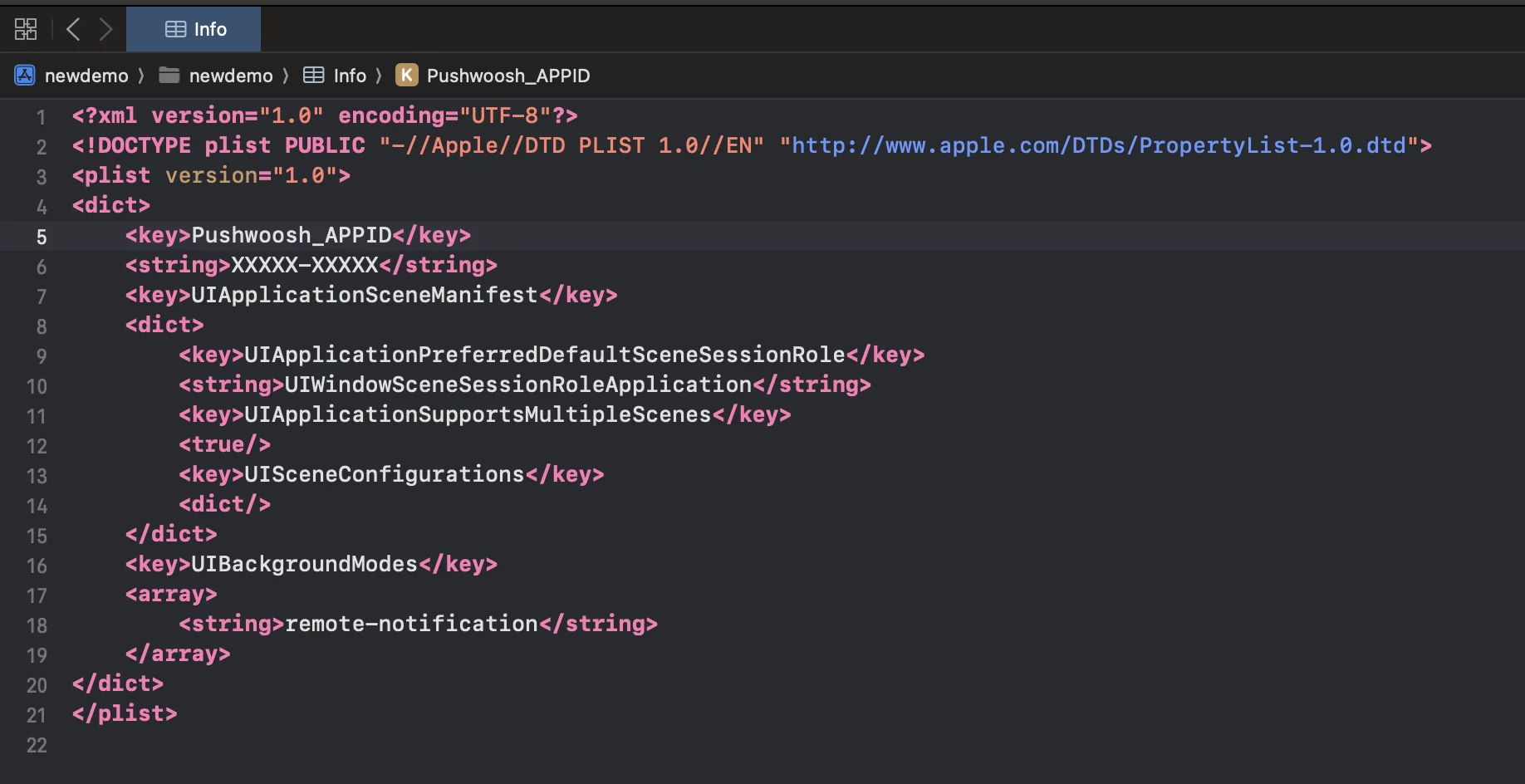
2. In your `Info.plist`, add the following string-type keys:
```xml
Pushwoosh_APPIDXXXXX-XXXXXPushwoosh_API_TOKENYOUR_DEVICE_API_TOKEN
```
* `Pushwoosh_APPID`: your Pushwoosh Application Code.
* `Pushwoosh_API_TOKEN`: your [Pushwoosh Device API Token](/developer/api-reference/api-access-token/#device-api-token)
> **Important:** Be sure to give the token access to the correct application in your Pushwoosh Control Panel. [Learn more](/developer/api-reference/api-access-token/#edit-token)
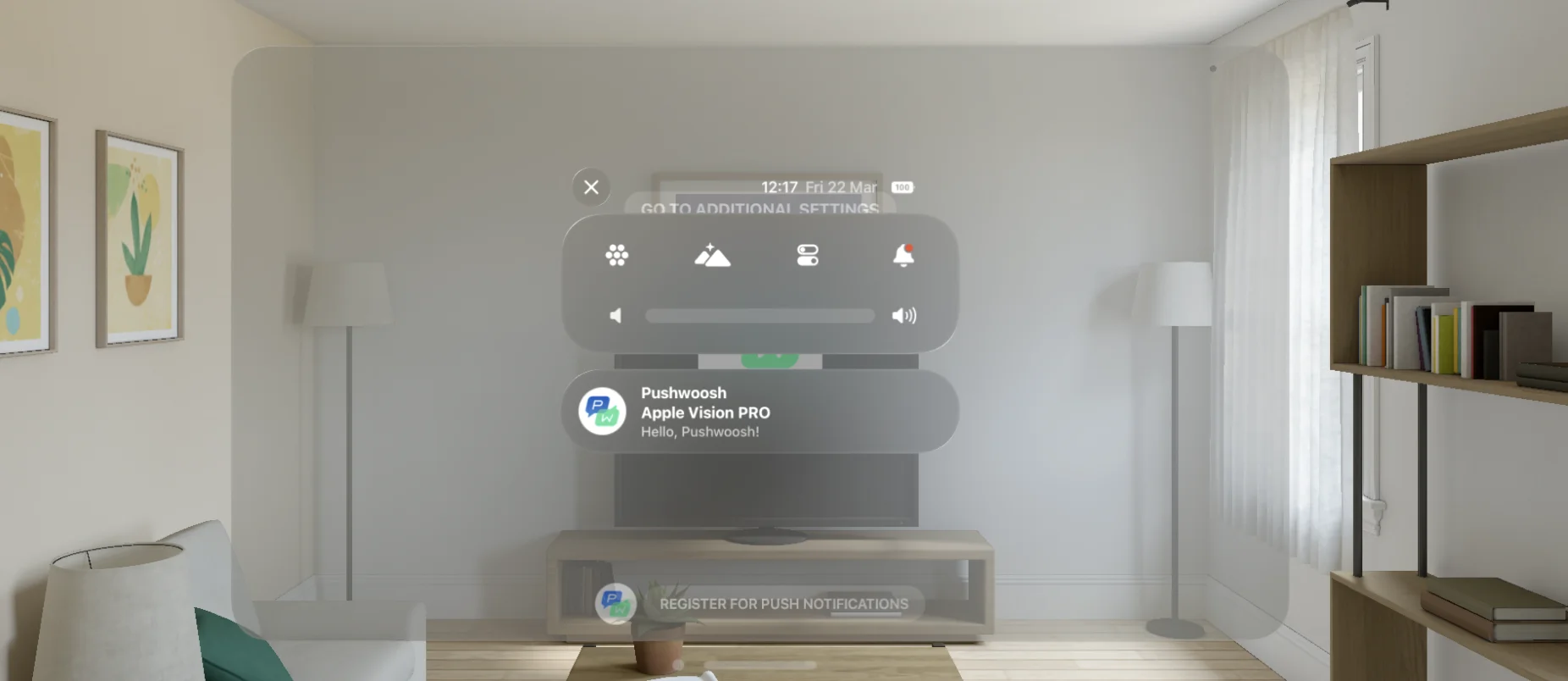
3. Well Done! Now you can send your first push notification!
### Share your feedback with us
Your feedback helps us create a better experience, so we would love to hear from you if you have any issues during the SDK integration process. If you face any difficulties, please do not hesitate to share your thoughts with us [via this form](https://docs.google.com/forms/d/e/1FAIpQLSd\_0b8jwn-V\_JmoPLIxIFYbHACCQhrzidOZV3ELywoQPXRSxw/viewform).
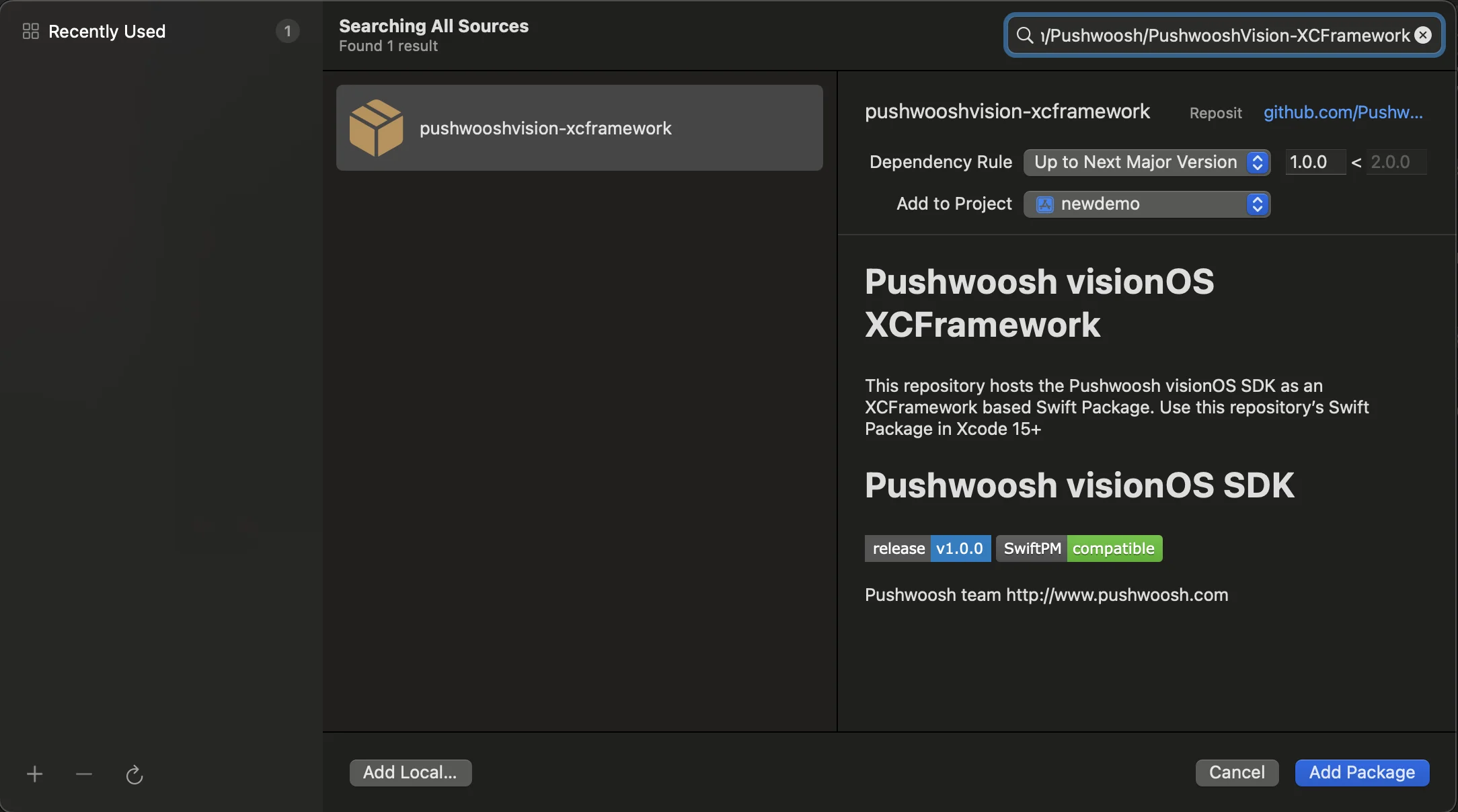 2. Enter the following Package URL:
[https://github.com/Pushwoosh/PushwooshVision-XCFramework](https://github.com/Pushwoosh/PushwooshVision-XCFramework)
3. Set up **Dependency Rule**
2. Enter the following Package URL:
[https://github.com/Pushwoosh/PushwooshVision-XCFramework](https://github.com/Pushwoosh/PushwooshVision-XCFramework)
3. Set up **Dependency Rule**
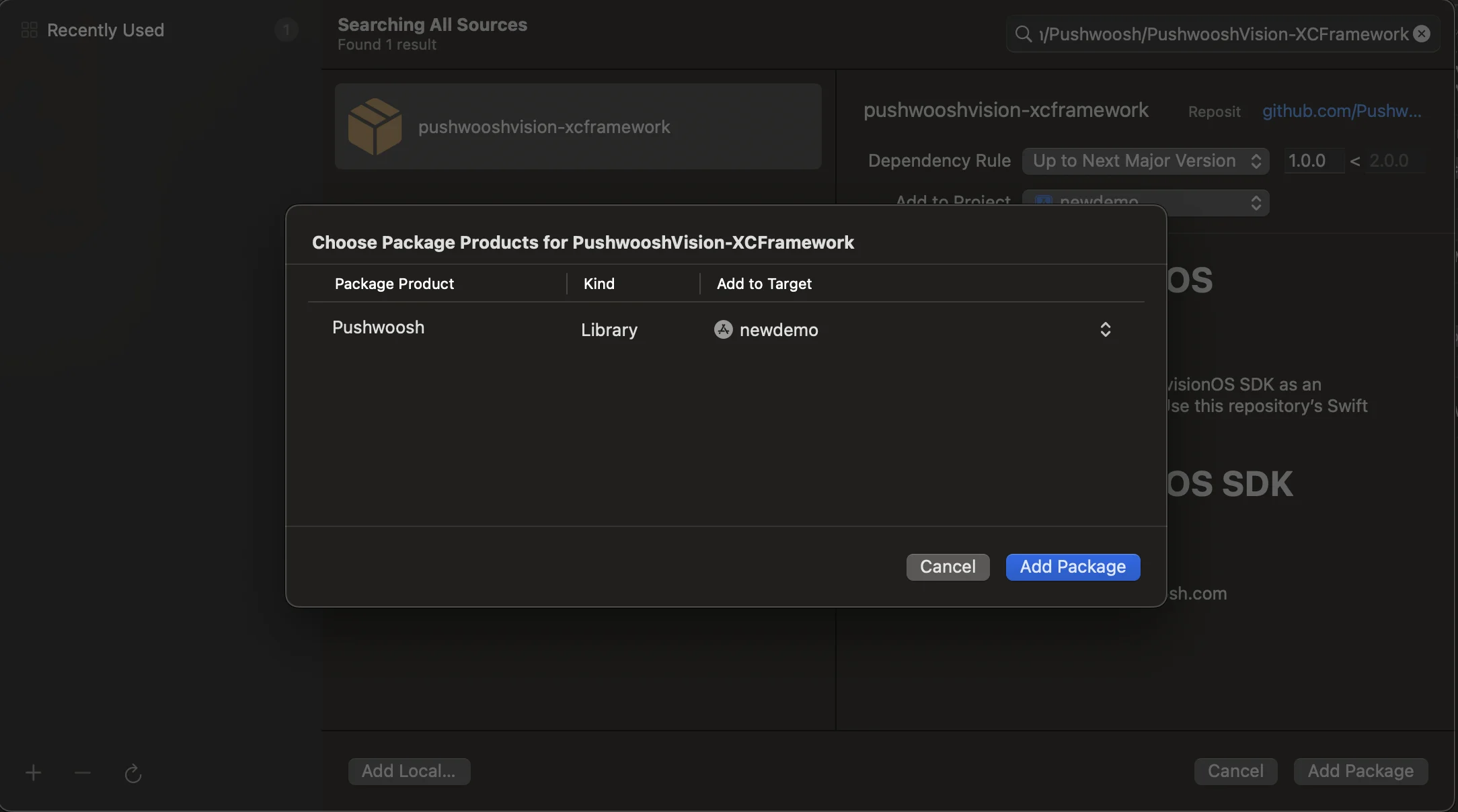 4. On the next screen, to choose your Package, select Pushwoosh Package and **Add Package** to your main app Target.
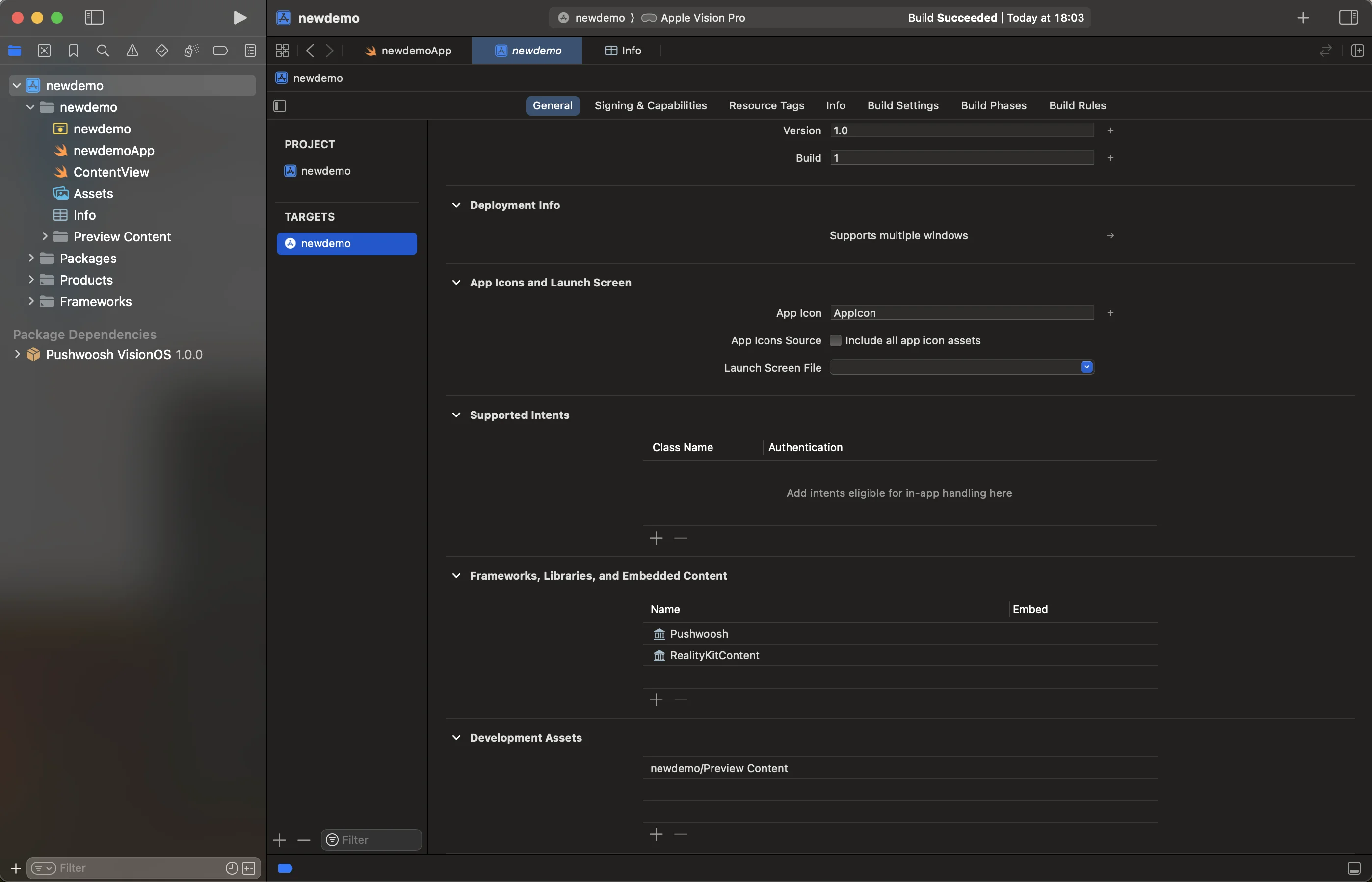 5. Open your Main App Target and under **Frameworks, Libraries, and Embedded Content** ensure that the Pushwoosh iOS SDK has been added.
 6. Well done! You've just integrated the Pushwoosh visionOS SDK into your project.
## Add Required Capabilities
1. Select the root project (1) and your main app target (2), then go to the **Signing and Capabilities** tab.
2. Press **+ Capability** button (3) and select the **Push Notifications** capability.
3. Then, add the **Background Modes** capability and check the **Remote notifications** check box (4).
6. Well done! You've just integrated the Pushwoosh visionOS SDK into your project.
## Add Required Capabilities
1. Select the root project (1) and your main app target (2), then go to the **Signing and Capabilities** tab.
2. Press **+ Capability** button (3) and select the **Push Notifications** capability.
3. Then, add the **Background Modes** capability and check the **Remote notifications** check box (4).
 4. Well done! Xcode capabilities configuration completed.
## Add the Pushwoosh Initialization code
1. Add the following code to your App
```swift
import SwiftUI
import Pushwoosh
class AppDelegate: NSObject, UIApplicationDelegate, UNUserNotificationCenterDelegate, PWMessagingDelegate {
func application(_ application: UIApplication, didFinishLaunchingWithOptions launchOptions: [UIApplication.LaunchOptionsKey : Any]? = nil) -> Bool {
Pushwoosh.sharedInstance().registerForPushNotifications()
Pushwoosh.sharedInstance().delegate = self
return true
}
func application(_ application: UIApplication, didRegisterForRemoteNotificationsWithDeviceToken deviceToken: Data) {
Pushwoosh.sharedInstance().handlePushRegistration(deviceToken)
}
func application(_ application: UIApplication, didFailToRegisterForRemoteNotificationsWithError error: any Error) {
Pushwoosh.sharedInstance().handlePushRegistrationFailure(error)
print("\(error.localizedDescription)")
}
func pushwoosh(_ pushwoosh: Pushwoosh, onMessageOpened message: PWMessage) {
print("Message opened: \(message.payload!)")
}
func pushwoosh(_ pushwoosh: Pushwoosh, onMessageReceived message: PWMessage) {
print("Message received: \(message.payload!)")
}
}
@main
struct newdemoApp: App {
@UIApplicationDelegateAdaptor(AppDelegate.self) var appDelegate
var body: some Scene {
WindowGroup {
ContentView()
}
}
}
```
2. In your `Info.plist`, add the following string-type keys:
```xml
4. Well done! Xcode capabilities configuration completed.
## Add the Pushwoosh Initialization code
1. Add the following code to your App
```swift
import SwiftUI
import Pushwoosh
class AppDelegate: NSObject, UIApplicationDelegate, UNUserNotificationCenterDelegate, PWMessagingDelegate {
func application(_ application: UIApplication, didFinishLaunchingWithOptions launchOptions: [UIApplication.LaunchOptionsKey : Any]? = nil) -> Bool {
Pushwoosh.sharedInstance().registerForPushNotifications()
Pushwoosh.sharedInstance().delegate = self
return true
}
func application(_ application: UIApplication, didRegisterForRemoteNotificationsWithDeviceToken deviceToken: Data) {
Pushwoosh.sharedInstance().handlePushRegistration(deviceToken)
}
func application(_ application: UIApplication, didFailToRegisterForRemoteNotificationsWithError error: any Error) {
Pushwoosh.sharedInstance().handlePushRegistrationFailure(error)
print("\(error.localizedDescription)")
}
func pushwoosh(_ pushwoosh: Pushwoosh, onMessageOpened message: PWMessage) {
print("Message opened: \(message.payload!)")
}
func pushwoosh(_ pushwoosh: Pushwoosh, onMessageReceived message: PWMessage) {
print("Message received: \(message.payload!)")
}
}
@main
struct newdemoApp: App {
@UIApplicationDelegateAdaptor(AppDelegate.self) var appDelegate
var body: some Scene {
WindowGroup {
ContentView()
}
}
}
```
2. In your `Info.plist`, add the following string-type keys:
```xml
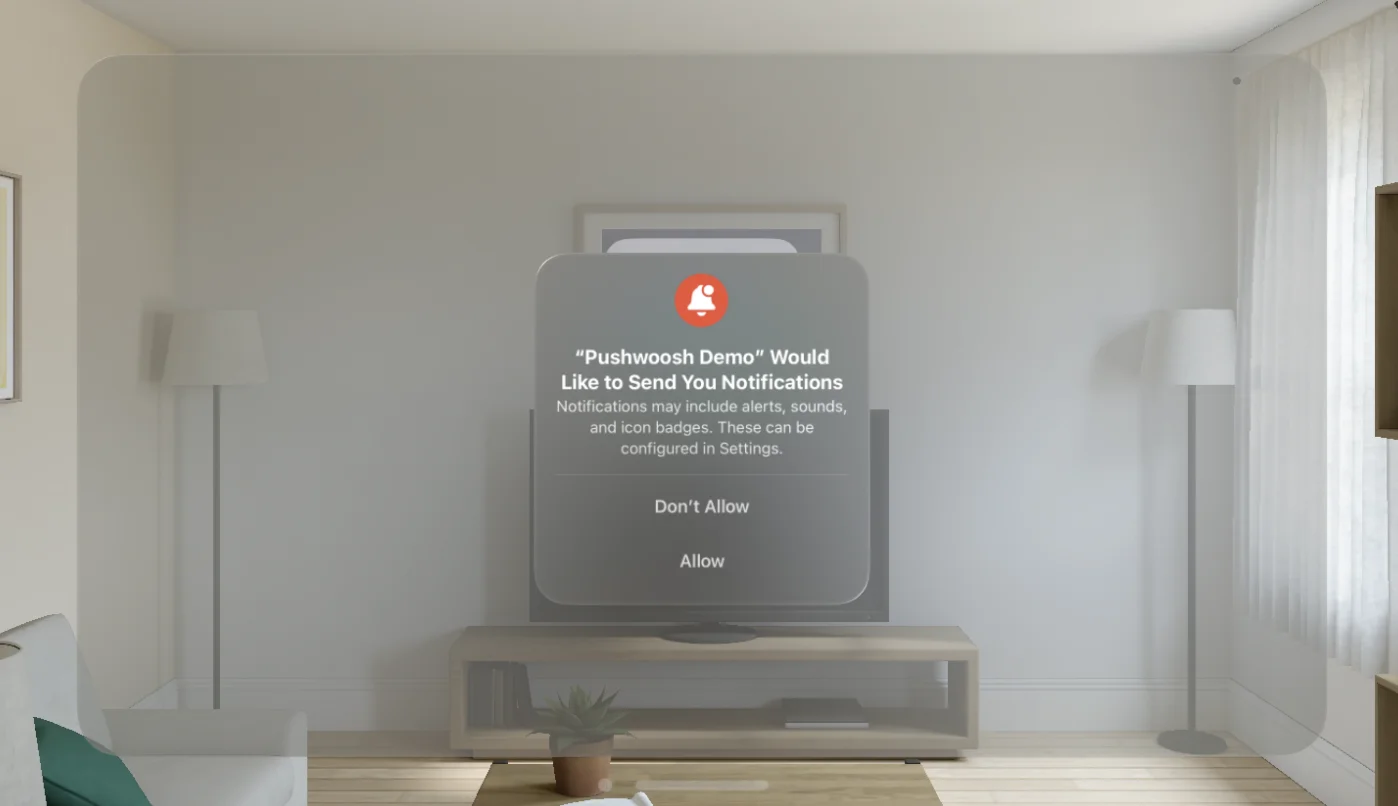 3. Well Done! Now you can send your first push notification!
 ### Share your feedback with us
Your feedback helps us create a better experience, so we would love to hear from you if you have any issues during the SDK integration process. If you face any difficulties, please do not hesitate to share your thoughts with us [via this form](https://docs.google.com/forms/d/e/1FAIpQLSd\_0b8jwn-V\_JmoPLIxIFYbHACCQhrzidOZV3ELywoQPXRSxw/viewform).
### Share your feedback with us
Your feedback helps us create a better experience, so we would love to hear from you if you have any issues during the SDK integration process. If you face any difficulties, please do not hesitate to share your thoughts with us [via this form](https://docs.google.com/forms/d/e/1FAIpQLSd\_0b8jwn-V\_JmoPLIxIFYbHACCQhrzidOZV3ELywoQPXRSxw/viewform).