# Mac OS X
[**Download SDK**](https://github.com/Pushwoosh/pushwoosh-mac-sdk)\
[**Sample Project**](https://github.com/Pushwoosh/pushwoosh-mac-sdk/tree/master/Samples/Mac)\
[**SDK API Docs**](https://github.com/Pushwoosh/pushwoosh-mac-sdk/tree/master/Documentation)
## Linking Pushwoosh.framework
Add `Pushwoosh.framework` to your project via a dependency manager by putting the following lines in your `podfile` or `cartfile`:
```
platform :osx, '10.7'
target 'MyApp' do
pod 'Pushwoosh_mac'
end
```
```
github "Pushwoosh/pushwoosh-mac-sdk"
```
Alternatively, you can simply drag and drop the framework into **Link Binaries With Libraries** in your project's **Build Phases**.
## Adding libraries
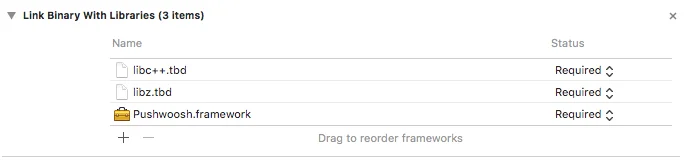
In **Build Phases** tab of your project, open **Link Binaries With Libraries** and click on Add items ("+" button). Search for and add **libz.tbd** and **libc++.tbd** libraries to your project:
 ## Linking the app with Pushwoosh Control Panel
In your **Info.plist**, add a string type key `Pushwoosh_APPID` with your Pushwoosh Application Code as value.
## Modifying the AppDelegate
Add the following code to your AppDelegate:
```swift
import PushKit
import Pushwoosh
func application(_ application: UIApplication, didFinishLaunchingWithOptions launchOptions: [UIApplicationLaunchOptionsKey : Any]? = nil) -> Bool {
//lots of your initialization code
//-----------PUSHWOOSH PART-----------
NSUserNotificationCenter.default.delegate = Pushwoosh.sharedInstance()?.notificationCenterDelegateProxy
// set custom delegate for push handling, in our case - view controller
Pushwoosh.sharedInstance().delegate = self
// handling push on app start
Pushwoosh.sharedInstance().handlePushReceived(aNotification.userInfo)
// register for push notifications!
Pushwoosh.sharedInstance().registerForPushNotifications()
```
```objective-c
#import
- (void)applicationDidFinishLaunching:(NSNotification *)aNotification
{
//lots of your initialization code
//-----------PUSHWOOSH PART-----------
[NSUserNotificationCenter defaultUserNotificationCenter].delegate = [Pushwoosh sharedInstance].notificationCenterDelegateProxy;
// set custom delegate for push handling, in our case - view controller
[Pushwoosh sharedInstance].delegate = self;
// handling push on app start
[[Pushwoosh sharedInstance] handlePushReceived:[aNotification userInfo]];
// register for push notifications!
[[Pushwoosh sharedInstance] registerForPushNotifications];
}
```
Add the following code to your **UIApplicationDelegate** (same file as above).
```swift
// system push notification registration success callback, delegate to PWMessagingDelegate
func application(_ application: NSApplication, didRegisterForRemoteNotificationsWithDeviceToken deviceToken: Data) {
Pushwoosh.sharedInstance()?.handlePushRegistration(deviceToken)
}
// system push notification registration error callback, delegate to PWMessagingDelegate
func application(_ application: NSApplication, didFailToRegisterForRemoteNotificationsWithError error: Error) {
Pushwoosh.sharedInstance()?.handlePushRegistrationFailure(error)
}
```
```objective-c
// system push notification registration success callback, delegate to pushManager
- (void)application:(NSApplication *)application didRegisterForRemoteNotificationsWithDeviceToken:(NSData *)deviceToken {
[[Pushwoosh sharedInstance] handlePushRegistration:deviceToken];
}
// system push notification registration error callback, delegate to pushManager
- (void)application:(NSApplication *)application didFailToRegisterForRemoteNotificationsWithError:(NSError *)error {
[[Pushwoosh sharedInstance] handlePushRegistrationFailure:error];
}
```
To handle push notifications, add the following function to your **UIApplicationDelegate** (the same file as three steps above):
```swift
//this event is fired when the push gets received
func pushwoosh(_ pushwoosh: Pushwoosh!, onMessageReceived message: PWMessage!) {
print("onMessageReceived: \(String(describing: message.payload))")
}
//this event is fired when user taps the notification
func pushwoosh(_ pushwoosh: Pushwoosh!, onMessageOpened message: PWMessage!) {
print("onMessageOpened: \(String(describing: message.payload))")
}
```
```objective-c
//this event is fired when the push gets received
- (void)pushwoosh:(Pushwoosh *)pushwoosh onMessageReceived:(PWMessage *)message {
NSLog(@"onMessageReceived: %@", message.payload);
}
//this event is fired when user taps the notification
- (void)pushwoosh:(Pushwoosh *)pushwoosh onMessageOpened:(PWMessage *)message {
NSLog(@"onMessageOpened: %@", message.payload);
}
```
## Enabling Push Notifications
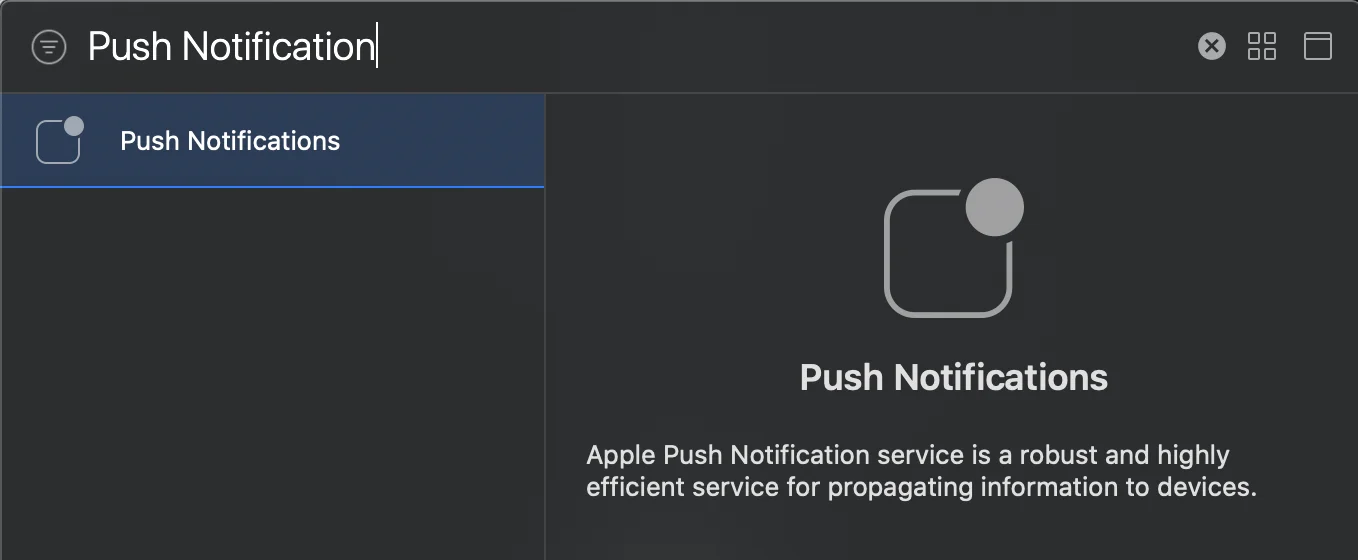
Go to **Signing and** **Capabilities** in your target. Press **+ Capability** and add **Push Notifications**.
## Linking the app with Pushwoosh Control Panel
In your **Info.plist**, add a string type key `Pushwoosh_APPID` with your Pushwoosh Application Code as value.
## Modifying the AppDelegate
Add the following code to your AppDelegate:
```swift
import PushKit
import Pushwoosh
func application(_ application: UIApplication, didFinishLaunchingWithOptions launchOptions: [UIApplicationLaunchOptionsKey : Any]? = nil) -> Bool {
//lots of your initialization code
//-----------PUSHWOOSH PART-----------
NSUserNotificationCenter.default.delegate = Pushwoosh.sharedInstance()?.notificationCenterDelegateProxy
// set custom delegate for push handling, in our case - view controller
Pushwoosh.sharedInstance().delegate = self
// handling push on app start
Pushwoosh.sharedInstance().handlePushReceived(aNotification.userInfo)
// register for push notifications!
Pushwoosh.sharedInstance().registerForPushNotifications()
```
```objective-c
#import
- (void)applicationDidFinishLaunching:(NSNotification *)aNotification
{
//lots of your initialization code
//-----------PUSHWOOSH PART-----------
[NSUserNotificationCenter defaultUserNotificationCenter].delegate = [Pushwoosh sharedInstance].notificationCenterDelegateProxy;
// set custom delegate for push handling, in our case - view controller
[Pushwoosh sharedInstance].delegate = self;
// handling push on app start
[[Pushwoosh sharedInstance] handlePushReceived:[aNotification userInfo]];
// register for push notifications!
[[Pushwoosh sharedInstance] registerForPushNotifications];
}
```
Add the following code to your **UIApplicationDelegate** (same file as above).
```swift
// system push notification registration success callback, delegate to PWMessagingDelegate
func application(_ application: NSApplication, didRegisterForRemoteNotificationsWithDeviceToken deviceToken: Data) {
Pushwoosh.sharedInstance()?.handlePushRegistration(deviceToken)
}
// system push notification registration error callback, delegate to PWMessagingDelegate
func application(_ application: NSApplication, didFailToRegisterForRemoteNotificationsWithError error: Error) {
Pushwoosh.sharedInstance()?.handlePushRegistrationFailure(error)
}
```
```objective-c
// system push notification registration success callback, delegate to pushManager
- (void)application:(NSApplication *)application didRegisterForRemoteNotificationsWithDeviceToken:(NSData *)deviceToken {
[[Pushwoosh sharedInstance] handlePushRegistration:deviceToken];
}
// system push notification registration error callback, delegate to pushManager
- (void)application:(NSApplication *)application didFailToRegisterForRemoteNotificationsWithError:(NSError *)error {
[[Pushwoosh sharedInstance] handlePushRegistrationFailure:error];
}
```
To handle push notifications, add the following function to your **UIApplicationDelegate** (the same file as three steps above):
```swift
//this event is fired when the push gets received
func pushwoosh(_ pushwoosh: Pushwoosh!, onMessageReceived message: PWMessage!) {
print("onMessageReceived: \(String(describing: message.payload))")
}
//this event is fired when user taps the notification
func pushwoosh(_ pushwoosh: Pushwoosh!, onMessageOpened message: PWMessage!) {
print("onMessageOpened: \(String(describing: message.payload))")
}
```
```objective-c
//this event is fired when the push gets received
- (void)pushwoosh:(Pushwoosh *)pushwoosh onMessageReceived:(PWMessage *)message {
NSLog(@"onMessageReceived: %@", message.payload);
}
//this event is fired when user taps the notification
- (void)pushwoosh:(Pushwoosh *)pushwoosh onMessageOpened:(PWMessage *)message {
NSLog(@"onMessageOpened: %@", message.payload);
}
```
## Enabling Push Notifications
Go to **Signing and** **Capabilities** in your target. Press **+ Capability** and add **Push Notifications**.