# iOS App Clips
App Clips let users complete a task quickly without downloading your full app. With Pushwoosh, you can send push notifications to App Clip users — iOS automatically grants **8-hour notification access** when the App Clip is opened.
## What you need
- Pushwoosh iOS SDK **7.0.33+**
- Xcode 15+
- A **separate Pushwoosh application** for your App Clip (different bundle ID = separate app)
- A real device for testing (push tokens don't work on simulator)
## 1. Create a Pushwoosh application
Your App Clip has a different bundle ID (e.g. `com.yourapp.Clip`), so it needs a **separate Pushwoosh app** with its own APNs key.
1. Go to [Pushwoosh Control Panel](https://app.pushwoosh.com/)
2. Create a new application with the App Clip bundle ID
3. Upload your APNs authentication key
4. Copy the **Application Code** and **API Token**
## 2. Create an App Clip target
1. In Xcode: **File → New → Target → App Clip**
2. Add **Push Notifications** capability to the App Clip target
For detailed screenshots of adding capabilities, see the [basic integration guide](/developer/pushwoosh-sdk/ios-sdk/setting-up-pushwoosh-ios-sdk-7-0/basic-integration-guide/).
## 3. Add Pushwoosh frameworks
In the App Clip target's **Build Phases → Link Binary With Libraries**, add:
- `PushwooshFramework.framework`
- `PushwooshCore.framework`
- `PushwooshBridge.framework`
## 4. Configure Info.plist
```xml
Pushwoosh_APPID
XXXXX-XXXXX
Pushwoosh_API_TOKEN
YOUR_API_TOKEN
NSAppClip
NSAppClipRequestEphemeralUserNotification
NSAppClipRequestLocationConfirmation
UIBackgroundModes
remote-notification
```
## 5. Initialize the SDK
```swift
import SwiftUI
import PushwooshFramework
class AppClipDelegate: NSObject, UIApplicationDelegate, PWMessagingDelegate {
func application(_ application: UIApplication,
didFinishLaunchingWithOptions launchOptions: [UIApplication.LaunchOptionsKey: Any]? = nil) -> Bool {
Pushwoosh.configure.delegate = self
Pushwoosh.configure.registerForPushNotifications()
return true
}
func application(_ application: UIApplication,
didRegisterForRemoteNotificationsWithDeviceToken deviceToken: Data) {
Pushwoosh.configure.handlePushRegistration(deviceToken)
}
func application(_ application: UIApplication,
didFailToRegisterForRemoteNotificationsWithError error: Error) {
Pushwoosh.configure.handlePushRegistrationFailure(error as NSError)
}
func application(_ application: UIApplication,
didReceiveRemoteNotification userInfo: [AnyHashable: Any],
fetchCompletionHandler completionHandler: @escaping (UIBackgroundFetchResult) -> Void) {
Pushwoosh.configure.handlePushReceived(userInfo)
completionHandler(.noData)
}
func pushwoosh(_ pushwoosh: Pushwoosh, onMessageOpened message: PWMessage) {
print("Push opened: \(message.payload ?? [:])")
}
}
@main
struct YourAppClip: App {
@UIApplicationDelegateAdaptor(AppClipDelegate.self) var appDelegate
var body: some Scene {
WindowGroup {
ContentView()
}
}
}
```
```swift
import UIKit
import PushwooshFramework
@main
class AppDelegate: UIResponder, UIApplicationDelegate, PWMessagingDelegate {
func application(_ application: UIApplication,
didFinishLaunchingWithOptions launchOptions: [UIApplication.LaunchOptionsKey: Any]?) -> Bool {
Pushwoosh.configure.delegate = self
Pushwoosh.configure.registerForPushNotifications()
return true
}
func application(_ application: UIApplication,
didRegisterForRemoteNotificationsWithDeviceToken deviceToken: Data) {
Pushwoosh.configure.handlePushRegistration(deviceToken)
}
func application(_ application: UIApplication,
didFailToRegisterForRemoteNotificationsWithError error: Error) {
Pushwoosh.configure.handlePushRegistrationFailure(error as NSError)
}
func application(_ application: UIApplication,
didReceiveRemoteNotification userInfo: [AnyHashable: Any],
fetchCompletionHandler completionHandler: @escaping (UIBackgroundFetchResult) -> Void) {
Pushwoosh.configure.handlePushReceived(userInfo)
completionHandler(.noData)
}
func pushwoosh(_ pushwoosh: Pushwoosh, onMessageOpened message: PWMessage) {
print("Push opened: \(message.payload ?? [:])")
}
}
```
With ephemeral permissions, iOS grants push access for 8 hours automatically. If you want to use ephemeral mode **without showing a permission dialog**, call `UIApplication.shared.registerForRemoteNotifications()` directly instead of `Pushwoosh.configure.registerForPushNotifications()`.
To request **permanent** push permission (standard dialog), use `Pushwoosh.configure.registerForPushNotifications()` as shown above.
## Ephemeral push permissions
When a user opens your App Clip, iOS grants push notification access for **8 hours** without asking. After 8 hours, the permission expires. The user must reopen the App Clip to get another 8 hours.
To get a push token for 8 hours **without showing a permission dialog**:
```swift
UIApplication.shared.registerForRemoteNotifications()
```
To get a **permanent** push token (shows the standard permission dialog):
```swift
Pushwoosh.configure.registerForPushNotifications()
```
## Limitations
| Limitation | Details |
|---|---|
| **No rich notifications** | App Clips can't include Notification Service Extension — no images, no Communication Notifications |
| **Size limit** | 15 MB (iOS 16) / 50 MB (iOS 17+) |
| **8-hour push window** | Ephemeral permission expires after 8 hours |
| **No background processing** | Silent push has limited functionality |
| **Device ID** | `identifierForVendor` returns zeros — SDK handles this automatically (7.0.33+) |
## How it looks
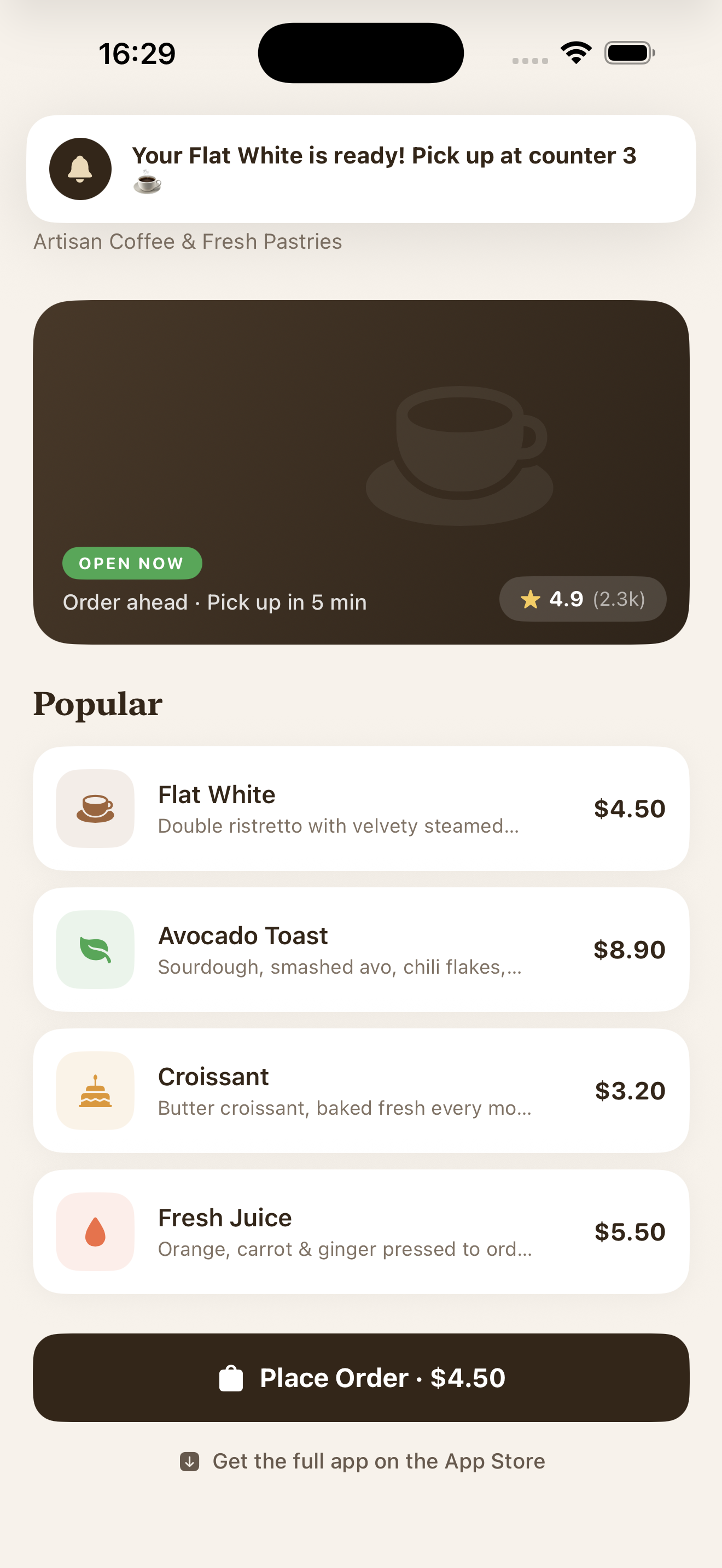 *Push notification received in an App Clip with ephemeral permissions*