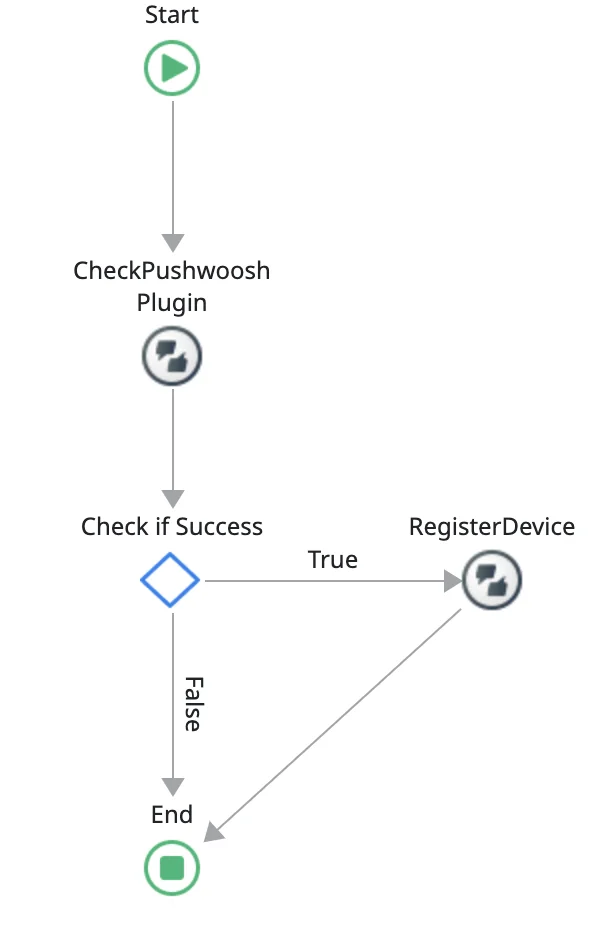
 ### RegisterDevice
Registers a device for push notifications and retrieves a Push Token.
#### Input parameters
| ApplicationCode | Text, the Pushwoosh application code obtained from your account settings. |
| --------------- | ------------------------------------------------------------------------- |
#### Output parameters
| RegisterToken | Token received from Google or Apple for the device |
| ------------- | ---------------------------------------------------------------------------------------------------------------------------------------------------------------- |
| Success | Returns true if everything goes as expected, false if there is an error. |
| Error | An error containing the error code and error message with details about any error that might have occurred. Only set when the Success output parameter is false. |
### UnregisterDevice
Unregisters a device from receiving push notifications.
#### Output parameters
| Success | Returns true if everything goes as expected, false if there is an error. |
| ------- | ---------------------------------------------------------------------------------------------------------------------------------------------------------------- |
| Error | An error containing the error code and error message with details about any error that might have occurred. Only set when the Success output parameter is false. |
### GetDeviceID
Retrieves the device ID, which should be a unique identifier.
#### Output parameters
| DeviceHwid | The unique identifier of the device. |
| ---------- | --------------------------------------------------------------------------------------------------------------------------------------------- |
| Error | An error containing the error code and error message with details about any error that might have occurred. Only set when there was an error. |
### GetDeviceType
Gets the Device Type (Android, iOS, or Windows).
#### Output parameters
| DeviceTypeId | The identifier of this device type. |
| ------------ | ----------------------------------- |
### GetTags
Fetches tags data from Pushwoosh.
#### Output parameters
| Success | Returns true if everything goes as expected, false if there is an error. |
| ------- | ---------------------------------------------------------------------------------------------------------------------------------------------------------------- |
| Error | An error containing the error code and error message with details about any error that might have occurred. Only set when the Success output parameter is false. |
| Tags | Returns Key, Value Record List containing all tags assigned to this device. |
#### Usage example
1. Invoke the **GetTags** action to fetch the tags data from Pushwoosh.
2. The returned tags are accessible via the **GetTags.Tags** list.
### RegisterDevice
Registers a device for push notifications and retrieves a Push Token.
#### Input parameters
| ApplicationCode | Text, the Pushwoosh application code obtained from your account settings. |
| --------------- | ------------------------------------------------------------------------- |
#### Output parameters
| RegisterToken | Token received from Google or Apple for the device |
| ------------- | ---------------------------------------------------------------------------------------------------------------------------------------------------------------- |
| Success | Returns true if everything goes as expected, false if there is an error. |
| Error | An error containing the error code and error message with details about any error that might have occurred. Only set when the Success output parameter is false. |
### UnregisterDevice
Unregisters a device from receiving push notifications.
#### Output parameters
| Success | Returns true if everything goes as expected, false if there is an error. |
| ------- | ---------------------------------------------------------------------------------------------------------------------------------------------------------------- |
| Error | An error containing the error code and error message with details about any error that might have occurred. Only set when the Success output parameter is false. |
### GetDeviceID
Retrieves the device ID, which should be a unique identifier.
#### Output parameters
| DeviceHwid | The unique identifier of the device. |
| ---------- | --------------------------------------------------------------------------------------------------------------------------------------------- |
| Error | An error containing the error code and error message with details about any error that might have occurred. Only set when there was an error. |
### GetDeviceType
Gets the Device Type (Android, iOS, or Windows).
#### Output parameters
| DeviceTypeId | The identifier of this device type. |
| ------------ | ----------------------------------- |
### GetTags
Fetches tags data from Pushwoosh.
#### Output parameters
| Success | Returns true if everything goes as expected, false if there is an error. |
| ------- | ---------------------------------------------------------------------------------------------------------------------------------------------------------------- |
| Error | An error containing the error code and error message with details about any error that might have occurred. Only set when the Success output parameter is false. |
| Tags | Returns Key, Value Record List containing all tags assigned to this device. |
#### Usage example
1. Invoke the **GetTags** action to fetch the tags data from Pushwoosh.
2. The returned tags are accessible via the **GetTags.Tags** list.
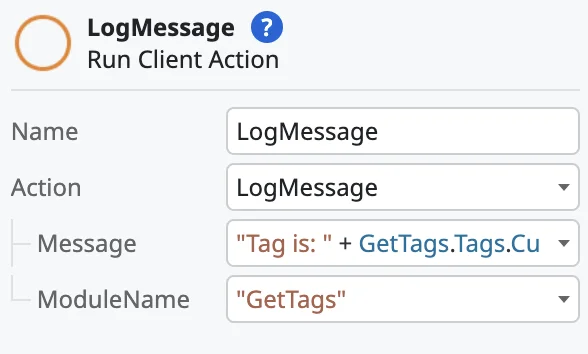
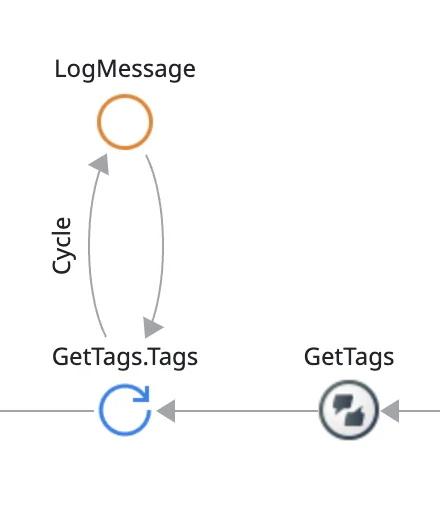 3. Use the **LogMessage** action to log each tag's key and value.
 ### PostEvent
Sends a message to Pushwoosh when a particular event in your application happens.
#### Input parameters
| EventName | Text, name of the event |
| --------------- | -------------------------------------------------------------------------------------------------------------------------------------------------------------------------- |
| EventAttributes | Key, Value Record List, used to send additional event data to Pushwoosh (i.e. for the "UserLogin" action you might want to send login data, such as - `{"username":"John"}`) |
Output parameters
| Success | Returns true if everything goes as expected, false if there is an error. |
| ------- | ---------------------------------------------------------------------------------------------------------------------------------------------------------------- |
| Error | An error containing the error code and error message with details about any error that might have occurred. Only set when the Success output parameter is false. |
#### Usage example
### PostEvent
Sends a message to Pushwoosh when a particular event in your application happens.
#### Input parameters
| EventName | Text, name of the event |
| --------------- | -------------------------------------------------------------------------------------------------------------------------------------------------------------------------- |
| EventAttributes | Key, Value Record List, used to send additional event data to Pushwoosh (i.e. for the "UserLogin" action you might want to send login data, such as - `{"username":"John"}`) |
Output parameters
| Success | Returns true if everything goes as expected, false if there is an error. |
| ------- | ---------------------------------------------------------------------------------------------------------------------------------------------------------------- |
| Error | An error containing the error code and error message with details about any error that might have occurred. Only set when the Success output parameter is false. |
#### Usage example
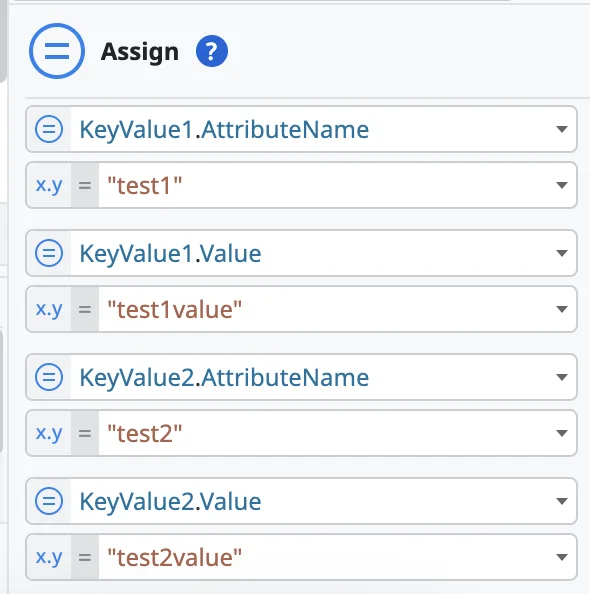
 **1. Assign**
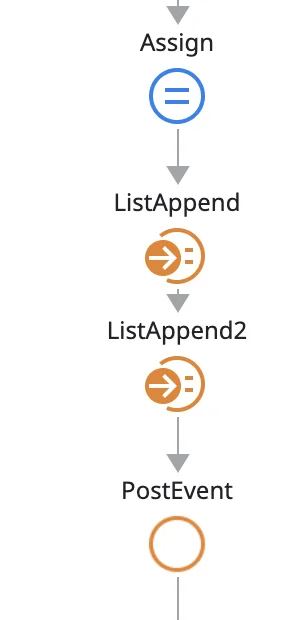
Set up key-value pairs to define the data for the event. For instance, KeyValue1.AttributeName as "test1" and KeyValue1.Value as "test1value". Similarly, define KeyValue2 with the appropriate attribute name and value.
**1. Assign**
Set up key-value pairs to define the data for the event. For instance, KeyValue1.AttributeName as "test1" and KeyValue1.Value as "test1value". Similarly, define KeyValue2 with the appropriate attribute name and value.
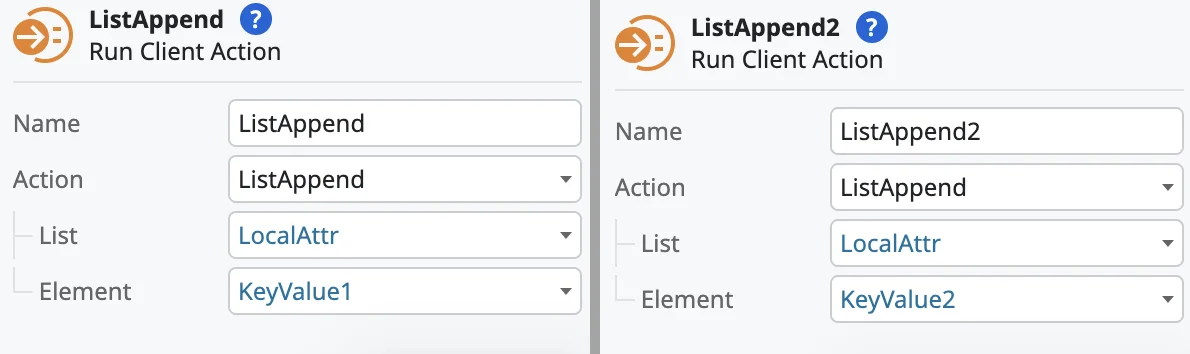
 2\. Create lists of attributes to be associated with the event.
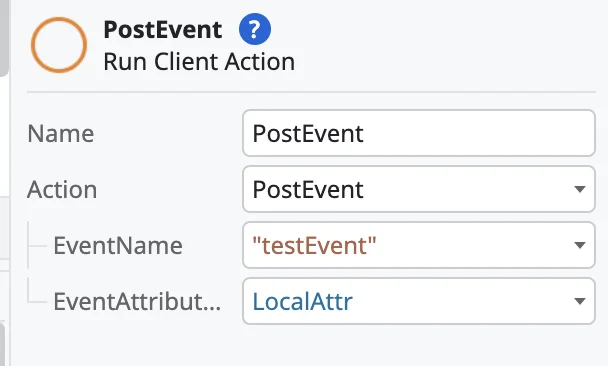
 3. Finally, configure the **PostEvent** action.
 ### SetBadgeNumber
Sets the application icon badge number.
#### Input parameters
| BadgeNumber | Integer, Icon badge number. |
| ----------- | --------------------------- |
#### Output parameters
| Success | Returns true if everything goes as expected, false if there is an error. |
| ------- | ---------------------------------------------------------------------------------------------------------------------------------------------------------------- |
| Error | An error containing the error code and error message with details about any error that might have occurred. Only set when the Success output parameter is false. |
### SetLanguage
Sets custom application language instead of the default system language.
#### Input parameters
| Language | Text, Custom application language in 2-letter ISO format (e.g., "en", "es", "fr") |
| -------- | --------------------------------------------------------------------------------- |
### SetTags
Sends tags and their values to Pushwoosh.
#### Input parameters
| Tags | TagName, TagValue Record List containing all tags you want to send. TagName type should always be Text, while TagValue can be Text, Integer, Boolean, Date, etc. |
| ---- | ---------------------------------------------------------------------------------------------------------------------------------------------------------------- |
#### Output parameters
| Success | Returns true if everything goes as expected, false if there is an error. |
| ------- | ---------------------------------------------------------------------------------------------------------------------------------------------------------------- |
| Error | An error containing the error code and error message with details about any error that might have occurred. Only set when the Success output parameter is false. |
#### Usage example
### SetBadgeNumber
Sets the application icon badge number.
#### Input parameters
| BadgeNumber | Integer, Icon badge number. |
| ----------- | --------------------------- |
#### Output parameters
| Success | Returns true if everything goes as expected, false if there is an error. |
| ------- | ---------------------------------------------------------------------------------------------------------------------------------------------------------------- |
| Error | An error containing the error code and error message with details about any error that might have occurred. Only set when the Success output parameter is false. |
### SetLanguage
Sets custom application language instead of the default system language.
#### Input parameters
| Language | Text, Custom application language in 2-letter ISO format (e.g., "en", "es", "fr") |
| -------- | --------------------------------------------------------------------------------- |
### SetTags
Sends tags and their values to Pushwoosh.
#### Input parameters
| Tags | TagName, TagValue Record List containing all tags you want to send. TagName type should always be Text, while TagValue can be Text, Integer, Boolean, Date, etc. |
| ---- | ---------------------------------------------------------------------------------------------------------------------------------------------------------------- |
#### Output parameters
| Success | Returns true if everything goes as expected, false if there is an error. |
| ------- | ---------------------------------------------------------------------------------------------------------------------------------------------------------------- |
| Error | An error containing the error code and error message with details about any error that might have occurred. Only set when the Success output parameter is false. |
#### Usage example
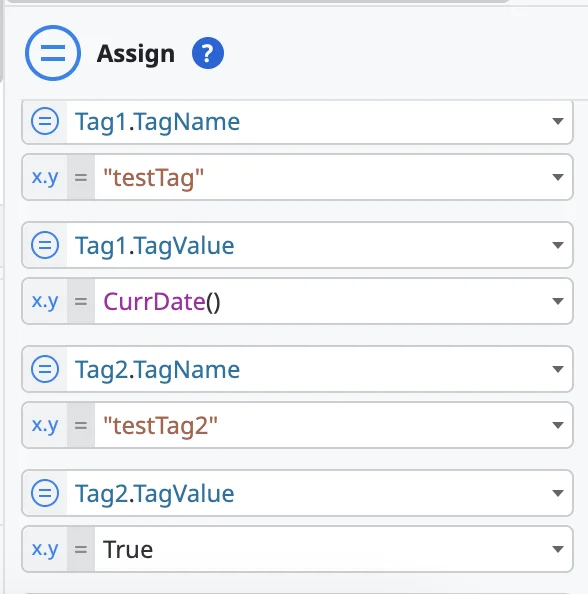
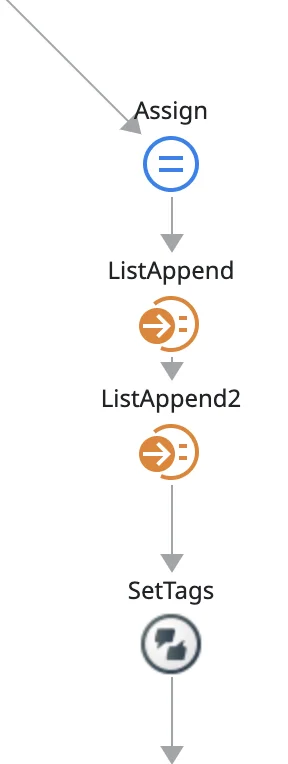 1. Assign tag values. In the example below, there are two tags:
* Tag1 with a name testTag and its value set to the current date.
* Tag2 with a name testTag2 and its value set to True.
1. Assign tag values. In the example below, there are two tags:
* Tag1 with a name testTag and its value set to the current date.
* Tag2 with a name testTag2 and its value set to True.
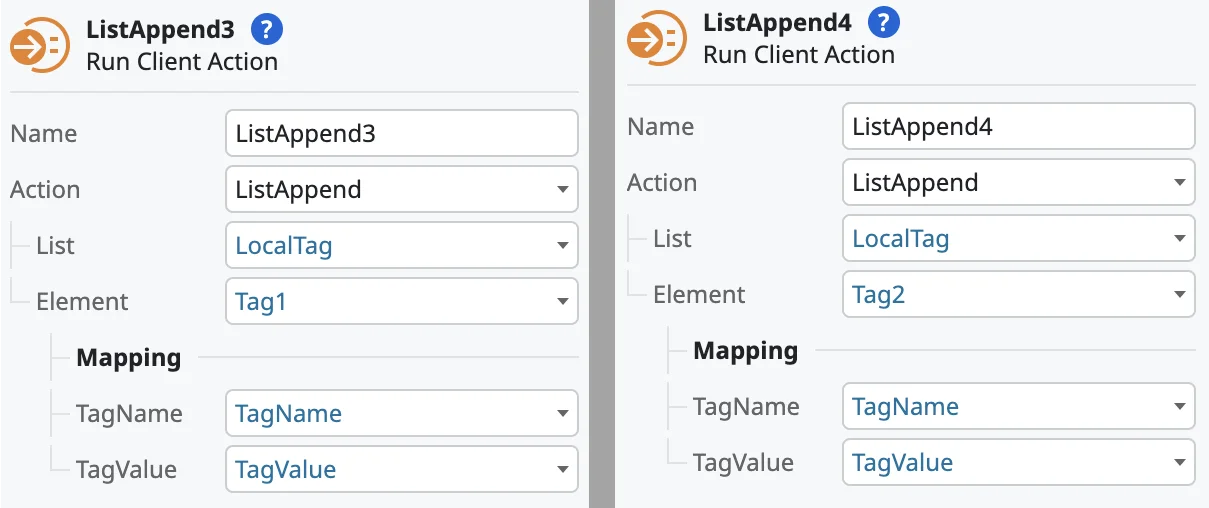
 2\. Then, append tags to a list. In this example:
* ListAppend3 adds Tag1 to the LocalTag list.
* ListAppend4 adds Tag2 to the LocalTag list.
2\. Then, append tags to a list. In this example:
* ListAppend3 adds Tag1 to the LocalTag list.
* ListAppend4 adds Tag2 to the LocalTag list.
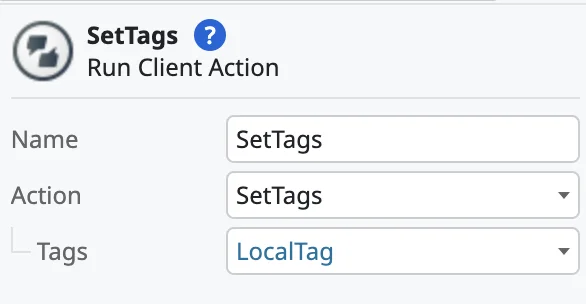
 3\. After populating the list with the necessary tags, use the **SetTags** client action to send this list to Pushwoosh.
 ### SetUserId
Assigns a custom User ID to this device.
#### Input parameters
| UserID | Text, custom User ID. |
| ------ | --------------------- |
#### Output parameters
| Success | Returns true if everything goes as expected, false if there is an error. |
| ------- | ---------------------------------------------------------------------------------------------------------------------------------------------------------------- |
| Error | An error containing the error code and error message with details about any error that might have occurred. Only set when the Success output parameter is false. |
## Pushwoosh Inbox Client Actions
The process of working with Inbox is the following:
1. Load a list of InboxMessage objects.
2. Use these objects to render the inbox view.
3. Perform the actions listed below, or delete these objects using the actions described below.
| code | Text | Unique ID of an inbox notification. |
| ----------------- | ---------------------- | --------------------------------------------------------------------------------------------------------------------------------------------------------------------------------------------------------------------------------------------------------------------------------------------------------------------------------- |
| title | Text | Notification title. |
| message | Text | Notification message. |
| imageUrl | Text | URL of a custom image attached to a notification. |
| sendDate |
### SetUserId
Assigns a custom User ID to this device.
#### Input parameters
| UserID | Text, custom User ID. |
| ------ | --------------------- |
#### Output parameters
| Success | Returns true if everything goes as expected, false if there is an error. |
| ------- | ---------------------------------------------------------------------------------------------------------------------------------------------------------------- |
| Error | An error containing the error code and error message with details about any error that might have occurred. Only set when the Success output parameter is false. |
## Pushwoosh Inbox Client Actions
The process of working with Inbox is the following:
1. Load a list of InboxMessage objects.
2. Use these objects to render the inbox view.
3. Perform the actions listed below, or delete these objects using the actions described below.
| code | Text | Unique ID of an inbox notification. |
| ----------------- | ---------------------- | --------------------------------------------------------------------------------------------------------------------------------------------------------------------------------------------------------------------------------------------------------------------------------------------------------------------------------- |
| title | Text | Notification title. |
| message | Text | Notification message. |
| imageUrl | Text | URL of a custom image attached to a notification. |
| sendDate | Date
Time
| Represents the time when a notification was sent. | | type | Integer |Type of notification.
Possible values: