# Pushwoosh Mendix module actions
The Pushwoosh module for Mendix exposes its functionality in two places: the **Pushwoosh events** widget, which starts the SDK and turns incoming notifications into nanoflow events, and the JavaScript actions you call from any nanoflow on the native mobile navigation profile. This page lists both.
## Pushwoosh events widget properties
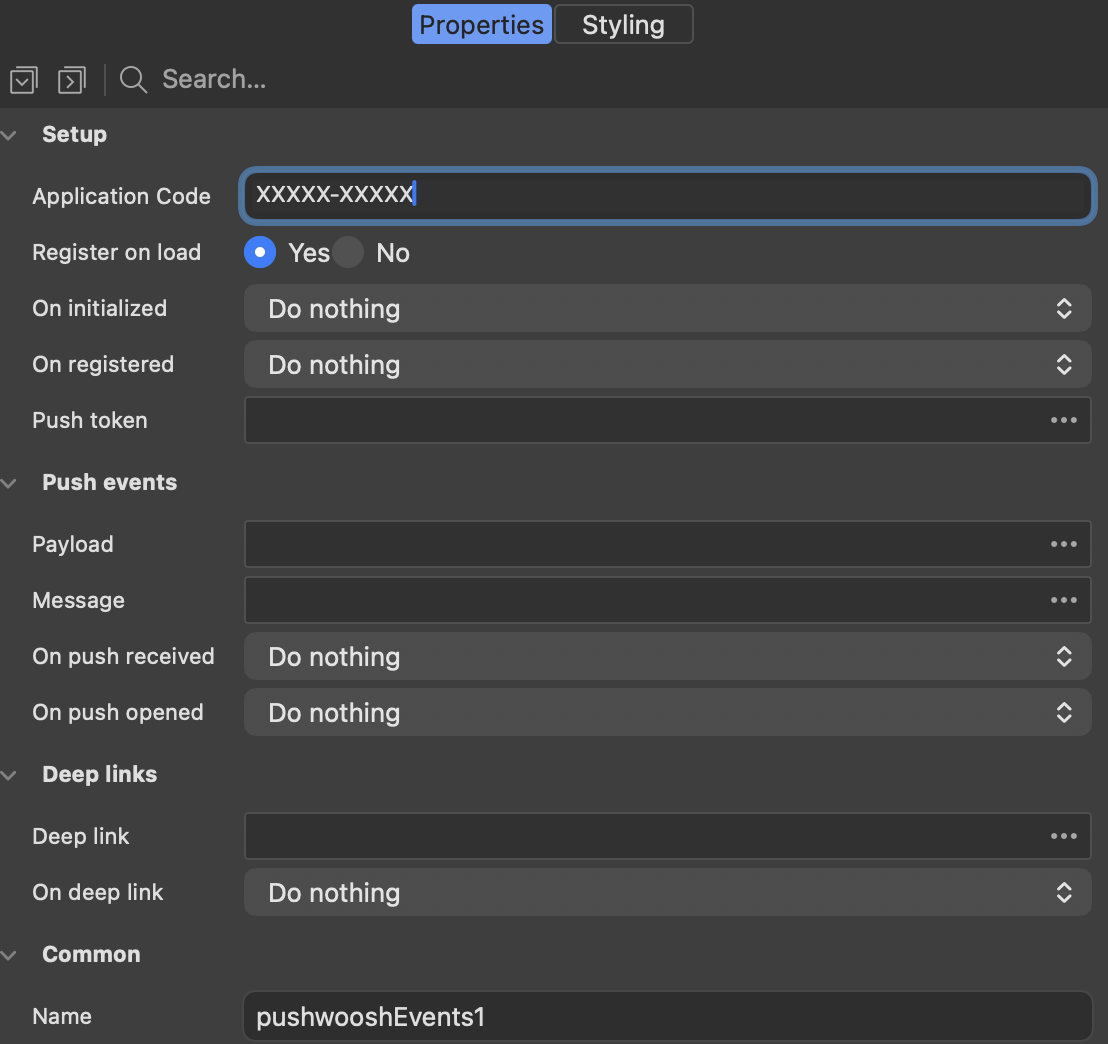
The widget renders nothing. Place it once, on the page that loads first in the native mobile navigation profile. It initializes the SDK, optionally registers the device, and triggers a nanoflow for each push notification event.
### Setup
These properties start the SDK and report when it is ready.
| Property | What it does |
| --- | --- |
| **Application Code** | The Pushwoosh Application Code of your app, for example `XXXXX-XXXXX`. Required. |
| **Register on load** | Registers the device as soon as the widget loads. On iOS this shows the system permission prompt, so turn it off if you would rather ask later with the `RegisterForPushNotifications` action. |
| **On initialized** | A nanoflow that runs once the SDK has started. |
| **On registered** | A nanoflow that runs when the device has a push token. |
| **Push token** | The string attribute the push token is written to before **On registered** runs. |
### Push events
These properties deliver an incoming notification into your model and trigger a nanoflow.
| Property | What it does |
| --- | --- |
| **Payload** | The string attribute that receives the full notification payload as JSON. |
| **Message** | The string attribute that receives the notification text. |
| **On push received** | A nanoflow that runs when a notification arrives while the app is in the foreground. |
| **On push opened** | A nanoflow that runs when the user taps a notification. |
### Deep links
These properties handle a notification that carries a link into a specific page of the app.
| Property | What it does |
| --- | --- |
| **Deep link** | The string attribute that receives the deep link URL from the notification. |
| **On deep link** | A nanoflow that runs when an opened notification carries a link. It runs in addition to **On push opened**. |
The attributes are filled before the nanoflow runs, so the nanoflow can read them straight away.
## Setup actions
Use these actions when you start the SDK yourself instead of using the widget.
### Initialize
Initializes the Pushwoosh SDK. Call it once, before any other Pushwoosh action, typically from the on-load nanoflow of the home page. You do not need it when the **Pushwoosh events** widget is on the page, because the widget initializes the SDK itself.
On Android, the FCM Sender ID comes from `google-services.json`, which the native build picks up. It is not passed to this action.
| Parameter | Type | Description |
| --- | --- | --- |
| `applicationCode` | String | The Pushwoosh Application Code, for example `XXXXX-XXXXX`. Required. |
| `notificationHandling` | String | Optional. `default` or `manual`. Leave it empty for the default behavior. |
Returns a Boolean that is true when the SDK started.
## Registration actions
These actions control whether this device receives notifications, and expose the identifiers that address it.
### RegisterForPushNotifications
Registers the device for push notifications and returns the push token. On iOS this triggers the system permission prompt, so call it at a point in the flow where asking makes sense to the user.
Returns a String with the push token.
### UnregisterForPushNotifications
Unregisters the device. It stops receiving notifications until `RegisterForPushNotifications` is called again.
Returns a String with the token the device was unregistered with.
### GetPushToken
Returns the current push token, or an empty string if the device is not registered yet.
Returns a String.
### GetHwid
Returns the [HWID](/developer/api-reference/api-identifiers/#hardware-id) of the device, the identifier Pushwoosh addresses it by. Use it to target a single device from the Pushwoosh Control Panel or the server API.
Returns a String.
## User identity actions
These actions connect a device to a person, so that one message reaches every device that person uses.
### SetUserId
Associates the device with a user. Call it after login.
| Parameter | Type | Description |
| --- | --- | --- |
| `userId` | String | Your own identifier for the user. Required. |
Returns a Boolean.
### GetUserId
Returns the user ID currently associated with the device, or an empty string if none is set.
Returns a String.
### SetEmails
Registers the user's email addresses with Pushwoosh, so they can be reached by email as well as by push.
| Parameter | Type | Description |
| --- | --- | --- |
| `emails` | String | One address, or several separated by commas. Required. |
Returns a Boolean.
## Tag actions
Tags are the device properties that segments are built from in the Pushwoosh Control Panel.
### SetTags
Sets tags on the device.
| Parameter | Type | Description |
| --- | --- | --- |
| `tagsJson` | String | A JSON object, for example `{"Language":"en","Level":7,"Premium":true}`. Required. |
Returns a Boolean.
### GetTags
Returns the tags currently set on the device, as a JSON string.
Returns a String.
## Event actions
Events are what triggered campaigns and in-app messages are started from.
### PostEvent
Posts an event to Pushwoosh.
| Parameter | Type | Description |
| --- | --- | --- |
| `eventName` | String | The event name as configured in the Control Panel. Required. |
| `attributesJson` | String | Optional. A JSON object of event attributes. |
Returns a Boolean.
The underlying SDK call reports neither success nor failure, so the action returns true as soon as the call has been handed to the SDK.
## Local notification actions
Local notifications are produced by the app itself and need no network, which makes them suitable for reminders.
### ScheduleLocalNotification
Schedules a local notification on the device.
| Parameter | Type | Description |
| --- | --- | --- |
| `message` | String | The notification text. Required. |
| `afterSeconds` | Integer/Long | How long to wait before showing it, in seconds. Required, and zero or greater. |
| `customDataJson` | String | Optional. A JSON object delivered back with the notification. |
Returns a Boolean as soon as the call has been handed to the SDK. The SDK does not report back whether the notification was actually scheduled.
### ClearLocalNotifications
Cancels local notifications that were scheduled but have not fired yet.
Returns a Boolean as soon as the call has been handed to the SDK.
### ClearNotificationCenter
Removes the app's already-delivered notifications from the notification center.
Returns a Boolean as soon as the call has been handed to the SDK.
## Privacy actions
These actions back a consent toggle in your app, and switch all Pushwoosh messaging for the device on or off.
### IsCommunicationEnabled
Tells whether the device is currently allowed to receive communication from Pushwoosh. Use it to render the state of a privacy toggle.
Returns a Boolean.
### SetCommunicationEnabled
Turns communication with Pushwoosh on or off for the device. Switching it off stops all messaging, which makes it the action to wire to a "do not contact me" toggle.
| Parameter | Type | Description |
| --- | --- | --- |
| `enabled` | Boolean | True to allow messaging, false to stop it. Required. |
Returns a Boolean.
## Settings actions
These actions change how the SDK behaves for this device.
### SetLanguage
Overrides the language Pushwoosh uses to localize messages for the device. By default the device language is used.
| Parameter | Type | Description |
| --- | --- | --- |
| `language` | String | A two-letter code such as `en`, `de`, `nl`. Required. |
Returns a Boolean as soon as the call has been handed to the SDK.
### SetReverseProxy
Routes all Pushwoosh traffic through your own endpoint. Call it before `Initialize`, otherwise the early requests still go straight to Pushwoosh.
| Parameter | Type | Description |
| --- | --- | --- |
| `url` | String | The proxy base URL. Required. |
| `headersJson` | String | Optional. A JSON object of extra HTTP headers. |
Returns a Boolean as soon as the call has been handed to the SDK.
### SetShowForegroundAlert
Controls whether a notification that arrives while the app is open is shown as a system alert. The default is on, so turn it off to handle foreground notifications yourself through the **On push received** event of the widget.
| Parameter | Type | Description |
| --- | --- | --- |
| `showAlert` | Boolean | True to show the system alert. Required. |
Returns a Boolean as soon as the call has been handed to the SDK.
### GetShowForegroundAlert
Tells whether a notification arriving while the app is open will be shown as a system alert. It is on by default.
Returns a Boolean.
## Other channel actions
These actions register the user for the messaging channels Pushwoosh supports beyond push.
### RegisterSmsNumber
Registers the user's phone number so Pushwoosh can reach them over SMS.
| Parameter | Type | Description |
| --- | --- | --- |
| `phoneNumber` | String | In international format, for example `+31201234567`. Required. |
Returns a Boolean as soon as the call has been handed to the SDK.
### RegisterWhatsappNumber
Registers the user's phone number so Pushwoosh can reach them over WhatsApp.
| Parameter | Type | Description |
| --- | --- | --- |
| `phoneNumber` | String | In international format, for example `+31201234567`. Required. |
Returns a Boolean as soon as the call has been handed to the SDK.
 ### Setup
These properties start the SDK and report when it is ready.
| Property | What it does |
| --- | --- |
| **Application Code** | The Pushwoosh Application Code of your app, for example `XXXXX-XXXXX`. Required. |
| **Register on load** | Registers the device as soon as the widget loads. On iOS this shows the system permission prompt, so turn it off if you would rather ask later with the `RegisterForPushNotifications` action. |
| **On initialized** | A nanoflow that runs once the SDK has started. |
| **On registered** | A nanoflow that runs when the device has a push token. |
| **Push token** | The string attribute the push token is written to before **On registered** runs. |
### Push events
These properties deliver an incoming notification into your model and trigger a nanoflow.
| Property | What it does |
| --- | --- |
| **Payload** | The string attribute that receives the full notification payload as JSON. |
| **Message** | The string attribute that receives the notification text. |
| **On push received** | A nanoflow that runs when a notification arrives while the app is in the foreground. |
| **On push opened** | A nanoflow that runs when the user taps a notification. |
### Deep links
These properties handle a notification that carries a link into a specific page of the app.
| Property | What it does |
| --- | --- |
| **Deep link** | The string attribute that receives the deep link URL from the notification. |
| **On deep link** | A nanoflow that runs when an opened notification carries a link. It runs in addition to **On push opened**. |
The attributes are filled before the nanoflow runs, so the nanoflow can read them straight away.
## Setup actions
Use these actions when you start the SDK yourself instead of using the widget.
### Initialize
Initializes the Pushwoosh SDK. Call it once, before any other Pushwoosh action, typically from the on-load nanoflow of the home page. You do not need it when the **Pushwoosh events** widget is on the page, because the widget initializes the SDK itself.
On Android, the FCM Sender ID comes from `google-services.json`, which the native build picks up. It is not passed to this action.
| Parameter | Type | Description |
| --- | --- | --- |
| `applicationCode` | String | The Pushwoosh Application Code, for example `XXXXX-XXXXX`. Required. |
| `notificationHandling` | String | Optional. `default` or `manual`. Leave it empty for the default behavior. |
Returns a Boolean that is true when the SDK started.
## Registration actions
These actions control whether this device receives notifications, and expose the identifiers that address it.
### RegisterForPushNotifications
Registers the device for push notifications and returns the push token. On iOS this triggers the system permission prompt, so call it at a point in the flow where asking makes sense to the user.
Returns a String with the push token.
### UnregisterForPushNotifications
Unregisters the device. It stops receiving notifications until `RegisterForPushNotifications` is called again.
Returns a String with the token the device was unregistered with.
### GetPushToken
Returns the current push token, or an empty string if the device is not registered yet.
Returns a String.
### GetHwid
Returns the [HWID](/developer/api-reference/api-identifiers/#hardware-id) of the device, the identifier Pushwoosh addresses it by. Use it to target a single device from the Pushwoosh Control Panel or the server API.
Returns a String.
## User identity actions
These actions connect a device to a person, so that one message reaches every device that person uses.
### SetUserId
Associates the device with a user. Call it after login.
| Parameter | Type | Description |
| --- | --- | --- |
| `userId` | String | Your own identifier for the user. Required. |
Returns a Boolean.
### GetUserId
Returns the user ID currently associated with the device, or an empty string if none is set.
Returns a String.
### SetEmails
Registers the user's email addresses with Pushwoosh, so they can be reached by email as well as by push.
| Parameter | Type | Description |
| --- | --- | --- |
| `emails` | String | One address, or several separated by commas. Required. |
Returns a Boolean.
## Tag actions
Tags are the device properties that segments are built from in the Pushwoosh Control Panel.
### SetTags
Sets tags on the device.
| Parameter | Type | Description |
| --- | --- | --- |
| `tagsJson` | String | A JSON object, for example `{"Language":"en","Level":7,"Premium":true}`. Required. |
Returns a Boolean.
### GetTags
Returns the tags currently set on the device, as a JSON string.
Returns a String.
## Event actions
Events are what triggered campaigns and in-app messages are started from.
### PostEvent
Posts an event to Pushwoosh.
| Parameter | Type | Description |
| --- | --- | --- |
| `eventName` | String | The event name as configured in the Control Panel. Required. |
| `attributesJson` | String | Optional. A JSON object of event attributes. |
Returns a Boolean.
The underlying SDK call reports neither success nor failure, so the action returns true as soon as the call has been handed to the SDK.
## Local notification actions
Local notifications are produced by the app itself and need no network, which makes them suitable for reminders.
### ScheduleLocalNotification
Schedules a local notification on the device.
| Parameter | Type | Description |
| --- | --- | --- |
| `message` | String | The notification text. Required. |
| `afterSeconds` | Integer/Long | How long to wait before showing it, in seconds. Required, and zero or greater. |
| `customDataJson` | String | Optional. A JSON object delivered back with the notification. |
Returns a Boolean as soon as the call has been handed to the SDK. The SDK does not report back whether the notification was actually scheduled.
### ClearLocalNotifications
Cancels local notifications that were scheduled but have not fired yet.
Returns a Boolean as soon as the call has been handed to the SDK.
### ClearNotificationCenter
Removes the app's already-delivered notifications from the notification center.
Returns a Boolean as soon as the call has been handed to the SDK.
## Privacy actions
These actions back a consent toggle in your app, and switch all Pushwoosh messaging for the device on or off.
### IsCommunicationEnabled
Tells whether the device is currently allowed to receive communication from Pushwoosh. Use it to render the state of a privacy toggle.
Returns a Boolean.
### SetCommunicationEnabled
Turns communication with Pushwoosh on or off for the device. Switching it off stops all messaging, which makes it the action to wire to a "do not contact me" toggle.
| Parameter | Type | Description |
| --- | --- | --- |
| `enabled` | Boolean | True to allow messaging, false to stop it. Required. |
Returns a Boolean.
## Settings actions
These actions change how the SDK behaves for this device.
### SetLanguage
Overrides the language Pushwoosh uses to localize messages for the device. By default the device language is used.
| Parameter | Type | Description |
| --- | --- | --- |
| `language` | String | A two-letter code such as `en`, `de`, `nl`. Required. |
Returns a Boolean as soon as the call has been handed to the SDK.
### SetReverseProxy
Routes all Pushwoosh traffic through your own endpoint. Call it before `Initialize`, otherwise the early requests still go straight to Pushwoosh.
| Parameter | Type | Description |
| --- | --- | --- |
| `url` | String | The proxy base URL. Required. |
| `headersJson` | String | Optional. A JSON object of extra HTTP headers. |
Returns a Boolean as soon as the call has been handed to the SDK.
### SetShowForegroundAlert
Controls whether a notification that arrives while the app is open is shown as a system alert. The default is on, so turn it off to handle foreground notifications yourself through the **On push received** event of the widget.
| Parameter | Type | Description |
| --- | --- | --- |
| `showAlert` | Boolean | True to show the system alert. Required. |
Returns a Boolean as soon as the call has been handed to the SDK.
### GetShowForegroundAlert
Tells whether a notification arriving while the app is open will be shown as a system alert. It is on by default.
Returns a Boolean.
## Other channel actions
These actions register the user for the messaging channels Pushwoosh supports beyond push.
### RegisterSmsNumber
Registers the user's phone number so Pushwoosh can reach them over SMS.
| Parameter | Type | Description |
| --- | --- | --- |
| `phoneNumber` | String | In international format, for example `+31201234567`. Required. |
Returns a Boolean as soon as the call has been handed to the SDK.
### RegisterWhatsappNumber
Registers the user's phone number so Pushwoosh can reach them over WhatsApp.
| Parameter | Type | Description |
| --- | --- | --- |
| `phoneNumber` | String | In international format, for example `+31201234567`. Required. |
Returns a Boolean as soon as the call has been handed to the SDK.
### Setup
These properties start the SDK and report when it is ready.
| Property | What it does |
| --- | --- |
| **Application Code** | The Pushwoosh Application Code of your app, for example `XXXXX-XXXXX`. Required. |
| **Register on load** | Registers the device as soon as the widget loads. On iOS this shows the system permission prompt, so turn it off if you would rather ask later with the `RegisterForPushNotifications` action. |
| **On initialized** | A nanoflow that runs once the SDK has started. |
| **On registered** | A nanoflow that runs when the device has a push token. |
| **Push token** | The string attribute the push token is written to before **On registered** runs. |
### Push events
These properties deliver an incoming notification into your model and trigger a nanoflow.
| Property | What it does |
| --- | --- |
| **Payload** | The string attribute that receives the full notification payload as JSON. |
| **Message** | The string attribute that receives the notification text. |
| **On push received** | A nanoflow that runs when a notification arrives while the app is in the foreground. |
| **On push opened** | A nanoflow that runs when the user taps a notification. |
### Deep links
These properties handle a notification that carries a link into a specific page of the app.
| Property | What it does |
| --- | --- |
| **Deep link** | The string attribute that receives the deep link URL from the notification. |
| **On deep link** | A nanoflow that runs when an opened notification carries a link. It runs in addition to **On push opened**. |
The attributes are filled before the nanoflow runs, so the nanoflow can read them straight away.
## Setup actions
Use these actions when you start the SDK yourself instead of using the widget.
### Initialize
Initializes the Pushwoosh SDK. Call it once, before any other Pushwoosh action, typically from the on-load nanoflow of the home page. You do not need it when the **Pushwoosh events** widget is on the page, because the widget initializes the SDK itself.
On Android, the FCM Sender ID comes from `google-services.json`, which the native build picks up. It is not passed to this action.
| Parameter | Type | Description |
| --- | --- | --- |
| `applicationCode` | String | The Pushwoosh Application Code, for example `XXXXX-XXXXX`. Required. |
| `notificationHandling` | String | Optional. `default` or `manual`. Leave it empty for the default behavior. |
Returns a Boolean that is true when the SDK started.
## Registration actions
These actions control whether this device receives notifications, and expose the identifiers that address it.
### RegisterForPushNotifications
Registers the device for push notifications and returns the push token. On iOS this triggers the system permission prompt, so call it at a point in the flow where asking makes sense to the user.
Returns a String with the push token.
### UnregisterForPushNotifications
Unregisters the device. It stops receiving notifications until `RegisterForPushNotifications` is called again.
Returns a String with the token the device was unregistered with.
### GetPushToken
Returns the current push token, or an empty string if the device is not registered yet.
Returns a String.
### GetHwid
Returns the [HWID](/developer/api-reference/api-identifiers/#hardware-id) of the device, the identifier Pushwoosh addresses it by. Use it to target a single device from the Pushwoosh Control Panel or the server API.
Returns a String.
## User identity actions
These actions connect a device to a person, so that one message reaches every device that person uses.
### SetUserId
Associates the device with a user. Call it after login.
| Parameter | Type | Description |
| --- | --- | --- |
| `userId` | String | Your own identifier for the user. Required. |
Returns a Boolean.
### GetUserId
Returns the user ID currently associated with the device, or an empty string if none is set.
Returns a String.
### SetEmails
Registers the user's email addresses with Pushwoosh, so they can be reached by email as well as by push.
| Parameter | Type | Description |
| --- | --- | --- |
| `emails` | String | One address, or several separated by commas. Required. |
Returns a Boolean.
## Tag actions
Tags are the device properties that segments are built from in the Pushwoosh Control Panel.
### SetTags
Sets tags on the device.
| Parameter | Type | Description |
| --- | --- | --- |
| `tagsJson` | String | A JSON object, for example `{"Language":"en","Level":7,"Premium":true}`. Required. |
Returns a Boolean.
### GetTags
Returns the tags currently set on the device, as a JSON string.
Returns a String.
## Event actions
Events are what triggered campaigns and in-app messages are started from.
### PostEvent
Posts an event to Pushwoosh.
| Parameter | Type | Description |
| --- | --- | --- |
| `eventName` | String | The event name as configured in the Control Panel. Required. |
| `attributesJson` | String | Optional. A JSON object of event attributes. |
Returns a Boolean.
The underlying SDK call reports neither success nor failure, so the action returns true as soon as the call has been handed to the SDK.
## Local notification actions
Local notifications are produced by the app itself and need no network, which makes them suitable for reminders.
### ScheduleLocalNotification
Schedules a local notification on the device.
| Parameter | Type | Description |
| --- | --- | --- |
| `message` | String | The notification text. Required. |
| `afterSeconds` | Integer/Long | How long to wait before showing it, in seconds. Required, and zero or greater. |
| `customDataJson` | String | Optional. A JSON object delivered back with the notification. |
Returns a Boolean as soon as the call has been handed to the SDK. The SDK does not report back whether the notification was actually scheduled.
### ClearLocalNotifications
Cancels local notifications that were scheduled but have not fired yet.
Returns a Boolean as soon as the call has been handed to the SDK.
### ClearNotificationCenter
Removes the app's already-delivered notifications from the notification center.
Returns a Boolean as soon as the call has been handed to the SDK.
## Privacy actions
These actions back a consent toggle in your app, and switch all Pushwoosh messaging for the device on or off.
### IsCommunicationEnabled
Tells whether the device is currently allowed to receive communication from Pushwoosh. Use it to render the state of a privacy toggle.
Returns a Boolean.
### SetCommunicationEnabled
Turns communication with Pushwoosh on or off for the device. Switching it off stops all messaging, which makes it the action to wire to a "do not contact me" toggle.
| Parameter | Type | Description |
| --- | --- | --- |
| `enabled` | Boolean | True to allow messaging, false to stop it. Required. |
Returns a Boolean.
## Settings actions
These actions change how the SDK behaves for this device.
### SetLanguage
Overrides the language Pushwoosh uses to localize messages for the device. By default the device language is used.
| Parameter | Type | Description |
| --- | --- | --- |
| `language` | String | A two-letter code such as `en`, `de`, `nl`. Required. |
Returns a Boolean as soon as the call has been handed to the SDK.
### SetReverseProxy
Routes all Pushwoosh traffic through your own endpoint. Call it before `Initialize`, otherwise the early requests still go straight to Pushwoosh.
| Parameter | Type | Description |
| --- | --- | --- |
| `url` | String | The proxy base URL. Required. |
| `headersJson` | String | Optional. A JSON object of extra HTTP headers. |
Returns a Boolean as soon as the call has been handed to the SDK.
### SetShowForegroundAlert
Controls whether a notification that arrives while the app is open is shown as a system alert. The default is on, so turn it off to handle foreground notifications yourself through the **On push received** event of the widget.
| Parameter | Type | Description |
| --- | --- | --- |
| `showAlert` | Boolean | True to show the system alert. Required. |
Returns a Boolean as soon as the call has been handed to the SDK.
### GetShowForegroundAlert
Tells whether a notification arriving while the app is open will be shown as a system alert. It is on by default.
Returns a Boolean.
## Other channel actions
These actions register the user for the messaging channels Pushwoosh supports beyond push.
### RegisterSmsNumber
Registers the user's phone number so Pushwoosh can reach them over SMS.
| Parameter | Type | Description |
| --- | --- | --- |
| `phoneNumber` | String | In international format, for example `+31201234567`. Required. |
Returns a Boolean as soon as the call has been handed to the SDK.
### RegisterWhatsappNumber
Registers the user's phone number so Pushwoosh can reach them over WhatsApp.
| Parameter | Type | Description |
| --- | --- | --- |
| `phoneNumber` | String | In international format, for example `+31201234567`. Required. |
Returns a Boolean as soon as the call has been handed to the SDK.