# Customizing rich media appearance
## Overview
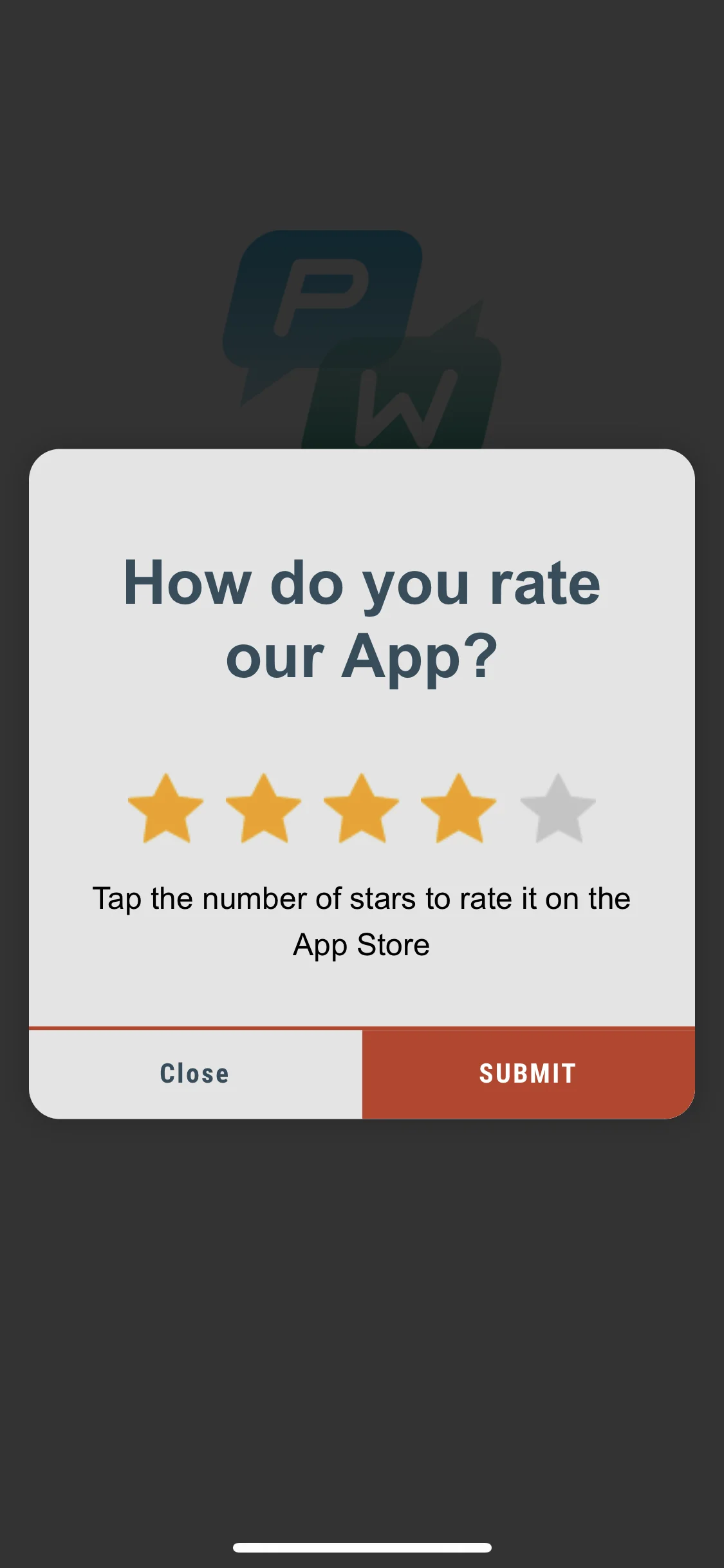
Customize the appearance of rich media pages to make them fit your app’s style perfectly. Change the background color of your in-app messages, add some animation, or adjust the loading view to the app layout. Improve user experience with in-apps looking like a native component of the app.
## Implementation
First, get an instance of the **RichMediaStyle** class:
#### iOS
```objective-c
PWRichMediaStyle *style = [PWRichMediaManager sharedManager].richMediaStyle;
```
#### Android
```java
RichMediaStyle style = RichMediaManager.getRichMediaStyle();
```
### Background color
Make in-app messages look like an inherent part of your app by **changing the background color** of rich media pages displayed to the app's users.
#### iOS
```objective-c
style.backgroundColor = [[UIColor blackColor] colorWithAlphaComponent:0.2f];
```
#### Android
```java
style.setBackgroundColor(ContextCompat.getColor(getApplication(), R.color.black));
```
That's it!
### Animation
Enhance the effect of your in-app messages by **animating rich media appearance**.
#### iOS
Set the animation delegate to one of the default classes:
* `PWRichMediaStyleSlideLeftAnimation`,
* `PWRichMediaStyleSlideRightAnimation`,
* `PWRichMediaStyleSlideTopAnimation`,
* `PWRichMediaStyleSlideBottomAnimation`,
* `PWRichMediaStyleCrossFadeAnimation`.
```objective-c
style.animationDelegate = [PWRichMediaStyleCrossFadeAnimation new];
```
#### Android
Set the animation delegate to one of the default classes:
* `RichMediaAnimationSlideTop`,
* `RichMediaAnimationSlideBottom`,
* `RichMediaAnimationSlideRight`,
* `RichMediaAnimationSlideLeft`,
* `RichMediaAnimationCrossFade`.
```java
richMediaStyle.setRichMediaAnimationType(new RichMediaAnimationSlideTop());
```
To set a **custom animation**, implement `PWRichMediaStyleAnimationDelegate` method for iOS or `RichMediaAnimation` for Android as follows:
#### iOS
1. Set the animation delegate:
```objective-c
style.animationDelegate = self;
```
2. Implement `PWRichMediaStyleAnimationDelegate` methods (don't forget to call a **completion block**):
```objective-c
- (void)runPresentingAnimationWithContentView:(UIView *)contentView parentView:(UIView *)parentView completion:(dispatch_block_t)completion {
contentView.transform = CGAffineTransformMakeTranslation(0, parentView.bounds.size.height);
[UIView animateWithDuration:0.6
delay:0
usingSpringWithDamping:0.4
initialSpringVelocity:0
options:0
animations:^{
contentView.transform = CGAffineTransformIdentity;
} completion:^(BOOL finished) {
completion();
}];
}
- (void)runDismissingAnimationWithContentView:(UIView *)contentView parentView:(UIView *)parentView completion:(dispatch_block_t)completion {
[UIView animateWithDuration:0.3
animations:^{
contentView.alpha = 0.0f;
contentView.transform = CGAffineTransformMakeScale(2, 2);
} completion:^(BOOL finished) {
completion();
}];
}
```
#### Android
Implement `RichMediaAnimation` interface and set it for custom Rich Media close and open animation:
```java
richMediaStyle.setRichMediaAnimation(new RichMediaAnimation() {
//Allows to set rules and behavior for custom Rich Media open animation
@Override
public void openAnimation(View contentView, View parentView) {
AnimationSet fadeInAnimation = new AnimationSet(true);
fadeInAnimation.addAnimation(new TranslateAnimation(0.15f * parentView.getWidth(), 0, parentView.getHeight() / 2.5f, 0));
fadeInAnimation.addAnimation(new AlphaAnimation(0, 1));
fadeInAnimation.addAnimation(new ScaleAnimation(0.7f, 1.0f, 0.7f, 1.0f));
fadeInAnimation.setDuration(2000);
fadeInAnimation.setInterpolator(new DecelerateInterpolator(1f));
contentView.startAnimation(fadeInAnimation);
}
//Allows to set rules and behavior for custom Rich Media close animation
@Override
public void closeAnimation(View contentView, View parentView, Animation.AnimationListener endAnimationListener) {
// !IMPORTANT!
// endAnimationListener has to be added to your custom animation to let Pushwoosh SDK handle animation end event
AlphaAnimation alphaAnimation = new AlphaAnimation(1, 0);
alphaAnimation.setDuration(2000);
alphaAnimation.setAnimationListener(endAnimationListener);
alphaAnimation.setFillEnabled(true);
alphaAnimation.setFillAfter(true);
contentView.animate().translationY(parentView.getHeight() / 5).setDuration(250).start();
parentView.startAnimation(alphaAnimation);
}
});
```
### Custom loading view
Catch user attention from the first seconds with **customized loading view** of your In-App Messages.
#### iOS
1. Use `loadingViewBlock` as follows:
```objective-c
style.loadingViewBlock = ^PWLoadingView *{
return [[[NSBundle mainBundle] loadNibNamed:@"LoadingView" owner:self options:nil] lastObject];
};
```
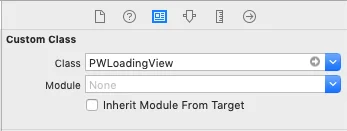
2. "LoadingView" here must inherit from PWLoadingView (defined in PWRichMediaStyle.h):
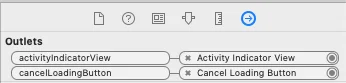
3. Set outlets:
#### Android
`RichMediaStyle.LoadingViewCreatorInterface` implements a method that returns a View to be used as a loading screen for Rich Media:
```java
richMediaStyle.setLoadingViewCreator(() -> {
View screenView = createYourScreenView();
return screenView;
});
```
### Close button enabling delay
Make sure the In-App Message is shown to users by **disabling close button** until the Rich Media is loaded.
#### iOS
```objective-c
style.closeButtonPresentingDelay = 3;
```
#### Android
```java
// set a value in milliseconds
richMediaStyle.setTimeOutBackButtonEnable(3000);
```
 #### iOS
```objective-c
style.backgroundColor = [[UIColor blackColor] colorWithAlphaComponent:0.2f];
```
#### Android
```java
style.setBackgroundColor(ContextCompat.getColor(getApplication(), R.color.black));
```
That's it!
### Animation
Enhance the effect of your in-app messages by **animating rich media appearance**.
#### iOS
Set the animation delegate to one of the default classes:
* `PWRichMediaStyleSlideLeftAnimation`,
* `PWRichMediaStyleSlideRightAnimation`,
* `PWRichMediaStyleSlideTopAnimation`,
* `PWRichMediaStyleSlideBottomAnimation`,
* `PWRichMediaStyleCrossFadeAnimation`.
```objective-c
style.animationDelegate = [PWRichMediaStyleCrossFadeAnimation new];
```
#### Android
Set the animation delegate to one of the default classes:
* `RichMediaAnimationSlideTop`,
* `RichMediaAnimationSlideBottom`,
* `RichMediaAnimationSlideRight`,
* `RichMediaAnimationSlideLeft`,
* `RichMediaAnimationCrossFade`.
```java
richMediaStyle.setRichMediaAnimationType(new RichMediaAnimationSlideTop());
```
To set a **custom animation**, implement `PWRichMediaStyleAnimationDelegate` method for iOS or `RichMediaAnimation` for Android as follows:
#### iOS
1. Set the animation delegate:
```objective-c
style.animationDelegate = self;
```
2. Implement `PWRichMediaStyleAnimationDelegate` methods (don't forget to call a **completion block**):
```objective-c
- (void)runPresentingAnimationWithContentView:(UIView *)contentView parentView:(UIView *)parentView completion:(dispatch_block_t)completion {
contentView.transform = CGAffineTransformMakeTranslation(0, parentView.bounds.size.height);
[UIView animateWithDuration:0.6
delay:0
usingSpringWithDamping:0.4
initialSpringVelocity:0
options:0
animations:^{
contentView.transform = CGAffineTransformIdentity;
} completion:^(BOOL finished) {
completion();
}];
}
- (void)runDismissingAnimationWithContentView:(UIView *)contentView parentView:(UIView *)parentView completion:(dispatch_block_t)completion {
[UIView animateWithDuration:0.3
animations:^{
contentView.alpha = 0.0f;
contentView.transform = CGAffineTransformMakeScale(2, 2);
} completion:^(BOOL finished) {
completion();
}];
}
```
#### Android
Implement `RichMediaAnimation` interface and set it for custom Rich Media close and open animation:
```java
richMediaStyle.setRichMediaAnimation(new RichMediaAnimation() {
//Allows to set rules and behavior for custom Rich Media open animation
@Override
public void openAnimation(View contentView, View parentView) {
AnimationSet fadeInAnimation = new AnimationSet(true);
fadeInAnimation.addAnimation(new TranslateAnimation(0.15f * parentView.getWidth(), 0, parentView.getHeight() / 2.5f, 0));
fadeInAnimation.addAnimation(new AlphaAnimation(0, 1));
fadeInAnimation.addAnimation(new ScaleAnimation(0.7f, 1.0f, 0.7f, 1.0f));
fadeInAnimation.setDuration(2000);
fadeInAnimation.setInterpolator(new DecelerateInterpolator(1f));
contentView.startAnimation(fadeInAnimation);
}
//Allows to set rules and behavior for custom Rich Media close animation
@Override
public void closeAnimation(View contentView, View parentView, Animation.AnimationListener endAnimationListener) {
// !IMPORTANT!
// endAnimationListener has to be added to your custom animation to let Pushwoosh SDK handle animation end event
AlphaAnimation alphaAnimation = new AlphaAnimation(1, 0);
alphaAnimation.setDuration(2000);
alphaAnimation.setAnimationListener(endAnimationListener);
alphaAnimation.setFillEnabled(true);
alphaAnimation.setFillAfter(true);
contentView.animate().translationY(parentView.getHeight() / 5).setDuration(250).start();
parentView.startAnimation(alphaAnimation);
}
});
```
### Custom loading view
Catch user attention from the first seconds with **customized loading view** of your In-App Messages.
#### iOS
1. Use `loadingViewBlock` as follows:
```objective-c
style.loadingViewBlock = ^PWLoadingView *{
return [[[NSBundle mainBundle] loadNibNamed:@"LoadingView" owner:self options:nil] lastObject];
};
```
2. "LoadingView" here must inherit from PWLoadingView (defined in PWRichMediaStyle.h):
#### iOS
```objective-c
style.backgroundColor = [[UIColor blackColor] colorWithAlphaComponent:0.2f];
```
#### Android
```java
style.setBackgroundColor(ContextCompat.getColor(getApplication(), R.color.black));
```
That's it!
### Animation
Enhance the effect of your in-app messages by **animating rich media appearance**.
#### iOS
Set the animation delegate to one of the default classes:
* `PWRichMediaStyleSlideLeftAnimation`,
* `PWRichMediaStyleSlideRightAnimation`,
* `PWRichMediaStyleSlideTopAnimation`,
* `PWRichMediaStyleSlideBottomAnimation`,
* `PWRichMediaStyleCrossFadeAnimation`.
```objective-c
style.animationDelegate = [PWRichMediaStyleCrossFadeAnimation new];
```
#### Android
Set the animation delegate to one of the default classes:
* `RichMediaAnimationSlideTop`,
* `RichMediaAnimationSlideBottom`,
* `RichMediaAnimationSlideRight`,
* `RichMediaAnimationSlideLeft`,
* `RichMediaAnimationCrossFade`.
```java
richMediaStyle.setRichMediaAnimationType(new RichMediaAnimationSlideTop());
```
To set a **custom animation**, implement `PWRichMediaStyleAnimationDelegate` method for iOS or `RichMediaAnimation` for Android as follows:
#### iOS
1. Set the animation delegate:
```objective-c
style.animationDelegate = self;
```
2. Implement `PWRichMediaStyleAnimationDelegate` methods (don't forget to call a **completion block**):
```objective-c
- (void)runPresentingAnimationWithContentView:(UIView *)contentView parentView:(UIView *)parentView completion:(dispatch_block_t)completion {
contentView.transform = CGAffineTransformMakeTranslation(0, parentView.bounds.size.height);
[UIView animateWithDuration:0.6
delay:0
usingSpringWithDamping:0.4
initialSpringVelocity:0
options:0
animations:^{
contentView.transform = CGAffineTransformIdentity;
} completion:^(BOOL finished) {
completion();
}];
}
- (void)runDismissingAnimationWithContentView:(UIView *)contentView parentView:(UIView *)parentView completion:(dispatch_block_t)completion {
[UIView animateWithDuration:0.3
animations:^{
contentView.alpha = 0.0f;
contentView.transform = CGAffineTransformMakeScale(2, 2);
} completion:^(BOOL finished) {
completion();
}];
}
```
#### Android
Implement `RichMediaAnimation` interface and set it for custom Rich Media close and open animation:
```java
richMediaStyle.setRichMediaAnimation(new RichMediaAnimation() {
//Allows to set rules and behavior for custom Rich Media open animation
@Override
public void openAnimation(View contentView, View parentView) {
AnimationSet fadeInAnimation = new AnimationSet(true);
fadeInAnimation.addAnimation(new TranslateAnimation(0.15f * parentView.getWidth(), 0, parentView.getHeight() / 2.5f, 0));
fadeInAnimation.addAnimation(new AlphaAnimation(0, 1));
fadeInAnimation.addAnimation(new ScaleAnimation(0.7f, 1.0f, 0.7f, 1.0f));
fadeInAnimation.setDuration(2000);
fadeInAnimation.setInterpolator(new DecelerateInterpolator(1f));
contentView.startAnimation(fadeInAnimation);
}
//Allows to set rules and behavior for custom Rich Media close animation
@Override
public void closeAnimation(View contentView, View parentView, Animation.AnimationListener endAnimationListener) {
// !IMPORTANT!
// endAnimationListener has to be added to your custom animation to let Pushwoosh SDK handle animation end event
AlphaAnimation alphaAnimation = new AlphaAnimation(1, 0);
alphaAnimation.setDuration(2000);
alphaAnimation.setAnimationListener(endAnimationListener);
alphaAnimation.setFillEnabled(true);
alphaAnimation.setFillAfter(true);
contentView.animate().translationY(parentView.getHeight() / 5).setDuration(250).start();
parentView.startAnimation(alphaAnimation);
}
});
```
### Custom loading view
Catch user attention from the first seconds with **customized loading view** of your In-App Messages.
#### iOS
1. Use `loadingViewBlock` as follows:
```objective-c
style.loadingViewBlock = ^PWLoadingView *{
return [[[NSBundle mainBundle] loadNibNamed:@"LoadingView" owner:self options:nil] lastObject];
};
```
2. "LoadingView" here must inherit from PWLoadingView (defined in PWRichMediaStyle.h):
 3. Set outlets:
 #### Android
`RichMediaStyle.LoadingViewCreatorInterface` implements a method that returns a View to be used as a loading screen for Rich Media:
```java
richMediaStyle.setLoadingViewCreator(() -> {
View screenView = createYourScreenView();
return screenView;
});
```
### Close button enabling delay
Make sure the In-App Message is shown to users by **disabling close button** until the Rich Media is loaded.
#### iOS
```objective-c
style.closeButtonPresentingDelay = 3;
```
#### Android
```java
// set a value in milliseconds
richMediaStyle.setTimeOutBackButtonEnable(3000);
```
#### Android
`RichMediaStyle.LoadingViewCreatorInterface` implements a method that returns a View to be used as a loading screen for Rich Media:
```java
richMediaStyle.setLoadingViewCreator(() -> {
View screenView = createYourScreenView();
return screenView;
});
```
### Close button enabling delay
Make sure the In-App Message is shown to users by **disabling close button** until the Rich Media is loaded.
#### iOS
```objective-c
style.closeButtonPresentingDelay = 3;
```
#### Android
```java
// set a value in milliseconds
richMediaStyle.setTimeOutBackButtonEnable(3000);
```