# SMS platform configuration
Pushwoosh enables you to send SMS messages to users by connecting your own SMS provider. Once configured, you can send [SMS](/product/messaging-channels/sms) in one-time campaigns and Customer Journeys, or through the [`Notify`](/developer/api-reference/messaging-api-v2/notify/) API method.
## Prerequisites
Before configuring SMS, ensure the following requirements are met:
* **Pushwoosh project**: A project where you want to enable the SMS channel.
* **SMS provider account**: An account with one of the [supported SMS providers](#supported-sms-providers).
* **Provider credentials**: The credentials required by your provider, such as account identifiers, API keys, a sender ID, or a phone number.
## Setting up the SMS configuration
To set up the SMS configuration, follow these steps:
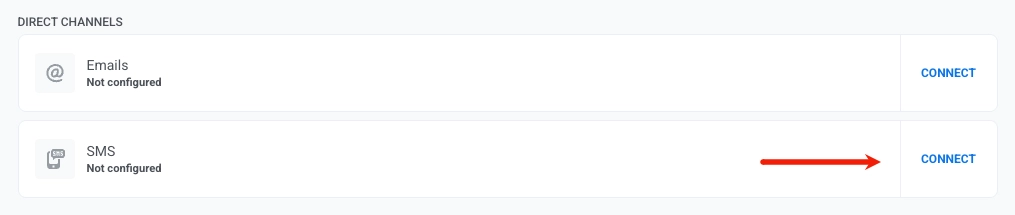
1. Go to **Settings → Configure Platforms**, select **SMS**, and click **Connect**.
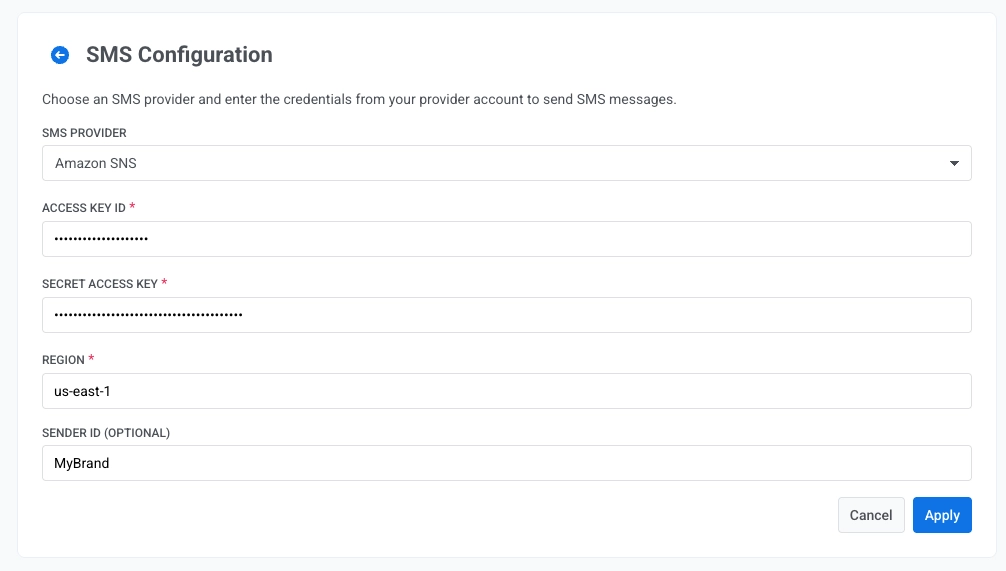
2. Choose your **SMS provider** from the list of [supported SMS providers](#supported-sms-providers).
3. Enter the provider credentials. The required fields depend on the provider you select, such as account identifiers, API keys, a sender ID, or a phone number.
4. Click **Save** to activate the channel.
## Supported SMS providers
Pushwoosh supports the following SMS providers:
* [Twilio](https://www.twilio.com/)
* [Amazon SNS](https://aws.amazon.com/sns/)
* [SMSGlobal](https://www.smsglobal.com/)
* [SMSAla](https://smsala.com/)
* [CapitoleMobile](https://www.capitolemobile.com/)
* [Mobipace](https://www.mobipace.com/)
* [SMSCenter](https://smscentre.com/)
* [SMSTraffic](https://www.smstraffic.ru/)
* [TextMe.co.il](https://textme.co.il/)
* [AbleMobile](https://ablemobile.com/)
* [MStat](https://campaign.omni-messaging.com/)
To get your credentials, refer to your SMS provider's documentation. Provider availability may depend on your account and region.
## Provider webhooks
Some providers also require callback URLs registered on the provider side so Pushwoosh can receive delivery receipts, inbound replies, and channel events such as Viber subscription status.
## What's next
After you connect a provider, register webhooks if your provider requires them, then send SMS from campaigns, journeys, or the API.
 2. Choose your **SMS provider** from the list of [supported SMS providers](#supported-sms-providers).
3. Enter the provider credentials. The required fields depend on the provider you select, such as account identifiers, API keys, a sender ID, or a phone number.
2. Choose your **SMS provider** from the list of [supported SMS providers](#supported-sms-providers).
3. Enter the provider credentials. The required fields depend on the provider you select, such as account identifiers, API keys, a sender ID, or a phone number.
 4. Click **Save** to activate the channel.
## Supported SMS providers
Pushwoosh supports the following SMS providers:
* [Twilio](https://www.twilio.com/)
* [Amazon SNS](https://aws.amazon.com/sns/)
* [SMSGlobal](https://www.smsglobal.com/)
* [SMSAla](https://smsala.com/)
* [CapitoleMobile](https://www.capitolemobile.com/)
* [Mobipace](https://www.mobipace.com/)
* [SMSCenter](https://smscentre.com/)
* [SMSTraffic](https://www.smstraffic.ru/)
* [TextMe.co.il](https://textme.co.il/)
* [AbleMobile](https://ablemobile.com/)
* [MStat](https://campaign.omni-messaging.com/)
To get your credentials, refer to your SMS provider's documentation. Provider availability may depend on your account and region.
## Provider webhooks
Some providers also require callback URLs registered on the provider side so Pushwoosh can receive delivery receipts, inbound replies, and channel events such as Viber subscription status.
4. Click **Save** to activate the channel.
## Supported SMS providers
Pushwoosh supports the following SMS providers:
* [Twilio](https://www.twilio.com/)
* [Amazon SNS](https://aws.amazon.com/sns/)
* [SMSGlobal](https://www.smsglobal.com/)
* [SMSAla](https://smsala.com/)
* [CapitoleMobile](https://www.capitolemobile.com/)
* [Mobipace](https://www.mobipace.com/)
* [SMSCenter](https://smscentre.com/)
* [SMSTraffic](https://www.smstraffic.ru/)
* [TextMe.co.il](https://textme.co.il/)
* [AbleMobile](https://ablemobile.com/)
* [MStat](https://campaign.omni-messaging.com/)
To get your credentials, refer to your SMS provider's documentation. Provider availability may depend on your account and region.
## Provider webhooks
Some providers also require callback URLs registered on the provider side so Pushwoosh can receive delivery receipts, inbound replies, and channel events such as Viber subscription status.