# /createMessage parameters
Here you'll find the descriptions of the [`/createMessage`](/developer/api-reference/messages-api/#createmessage) API parameters.
- [Required parameters](#required-parameters) must be included to successfully send a `/createMessage` API request and broadcast a push notification at the specified time.
- [Optional parameters](#optional-parameters) allow you to customize push notification properties.
## Required parameters
Required parameters are obligatory to use in [`/createMessage`](/developer/api-reference/messages-api/#createmessage) requests. Otherwise, the request won't be submitted.
### application
Unique code of an app created in your Pushwoosh account. App code can be found at the top left corner of the Control Panel or in response to a [`/createApplication`](/developer/api-reference/applications/#createapplication) request. The app code is a hyphen-separated set of 10 characters (both letters and digits).
When creating an app via the API, you'll get an app code in response to your [`/createApplication`](/developer/api-reference/applications/#createapplication) request.
To obtain a code of a previously created app via the API, call [`/getApplications`](/developer/api-reference/applications/#getapplications). In response to the [`/getApplications`](/developer/api-reference/applications/#getapplications) request, you'll receive the list of all apps created in your Pushwoosh account with their names and codes.
### auth
API access token from Pushwoosh Control Panel. Go to **Settings** → **API Access** and copy a token you’d like to use or generate a new one.
When generating an access token, specify its permissions. Check the checkboxes for those types of activities you're going to use the API token with. You can create app-specific API tokens by checking the Applications checkboxes.
### content
The string or object that defines the message content. The "content" parameter submitted with a string type value will send the same message for all recipients.
```txt title="String"
"content": "Hello world!",
```
JSON objects are used for specifying content using [Dynamic Content](/developer/guides/personalization/dynamic-content/), for example, for multi-language messages.
```txt title="Object"
"content": {
"en": "Hello!",
"es": "¡Hola!",
"de": "Hallo!"
},
```
### notifications
The JSON array of push properties. Must include at least the required `content` and `send_date` parameters.
Optional parameters to use within the "notifications" array:
* [campaign](#campaign)
* [capping_days](#capping_days)
* [capping_count](#capping_count)
* [conditions](#conditions)
* [data](#data)
* [devices](#devices)
* [dynamic_content](#dynamic_content)
* [filter](#filter)
* [ignore_user_timezone](#ignore_user_timezone)
* [inbox_date](#inbox_date)
* [inbox_image](#inbox_image)
* [link](#link)
* [minimize_link](#minimize_link)
* [message_type](#message_type)
* [platforms](#platforms)
* [preset](#preset)
* [rich_media](#rich_media)
* [send_rate](#send_rate)
* [timezone](#timezone)
* [template_bindings](#template_bindings)
* [transactionId](#transactionid)
* [users](#users)
### send_date
Date and time on which the message is sent. Can be any date and time formatted as YYYY-MM-DD HH:mm or 'now'. If set to 'now', the message will be sent immediately after submitting the request.
## Optional parameters
### campaign
The code of a Campaign. To obtain a Campaign code, go to **Statistics** → **Aggregated statistics** and select the Campaign you're going to use. The campaign code will be visible at the end of the page URL in the format `XXXXX-XXXXX`.
**Example:**
**URL:** `https://app.pushwoosh.com/applications/AAAAA-AAAAA/statistics/aggregated-message?campaignCode=XXXXX-XXXXX`
**Campaign code:** `XXXXX-XXXXX`
To obtain a list of Campaigns with their codes, call [`/getCampaigns`](/developer/api-reference/campaigns/#getcampaigns). In response to the `/getCampaigns` request, you'll receive the list of all Campaigns created for a particular app in your Pushwoosh account, with their codes, names, and descriptions.
### capping_days
Period to be applied for frequency capping, in days (max 30 days). See [Frequency capping](/product/messaging-channels/global-frequency-capping/) for details.
Frequency capping is not applied to messages with `message_type: transactional`. In all other cases, frequency capping is applied, including requests where `message_type` is omitted.
### capping_count
The maximum number of pushes that can be sent from a specific app to a particular device within a "capping_days" period. In case the message created exceeds the "capping_count" limit for a device, it won't be sent to that device. See [Frequency capping](/product/messaging-channels/global-frequency-capping/) for details.
### conditions
Conditions are arrays like `[tagName, operator, operand]` used for sending targeted messages based on [Tags](/developer/guides/audience-and-segmentation/tags/) and their values, where:
* tagName — the name of a tag to apply,
* [operator](/developer/guides/audience-and-segmentation/tags#tag-operators) — a value comparison operator ("EQ" | "IN" | "NOTEQ" | "NOTIN" | "LTE" | "GTE" | "BETWEEN" | "NOTSET" | "ANY"),
* [operand](/developer/guides/audience-and-segmentation/tags#tag-values) — Tag values of any of the following types: string | integer | array | date | boolean | list
#### Operator description
| | |
| -------- | ----------- |
| **EQ** | tag value is equal to operand. |
| **IN** | tag value intersects with operand (operand must always be an array). |
| **NOTEQ** | tag value is not equal to an operand. |
| **NOTIN** | tag value does not intersect with operand (operand must always be an array). |
| **GTE** | tag value is greater than or equal to operand. |
| **LTE** | tag value is less than or equal to operand. |
| **BETWEEN** | tag value is greater than or equal to min operand value but less than or equal to max operand value (operand must always be an array). |
| **NOTSET** | tag is not set. Operand is not considered. |
| **ANY** | tag has any value. Operand is not considered. |
#### String tags
**Valid operators**: EQ, IN, NOTEQ, NOTIN, NOTSET, ANY
**Valid operands:**
| | |
| -------- | ------- |
| **EQ, NOTEQ** | operand must be a string |
| **IN, NOTIN** | operand must be an array of strings like `["value 1", "value 2", "value N"]` |
| **NOTSET** | tag is not set. Operand is not considered |
| **ANY** | tag has any value. Operand is not considered |
#### Integer tags
**Valid operators**: EQ, IN, NOTEQ, NOTIN, BETWEEN, GTE, LTE, NOTSET, ANY
**Valid operands:**
| | |
| -------- | ------- |
| **EQ, NOTEQ, GTE, LTE** | operand must be an integer |
| **IN, NOTIN** | operand must be an array of integers like `[value 1, value 2, value N]` |
| **BETWEEN** | operand must be an array of integers like `[min_value, max_value]` |
| **NOTSET** | tag is not set. Operand is not considered |
| **ANY** | tag has any value. Operand is not considered |
#### Date tags
**Valid operators**: EQ, IN, NOTEQ, NOTIN, BETWEEN, GTE, LTE, NOTSET, ANY
**Valid operands:**
* `"YYYY-MM-DD 00:00"` (string)
* unix timestamp `1234567890` (integer)
* `"N days ago"` (string) for operators EQ, BETWEEN, GTE, LTE
#### Boolean tags
**Valid operators**: EQ, NOTSET, ANY
**Valid operands:** `0, 1, true, false`
#### List tags
**Valid operators**: IN, NOTIN, NOTSET, ANY
**Valid operands:** operand must be an array of strings like `["value 1", "value 2", "value N"]`.
### conditions_operator
Logical operator for conditions arrays. Possible values: AND | OR. AND is default.
If the operator applied is AND (when no operator is specified, or the 'conditions_operator' param has the 'AND' value), devices simultaneously complying with all the conditions will receive the push notification.
If the operator is OR, devices that comply with any of the specified conditions will receive the message.
### data
JSON string or JSON object used to pass any [custom data](/developer/guides/messaging-channels/using-custom-data) in the push payload; is passed as "u" parameter in the payload (converted to JSON string).
### devices
The array of [push tokens](/developer/pushwoosh-knowledge-hub/device-identifiers/#push-token) or [hwids](/developer/pushwoosh-knowledge-hub/device-identifiers/#hwid) to send targeted push notifications. If set, the message will only be sent to the devices on the list.
### dynamic_content
Placeholders for [Dynamic Content](/product/personalization/dynamic-content) to be used instead of device Tag values. The example below will send the "Hello, John!" message to every user you target. If not set, the Dynamic Content values are taken from the device Tags.
```
"content": "Hello, {firstname|CapitalizeFirst}!",
"dynamic_content_placeholders": {
"firstname": "John",
"lastname": "Doe"
},
```
### filter
The name of a [Segment](/product/audience-data-and-segmentation/segmentation/) exactly as it's created in Pushwoosh Control Panel or via a [`/createFilter`](/developer/api-reference/segmentation-filters-api/#createfilter) API request. Go to the **Audience** → **Segments** section and check the list of Segments created.
To get Segments list via the API, call the [`/listFilters`](/developer/api-reference/segmentation-filters-api/#listfilters) API method. In response to the `/listFilters` request, you'll receive the list of all Segments created in your Pushwoosh account, with Segments' names, conditions, and expiration dates.
### ignore_user_timezone
If set to 'true', sends the message at the time and date specified in the "send_date" parameter according to UTC-0.
If set to 'false', users will receive the message at the specified local time according to their device's settings.
### inbox_date
The date until which the message should be kept in users' [Inbox](/developer/guides/message-inbox/mobile-message-inbox). If not specified, the message will be removed from Inbox on the next day after the sending date.
### inbox_image
The URL of the custom image to be shown near the message in [Inbox](/developer/guides/message-inbox/mobile-message-inbox).
### inbox_days
The lifetime of an inbox message in days, up to 30 days. After this period, the message will be removed from the inbox. Can be used instead of the **inbox_date** parameter.
### link
The URL to be opened once a user opens a push notification.
### message_type
Specifies the push message type. Available values are `marketing` and `transactional`. See [Marketing vs transactional messages](/product/messaging-channels/marketing-vs-transactional/) for details.
This parameter is optional. If omitted, users with `PW_ControlGroup: true` will not receive the message.
### minimize_link
Shortener to minimize the URL submitted in the "link" parameter. Please note that push notification payload size is limited, so consider creating short URLs not to exceed the limit. Available values: 0 — do not minimize, 2 — bitly. Default = 2. Google URL shortener is disabled since March 30, 2019.
### platforms
The array of platform codes to send the message to specific platforms only.
Available platform codes include: `1` — iOS, `3` — Android, `7` — Mac OS X, `8` — Windows, `9` — Amazon, `10` — Safari, `11` — Chrome, `12` — Firefox, `14` — Email, `17` — Huawei, `18` — SMS, and `21` — WhatsApp.
### preset
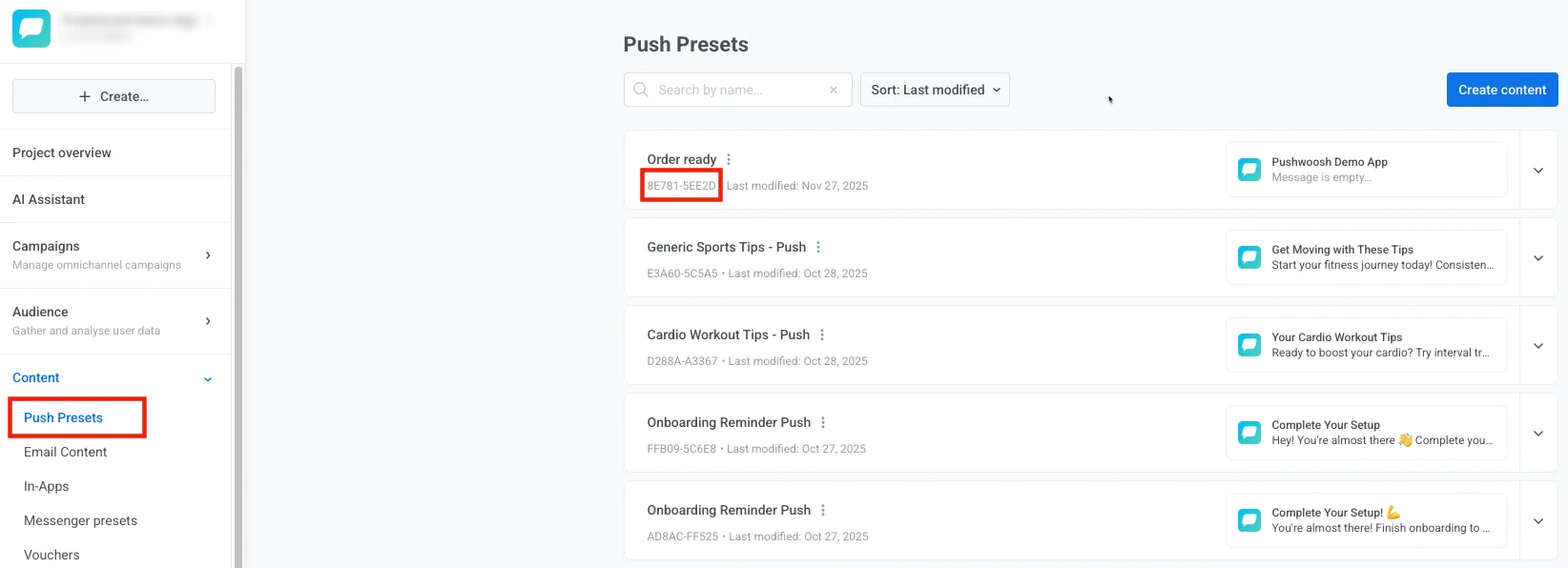
The code of a [Preset](/product/content/push-presets/) created in Pushwoosh Control Panel or via API. To obtain a preset code, go **Content** → **Presets**, expand the preset you are going to use, and copy the **Preset Code** from preset's details.
### rich_media
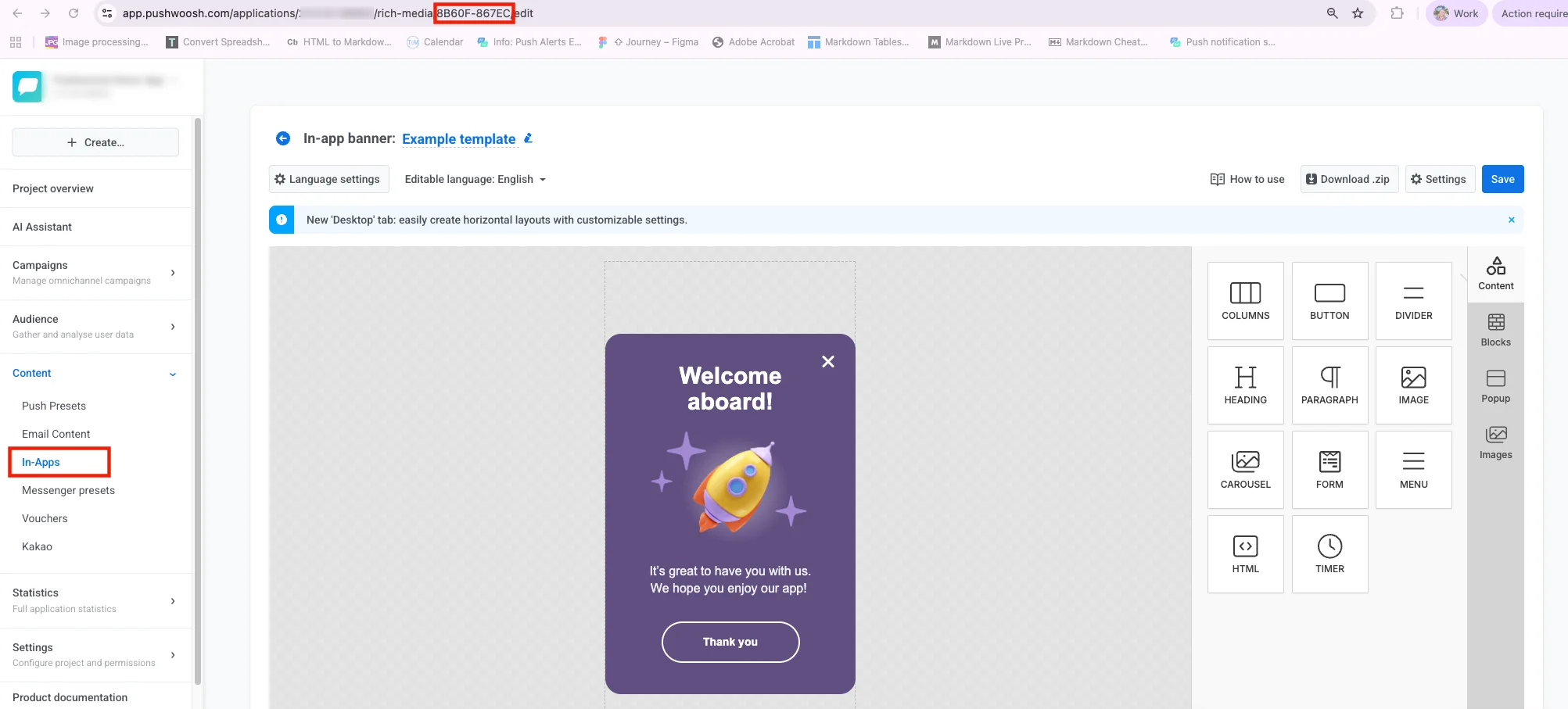
The code of a [Rich Media](/product/content/in-apps/) page you're going to attach to your message. To obtain a code, go to **Content** → **Rich Media**, open a Rich Media page you are going to use, and copy the code from the URL bar of your browser. The code is a hyphen-separated set of 10 characters (both letters and digits).
### send_rate
Throttling to restrain the push sending speed. Valid values are from 100 to 1000 pushes/second.
### timezone
Timezone to be taken into account when the message is sent on a particular date and time. If set, the device's timezone is ignored. If ignored, the message is sent in UTC. See [https://php.net/manual/timezones.php](https://php.net/manual/timezones.php) for supported timezones.
### template_bindings
Template placeholders to use in your content template. See the [Liquid Templates guide](/developer/guides/personalization/liquid-templates/) for details.
### transactionId
Unique message identifier to prevent duplicating messages in case of network problems. You can assign any ID to a message created via the [`/createMessage`](/developer/api-reference/messages-api/#createmessage) or [`/createTargetedMessage`](/developer/api-reference/messages-api/#createtargetedmessage) request. Stored on the side of Pushwoosh for 5 minutes.
### users
The array of [userIds](/developer/pushwoosh-knowledge-hub/users-userids/). User ID is a unique user identifier set by a [`/registerUser`](/developer/api-reference/user-centric-api/), [`/registerDevice`](/developer/api-reference/device-api/#registerdevice), or [`/registerEmail`](/developer/api-reference/email-api/) API request.
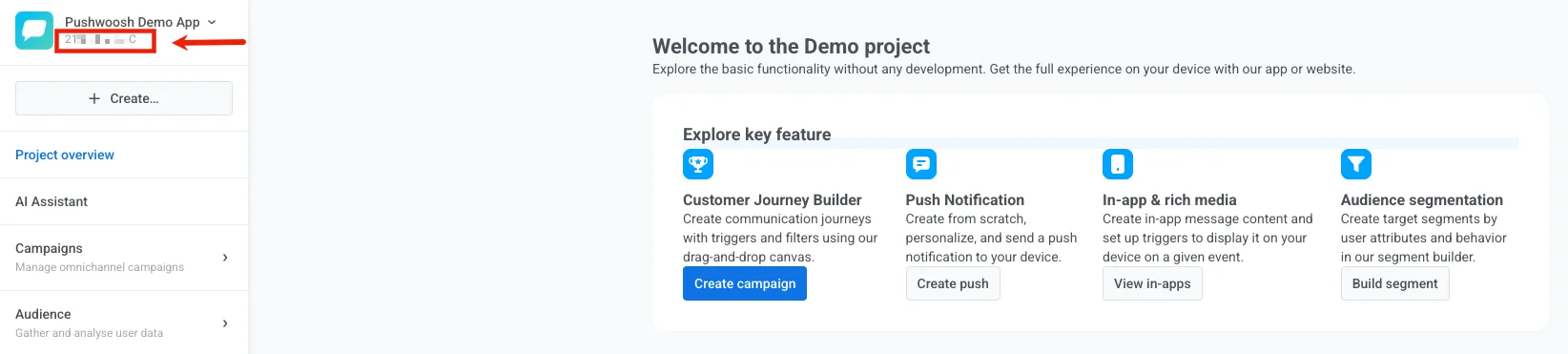 When creating an app via the API, you'll get an app code in response to your [`/createApplication`](/developer/api-reference/applications/#createapplication) request.
To obtain a code of a previously created app via the API, call [`/getApplications`](/developer/api-reference/applications/#getapplications). In response to the [`/getApplications`](/developer/api-reference/applications/#getapplications) request, you'll receive the list of all apps created in your Pushwoosh account with their names and codes.
### auth
API access token from Pushwoosh Control Panel. Go to **Settings** → **API Access** and copy a token you’d like to use or generate a new one.
When creating an app via the API, you'll get an app code in response to your [`/createApplication`](/developer/api-reference/applications/#createapplication) request.
To obtain a code of a previously created app via the API, call [`/getApplications`](/developer/api-reference/applications/#getapplications). In response to the [`/getApplications`](/developer/api-reference/applications/#getapplications) request, you'll receive the list of all apps created in your Pushwoosh account with their names and codes.
### auth
API access token from Pushwoosh Control Panel. Go to **Settings** → **API Access** and copy a token you’d like to use or generate a new one.
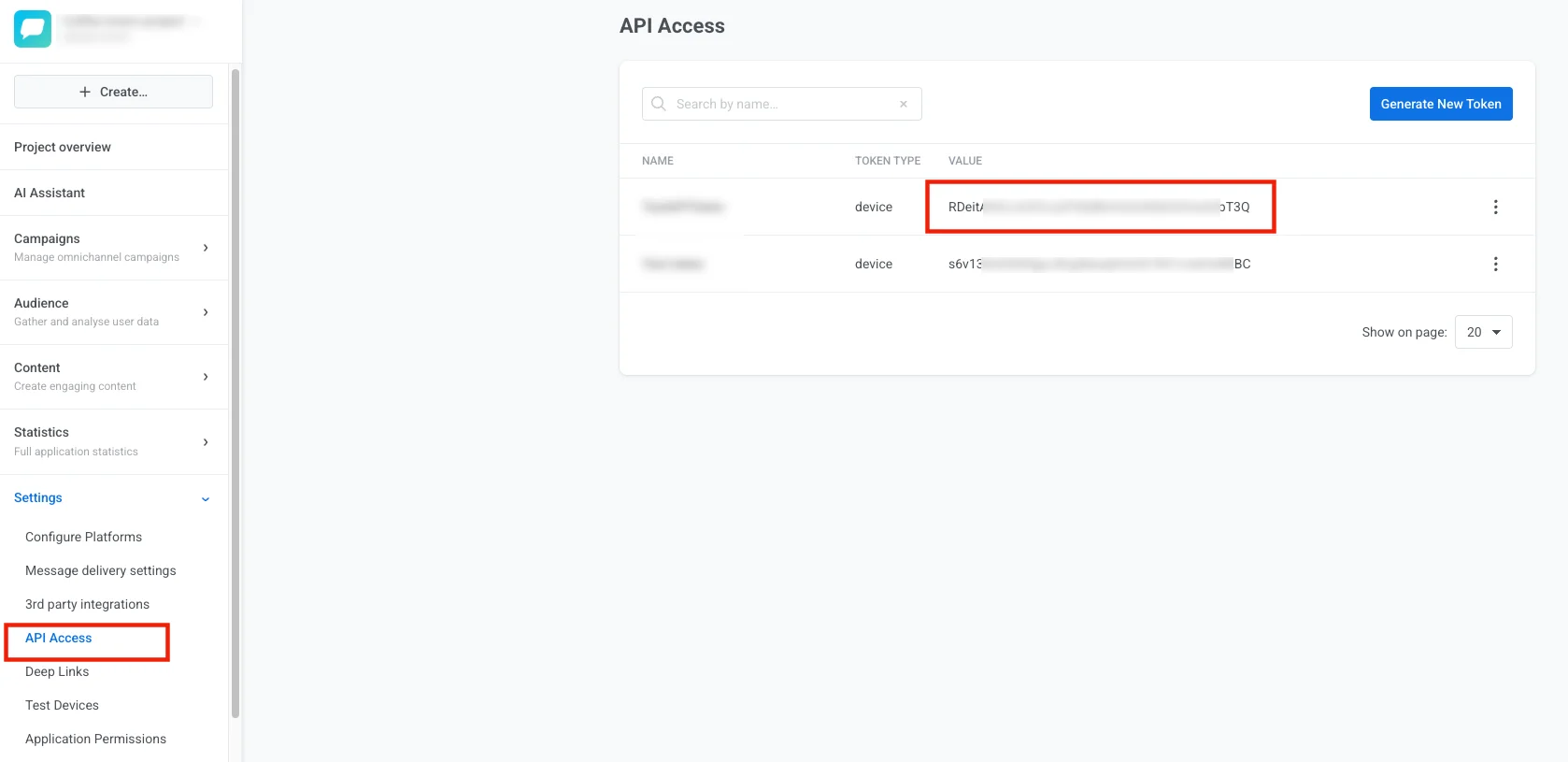 When generating an access token, specify its permissions. Check the checkboxes for those types of activities you're going to use the API token with. You can create app-specific API tokens by checking the Applications checkboxes.
 ### content
The string or object that defines the message content. The "content" parameter submitted with a string type value will send the same message for all recipients.
```txt title="String"
"content": "Hello world!",
```
JSON objects are used for specifying content using [Dynamic Content](/developer/guides/personalization/dynamic-content/), for example, for multi-language messages.
```txt title="Object"
"content": {
"en": "Hello!",
"es": "¡Hola!",
"de": "Hallo!"
},
```
### notifications
The JSON array of push properties. Must include at least the required `content` and `send_date` parameters.
Optional parameters to use within the "notifications" array:
* [campaign](#campaign)
* [capping_days](#capping_days)
* [capping_count](#capping_count)
* [conditions](#conditions)
* [data](#data)
* [devices](#devices)
* [dynamic_content](#dynamic_content)
* [filter](#filter)
* [ignore_user_timezone](#ignore_user_timezone)
* [inbox_date](#inbox_date)
* [inbox_image](#inbox_image)
* [link](#link)
* [minimize_link](#minimize_link)
* [message_type](#message_type)
* [platforms](#platforms)
* [preset](#preset)
* [rich_media](#rich_media)
* [send_rate](#send_rate)
* [timezone](#timezone)
* [template_bindings](#template_bindings)
* [transactionId](#transactionid)
* [users](#users)
### send_date
Date and time on which the message is sent. Can be any date and time formatted as YYYY-MM-DD HH:mm or 'now'. If set to 'now', the message will be sent immediately after submitting the request.
## Optional parameters
### campaign
The code of a Campaign. To obtain a Campaign code, go to **Statistics** → **Aggregated statistics** and select the Campaign you're going to use. The campaign code will be visible at the end of the page URL in the format `XXXXX-XXXXX`.
**Example:**
**URL:** `https://app.pushwoosh.com/applications/AAAAA-AAAAA/statistics/aggregated-message?campaignCode=XXXXX-XXXXX`
**Campaign code:** `XXXXX-XXXXX`
To obtain a list of Campaigns with their codes, call [`/getCampaigns`](/developer/api-reference/campaigns/#getcampaigns). In response to the `/getCampaigns` request, you'll receive the list of all Campaigns created for a particular app in your Pushwoosh account, with their codes, names, and descriptions.
### capping_days
Period to be applied for frequency capping, in days (max 30 days). See [Frequency capping](/product/messaging-channels/global-frequency-capping/) for details.
Frequency capping is not applied to messages with `message_type: transactional`. In all other cases, frequency capping is applied, including requests where `message_type` is omitted.
### capping_count
The maximum number of pushes that can be sent from a specific app to a particular device within a "capping_days" period. In case the message created exceeds the "capping_count" limit for a device, it won't be sent to that device. See [Frequency capping](/product/messaging-channels/global-frequency-capping/) for details.
### conditions
Conditions are arrays like `[tagName, operator, operand]` used for sending targeted messages based on [Tags](/developer/guides/audience-and-segmentation/tags/) and their values, where:
* tagName — the name of a tag to apply,
* [operator](/developer/guides/audience-and-segmentation/tags#tag-operators) — a value comparison operator ("EQ" | "IN" | "NOTEQ" | "NOTIN" | "LTE" | "GTE" | "BETWEEN" | "NOTSET" | "ANY"),
* [operand](/developer/guides/audience-and-segmentation/tags#tag-values) — Tag values of any of the following types: string | integer | array | date | boolean | list
#### Operator description
| | |
| -------- | ----------- |
| **EQ** | tag value is equal to operand. |
| **IN** | tag value intersects with operand (operand must always be an array). |
| **NOTEQ** | tag value is not equal to an operand. |
| **NOTIN** | tag value does not intersect with operand (operand must always be an array). |
| **GTE** | tag value is greater than or equal to operand. |
| **LTE** | tag value is less than or equal to operand. |
| **BETWEEN** | tag value is greater than or equal to min operand value but less than or equal to max operand value (operand must always be an array). |
| **NOTSET** | tag is not set. Operand is not considered. |
| **ANY** | tag has any value. Operand is not considered. |
#### String tags
**Valid operators**: EQ, IN, NOTEQ, NOTIN, NOTSET, ANY
**Valid operands:**
| | |
| -------- | ------- |
| **EQ, NOTEQ** | operand must be a string |
| **IN, NOTIN** | operand must be an array of strings like `["value 1", "value 2", "value N"]` |
| **NOTSET** | tag is not set. Operand is not considered |
| **ANY** | tag has any value. Operand is not considered |
#### Integer tags
**Valid operators**: EQ, IN, NOTEQ, NOTIN, BETWEEN, GTE, LTE, NOTSET, ANY
**Valid operands:**
| | |
| -------- | ------- |
| **EQ, NOTEQ, GTE, LTE** | operand must be an integer |
| **IN, NOTIN** | operand must be an array of integers like `[value 1, value 2, value N]` |
| **BETWEEN** | operand must be an array of integers like `[min_value, max_value]` |
| **NOTSET** | tag is not set. Operand is not considered |
| **ANY** | tag has any value. Operand is not considered |
#### Date tags
**Valid operators**: EQ, IN, NOTEQ, NOTIN, BETWEEN, GTE, LTE, NOTSET, ANY
**Valid operands:**
* `"YYYY-MM-DD 00:00"` (string)
* unix timestamp `1234567890` (integer)
* `"N days ago"` (string) for operators EQ, BETWEEN, GTE, LTE
#### Boolean tags
**Valid operators**: EQ, NOTSET, ANY
**Valid operands:** `0, 1, true, false`
#### List tags
**Valid operators**: IN, NOTIN, NOTSET, ANY
**Valid operands:** operand must be an array of strings like `["value 1", "value 2", "value N"]`.
### conditions_operator
Logical operator for conditions arrays. Possible values: AND | OR. AND is default.
If the operator applied is AND (when no operator is specified, or the 'conditions_operator' param has the 'AND' value), devices simultaneously complying with all the conditions will receive the push notification.
If the operator is OR, devices that comply with any of the specified conditions will receive the message.
### data
JSON string or JSON object used to pass any [custom data](/developer/guides/messaging-channels/using-custom-data) in the push payload; is passed as "u" parameter in the payload (converted to JSON string).
### devices
The array of [push tokens](/developer/pushwoosh-knowledge-hub/device-identifiers/#push-token) or [hwids](/developer/pushwoosh-knowledge-hub/device-identifiers/#hwid) to send targeted push notifications. If set, the message will only be sent to the devices on the list.
### dynamic_content
Placeholders for [Dynamic Content](/product/personalization/dynamic-content) to be used instead of device Tag values. The example below will send the "Hello, John!" message to every user you target. If not set, the Dynamic Content values are taken from the device Tags.
```
"content": "Hello, {firstname|CapitalizeFirst}!",
"dynamic_content_placeholders": {
"firstname": "John",
"lastname": "Doe"
},
```
### filter
The name of a [Segment](/product/audience-data-and-segmentation/segmentation/) exactly as it's created in Pushwoosh Control Panel or via a [`/createFilter`](/developer/api-reference/segmentation-filters-api/#createfilter) API request. Go to the **Audience** → **Segments** section and check the list of Segments created.
### content
The string or object that defines the message content. The "content" parameter submitted with a string type value will send the same message for all recipients.
```txt title="String"
"content": "Hello world!",
```
JSON objects are used for specifying content using [Dynamic Content](/developer/guides/personalization/dynamic-content/), for example, for multi-language messages.
```txt title="Object"
"content": {
"en": "Hello!",
"es": "¡Hola!",
"de": "Hallo!"
},
```
### notifications
The JSON array of push properties. Must include at least the required `content` and `send_date` parameters.
Optional parameters to use within the "notifications" array:
* [campaign](#campaign)
* [capping_days](#capping_days)
* [capping_count](#capping_count)
* [conditions](#conditions)
* [data](#data)
* [devices](#devices)
* [dynamic_content](#dynamic_content)
* [filter](#filter)
* [ignore_user_timezone](#ignore_user_timezone)
* [inbox_date](#inbox_date)
* [inbox_image](#inbox_image)
* [link](#link)
* [minimize_link](#minimize_link)
* [message_type](#message_type)
* [platforms](#platforms)
* [preset](#preset)
* [rich_media](#rich_media)
* [send_rate](#send_rate)
* [timezone](#timezone)
* [template_bindings](#template_bindings)
* [transactionId](#transactionid)
* [users](#users)
### send_date
Date and time on which the message is sent. Can be any date and time formatted as YYYY-MM-DD HH:mm or 'now'. If set to 'now', the message will be sent immediately after submitting the request.
## Optional parameters
### campaign
The code of a Campaign. To obtain a Campaign code, go to **Statistics** → **Aggregated statistics** and select the Campaign you're going to use. The campaign code will be visible at the end of the page URL in the format `XXXXX-XXXXX`.
**Example:**
**URL:** `https://app.pushwoosh.com/applications/AAAAA-AAAAA/statistics/aggregated-message?campaignCode=XXXXX-XXXXX`
**Campaign code:** `XXXXX-XXXXX`
To obtain a list of Campaigns with their codes, call [`/getCampaigns`](/developer/api-reference/campaigns/#getcampaigns). In response to the `/getCampaigns` request, you'll receive the list of all Campaigns created for a particular app in your Pushwoosh account, with their codes, names, and descriptions.
### capping_days
Period to be applied for frequency capping, in days (max 30 days). See [Frequency capping](/product/messaging-channels/global-frequency-capping/) for details.
Frequency capping is not applied to messages with `message_type: transactional`. In all other cases, frequency capping is applied, including requests where `message_type` is omitted.
### capping_count
The maximum number of pushes that can be sent from a specific app to a particular device within a "capping_days" period. In case the message created exceeds the "capping_count" limit for a device, it won't be sent to that device. See [Frequency capping](/product/messaging-channels/global-frequency-capping/) for details.
### conditions
Conditions are arrays like `[tagName, operator, operand]` used for sending targeted messages based on [Tags](/developer/guides/audience-and-segmentation/tags/) and their values, where:
* tagName — the name of a tag to apply,
* [operator](/developer/guides/audience-and-segmentation/tags#tag-operators) — a value comparison operator ("EQ" | "IN" | "NOTEQ" | "NOTIN" | "LTE" | "GTE" | "BETWEEN" | "NOTSET" | "ANY"),
* [operand](/developer/guides/audience-and-segmentation/tags#tag-values) — Tag values of any of the following types: string | integer | array | date | boolean | list
#### Operator description
| | |
| -------- | ----------- |
| **EQ** | tag value is equal to operand. |
| **IN** | tag value intersects with operand (operand must always be an array). |
| **NOTEQ** | tag value is not equal to an operand. |
| **NOTIN** | tag value does not intersect with operand (operand must always be an array). |
| **GTE** | tag value is greater than or equal to operand. |
| **LTE** | tag value is less than or equal to operand. |
| **BETWEEN** | tag value is greater than or equal to min operand value but less than or equal to max operand value (operand must always be an array). |
| **NOTSET** | tag is not set. Operand is not considered. |
| **ANY** | tag has any value. Operand is not considered. |
#### String tags
**Valid operators**: EQ, IN, NOTEQ, NOTIN, NOTSET, ANY
**Valid operands:**
| | |
| -------- | ------- |
| **EQ, NOTEQ** | operand must be a string |
| **IN, NOTIN** | operand must be an array of strings like `["value 1", "value 2", "value N"]` |
| **NOTSET** | tag is not set. Operand is not considered |
| **ANY** | tag has any value. Operand is not considered |
#### Integer tags
**Valid operators**: EQ, IN, NOTEQ, NOTIN, BETWEEN, GTE, LTE, NOTSET, ANY
**Valid operands:**
| | |
| -------- | ------- |
| **EQ, NOTEQ, GTE, LTE** | operand must be an integer |
| **IN, NOTIN** | operand must be an array of integers like `[value 1, value 2, value N]` |
| **BETWEEN** | operand must be an array of integers like `[min_value, max_value]` |
| **NOTSET** | tag is not set. Operand is not considered |
| **ANY** | tag has any value. Operand is not considered |
#### Date tags
**Valid operators**: EQ, IN, NOTEQ, NOTIN, BETWEEN, GTE, LTE, NOTSET, ANY
**Valid operands:**
* `"YYYY-MM-DD 00:00"` (string)
* unix timestamp `1234567890` (integer)
* `"N days ago"` (string) for operators EQ, BETWEEN, GTE, LTE
#### Boolean tags
**Valid operators**: EQ, NOTSET, ANY
**Valid operands:** `0, 1, true, false`
#### List tags
**Valid operators**: IN, NOTIN, NOTSET, ANY
**Valid operands:** operand must be an array of strings like `["value 1", "value 2", "value N"]`.
### conditions_operator
Logical operator for conditions arrays. Possible values: AND | OR. AND is default.
If the operator applied is AND (when no operator is specified, or the 'conditions_operator' param has the 'AND' value), devices simultaneously complying with all the conditions will receive the push notification.
If the operator is OR, devices that comply with any of the specified conditions will receive the message.
### data
JSON string or JSON object used to pass any [custom data](/developer/guides/messaging-channels/using-custom-data) in the push payload; is passed as "u" parameter in the payload (converted to JSON string).
### devices
The array of [push tokens](/developer/pushwoosh-knowledge-hub/device-identifiers/#push-token) or [hwids](/developer/pushwoosh-knowledge-hub/device-identifiers/#hwid) to send targeted push notifications. If set, the message will only be sent to the devices on the list.
### dynamic_content
Placeholders for [Dynamic Content](/product/personalization/dynamic-content) to be used instead of device Tag values. The example below will send the "Hello, John!" message to every user you target. If not set, the Dynamic Content values are taken from the device Tags.
```
"content": "Hello, {firstname|CapitalizeFirst}!",
"dynamic_content_placeholders": {
"firstname": "John",
"lastname": "Doe"
},
```
### filter
The name of a [Segment](/product/audience-data-and-segmentation/segmentation/) exactly as it's created in Pushwoosh Control Panel or via a [`/createFilter`](/developer/api-reference/segmentation-filters-api/#createfilter) API request. Go to the **Audience** → **Segments** section and check the list of Segments created.
 To get Segments list via the API, call the [`/listFilters`](/developer/api-reference/segmentation-filters-api/#listfilters) API method. In response to the `/listFilters` request, you'll receive the list of all Segments created in your Pushwoosh account, with Segments' names, conditions, and expiration dates.
### ignore_user_timezone
If set to 'true', sends the message at the time and date specified in the "send_date" parameter according to UTC-0.
If set to 'false', users will receive the message at the specified local time according to their device's settings.
### inbox_date
The date until which the message should be kept in users' [Inbox](/developer/guides/message-inbox/mobile-message-inbox). If not specified, the message will be removed from Inbox on the next day after the sending date.
### inbox_image
The URL of the custom image to be shown near the message in [Inbox](/developer/guides/message-inbox/mobile-message-inbox).
### inbox_days
The lifetime of an inbox message in days, up to 30 days. After this period, the message will be removed from the inbox. Can be used instead of the **inbox_date** parameter.
### link
The URL to be opened once a user opens a push notification.
### message_type
Specifies the push message type. Available values are `marketing` and `transactional`. See [Marketing vs transactional messages](/product/messaging-channels/marketing-vs-transactional/) for details.
This parameter is optional. If omitted, users with `PW_ControlGroup: true` will not receive the message.
### minimize_link
Shortener to minimize the URL submitted in the "link" parameter. Please note that push notification payload size is limited, so consider creating short URLs not to exceed the limit. Available values: 0 — do not minimize, 2 — bitly. Default = 2. Google URL shortener is disabled since March 30, 2019.
### platforms
The array of platform codes to send the message to specific platforms only.
Available platform codes include: `1` — iOS, `3` — Android, `7` — Mac OS X, `8` — Windows, `9` — Amazon, `10` — Safari, `11` — Chrome, `12` — Firefox, `14` — Email, `17` — Huawei, `18` — SMS, and `21` — WhatsApp.
### preset
The code of a [Preset](/product/content/push-presets/) created in Pushwoosh Control Panel or via API. To obtain a preset code, go **Content** → **Presets**, expand the preset you are going to use, and copy the **Preset Code** from preset's details.
To get Segments list via the API, call the [`/listFilters`](/developer/api-reference/segmentation-filters-api/#listfilters) API method. In response to the `/listFilters` request, you'll receive the list of all Segments created in your Pushwoosh account, with Segments' names, conditions, and expiration dates.
### ignore_user_timezone
If set to 'true', sends the message at the time and date specified in the "send_date" parameter according to UTC-0.
If set to 'false', users will receive the message at the specified local time according to their device's settings.
### inbox_date
The date until which the message should be kept in users' [Inbox](/developer/guides/message-inbox/mobile-message-inbox). If not specified, the message will be removed from Inbox on the next day after the sending date.
### inbox_image
The URL of the custom image to be shown near the message in [Inbox](/developer/guides/message-inbox/mobile-message-inbox).
### inbox_days
The lifetime of an inbox message in days, up to 30 days. After this period, the message will be removed from the inbox. Can be used instead of the **inbox_date** parameter.
### link
The URL to be opened once a user opens a push notification.
### message_type
Specifies the push message type. Available values are `marketing` and `transactional`. See [Marketing vs transactional messages](/product/messaging-channels/marketing-vs-transactional/) for details.
This parameter is optional. If omitted, users with `PW_ControlGroup: true` will not receive the message.
### minimize_link
Shortener to minimize the URL submitted in the "link" parameter. Please note that push notification payload size is limited, so consider creating short URLs not to exceed the limit. Available values: 0 — do not minimize, 2 — bitly. Default = 2. Google URL shortener is disabled since March 30, 2019.
### platforms
The array of platform codes to send the message to specific platforms only.
Available platform codes include: `1` — iOS, `3` — Android, `7` — Mac OS X, `8` — Windows, `9` — Amazon, `10` — Safari, `11` — Chrome, `12` — Firefox, `14` — Email, `17` — Huawei, `18` — SMS, and `21` — WhatsApp.
### preset
The code of a [Preset](/product/content/push-presets/) created in Pushwoosh Control Panel or via API. To obtain a preset code, go **Content** → **Presets**, expand the preset you are going to use, and copy the **Preset Code** from preset's details.
 ### rich_media
The code of a [Rich Media](/product/content/in-apps/) page you're going to attach to your message. To obtain a code, go to **Content** → **Rich Media**, open a Rich Media page you are going to use, and copy the code from the URL bar of your browser. The code is a hyphen-separated set of 10 characters (both letters and digits).
### rich_media
The code of a [Rich Media](/product/content/in-apps/) page you're going to attach to your message. To obtain a code, go to **Content** → **Rich Media**, open a Rich Media page you are going to use, and copy the code from the URL bar of your browser. The code is a hyphen-separated set of 10 characters (both letters and digits).
 ### send_rate
Throttling to restrain the push sending speed. Valid values are from 100 to 1000 pushes/second.
### timezone
Timezone to be taken into account when the message is sent on a particular date and time. If set, the device's timezone is ignored. If ignored, the message is sent in UTC. See [https://php.net/manual/timezones.php](https://php.net/manual/timezones.php) for supported timezones.
### template_bindings
Template placeholders to use in your content template. See the [Liquid Templates guide](/developer/guides/personalization/liquid-templates/) for details.
### transactionId
Unique message identifier to prevent duplicating messages in case of network problems. You can assign any ID to a message created via the [`/createMessage`](/developer/api-reference/messages-api/#createmessage) or [`/createTargetedMessage`](/developer/api-reference/messages-api/#createtargetedmessage) request. Stored on the side of Pushwoosh for 5 minutes.
### users
The array of [userIds](/developer/pushwoosh-knowledge-hub/users-userids/). User ID is a unique user identifier set by a [`/registerUser`](/developer/api-reference/user-centric-api/), [`/registerDevice`](/developer/api-reference/device-api/#registerdevice), or [`/registerEmail`](/developer/api-reference/email-api/) API request.
### send_rate
Throttling to restrain the push sending speed. Valid values are from 100 to 1000 pushes/second.
### timezone
Timezone to be taken into account when the message is sent on a particular date and time. If set, the device's timezone is ignored. If ignored, the message is sent in UTC. See [https://php.net/manual/timezones.php](https://php.net/manual/timezones.php) for supported timezones.
### template_bindings
Template placeholders to use in your content template. See the [Liquid Templates guide](/developer/guides/personalization/liquid-templates/) for details.
### transactionId
Unique message identifier to prevent duplicating messages in case of network problems. You can assign any ID to a message created via the [`/createMessage`](/developer/api-reference/messages-api/#createmessage) or [`/createTargetedMessage`](/developer/api-reference/messages-api/#createtargetedmessage) request. Stored on the side of Pushwoosh for 5 minutes.
### users
The array of [userIds](/developer/pushwoosh-knowledge-hub/users-userids/). User ID is a unique user identifier set by a [`/registerUser`](/developer/api-reference/user-centric-api/), [`/registerDevice`](/developer/api-reference/device-api/#registerdevice), or [`/registerEmail`](/developer/api-reference/email-api/) API request.