# Einrichten von Badges für Cordova
Da das Cordova-Plugin den Header `PWNotificationExtensionManager` nicht enthält, müssen Sie mehrere zusätzliche Schritte durchführen, um Badges für Ihr Cordova-Projekt zu implementieren.
Um Badges einzurichten, führen Sie die folgenden Schritte aus:
1. Erstellen Sie eine Notification Service Extension
2. Fügen Sie das Pushwoosh-Framework hinzu
3. Fügen Sie die App Groups-Fähigkeit hinzu
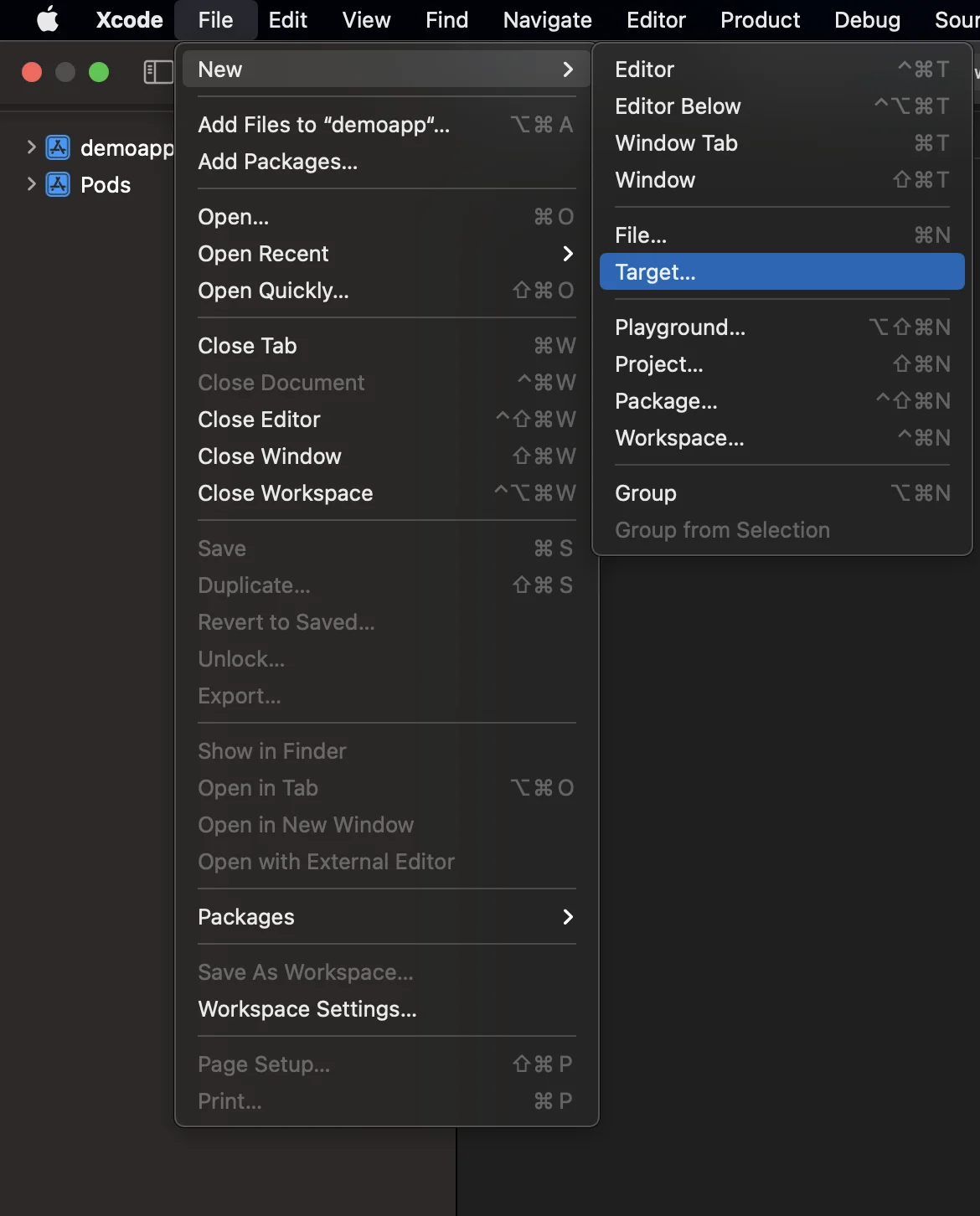
### 1. Fügen Sie eine Notification Service Extension hinzu (File -> New -> Target...)
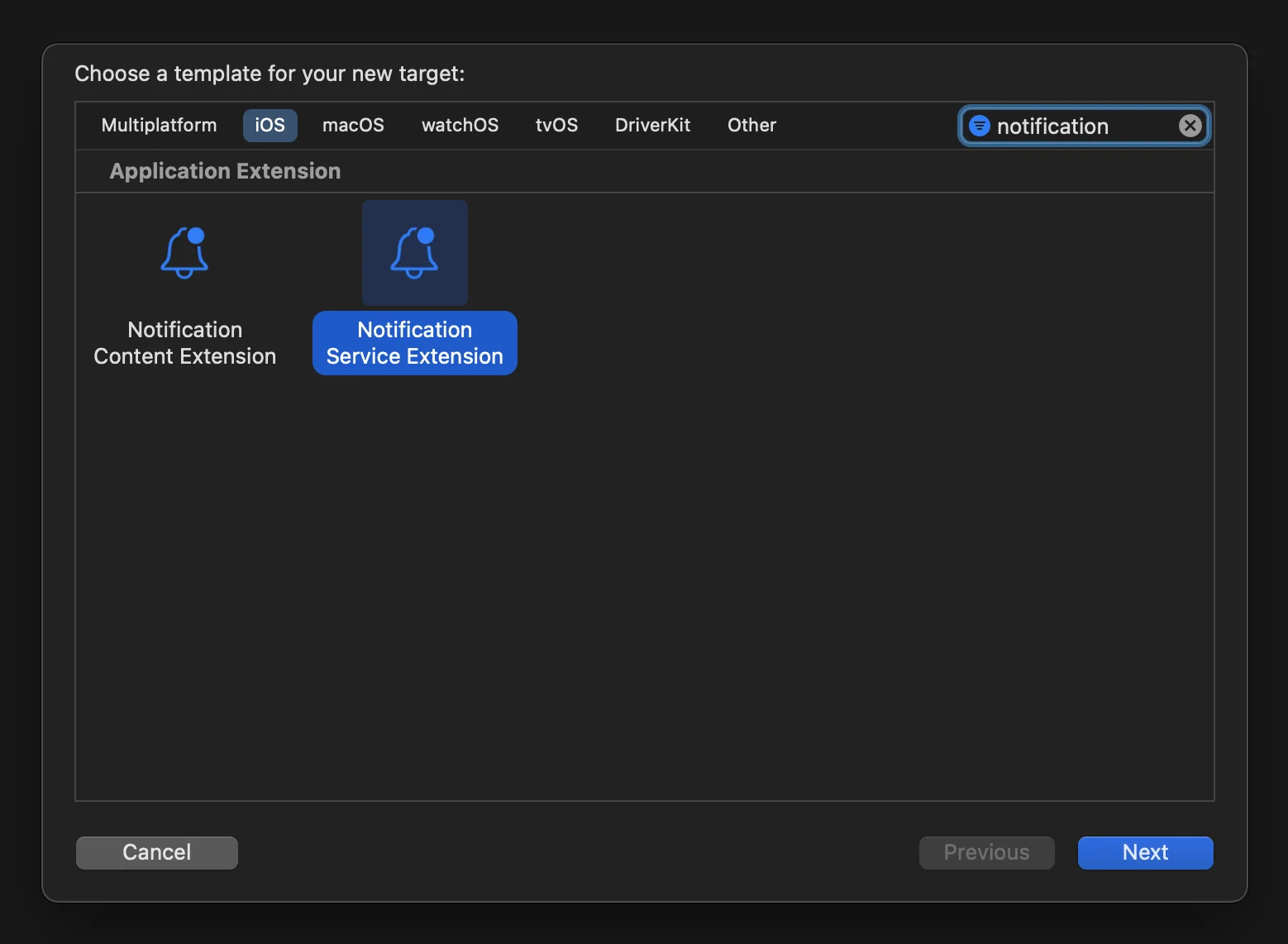
### 2. Wählen Sie die „Notification Service Extension“
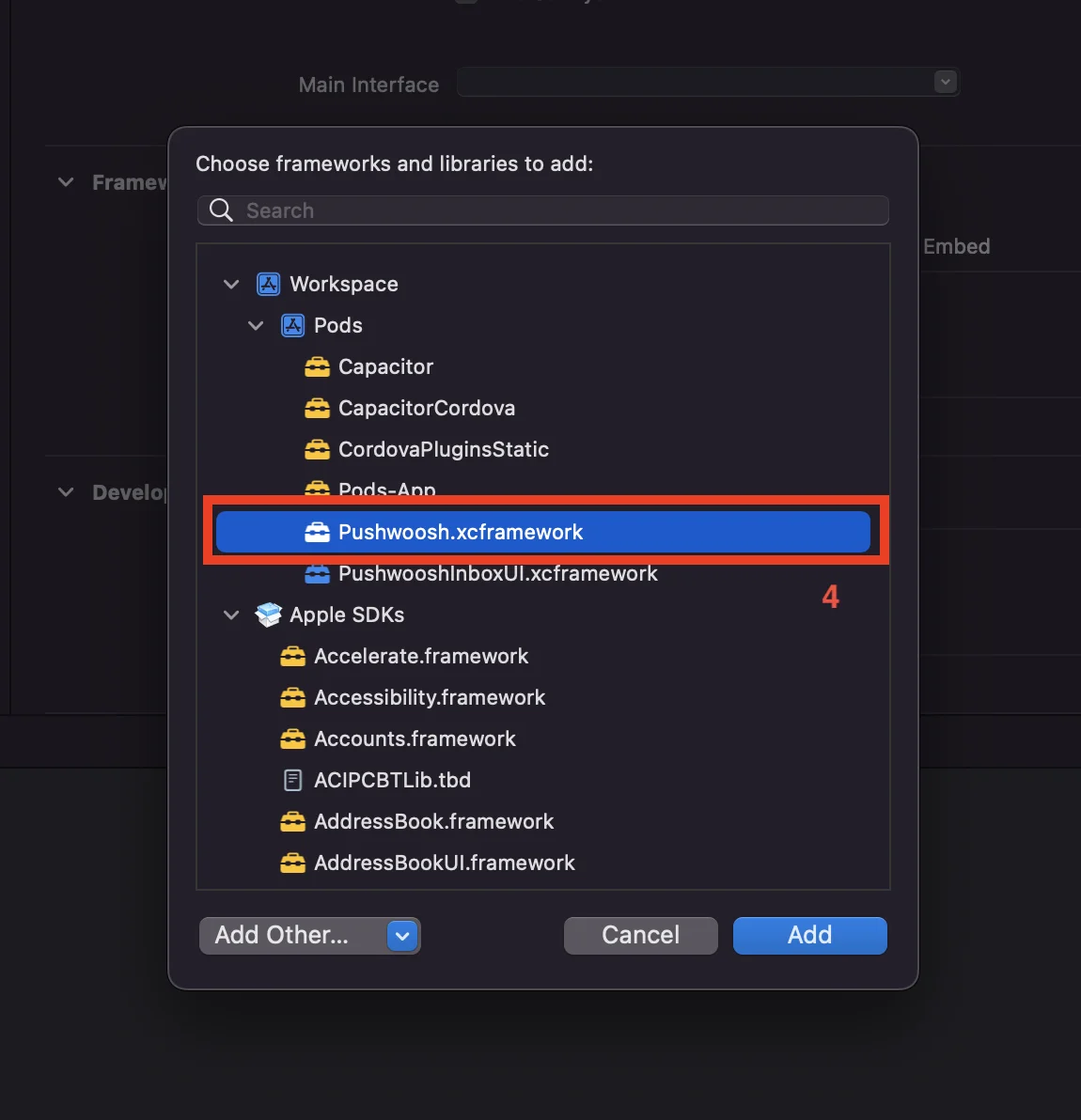
### 3. Fügen Sie Pushwoosh.xcframework zum Ziel der NotificationService-Erweiterung wie folgt hinzu:
1. Wählen Sie das Ziel der **NotificationService**-Erweiterung.
2. Gehen Sie zum Tab „**General**“.
3. Suchen Sie nach „**Framework and Libraries**“ und klicken Sie auf die Schaltfläche „**+**“.
4. Wählen Sie **Pushwoosh.xcframework** aus.
### 4. Aktualisieren Sie den Code der Notification Service Extension wie folgt:
```
#import "NotificationService.h"
#import "PWNotificationExtensionManager.h"
@interface NotificationService ()
@property (nonatomic, strong) void (^contentHandler)(UNNotificationContent *contentToDeliver);
@property (nonatomic, strong) UNMutableNotificationContent *bestAttemptContent;
@end
@implementation NotificationService
- (void)didReceiveNotificationRequest:(UNNotificationRequest *)request withContentHandler:(void (^)(UNNotificationContent * _Nonnull))contentHandler {
self.contentHandler = contentHandler;
self.bestAttemptContent = [request.content mutableCopy];
[[PWNotificationExtensionManager sharedManager] handleNotificationRequest:request contentHandler:contentHandler];
}
- (void)serviceExtensionTimeWillExpire {
// Called just before the extension will be terminated by the system.
// Use this as an opportunity to deliver your "best attempt" at modified content, otherwise the original push payload will be used.
self.contentHandler(self.bestAttemptContent);
}
@end
```
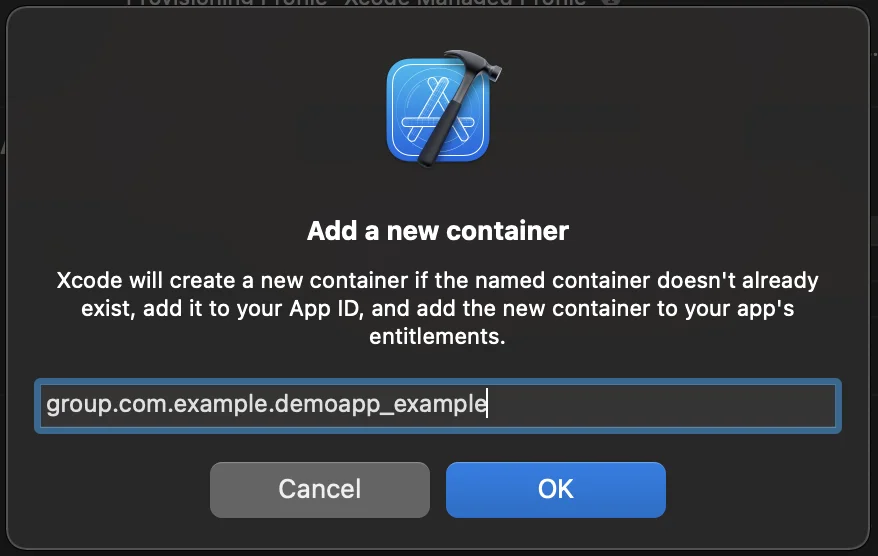
### 5. Fügen Sie die „App Groups Capability“ für jedes Ziel Ihrer Anwendung hinzu
### 6. Fügen Sie die App Groups ID zu Ihrer info.plist für jedes Ziel Ihrer Anwendung hinzu
```
PW_APP_GROUPS_NAMEgroup.com.example.demoapp_example
```
## Teilen Sie Ihr Feedback mit uns
Ihr Feedback hilft uns, eine bessere Erfahrung zu schaffen. Daher würden wir uns freuen, von Ihnen zu hören, wenn Sie während des SDK-Integrationsprozesses auf Probleme stoßen. Sollten Sie Schwierigkeiten haben, zögern Sie bitte nicht, uns Ihre Gedanken [über dieses Formular](https://docs.google.com/forms/d/e/1FAIpQLSd\_0b8jwn-V\_JmoPLIxIFYbHACCQhrzidOZV3ELywoQPXRSxw/viewform) mitzuteilen.
 ### 2. Wählen Sie die „Notification Service Extension“
 ### 3. Fügen Sie Pushwoosh.xcframework zum Ziel der NotificationService-Erweiterung wie folgt hinzu:
1. Wählen Sie das Ziel der **NotificationService**-Erweiterung.
2. Gehen Sie zum Tab „**General**“.
3. Suchen Sie nach „**Framework and Libraries**“ und klicken Sie auf die Schaltfläche „**+**“.
4. Wählen Sie **Pushwoosh.xcframework** aus.
### 3. Fügen Sie Pushwoosh.xcframework zum Ziel der NotificationService-Erweiterung wie folgt hinzu:
1. Wählen Sie das Ziel der **NotificationService**-Erweiterung.
2. Gehen Sie zum Tab „**General**“.
3. Suchen Sie nach „**Framework and Libraries**“ und klicken Sie auf die Schaltfläche „**+**“.
4. Wählen Sie **Pushwoosh.xcframework** aus.
 ### 4. Aktualisieren Sie den Code der Notification Service Extension wie folgt:
```
#import "NotificationService.h"
#import "PWNotificationExtensionManager.h"
@interface NotificationService ()
@property (nonatomic, strong) void (^contentHandler)(UNNotificationContent *contentToDeliver);
@property (nonatomic, strong) UNMutableNotificationContent *bestAttemptContent;
@end
@implementation NotificationService
- (void)didReceiveNotificationRequest:(UNNotificationRequest *)request withContentHandler:(void (^)(UNNotificationContent * _Nonnull))contentHandler {
self.contentHandler = contentHandler;
self.bestAttemptContent = [request.content mutableCopy];
[[PWNotificationExtensionManager sharedManager] handleNotificationRequest:request contentHandler:contentHandler];
}
- (void)serviceExtensionTimeWillExpire {
// Called just before the extension will be terminated by the system.
// Use this as an opportunity to deliver your "best attempt" at modified content, otherwise the original push payload will be used.
self.contentHandler(self.bestAttemptContent);
}
@end
```
### 5. Fügen Sie die „App Groups Capability“ für jedes Ziel Ihrer Anwendung hinzu
### 4. Aktualisieren Sie den Code der Notification Service Extension wie folgt:
```
#import "NotificationService.h"
#import "PWNotificationExtensionManager.h"
@interface NotificationService ()
@property (nonatomic, strong) void (^contentHandler)(UNNotificationContent *contentToDeliver);
@property (nonatomic, strong) UNMutableNotificationContent *bestAttemptContent;
@end
@implementation NotificationService
- (void)didReceiveNotificationRequest:(UNNotificationRequest *)request withContentHandler:(void (^)(UNNotificationContent * _Nonnull))contentHandler {
self.contentHandler = contentHandler;
self.bestAttemptContent = [request.content mutableCopy];
[[PWNotificationExtensionManager sharedManager] handleNotificationRequest:request contentHandler:contentHandler];
}
- (void)serviceExtensionTimeWillExpire {
// Called just before the extension will be terminated by the system.
// Use this as an opportunity to deliver your "best attempt" at modified content, otherwise the original push payload will be used.
self.contentHandler(self.bestAttemptContent);
}
@end
```
### 5. Fügen Sie die „App Groups Capability“ für jedes Ziel Ihrer Anwendung hinzu

 ### 6. Fügen Sie die App Groups ID zu Ihrer info.plist für jedes Ziel Ihrer Anwendung hinzu
```
### 6. Fügen Sie die App Groups ID zu Ihrer info.plist für jedes Ziel Ihrer Anwendung hinzu
```