# دليل التكامل الأساسي لـ iOS SDK
يحتوي هذا القسم على معلومات حول كيفية دمج Pushwoosh SDK في تطبيق iOS الخاص بك.
## المتطلبات الأساسية
لدمج Pushwoosh iOS SDK في تطبيقك، ستحتاج إلى ما يلي:
## خطوات التكامل
### 1. التثبيت
يمكنك دمج Pushwoosh SDK في تطبيقك باستخدام إما **Swift Package Manager** أو **CocoaPods**.
#### Swift Package Manager
في قسم **Package Dependencies**، أضف الحزمة التالية:
```
https://github.com/Pushwoosh/Pushwoosh-XCFramework
```
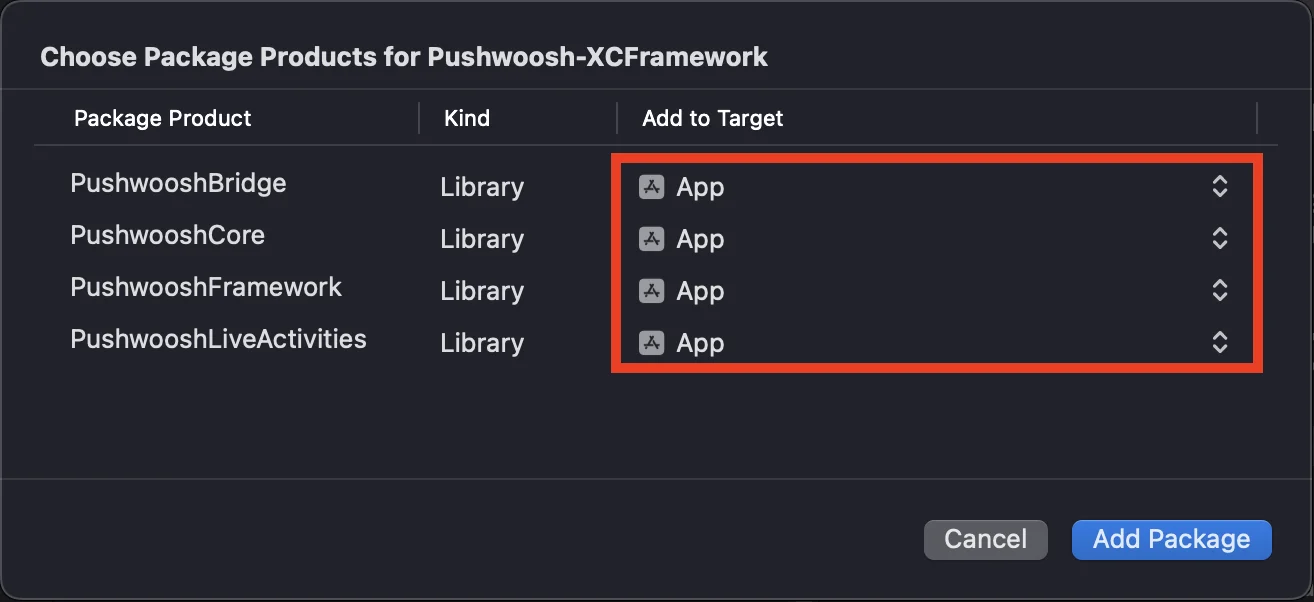
لاستخدام Pushwoosh iOS SDK، تأكد من إضافة الأطر الأربعة التالية إلى هدف تطبيقك عند التكامل عبر Swift Package Manager:
* ```PushwooshFramework```
* ```PushwooshCore```
* ```PushwooshBridge```
* ```PushwooshLiveActivities```
 #### CocoaPods
افتح ملف `Podfile` الخاص بك وأضف التبعية:
```bash
# Uncomment the next line to define a global platform for your project
# platform :ios, '9.0'
target 'MyApp' do
# Comment the next line if you don't want to use dynamic frameworks
use_frameworks!
pod 'PushwooshXCFramework'
end
```
ثم، في الطرفية، قم بتشغيل الأمر التالي لتثبيت التبعيات:
```bash
pod install
```
### 2. القدرات (Capabilities)
لتمكين الإشعارات الفورية في مشروعك، تحتاج إلى إضافة قدرات معينة.
في قسم Signing & Capabilities، أضف القدرات التالية:
- `Push Notifications`
- `Background Modes`. بعد إضافة هذه القدرة، حدد مربع `Remote notifications`.
إذا كنت تنوي استخدام الإشعارات الحساسة للوقت (Time Sensitive Notifications) (iOS 15+)، أضف أيضًا قدرة `Time Sensitive Notifications`.
### 3. كود التهيئة
#### AppDelegate
أضف الكود التالي إلى فئة AppDelegate الخاصة بك:
```swift
import SwiftUI
import PushwooshFramework
@main
struct MyApp: App {
// تسجيل AppDelegate كـ UIApplicationDelegate
@UIApplicationDelegateAdaptor(AppDelegate.self) var appDelegate
var body: some Scene {
WindowGroup {
ContentView()
}
}
}
class AppDelegate: NSObject, UIApplicationDelegate, PWMessagingDelegate {
func application(_ application: UIApplication, didFinishLaunchingWithOptions launchOptions: [UIApplication.LaunchOptionsKey: Any]?) -> Bool {
// كود التهيئة
// تعيين مندوب مخصص للتعامل مع الإشعارات
Pushwoosh.sharedInstance().delegate = self
// التسجيل في الإشعارات الفورية
Pushwoosh.sharedInstance().registerForPushNotifications()
return true
}
// التعامل مع الرمز المستلم من APNS
func application(_ application: UIApplication, didRegisterForRemoteNotificationsWithDeviceToken deviceToken: Data) {
Pushwoosh.sharedInstance().handlePushRegistration(deviceToken)
}
// التعامل مع خطأ استلام الرمز
func application(_ application: UIApplication, didFailToRegisterForRemoteNotificationsWithError error: Error) {
Pushwoosh.sharedInstance().handlePushRegistrationFailure(error)
}
// للإشعارات الفورية الصامتة
func application(_ application: UIApplication, didReceiveRemoteNotification userInfo: [AnyHashable: Any], fetchCompletionHandler completionHandler: @escaping (UIBackgroundFetchResult) -> Void) {
Pushwoosh.sharedInstance().handlePushReceived(userInfo)
completionHandler(.noData)
}
// يتم إطلاقه عند استلام إشعار
func pushwoosh(_ pushwoosh: Pushwoosh, onMessageReceived message: PWMessage) {
print("onMessageReceived: ", message.payload!.description)
}
// يتم إطلاقه عندما ينقر المستخدم على الإشعار
func pushwoosh(_ pushwoosh: Pushwoosh, onMessageOpened message: PWMessage) {
print("onMessageOpened: ", message.payload!.description)
}
}
struct ContentView: View {
var body: some View {
Text("Pushwoosh with SwiftUI")
.padding()
}
}
```
```swift
import PushwooshFramework
@UIApplicationMain
class AppDelegate: UIResponder, UIApplicationDelegate, PWMessagingDelegate {
var window: UIWindow?
func application(_ application: UIApplication, didFinishLaunchingWithOptions launchOptions: [UIApplication.LaunchOptionsKey: Any]?) -> Bool {
// كود التهيئة
// تعيين مندوب مخصص للتعامل مع الإشعارات، في حالتنا AppDelegate
Pushwoosh.sharedInstance().delegate = self;
// التسجيل في الإشعارات الفورية
Pushwoosh.sharedInstance().registerForPushNotifications()
return true
}
// التعامل مع الرمز المستلم من APNS
func application(_ application: UIApplication, didRegisterForRemoteNotificationsWithDeviceToken deviceToken: Data) {
Pushwoosh.sharedInstance().handlePushRegistration(deviceToken)
}
// التعامل مع خطأ استلام الرمز
func application(_ application: UIApplication, didFailToRegisterForRemoteNotificationsWithError error: Error) {
Pushwoosh.sharedInstance().handlePushRegistrationFailure(error);
}
// للإشعارات الفورية الصامتة
func application(_ application: UIApplication, didReceiveRemoteNotification userInfo: [AnyHashable : Any], fetchCompletionHandler completionHandler: @escaping (UIBackgroundFetchResult) -> Void) {
Pushwoosh.sharedInstance().handlePushReceived(userInfo)
completionHandler(.noData)
}
// يتم إطلاق هذا الحدث عند استلام الإشعار
func pushwoosh(_ pushwoosh: Pushwoosh, onMessageReceived message: PWMessage) {
print("onMessageReceived: ", message.payload!.description)
}
// يتم إطلاقه عندما ينقر المستخدم على الإشعار
func pushwoosh(_ pushwoosh: Pushwoosh, onMessageOpened message: PWMessage) {
print("onMessageOpened: ", message.payload!.description)
}
}
```
```objective-c
#import
@implementation AppDelegate
- (BOOL)application:(UIApplication *)application didFinishLaunchingWithOptions:(NSDictionary *)launchOptions {
//-----------جزء PUSHWOOSH-----------
// تعيين مندوب مخصص للتعامل مع الإشعارات، في حالتنا AppDelegate
[Pushwoosh sharedInstance].delegate = self;
// التسجيل في الإشعارات الفورية!
[[Pushwoosh sharedInstance] registerForPushNotifications];
return YES;
}
// التعامل مع الرمز المستلم من APNS
- (void)application:(UIApplication *)application
didRegisterForRemoteNotificationsWithDeviceToken:(NSData *)deviceToken {
[[Pushwoosh sharedInstance] handlePushRegistration:deviceToken];
}
// التعامل مع خطأ استلام الرمز
- (void)application:(UIApplication *)application didFailToRegisterForRemoteNotificationsWithError:(NSError *)error {
[[Pushwoosh sharedInstance] handlePushRegistrationFailure:error];
}
// للإشعارات الفورية الصامتة
- (void)application:(UIApplication *)application
didReceiveRemoteNotification:(NSDictionary *)userInfo
fetchCompletionHandler:(void (^)(UIBackgroundFetchResult))completionHandler {
[[Pushwoosh sharedInstance] handlePushReceived:userInfo];
completionHandler(UIBackgroundFetchResultNoData);
}
// يتم إطلاق هذا الحدث عند استلام الإشعار
- (void)pushwoosh:(Pushwoosh *)pushwoosh onMessageReceived:(PWMessage *)message {
NSLog(@"onMessageReceived: %@", message.payload);
}
// يتم إطلاق هذا الحدث عندما ينقر المستخدم على الإشعار
- (void)pushwoosh:(Pushwoosh *)pushwoosh onMessageOpened:(PWMessage *)message {
NSLog(@"onMessageOpened: %@", message.payload);
}
@end
```
#### Info.plist
في ملف `Info.plist` الخاص بك:
- قم بتعيين مفتاح `Pushwoosh_APPID` إلى رمز تطبيق Pushwoosh.
- قم بتعيين مفتاح `Pushwoosh_API_TOKEN` إلى [رمز واجهة برمجة تطبيقات جهاز Pushwoosh](/ar/developer/api-reference/api-access-token/#device-api-token)
### 4. تتبع تسليم الرسائل
يدعم Pushwoosh تتبع أحداث التسليم للإشعارات الفورية عبر Notification Service Extension.
#### إضافة Notification Service Extension
1. في Xcode، حدد **File** > **New** > **Target...**
2. اختر **Notification Service Extension** واضغط **Next.**
3. أدخل اسم الهدف واضغط **Finish.**
4. عند المطالبة بالتفعيل، اضغط **Cancel.**
#### التبعيات لـ Notification Service Extension (CocoaPods فقط)
ملاحظة: إذا كنت تستخدم Swift Package Manager لإدارة التبعيات، يمكنك تخطي هذه الخطوة، حيث تتم إضافة التبعيات تلقائيًا.
افتح ملف `Podfile` الخاص بك وأضف التبعية للهدف:
```ruby title="Podfile"
# Uncomment the next line to define a global platform for your project
# platform :ios, '9.0'
target 'MyApp' do
# Comment the next line if you don't want to use dynamic frameworks
use_frameworks!
pod 'PushwooshXCFramework'
end
target 'MyAppNotificationExtension' do
use_frameworks!
pod 'PushwooshXCFramework'
end
```
قم بتشغيل الأمر التالي في الطرفية لتحديث التبعيات:
```shell
pod update
```
#### إضافة Pushwoosh SDK إلى Notification Service Extension
يسمح لك هذا الكود باعتراض ومعالجة الإشعارات داخل ملحق الإشعارات الخاص بك.
```swift
import UserNotifications
import PushwooshFramework
class NotificationService: UNNotificationServiceExtension {
var contentHandler: ((UNNotificationContent) -> Void)?
var bestAttemptContent: UNMutableNotificationContent?
override func didReceive(_ request: UNNotificationRequest, withContentHandler contentHandler: @escaping (UNNotificationContent) -> Void) {
// Pushwoosh **********
PWNotificationExtensionManager.shared().handle(request, contentHandler: contentHandler)
// ********************
self.contentHandler = contentHandler
bestAttemptContent = (request.content.mutableCopy() as? UNMutableNotificationContent)
if let bestAttemptContent = bestAttemptContent {
// قم بتعديل محتوى الإشعار هنا...
contentHandler(bestAttemptContent)
}
}
override func serviceExtensionTimeWillExpire() {
// يتم استدعاؤه قبل إنهاء الملحق من قبل النظام مباشرة.
// استخدم هذا كفرصة لتقديم "أفضل محاولة" للمحتوى المعدل، وإلا فسيتم استخدام حمولة الإشعار الأصلية.
if let contentHandler = contentHandler, let bestAttemptContent = bestAttemptContent {
contentHandler(bestAttemptContent)
}
}
}
```
```objective-c
#import "PWNotificationExtensionManager.h"
@interface NotificationService : UNNotificationServiceExtension
@end
@implementation NotificationService
- (void)didReceiveNotificationRequest:(UNNotificationRequest *)request withContentHandler:(void (^)(UNNotificationContent * _Nonnull))contentHandler {
// Pushwoosh **********
[[PWNotificationExtensionManager sharedManager] handleNotificationRequest:request contentHandler:contentHandler];
//*********************
}
@end
```
#### Info.plist
في ملف Info.plist الخاص بـ Notification Service Extension، أضف:
- `Pushwoosh_APPID` - رمز التطبيق الخاص بك.
### 5. تشغيل المشروع
1. قم ببناء وتشغيل المشروع.
2. اذهب إلى لوحة تحكم Pushwoosh و[أرسل إشعارًا فوريًا](/ar/product/messaging-channels/push-notifications/send-push-notifications/one-time-push).
3. يجب أن ترى الإشعار في التطبيق.
## تكامل Pushwoosh iOS الممتد
في هذه المرحلة، لقد قمت بالفعل بدمج SDK ويمكنك إرسال واستقبال الإشعارات الفورية. الآن، دعنا نستكشف الوظائف الأساسية.
### الإشعارات الفورية
في Pushwoosh SDK، هناك نوعان من الاستدعاءات (callbacks) مصممة للتعامل مع الإشعارات الفورية:
- `onMessageReceived`: يتم استدعاء هذه الطريقة عند استلام إشعار فوري.
- `onMessageOpened`: يتم استدعاء هذه الطريقة عندما يتفاعل المستخدم مع الإشعار (يفتحه).
تمكن هذه الاستدعاءات المطورين من إدارة استقبال الإشعارات الفورية وتفاعل المستخدم معها داخل تطبيقاتهم.
```swift
import PushwooshFramework
class AppDelegate: NSObject, UIApplicationDelegate, PWMessagingDelegate {
func application(_ application: UIApplication, didFinishLaunchingWithOptions launchOptions: [UIApplication.LaunchOptionsKey : Any]? = nil) -> Bool {
Pushwoosh.sharedInstance().delegate = self;
}
func pushwoosh(_ pushwoosh: Pushwoosh, onMessageOpened message: PWMessage) {
if let payload = message.payload {
print("onMessageOpened: \(payload)")
}
}
func pushwoosh(_ pushwoosh: Pushwoosh, onMessageReceived message: PWMessage) {
if let payload = message.payload {
print("onMessageReceived: \(payload)")
}
}
}
```
```objective-c
#import
@interface AppDelegate ()
@end
@implementation AppDelegate
- (BOOL)application:(UIApplication *)application didFinishLaunchingWithOptions:(NSDictionary *)launchOptions {
[[Pushwoosh sharedInstance] setDelegate:self];
return YES;
}
- (void)pushwoosh:(Pushwoosh *)pushwoosh onMessageOpened:(PWMessage *)message {
if (message.payload) {
NSLog(@"onMessageOpened: %@", message.payload);
}
}
- (void)pushwoosh:(Pushwoosh *)pushwoosh onMessageReceived:(PWMessage *)message {
if (message.payload) {
NSLog(@"onMessageReceived: %@", message.payload);
}
}
@end
```
### تكوين المستخدم
من خلال التركيز على سلوك وتفضيلات المستخدم الفردية، يمكنك تقديم محتوى مخصص، مما يؤدي إلى زيادة رضا المستخدم وولائه.
```swift
import PushwooshFramework
class Registration {
func afterUserLogin(user: User) {
let pushwoosh = Pushwoosh.sharedInstance()
// تعيين معرف المستخدم
if let userId = user.userId {
pushwoosh.setUserId(userId)
}
// تعيين بريد المستخدم الإلكتروني
if let userEmail = user.email {
pushwoosh.setEmail(userEmail)
}
// تعيين رقم SMS للمستخدم
if let userSmsNumber = user.SmsNumber {
pushwoosh.registerSmsNumber(userSmsNumber)
}
// تعيين رقم WhatsApp للمستخدم
if let userWhatsAppNumber = user.WhatsAppNumber {
pushwoosh.registerSmsNumber(userWhatsAppNumber)
}
// تعيين معلومات إضافية للمستخدم كعلامات لـ Pushwoosh
if let age = user.userDetails.age,
let name = user.userDetails.userName,
let lastLogin = user.userDetails.lastLoginDate {
pushwoosh.setTags([
"age": age,
"name": name,
"last_login": lastLogin
])
}
}
}
```
```objective-c
#import
@implementation Registration
- (void)afterUserLogin:(User *)user {
Pushwoosh *pushwoosh = [Pushwoosh sharedInstance];
// تعيين معرف المستخدم
if (user.userId) {
[pushwoosh setUserId:user.userId];
}
// تعيين بريد المستخدم الإلكتروني
if (user.email) {
[pushwoosh setEmail:user.email];
}
// تعيين معلومات إضافية للمستخدم كعلامات لـ Pushwoosh
if (user.userDetails.age && user.userDetails.userName && user.userDetails.lastLoginDate) {
NSDictionary *tags = @{
@"age": user.userDetails.age,
@"name": user.userDetails.userName,
@"last_login": user.userDetails.lastLoginDate
};
[pushwoosh setTags:tags];
}
}
@end
```
### العلامات (Tags)
العلامات هي أزواج من المفاتيح والقيم يتم تعيينها للمستخدمين أو الأجهزة، مما يسمح بالتقسيم بناءً على سمات مثل التفضيلات أو السلوك، مما يتيح إرسال رسائل مستهدفة.
```swift
import PushwooshFramework
class UpdateUser {
func afterUserUpdateProfile(user: User) {
let pushwoosh = Pushwoosh.sharedInstance()
// تعيين قائمة الفئات المفضلة
pushwoosh.setTags(["favorite_categories" : user.getFavoriteCategories()])
// تعيين معلومات الدفع
pushwoosh.setTags([
"is_subscribed": user.isSubscribed(),
"payment_status": user.getPaymentStatus(),
"billing_address": user.getBillingAddress()
])
}
}
```
```objective-c
#import
@implementation UpdateUser
- (void)afterUserUpdateProfile:(User *)user {
Pushwoosh *pushwoosh = [Pushwoosh sharedInstance];
// تعيين قائمة الفئات المفضلة
[pushwoosh setTags:@{@"favorite_categories" : user.getFavoriteCategories}];
// تعيين معلومات الدفع
NSDictionary *tags = @{
@"is_subscribed": @(user.isSubscribed),
@"payment_status": user.getPaymentStatus,
@"billing_address": user.getBillingAddress
};
[pushwoosh setTags:tags];
}
@end
```
### الأحداث (Events)
الأحداث هي إجراءات أو وقائع محددة للمستخدم داخل التطبيق يمكن تتبعها لتحليل السلوك وتشغيل الرسائل أو الإجراءات المقابلة.
```swift
import PushwooshFramework
class Registration {
func afterUserLogin(user: User) {
if let userName = user.getUserName(), let lastLogin = user.getLastLoginDate() {
PWInAppManager.shared().postEvent("login", withAttributes: [
"name": userName,
"last_login": lastLogin
])
}
}
func afterUserPurchase(user: User, product: Product) {
let pushwoosh = Pushwoosh.sharedInstance()
// تتبع حدث الشراء
PWInAppManager.shared().postEvent("purchase", withAttributes: [
"product_id": product.getId(),
"product_name": product.getName(),
"price": product.getPrice(),
"quantity": product.getQuantity()
])
// تعيين علامات المستخدم
let lastPurchaseDate = Date().timeIntervalSince1970
let lifetimeSpend = getCurrentLifetimeSpend() + product.getPrice()
pushwoosh.setTags([
"last_purchase_date": lastPurchaseDate,
"lifetime_spend": lifetimeSpend
])
}
}
```
```objective-c
#import
#import
@implementation Registration
- (void)afterUserLogin:(User *)user {
NSString *userName = [user getUserName];
NSDate *lastLogin = [user getLastLoginDate];
if (userName && lastLogin) {
[[PWInAppManager sharedManager] postEvent:@"login" withAttributes:@{
@"name": userName,
@"last_login": lastLogin
}];
}
}
- (void)afterUserPurchase:(User *)user product:(Product *)product {
Pushwoosh *pushwoosh = [Pushwoosh sharedInstance];
// تتبع حدث الشراء
[[PWInAppManager sharedManager] postEvent:@"purchase" withAttributes:@{
@"product_id": [product getId],
@"product_name": [product getName],
@"price": @([product getPrice]),
@"quantity": @([product getQuantity])
}];
// تعيين علامات المستخدم
NSTimeInterval lastPurchaseDate = [[NSDate date] timeIntervalSince1970];
double lifetimeSpend = /* جلب الإنفاق مدى الحياة الحالي */ + [product getPrice];
NSDictionary *tags = @{
@"last_purchase_date": @(lastPurchaseDate),
@"lifetime_spend": @(lifetimeSpend)
};
[pushwoosh setTags:tags];
}
@end
```
### الوسائط الغنية (Rich Media)
تشير الوسائط الغنية إلى المحتوى التفاعلي والوسائط المتعددة، مثل الصور أو مقاطع الفيديو أو HTML، المستخدمة في الإشعارات والرسائل داخل التطبيق لتعزيز تفاعل المستخدم.
```swift
import PushwooshFramework
class ViewController: UIViewController, PWRichMediaPresentingDelegate {
override func viewDidLoad() {
super.viewDidLoad()
let richMediaConfiguration = PWModalWindowConfiguration.shared()
PWRichMediaManager.shared().delegate = self
richMediaConfiguration.configureModalWindow(with: .PWModalWindowPositionBottom,
present: .PWAnimationPresentFromBottom,
dismiss: .PWAnimationDismissDown)
}
func richMediaManager(_ richMediaManager: PWRichMediaManager!, shouldPresent richMedia: PWRichMedia!) -> Bool {
print("Rich media will be presented with: \(richMedia.pushPayload!)")
return true
}
func richMediaManager(_ richMediaManager: PWRichMediaManager!, didPresent richMedia: PWRichMedia!) {
print("Rich media has been presented with: \(richMedia.pushPayload!)")
}
func richMediaManager(_ richMediaManager: PWRichMediaManager!, didClose richMedia: PWRichMedia!) {
print("Rich media has been closed with: \(richMedia.pushPayload!)")
}
func richMediaManager(_ richMediaManager: PWRichMediaManager!, presentingDidFailFor richMedia: PWRichMedia!, withError error: (any Error)!) {
print("Failed to present rich media with: \(richMedia.pushPayload!). Error: \(error.localizedDescription)")
}
}
```
```objective-c
#import "ViewController.h"
#import
#import
#import
@interface ViewController ()
@end
@implementation ViewController
- (void)viewDidLoad {
[super viewDidLoad];
[[PWRichMediaManager sharedManager] setDelegate:self];
[[PWModalWindowConfiguration shared] configureModalWindowWith:PWModalWindowPositionBottom
presentAnimation:PWAnimationPresentFromBottom
dismissAnimation:PWAnimationDismissDown];
}
- (BOOL)richMediaManager:(PWRichMediaManager *)richMediaManager shouldPresentRichMedia:(PWRichMedia *)richMedia {
NSLog(@"Rich media will be presented with: %@", richMedia.pushPayload);
return YES;
}
- (void)richMediaManager:(PWRichMediaManager *)richMediaManager didPresentRichMedia:(PWRichMedia *)richMedia {
NSLog(@"Rich media has been presented with: %@", richMedia.pushPayload);
}
- (void)richMediaManager:(PWRichMediaManager *)richMediaManager didCloseRichMedia:(PWRichMedia *)richMedia {
NSLog(@"Rich media has been closed with:: %@", richMedia.pushPayload);
}
- (void)richMediaManager:(PWRichMediaManager *)richMediaManager presentingDidFailForRichMedia:(PWRichMedia *)richMedia withError:(NSError *)error {
NSLog(@"Failed to present rich media with: %@. Error: %@", richMedia.pushPayload, error.localizedDescription);
}
@end
```
## استكشاف الأخطاء وإصلاحها
### فشل في بناء الوحدة 'PushwooshFramework'
عند بناء مشروعك، قد تواجه خطأً مشابهًا لـ:
```
Failed to build module 'PushwooshFramework'; this SDK is not supported by the compiler
(the SDK is built with 'Apple Swift version 5.10 (swiftlang-5.10.0.13 clang-1500.3.9.4)',
while this compiler is 'Apple Swift version 6.1.2 effective-5.10 (swiftlang-6.1.2.1.2 clang-1700.0.13.5)')
```
**السبب:** هذا الخطأ لا يتعلق بعدم توافق إصدار مترجم Swift. بدءًا من Pushwoosh iOS SDK الإصدار 6.8.0، تم تقسيم SDK إلى عدة مكونات تتفاعل مع بعضها البعض. يحدث الخطأ عندما لا يتم إضافة جميع الأطر المطلوبة إلى مشروعك.
**الحل:** تأكد من إضافة جميع الأطر الأربعة المطلوبة إلى هدف تطبيقك عند التكامل عبر Swift Package Manager:
* ```PushwooshFramework```
* ```PushwooshCore```
* ```PushwooshBridge```
* ```PushwooshLiveActivities```
للتحقق من ذلك في Xcode:
1. حدد مشروعك في Project Navigator
2. حدد هدف تطبيقك
3. اذهب إلى **General** > **Frameworks, Libraries, and Embedded Content**
4. تأكد من إدراج جميع الأطر الأربعة
---
إذا واجهت أي مشاكل أثناء عملية التكامل، يرجى الرجوع إلى قسم [الدعم والمجتمع](/ar/developer/pushwoosh-sdk/support-and-community).
#### CocoaPods
افتح ملف `Podfile` الخاص بك وأضف التبعية:
```bash
# Uncomment the next line to define a global platform for your project
# platform :ios, '9.0'
target 'MyApp' do
# Comment the next line if you don't want to use dynamic frameworks
use_frameworks!
pod 'PushwooshXCFramework'
end
```
ثم، في الطرفية، قم بتشغيل الأمر التالي لتثبيت التبعيات:
```bash
pod install
```
### 2. القدرات (Capabilities)
لتمكين الإشعارات الفورية في مشروعك، تحتاج إلى إضافة قدرات معينة.
في قسم Signing & Capabilities، أضف القدرات التالية:
- `Push Notifications`
- `Background Modes`. بعد إضافة هذه القدرة، حدد مربع `Remote notifications`.
إذا كنت تنوي استخدام الإشعارات الحساسة للوقت (Time Sensitive Notifications) (iOS 15+)، أضف أيضًا قدرة `Time Sensitive Notifications`.
### 3. كود التهيئة
#### AppDelegate
أضف الكود التالي إلى فئة AppDelegate الخاصة بك:
```swift
import SwiftUI
import PushwooshFramework
@main
struct MyApp: App {
// تسجيل AppDelegate كـ UIApplicationDelegate
@UIApplicationDelegateAdaptor(AppDelegate.self) var appDelegate
var body: some Scene {
WindowGroup {
ContentView()
}
}
}
class AppDelegate: NSObject, UIApplicationDelegate, PWMessagingDelegate {
func application(_ application: UIApplication, didFinishLaunchingWithOptions launchOptions: [UIApplication.LaunchOptionsKey: Any]?) -> Bool {
// كود التهيئة
// تعيين مندوب مخصص للتعامل مع الإشعارات
Pushwoosh.sharedInstance().delegate = self
// التسجيل في الإشعارات الفورية
Pushwoosh.sharedInstance().registerForPushNotifications()
return true
}
// التعامل مع الرمز المستلم من APNS
func application(_ application: UIApplication, didRegisterForRemoteNotificationsWithDeviceToken deviceToken: Data) {
Pushwoosh.sharedInstance().handlePushRegistration(deviceToken)
}
// التعامل مع خطأ استلام الرمز
func application(_ application: UIApplication, didFailToRegisterForRemoteNotificationsWithError error: Error) {
Pushwoosh.sharedInstance().handlePushRegistrationFailure(error)
}
// للإشعارات الفورية الصامتة
func application(_ application: UIApplication, didReceiveRemoteNotification userInfo: [AnyHashable: Any], fetchCompletionHandler completionHandler: @escaping (UIBackgroundFetchResult) -> Void) {
Pushwoosh.sharedInstance().handlePushReceived(userInfo)
completionHandler(.noData)
}
// يتم إطلاقه عند استلام إشعار
func pushwoosh(_ pushwoosh: Pushwoosh, onMessageReceived message: PWMessage) {
print("onMessageReceived: ", message.payload!.description)
}
// يتم إطلاقه عندما ينقر المستخدم على الإشعار
func pushwoosh(_ pushwoosh: Pushwoosh, onMessageOpened message: PWMessage) {
print("onMessageOpened: ", message.payload!.description)
}
}
struct ContentView: View {
var body: some View {
Text("Pushwoosh with SwiftUI")
.padding()
}
}
```
```swift
import PushwooshFramework
@UIApplicationMain
class AppDelegate: UIResponder, UIApplicationDelegate, PWMessagingDelegate {
var window: UIWindow?
func application(_ application: UIApplication, didFinishLaunchingWithOptions launchOptions: [UIApplication.LaunchOptionsKey: Any]?) -> Bool {
// كود التهيئة
// تعيين مندوب مخصص للتعامل مع الإشعارات، في حالتنا AppDelegate
Pushwoosh.sharedInstance().delegate = self;
// التسجيل في الإشعارات الفورية
Pushwoosh.sharedInstance().registerForPushNotifications()
return true
}
// التعامل مع الرمز المستلم من APNS
func application(_ application: UIApplication, didRegisterForRemoteNotificationsWithDeviceToken deviceToken: Data) {
Pushwoosh.sharedInstance().handlePushRegistration(deviceToken)
}
// التعامل مع خطأ استلام الرمز
func application(_ application: UIApplication, didFailToRegisterForRemoteNotificationsWithError error: Error) {
Pushwoosh.sharedInstance().handlePushRegistrationFailure(error);
}
// للإشعارات الفورية الصامتة
func application(_ application: UIApplication, didReceiveRemoteNotification userInfo: [AnyHashable : Any], fetchCompletionHandler completionHandler: @escaping (UIBackgroundFetchResult) -> Void) {
Pushwoosh.sharedInstance().handlePushReceived(userInfo)
completionHandler(.noData)
}
// يتم إطلاق هذا الحدث عند استلام الإشعار
func pushwoosh(_ pushwoosh: Pushwoosh, onMessageReceived message: PWMessage) {
print("onMessageReceived: ", message.payload!.description)
}
// يتم إطلاقه عندما ينقر المستخدم على الإشعار
func pushwoosh(_ pushwoosh: Pushwoosh, onMessageOpened message: PWMessage) {
print("onMessageOpened: ", message.payload!.description)
}
}
```
```objective-c
#import
@implementation AppDelegate
- (BOOL)application:(UIApplication *)application didFinishLaunchingWithOptions:(NSDictionary *)launchOptions {
//-----------جزء PUSHWOOSH-----------
// تعيين مندوب مخصص للتعامل مع الإشعارات، في حالتنا AppDelegate
[Pushwoosh sharedInstance].delegate = self;
// التسجيل في الإشعارات الفورية!
[[Pushwoosh sharedInstance] registerForPushNotifications];
return YES;
}
// التعامل مع الرمز المستلم من APNS
- (void)application:(UIApplication *)application
didRegisterForRemoteNotificationsWithDeviceToken:(NSData *)deviceToken {
[[Pushwoosh sharedInstance] handlePushRegistration:deviceToken];
}
// التعامل مع خطأ استلام الرمز
- (void)application:(UIApplication *)application didFailToRegisterForRemoteNotificationsWithError:(NSError *)error {
[[Pushwoosh sharedInstance] handlePushRegistrationFailure:error];
}
// للإشعارات الفورية الصامتة
- (void)application:(UIApplication *)application
didReceiveRemoteNotification:(NSDictionary *)userInfo
fetchCompletionHandler:(void (^)(UIBackgroundFetchResult))completionHandler {
[[Pushwoosh sharedInstance] handlePushReceived:userInfo];
completionHandler(UIBackgroundFetchResultNoData);
}
// يتم إطلاق هذا الحدث عند استلام الإشعار
- (void)pushwoosh:(Pushwoosh *)pushwoosh onMessageReceived:(PWMessage *)message {
NSLog(@"onMessageReceived: %@", message.payload);
}
// يتم إطلاق هذا الحدث عندما ينقر المستخدم على الإشعار
- (void)pushwoosh:(Pushwoosh *)pushwoosh onMessageOpened:(PWMessage *)message {
NSLog(@"onMessageOpened: %@", message.payload);
}
@end
```
#### Info.plist
في ملف `Info.plist` الخاص بك:
- قم بتعيين مفتاح `Pushwoosh_APPID` إلى رمز تطبيق Pushwoosh.
- قم بتعيين مفتاح `Pushwoosh_API_TOKEN` إلى [رمز واجهة برمجة تطبيقات جهاز Pushwoosh](/ar/developer/api-reference/api-access-token/#device-api-token)
### 4. تتبع تسليم الرسائل
يدعم Pushwoosh تتبع أحداث التسليم للإشعارات الفورية عبر Notification Service Extension.
#### إضافة Notification Service Extension
1. في Xcode، حدد **File** > **New** > **Target...**
2. اختر **Notification Service Extension** واضغط **Next.**
3. أدخل اسم الهدف واضغط **Finish.**
4. عند المطالبة بالتفعيل، اضغط **Cancel.**
#### التبعيات لـ Notification Service Extension (CocoaPods فقط)
ملاحظة: إذا كنت تستخدم Swift Package Manager لإدارة التبعيات، يمكنك تخطي هذه الخطوة، حيث تتم إضافة التبعيات تلقائيًا.
افتح ملف `Podfile` الخاص بك وأضف التبعية للهدف:
```ruby title="Podfile"
# Uncomment the next line to define a global platform for your project
# platform :ios, '9.0'
target 'MyApp' do
# Comment the next line if you don't want to use dynamic frameworks
use_frameworks!
pod 'PushwooshXCFramework'
end
target 'MyAppNotificationExtension' do
use_frameworks!
pod 'PushwooshXCFramework'
end
```
قم بتشغيل الأمر التالي في الطرفية لتحديث التبعيات:
```shell
pod update
```
#### إضافة Pushwoosh SDK إلى Notification Service Extension
يسمح لك هذا الكود باعتراض ومعالجة الإشعارات داخل ملحق الإشعارات الخاص بك.
```swift
import UserNotifications
import PushwooshFramework
class NotificationService: UNNotificationServiceExtension {
var contentHandler: ((UNNotificationContent) -> Void)?
var bestAttemptContent: UNMutableNotificationContent?
override func didReceive(_ request: UNNotificationRequest, withContentHandler contentHandler: @escaping (UNNotificationContent) -> Void) {
// Pushwoosh **********
PWNotificationExtensionManager.shared().handle(request, contentHandler: contentHandler)
// ********************
self.contentHandler = contentHandler
bestAttemptContent = (request.content.mutableCopy() as? UNMutableNotificationContent)
if let bestAttemptContent = bestAttemptContent {
// قم بتعديل محتوى الإشعار هنا...
contentHandler(bestAttemptContent)
}
}
override func serviceExtensionTimeWillExpire() {
// يتم استدعاؤه قبل إنهاء الملحق من قبل النظام مباشرة.
// استخدم هذا كفرصة لتقديم "أفضل محاولة" للمحتوى المعدل، وإلا فسيتم استخدام حمولة الإشعار الأصلية.
if let contentHandler = contentHandler, let bestAttemptContent = bestAttemptContent {
contentHandler(bestAttemptContent)
}
}
}
```
```objective-c
#import "PWNotificationExtensionManager.h"
@interface NotificationService : UNNotificationServiceExtension
@end
@implementation NotificationService
- (void)didReceiveNotificationRequest:(UNNotificationRequest *)request withContentHandler:(void (^)(UNNotificationContent * _Nonnull))contentHandler {
// Pushwoosh **********
[[PWNotificationExtensionManager sharedManager] handleNotificationRequest:request contentHandler:contentHandler];
//*********************
}
@end
```
#### Info.plist
في ملف Info.plist الخاص بـ Notification Service Extension، أضف:
- `Pushwoosh_APPID` - رمز التطبيق الخاص بك.
### 5. تشغيل المشروع
1. قم ببناء وتشغيل المشروع.
2. اذهب إلى لوحة تحكم Pushwoosh و[أرسل إشعارًا فوريًا](/ar/product/messaging-channels/push-notifications/send-push-notifications/one-time-push).
3. يجب أن ترى الإشعار في التطبيق.
## تكامل Pushwoosh iOS الممتد
في هذه المرحلة، لقد قمت بالفعل بدمج SDK ويمكنك إرسال واستقبال الإشعارات الفورية. الآن، دعنا نستكشف الوظائف الأساسية.
### الإشعارات الفورية
في Pushwoosh SDK، هناك نوعان من الاستدعاءات (callbacks) مصممة للتعامل مع الإشعارات الفورية:
- `onMessageReceived`: يتم استدعاء هذه الطريقة عند استلام إشعار فوري.
- `onMessageOpened`: يتم استدعاء هذه الطريقة عندما يتفاعل المستخدم مع الإشعار (يفتحه).
تمكن هذه الاستدعاءات المطورين من إدارة استقبال الإشعارات الفورية وتفاعل المستخدم معها داخل تطبيقاتهم.
```swift
import PushwooshFramework
class AppDelegate: NSObject, UIApplicationDelegate, PWMessagingDelegate {
func application(_ application: UIApplication, didFinishLaunchingWithOptions launchOptions: [UIApplication.LaunchOptionsKey : Any]? = nil) -> Bool {
Pushwoosh.sharedInstance().delegate = self;
}
func pushwoosh(_ pushwoosh: Pushwoosh, onMessageOpened message: PWMessage) {
if let payload = message.payload {
print("onMessageOpened: \(payload)")
}
}
func pushwoosh(_ pushwoosh: Pushwoosh, onMessageReceived message: PWMessage) {
if let payload = message.payload {
print("onMessageReceived: \(payload)")
}
}
}
```
```objective-c
#import
@interface AppDelegate ()
@end
@implementation AppDelegate
- (BOOL)application:(UIApplication *)application didFinishLaunchingWithOptions:(NSDictionary *)launchOptions {
[[Pushwoosh sharedInstance] setDelegate:self];
return YES;
}
- (void)pushwoosh:(Pushwoosh *)pushwoosh onMessageOpened:(PWMessage *)message {
if (message.payload) {
NSLog(@"onMessageOpened: %@", message.payload);
}
}
- (void)pushwoosh:(Pushwoosh *)pushwoosh onMessageReceived:(PWMessage *)message {
if (message.payload) {
NSLog(@"onMessageReceived: %@", message.payload);
}
}
@end
```
### تكوين المستخدم
من خلال التركيز على سلوك وتفضيلات المستخدم الفردية، يمكنك تقديم محتوى مخصص، مما يؤدي إلى زيادة رضا المستخدم وولائه.
```swift
import PushwooshFramework
class Registration {
func afterUserLogin(user: User) {
let pushwoosh = Pushwoosh.sharedInstance()
// تعيين معرف المستخدم
if let userId = user.userId {
pushwoosh.setUserId(userId)
}
// تعيين بريد المستخدم الإلكتروني
if let userEmail = user.email {
pushwoosh.setEmail(userEmail)
}
// تعيين رقم SMS للمستخدم
if let userSmsNumber = user.SmsNumber {
pushwoosh.registerSmsNumber(userSmsNumber)
}
// تعيين رقم WhatsApp للمستخدم
if let userWhatsAppNumber = user.WhatsAppNumber {
pushwoosh.registerSmsNumber(userWhatsAppNumber)
}
// تعيين معلومات إضافية للمستخدم كعلامات لـ Pushwoosh
if let age = user.userDetails.age,
let name = user.userDetails.userName,
let lastLogin = user.userDetails.lastLoginDate {
pushwoosh.setTags([
"age": age,
"name": name,
"last_login": lastLogin
])
}
}
}
```
```objective-c
#import
@implementation Registration
- (void)afterUserLogin:(User *)user {
Pushwoosh *pushwoosh = [Pushwoosh sharedInstance];
// تعيين معرف المستخدم
if (user.userId) {
[pushwoosh setUserId:user.userId];
}
// تعيين بريد المستخدم الإلكتروني
if (user.email) {
[pushwoosh setEmail:user.email];
}
// تعيين معلومات إضافية للمستخدم كعلامات لـ Pushwoosh
if (user.userDetails.age && user.userDetails.userName && user.userDetails.lastLoginDate) {
NSDictionary *tags = @{
@"age": user.userDetails.age,
@"name": user.userDetails.userName,
@"last_login": user.userDetails.lastLoginDate
};
[pushwoosh setTags:tags];
}
}
@end
```
### العلامات (Tags)
العلامات هي أزواج من المفاتيح والقيم يتم تعيينها للمستخدمين أو الأجهزة، مما يسمح بالتقسيم بناءً على سمات مثل التفضيلات أو السلوك، مما يتيح إرسال رسائل مستهدفة.
```swift
import PushwooshFramework
class UpdateUser {
func afterUserUpdateProfile(user: User) {
let pushwoosh = Pushwoosh.sharedInstance()
// تعيين قائمة الفئات المفضلة
pushwoosh.setTags(["favorite_categories" : user.getFavoriteCategories()])
// تعيين معلومات الدفع
pushwoosh.setTags([
"is_subscribed": user.isSubscribed(),
"payment_status": user.getPaymentStatus(),
"billing_address": user.getBillingAddress()
])
}
}
```
```objective-c
#import
@implementation UpdateUser
- (void)afterUserUpdateProfile:(User *)user {
Pushwoosh *pushwoosh = [Pushwoosh sharedInstance];
// تعيين قائمة الفئات المفضلة
[pushwoosh setTags:@{@"favorite_categories" : user.getFavoriteCategories}];
// تعيين معلومات الدفع
NSDictionary *tags = @{
@"is_subscribed": @(user.isSubscribed),
@"payment_status": user.getPaymentStatus,
@"billing_address": user.getBillingAddress
};
[pushwoosh setTags:tags];
}
@end
```
### الأحداث (Events)
الأحداث هي إجراءات أو وقائع محددة للمستخدم داخل التطبيق يمكن تتبعها لتحليل السلوك وتشغيل الرسائل أو الإجراءات المقابلة.
```swift
import PushwooshFramework
class Registration {
func afterUserLogin(user: User) {
if let userName = user.getUserName(), let lastLogin = user.getLastLoginDate() {
PWInAppManager.shared().postEvent("login", withAttributes: [
"name": userName,
"last_login": lastLogin
])
}
}
func afterUserPurchase(user: User, product: Product) {
let pushwoosh = Pushwoosh.sharedInstance()
// تتبع حدث الشراء
PWInAppManager.shared().postEvent("purchase", withAttributes: [
"product_id": product.getId(),
"product_name": product.getName(),
"price": product.getPrice(),
"quantity": product.getQuantity()
])
// تعيين علامات المستخدم
let lastPurchaseDate = Date().timeIntervalSince1970
let lifetimeSpend = getCurrentLifetimeSpend() + product.getPrice()
pushwoosh.setTags([
"last_purchase_date": lastPurchaseDate,
"lifetime_spend": lifetimeSpend
])
}
}
```
```objective-c
#import
#import
@implementation Registration
- (void)afterUserLogin:(User *)user {
NSString *userName = [user getUserName];
NSDate *lastLogin = [user getLastLoginDate];
if (userName && lastLogin) {
[[PWInAppManager sharedManager] postEvent:@"login" withAttributes:@{
@"name": userName,
@"last_login": lastLogin
}];
}
}
- (void)afterUserPurchase:(User *)user product:(Product *)product {
Pushwoosh *pushwoosh = [Pushwoosh sharedInstance];
// تتبع حدث الشراء
[[PWInAppManager sharedManager] postEvent:@"purchase" withAttributes:@{
@"product_id": [product getId],
@"product_name": [product getName],
@"price": @([product getPrice]),
@"quantity": @([product getQuantity])
}];
// تعيين علامات المستخدم
NSTimeInterval lastPurchaseDate = [[NSDate date] timeIntervalSince1970];
double lifetimeSpend = /* جلب الإنفاق مدى الحياة الحالي */ + [product getPrice];
NSDictionary *tags = @{
@"last_purchase_date": @(lastPurchaseDate),
@"lifetime_spend": @(lifetimeSpend)
};
[pushwoosh setTags:tags];
}
@end
```
### الوسائط الغنية (Rich Media)
تشير الوسائط الغنية إلى المحتوى التفاعلي والوسائط المتعددة، مثل الصور أو مقاطع الفيديو أو HTML، المستخدمة في الإشعارات والرسائل داخل التطبيق لتعزيز تفاعل المستخدم.
```swift
import PushwooshFramework
class ViewController: UIViewController, PWRichMediaPresentingDelegate {
override func viewDidLoad() {
super.viewDidLoad()
let richMediaConfiguration = PWModalWindowConfiguration.shared()
PWRichMediaManager.shared().delegate = self
richMediaConfiguration.configureModalWindow(with: .PWModalWindowPositionBottom,
present: .PWAnimationPresentFromBottom,
dismiss: .PWAnimationDismissDown)
}
func richMediaManager(_ richMediaManager: PWRichMediaManager!, shouldPresent richMedia: PWRichMedia!) -> Bool {
print("Rich media will be presented with: \(richMedia.pushPayload!)")
return true
}
func richMediaManager(_ richMediaManager: PWRichMediaManager!, didPresent richMedia: PWRichMedia!) {
print("Rich media has been presented with: \(richMedia.pushPayload!)")
}
func richMediaManager(_ richMediaManager: PWRichMediaManager!, didClose richMedia: PWRichMedia!) {
print("Rich media has been closed with: \(richMedia.pushPayload!)")
}
func richMediaManager(_ richMediaManager: PWRichMediaManager!, presentingDidFailFor richMedia: PWRichMedia!, withError error: (any Error)!) {
print("Failed to present rich media with: \(richMedia.pushPayload!). Error: \(error.localizedDescription)")
}
}
```
```objective-c
#import "ViewController.h"
#import
#import
#import
@interface ViewController ()
@end
@implementation ViewController
- (void)viewDidLoad {
[super viewDidLoad];
[[PWRichMediaManager sharedManager] setDelegate:self];
[[PWModalWindowConfiguration shared] configureModalWindowWith:PWModalWindowPositionBottom
presentAnimation:PWAnimationPresentFromBottom
dismissAnimation:PWAnimationDismissDown];
}
- (BOOL)richMediaManager:(PWRichMediaManager *)richMediaManager shouldPresentRichMedia:(PWRichMedia *)richMedia {
NSLog(@"Rich media will be presented with: %@", richMedia.pushPayload);
return YES;
}
- (void)richMediaManager:(PWRichMediaManager *)richMediaManager didPresentRichMedia:(PWRichMedia *)richMedia {
NSLog(@"Rich media has been presented with: %@", richMedia.pushPayload);
}
- (void)richMediaManager:(PWRichMediaManager *)richMediaManager didCloseRichMedia:(PWRichMedia *)richMedia {
NSLog(@"Rich media has been closed with:: %@", richMedia.pushPayload);
}
- (void)richMediaManager:(PWRichMediaManager *)richMediaManager presentingDidFailForRichMedia:(PWRichMedia *)richMedia withError:(NSError *)error {
NSLog(@"Failed to present rich media with: %@. Error: %@", richMedia.pushPayload, error.localizedDescription);
}
@end
```
## استكشاف الأخطاء وإصلاحها
### فشل في بناء الوحدة 'PushwooshFramework'
عند بناء مشروعك، قد تواجه خطأً مشابهًا لـ:
```
Failed to build module 'PushwooshFramework'; this SDK is not supported by the compiler
(the SDK is built with 'Apple Swift version 5.10 (swiftlang-5.10.0.13 clang-1500.3.9.4)',
while this compiler is 'Apple Swift version 6.1.2 effective-5.10 (swiftlang-6.1.2.1.2 clang-1700.0.13.5)')
```
**السبب:** هذا الخطأ لا يتعلق بعدم توافق إصدار مترجم Swift. بدءًا من Pushwoosh iOS SDK الإصدار 6.8.0، تم تقسيم SDK إلى عدة مكونات تتفاعل مع بعضها البعض. يحدث الخطأ عندما لا يتم إضافة جميع الأطر المطلوبة إلى مشروعك.
**الحل:** تأكد من إضافة جميع الأطر الأربعة المطلوبة إلى هدف تطبيقك عند التكامل عبر Swift Package Manager:
* ```PushwooshFramework```
* ```PushwooshCore```
* ```PushwooshBridge```
* ```PushwooshLiveActivities```
للتحقق من ذلك في Xcode:
1. حدد مشروعك في Project Navigator
2. حدد هدف تطبيقك
3. اذهب إلى **General** > **Frameworks, Libraries, and Embedded Content**
4. تأكد من إدراج جميع الأطر الأربعة
---
إذا واجهت أي مشاكل أثناء عملية التكامل، يرجى الرجوع إلى قسم [الدعم والمجتمع](/ar/developer/pushwoosh-sdk/support-and-community).