# دمج إضافة Cordova Huawei
## دمج إضافة Cordova
قم بدمج إضافة Cordova في مشروعك باتباع الخطوات الموضحة في [دمج إضافة Cordova](/ar/developer/pushwoosh-sdk/cross-platform-frameworks/cordova/integrating-cordova-plugin/).
## تكوين Huawei عبر AppGallery Connect
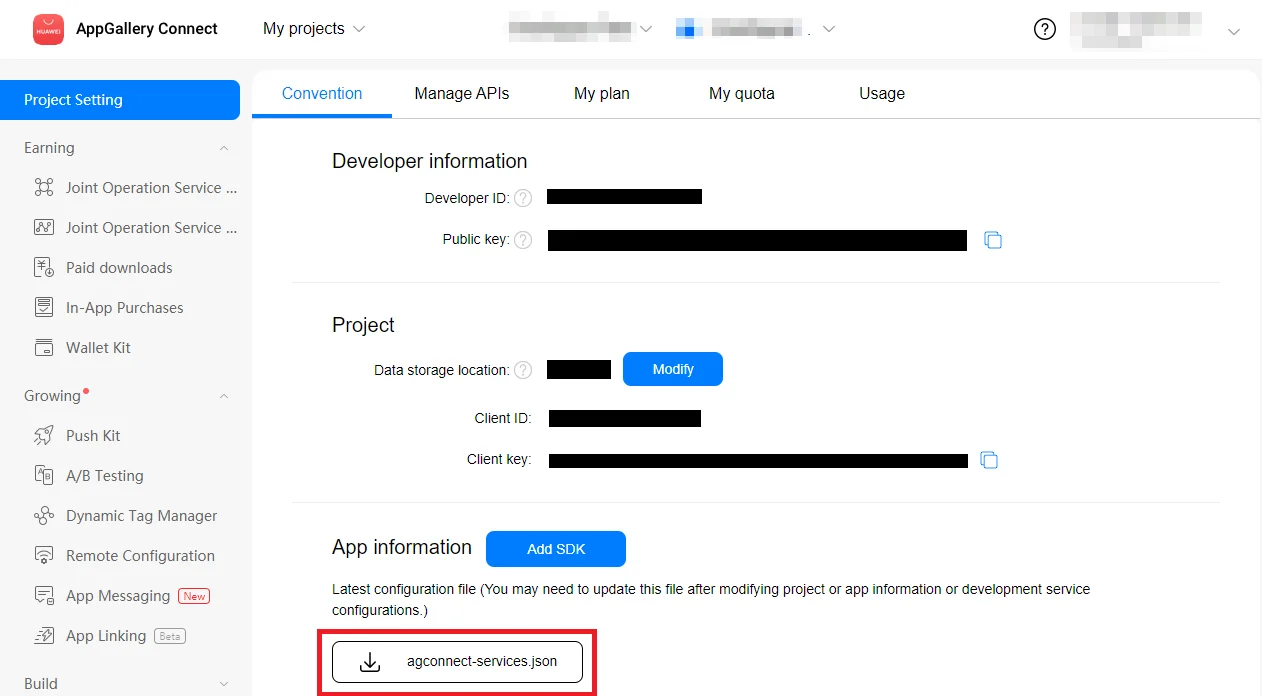
1. اذهب إلى [AppGallery Connect -> Projects List](https://developer.huawei.com/consumer/en/service/josp/agc/index.html#/myProject) واختر مشروعًا لتكوينه.
2. اضغط على **agconnect-services.json** في قسم معلومات التطبيق (App information) لتنزيل ملف التكوين.
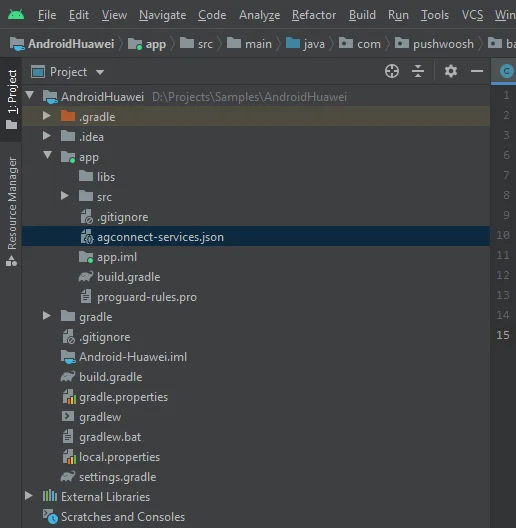
 3. ضع الملف الذي تم تنزيله في مشروع Android Studio الخاص بك (`YOUR_PROJECT/app/agconnect-services.json`).
 ## إنشاء بصمة شهادة التوقيع (Signing certificate fingerprint)
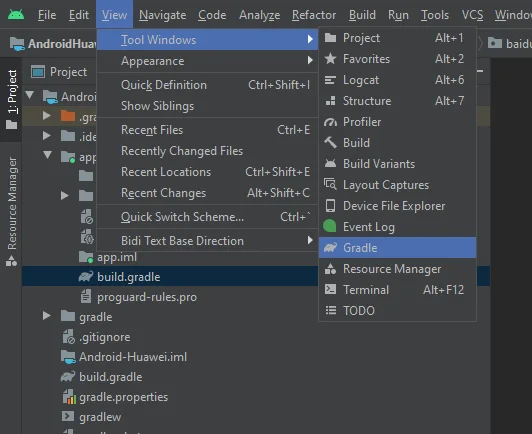
1. في Android Studio، اذهب إلى View > Tool Windows > Gradle.
## إنشاء بصمة شهادة التوقيع (Signing certificate fingerprint)
1. في Android Studio، اذهب إلى View > Tool Windows > Gradle.
 2. في النافذة التي فُتحت، اذهب إلى app > Tasks > android > signingReport.
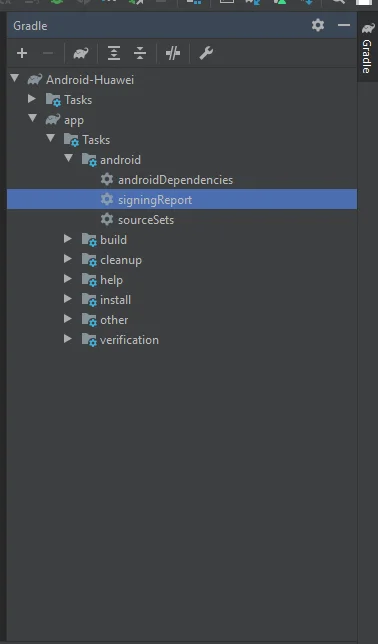 3. انسخ SHA-256 من release keystore الخاص بك.
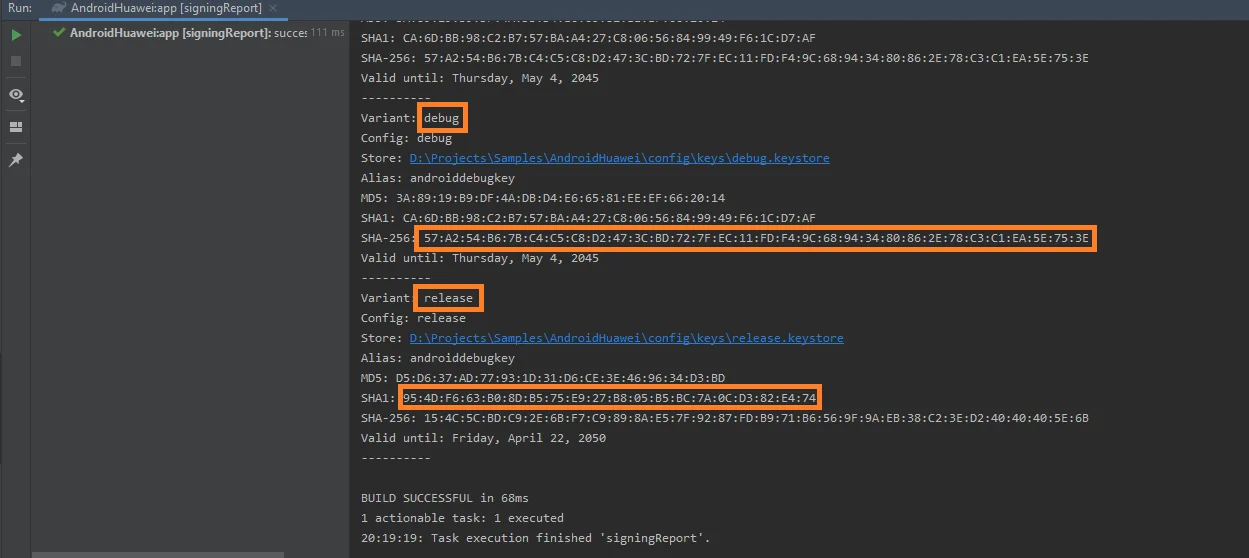 يمكنك أيضًا إضافة SHA-256 من debug keystore الخاص بك لأغراض الاختبار.
4. اختر مشروعك في [AppGallery Connect Project List](https://developer.huawei.com/consumer/en/service/josp/agc/index.html#/myProject).
5. الصق SHA-256 في حقل **SHA-256 certificate fingerprint**.
يرجى العلم أن معالجة بصمة الإصبع قد تستغرق ما يصل إلى 10 دقائق.
## تكوين Huawei في Pushwoosh
اتبع الدليل لتكوين منصة Huawei لمشروع Pushwoosh الخاص بك: [تكوين Huawei](/ar/developer/first-steps/connect-messaging-services/huawei-configuration/).
أضف **agconnect-services.json** إلى **android/app**.
## إضافة مستودع Huawei
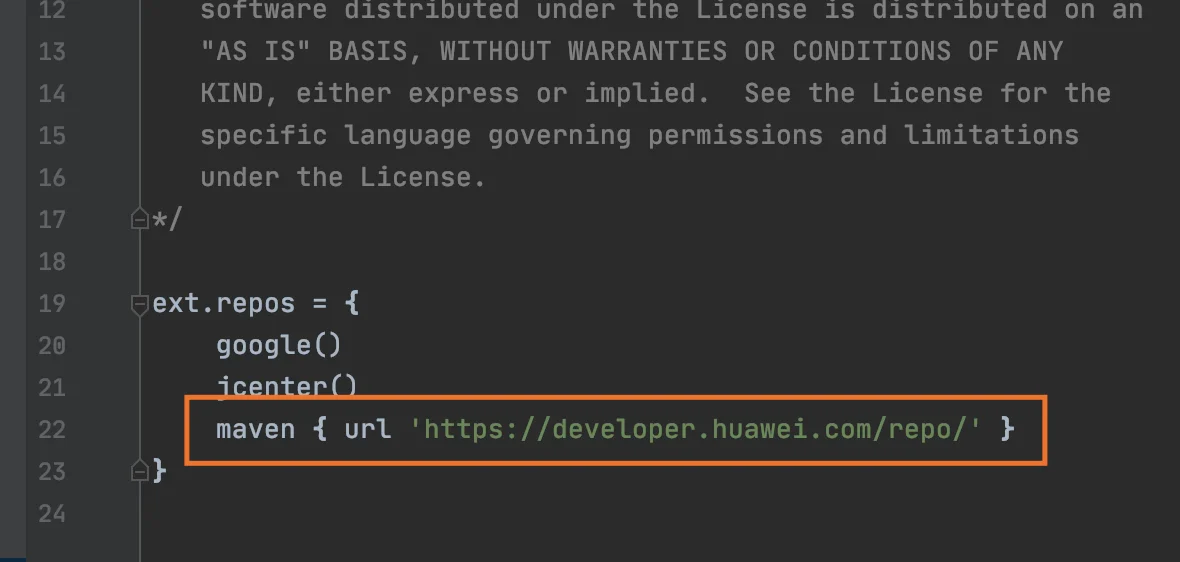
أضف [مستودع maven](https://developer.huawei.com/repo/) إلى ملفات **android/repositories.gradle** و **android/app/repositories.gradle** في مشروعك.
يمكنك أيضًا إضافة SHA-256 من debug keystore الخاص بك لأغراض الاختبار.
4. اختر مشروعك في [AppGallery Connect Project List](https://developer.huawei.com/consumer/en/service/josp/agc/index.html#/myProject).
5. الصق SHA-256 في حقل **SHA-256 certificate fingerprint**.
يرجى العلم أن معالجة بصمة الإصبع قد تستغرق ما يصل إلى 10 دقائق.
## تكوين Huawei في Pushwoosh
اتبع الدليل لتكوين منصة Huawei لمشروع Pushwoosh الخاص بك: [تكوين Huawei](/ar/developer/first-steps/connect-messaging-services/huawei-configuration/).
أضف **agconnect-services.json** إلى **android/app**.
## إضافة مستودع Huawei
أضف [مستودع maven](https://developer.huawei.com/repo/) إلى ملفات **android/repositories.gradle** و **android/app/repositories.gradle** في مشروعك.
 ## إضافة التبعيات (dependencies)
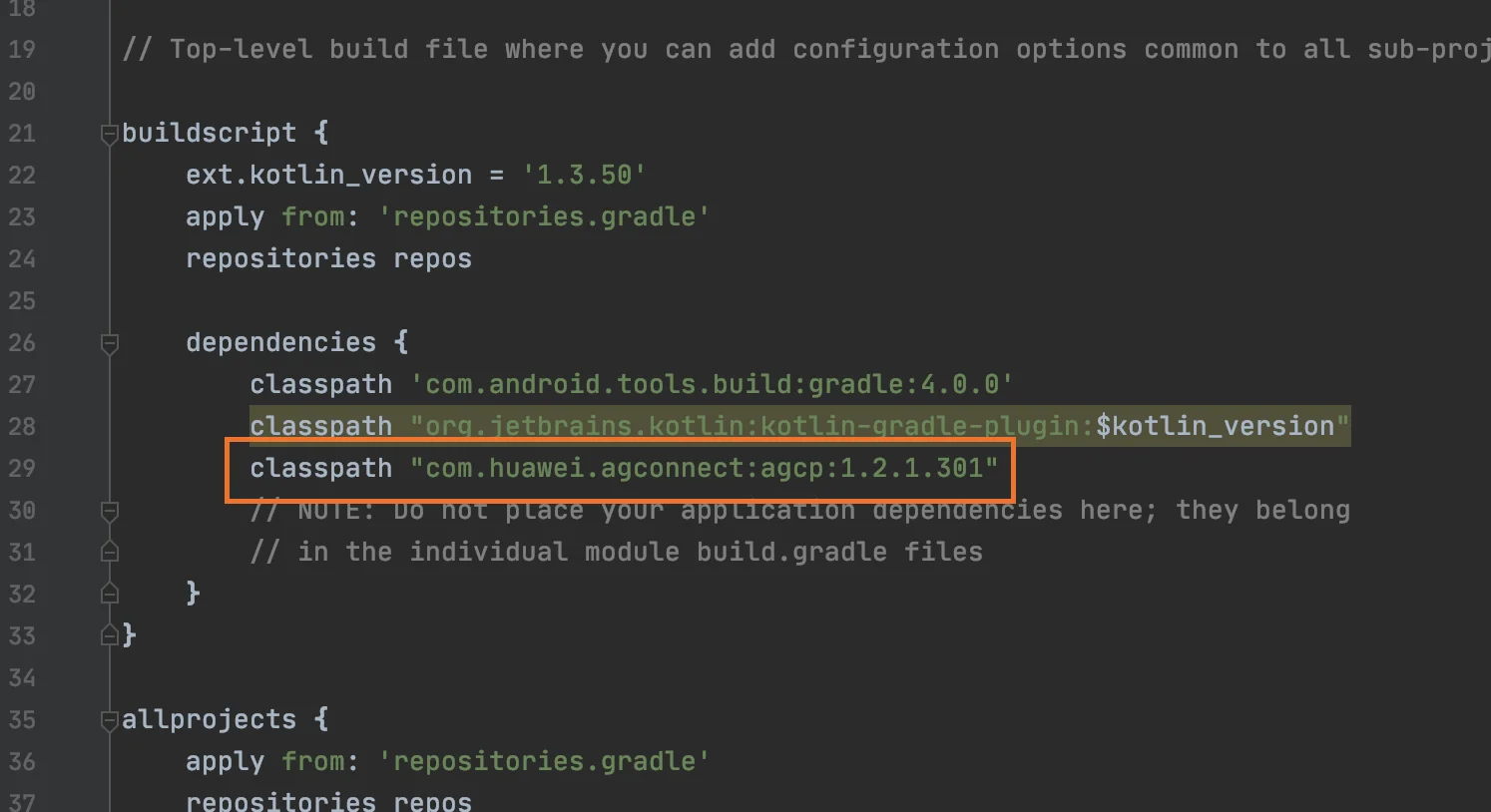
1. أضف **classpath "com.huawei.agconnect:agcp:1.2.1.301"** إلى ملف **android/build.gradle** الخاص بـ **buildScript/dependencies**.
## إضافة التبعيات (dependencies)
1. أضف **classpath "com.huawei.agconnect:agcp:1.2.1.301"** إلى ملف **android/build.gradle** الخاص بـ **buildScript/dependencies**.
 2. أضف **apply plugin: 'com.huawei.agconnect'** و **implementation "com.huawei.hms:push:6.1.0.300** إلى **android/app/build.gradle.**
## تمكين الإشعارات الفورية
في كود JavaScript الخاص بك، أضف **enableHuaweiPushNotifications** قبل تنفيذ **onDeviceReady:**
```javascript
var pushNotification = cordova.require("pushwoosh-cordova-plugin.PushNotification");
pushNotification.enableHuaweiPushNotifications();
pushNotification.onDeviceReady({
projectid: "GOOGLE_PROJECT_ID",
appid: "PUSHWOOSH_APP_ID",
serviceName: ""
});
```
## شاركنا ملاحظاتك
تساعدنا ملاحظاتك في إنشاء تجربة أفضل، لذلك نود أن نسمع منك إذا واجهت أي مشاكل أثناء عملية دمج SDK. إذا واجهت أي صعوبات، فلا تتردد في مشاركة أفكارك معنا [عبر هذا النموذج](https://docs.google.com/forms/d/e/1FAIpQLSd\_0b8jwn-V\_JmoPLIxIFYbHACCQhrzidOZV3ELywoQPXRSxw/viewform).
2. أضف **apply plugin: 'com.huawei.agconnect'** و **implementation "com.huawei.hms:push:6.1.0.300** إلى **android/app/build.gradle.**
## تمكين الإشعارات الفورية
في كود JavaScript الخاص بك، أضف **enableHuaweiPushNotifications** قبل تنفيذ **onDeviceReady:**
```javascript
var pushNotification = cordova.require("pushwoosh-cordova-plugin.PushNotification");
pushNotification.enableHuaweiPushNotifications();
pushNotification.onDeviceReady({
projectid: "GOOGLE_PROJECT_ID",
appid: "PUSHWOOSH_APP_ID",
serviceName: ""
});
```
## شاركنا ملاحظاتك
تساعدنا ملاحظاتك في إنشاء تجربة أفضل، لذلك نود أن نسمع منك إذا واجهت أي مشاكل أثناء عملية دمج SDK. إذا واجهت أي صعوبات، فلا تتردد في مشاركة أفكارك معنا [عبر هذا النموذج](https://docs.google.com/forms/d/e/1FAIpQLSd\_0b8jwn-V\_JmoPLIxIFYbHACCQhrzidOZV3ELywoQPXRSxw/viewform).