# تكامل Huawei
## المتطلبات
* [حساب Pushwoosh](https://go.pushwoosh.com/)
* [حساب مطور Huawei](https://developer.huawei.com)
* [مشروع Huawei AppGallery Connect](https://developer.huawei.com/consumer/en/service/josp/agc/index.html#/myProject)
* [تطبيق Pushwoosh](https://go.pushwoosh.com/cp/applications) مع [منصة Huawei مهيأة](/ar/developer/first-steps/connect-messaging-services/huawei-configuration/) ورمزه بالتنسيق **XXXXX-XXXXX**
* [Android Studio](https://developer.android.com/studio)
* جهاز Huawei مثبت عليه خدمات Huawei Mobile
## التكامل
### الحصول على agconnect-services.json
**1.** اذهب إلى [AppGallery Connect -> Projects List](https://developer.huawei.com/consumer/en/service/josp/agc/index.html#/myProject) واختر مشروعًا لتهيئته.
**2.** اضغط على **agconnect-services.json** في قسم معلومات التطبيق (App information) لتنزيل ملف التكوين.
**3.** ضع الملف الذي تم تنزيله في مشروع Android Studio الخاص بك (YOUR\_PROJECT/app/agconnect-services.json).
### إنشاء بصمة شهادة التوقيع
اتبع [Generating a Signing Certificate Fingerprint](https://developer.huawei.com/consumer/en/doc/development/HMS-Guides/Preparations#h2-1575707383351) لإنشاء بصمة شهادة التوقيع.
### إضافة وحدة `pushwoosh-huawei`
أضف وحدة `pushwoosh-huawei` إلى ملف `build.gradle` على مستوى التطبيق:
```
implementation 'com.pushwoosh:pushwoosh-huawei:6.+'
```
استبدل "+" بالإصدار الحالي من Pushwoosh: [https://github.com/Pushwoosh/pushwoosh-android-sdk/releases/latest](https://github.com/Pushwoosh/pushwoosh-android-sdk/releases/latest)
### إضافة تبعيات Huawei
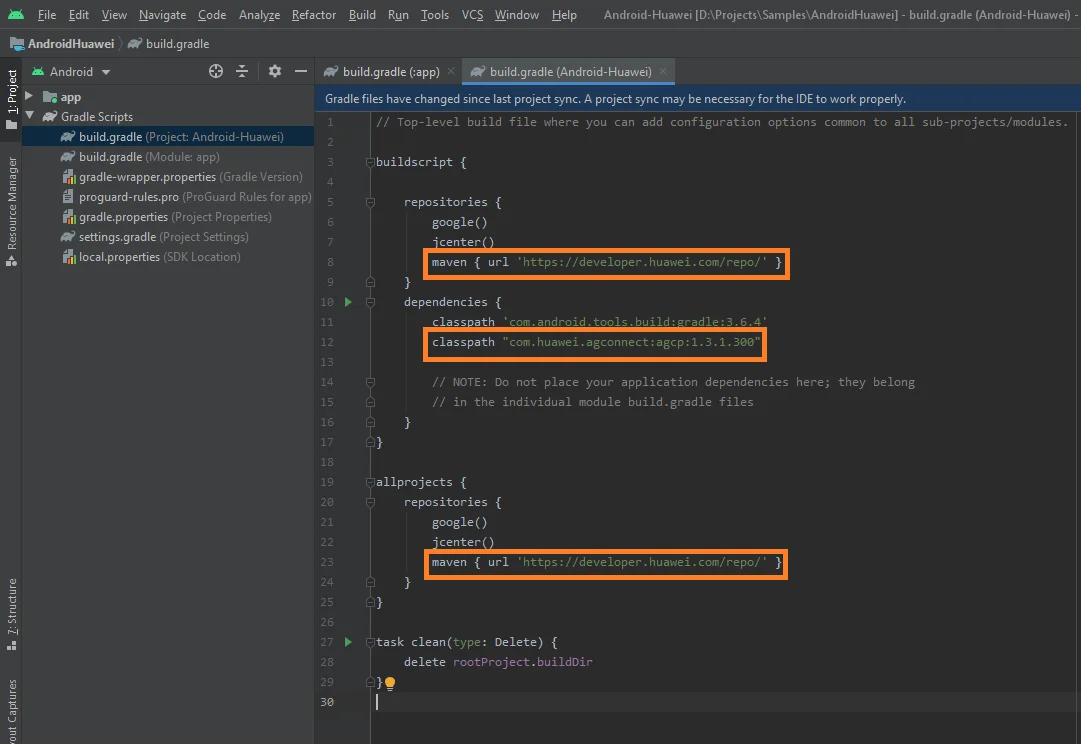
**1.** أضف `maven {url 'https://developer.huawei.com/repo/'}` إلى ملف `build.gradle (Project)` على **المستوى الجذري** تحت `buildscript { repositories }` و `allprojects { repositories }`.
**2.** أضف `classpath 'com.huawei.agconnect:agcp:1.3.1.300'` تحت `buildscript { dependencies }`.
تأكد من إضافة الأسطر الثلاثة التالية إلى ملف `build.gradle` على **المستوى الجذري**:
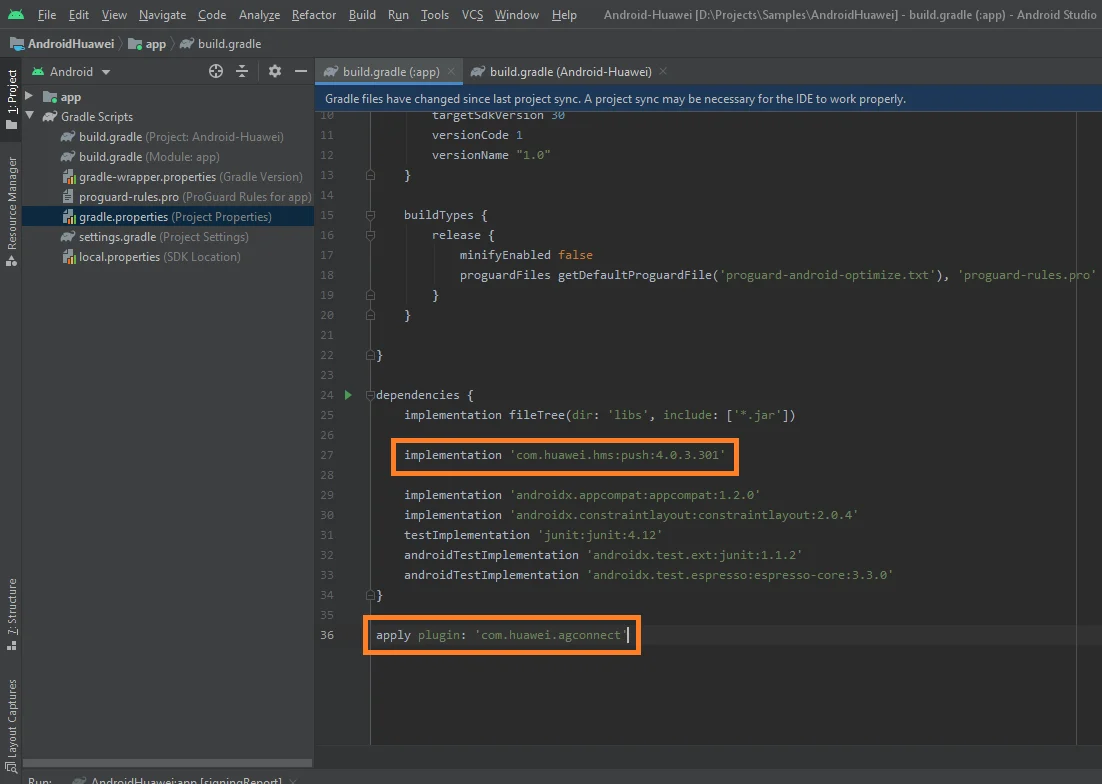
**3.** أضف `implementation 'com.huawei.hms:push:6.1.0.300'` إلى ملف `build.gradle` على **مستوى التطبيق** (app/build.gradle) تحت قسم `dependencies`.
**4.** أضف `apply plugin: 'com.huawei.agconnect'` في أسفل ملف `build.gradle` على **مستوى التطبيق**.
تأكد من وجود السطرين التاليين في ملف `build.gradle` على **مستوى التطبيق**:
### الاشتراك في الإشعارات الفورية
```
Pushwoosh.getInstance().registerForPushNotifications();
```
## شاركنا ملاحظاتك
تساعدنا ملاحظاتك في إنشاء تجربة أفضل، لذلك نود أن نسمع منك إذا واجهت أي مشاكل أثناء عملية تكامل SDK. إذا واجهت أي صعوبات، فلا تتردد في مشاركة أفكارك معنا [عبر هذا النموذج](https://docs.google.com/forms/d/e/1FAIpQLSd\_0b8jwn-V\_JmoPLIxIFYbHACCQhrzidOZV3ELywoQPXRSxw/viewform).
## الخطوات التالية
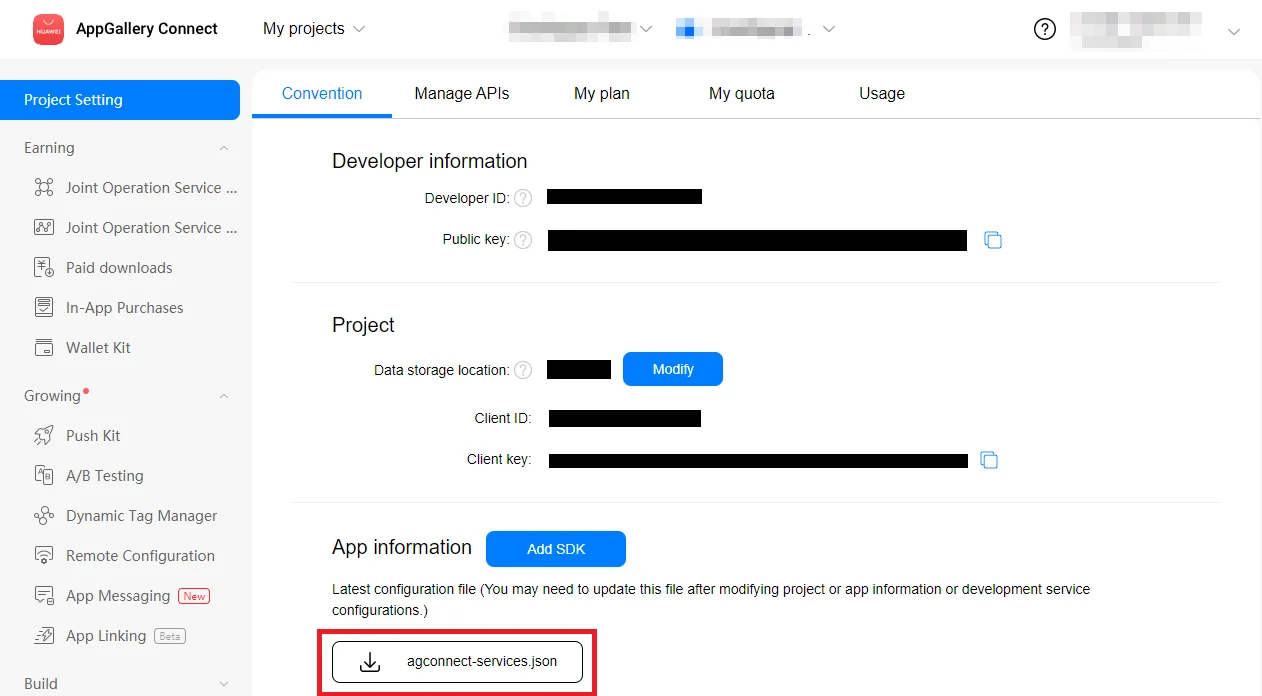 **3.** ضع الملف الذي تم تنزيله في مشروع Android Studio الخاص بك (YOUR\_PROJECT/app/agconnect-services.json).
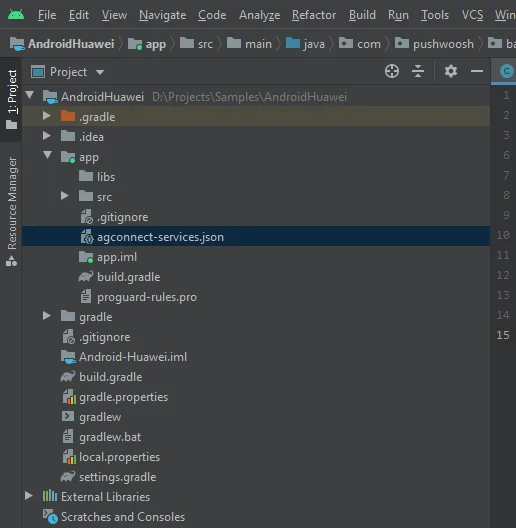 ### إنشاء بصمة شهادة التوقيع
اتبع [Generating a Signing Certificate Fingerprint](https://developer.huawei.com/consumer/en/doc/development/HMS-Guides/Preparations#h2-1575707383351) لإنشاء بصمة شهادة التوقيع.
### إضافة وحدة `pushwoosh-huawei`
أضف وحدة `pushwoosh-huawei` إلى ملف `build.gradle` على مستوى التطبيق:
```
implementation 'com.pushwoosh:pushwoosh-huawei:6.+'
```
استبدل "+" بالإصدار الحالي من Pushwoosh: [https://github.com/Pushwoosh/pushwoosh-android-sdk/releases/latest](https://github.com/Pushwoosh/pushwoosh-android-sdk/releases/latest)
### إضافة تبعيات Huawei
**1.** أضف `maven {url 'https://developer.huawei.com/repo/'}` إلى ملف `build.gradle (Project)` على **المستوى الجذري** تحت `buildscript { repositories }` و `allprojects { repositories }`.
**2.** أضف `classpath 'com.huawei.agconnect:agcp:1.3.1.300'` تحت `buildscript { dependencies }`.
تأكد من إضافة الأسطر الثلاثة التالية إلى ملف `build.gradle` على **المستوى الجذري**:
### إنشاء بصمة شهادة التوقيع
اتبع [Generating a Signing Certificate Fingerprint](https://developer.huawei.com/consumer/en/doc/development/HMS-Guides/Preparations#h2-1575707383351) لإنشاء بصمة شهادة التوقيع.
### إضافة وحدة `pushwoosh-huawei`
أضف وحدة `pushwoosh-huawei` إلى ملف `build.gradle` على مستوى التطبيق:
```
implementation 'com.pushwoosh:pushwoosh-huawei:6.+'
```
استبدل "+" بالإصدار الحالي من Pushwoosh: [https://github.com/Pushwoosh/pushwoosh-android-sdk/releases/latest](https://github.com/Pushwoosh/pushwoosh-android-sdk/releases/latest)
### إضافة تبعيات Huawei
**1.** أضف `maven {url 'https://developer.huawei.com/repo/'}` إلى ملف `build.gradle (Project)` على **المستوى الجذري** تحت `buildscript { repositories }` و `allprojects { repositories }`.
**2.** أضف `classpath 'com.huawei.agconnect:agcp:1.3.1.300'` تحت `buildscript { dependencies }`.
تأكد من إضافة الأسطر الثلاثة التالية إلى ملف `build.gradle` على **المستوى الجذري**:
 **3.** أضف `implementation 'com.huawei.hms:push:6.1.0.300'` إلى ملف `build.gradle` على **مستوى التطبيق** (app/build.gradle) تحت قسم `dependencies`.
**4.** أضف `apply plugin: 'com.huawei.agconnect'` في أسفل ملف `build.gradle` على **مستوى التطبيق**.
تأكد من وجود السطرين التاليين في ملف `build.gradle` على **مستوى التطبيق**:
**3.** أضف `implementation 'com.huawei.hms:push:6.1.0.300'` إلى ملف `build.gradle` على **مستوى التطبيق** (app/build.gradle) تحت قسم `dependencies`.
**4.** أضف `apply plugin: 'com.huawei.agconnect'` في أسفل ملف `build.gradle` على **مستوى التطبيق**.
تأكد من وجود السطرين التاليين في ملف `build.gradle` على **مستوى التطبيق**:
 ### الاشتراك في الإشعارات الفورية
```
Pushwoosh.getInstance().registerForPushNotifications();
```
## شاركنا ملاحظاتك
تساعدنا ملاحظاتك في إنشاء تجربة أفضل، لذلك نود أن نسمع منك إذا واجهت أي مشاكل أثناء عملية تكامل SDK. إذا واجهت أي صعوبات، فلا تتردد في مشاركة أفكارك معنا [عبر هذا النموذج](https://docs.google.com/forms/d/e/1FAIpQLSd\_0b8jwn-V\_JmoPLIxIFYbHACCQhrzidOZV3ELywoQPXRSxw/viewform).
## الخطوات التالية
### الاشتراك في الإشعارات الفورية
```
Pushwoosh.getInstance().registerForPushNotifications();
```
## شاركنا ملاحظاتك
تساعدنا ملاحظاتك في إنشاء تجربة أفضل، لذلك نود أن نسمع منك إذا واجهت أي مشاكل أثناء عملية تكامل SDK. إذا واجهت أي صعوبات، فلا تتردد في مشاركة أفكارك معنا [عبر هذا النموذج](https://docs.google.com/forms/d/e/1FAIpQLSd\_0b8jwn-V\_JmoPLIxIFYbHACCQhrzidOZV3ELywoQPXRSxw/viewform).
## الخطوات التالية